

10 Unique USB-C Cables That Serve A Practical Purpose
We may receive a commission on purchases made from links.
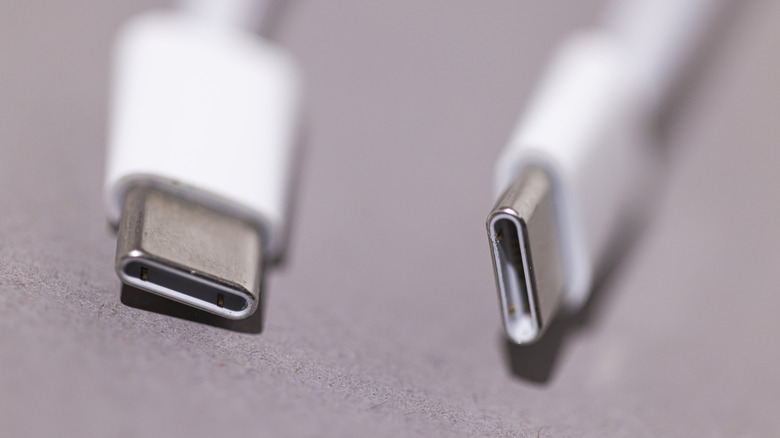
USB-C cables might be a pretty boring topic to think about unless you're exceptionally nerdy, but they arguably solved a huge problem we've mostly forgotten about by now: You can use one cable for almost everything. Sure, not all USB-C cables are equal, but the same cable that can charge your phone can usually charge almost every rechargeable gadget you own in addition to probably transferring data and connecting peripherals. Plus, you can plug them in right the first time, every time, unlike USB-A, where you usually flip-flop at least a couple of times until you figure out the right orientation. And as we've shown in the past, USB-C cables can do a lot more than the basics like charging.
We'd like to take a look at USB-C cables that go beyond the typical Anker charging cable that you blindly purchase and don't think twice about — cables that could become indispensable tools for less-common needs. We've found 10 that (we think) are pretty unique and worth nerding out about just a little bit.
Ugreen Nexode 240W USB-C cable with TFT smart display
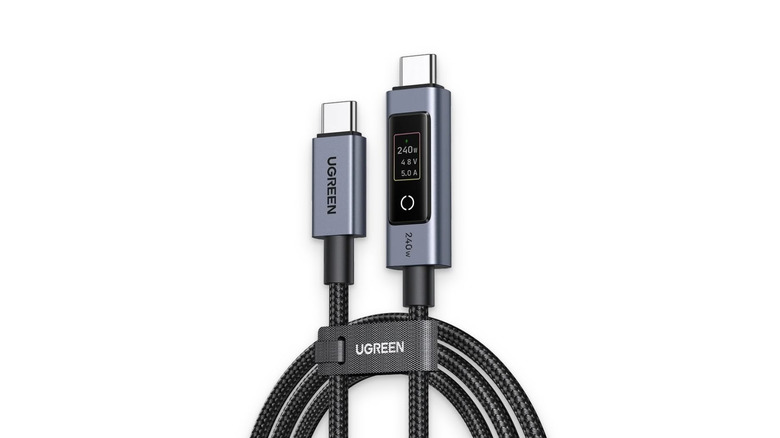
Plugging in something to charge is almost an act of faith. Ideally, it'll charge fast and you can forget about it. But sometimes, it charges at a trickle and you only find out when you come back later, and your device is still a long way from full. Instead of wasting your time eyeballing the battery level, use this Ugreen Nexode 240W Cable with a TFT Smart Display to find out exactly how much power the current port or charging brick you're connected to is putting out. The display shows it live in watts, volts, and amps. You don't need to be a tech wizard to understand these numbers, either. Find out how much juice your source and device can handle, make sure it roughly matches the display, and then leave it and go about your business.
In addition to charging stupid fast at 240W, it features an e-marker chip that Ugreen says chooses the safest and fastest current for that specific device. It's also just a good cable overall, sturdily built with nylon braiding and aluminum housings for the connectors. It's nice that the display includes a button, too, so you can turn it off if it ever starts to bother you. At a retail price of $26.99, this is a pretty good deal, and it eliminates the need to buy a separate USB tester. It also checks out with reviewers.
The only weak point of this cable is the USB 2.0 data transfer speed, which caps out at 480Mbps; USB 3.0, the newer and more common standard, can transfer 5Gbps. So it's not ideal for transferring anything more than small, basic files.
Ugreen USB-C extension cable
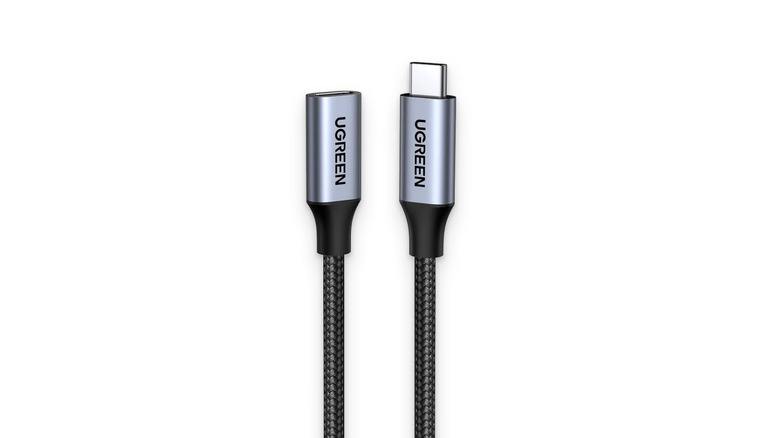
Here is another uncommon (but frustrating) situation a lot of people have run into at least once: having USB ports that are out of reach. Maybe there's a port on a computer tower that's underneath the desk, you're trying to use the I/O on the back of the motherboard, or maybe your favorite cable is just too short. For that, the Ugreen USB-C extension cable will quickly come in handy. The cable has high charging speeds and transfer speeds, so you'll be able to make full use of your chosen port, with some extra distance. Now you can fast-charge devices and use high-speed SSDs without getting down on all fours and trying to feel out that port under your desk. Additionally, it's compatible with transmitting video and audio, though it doesn't support Thunderbolt.
That's not all. A common issue with wireless peripherals (like mice and gaming controllers) is that plugging the dongle into, say, a USB hub can cause serious connection issues from wireless interference. You can use an extension cable to reposition the dongle somewhere away from the hub and closer to your device until the interference goes away. You can doubtless think of other situations beyond what we've mentioned where that distance would be appreciated.
Make sure you choose the right length. Ugreen provides 1.5-foot and 3.3-foot versions. The 3.3-foot version retails for $13.99, and the cable has a 4.6-star average across 11,000 reviews. At that price, you might as well just grab one for a rainy day.
Silkland USB-C monitor display cable
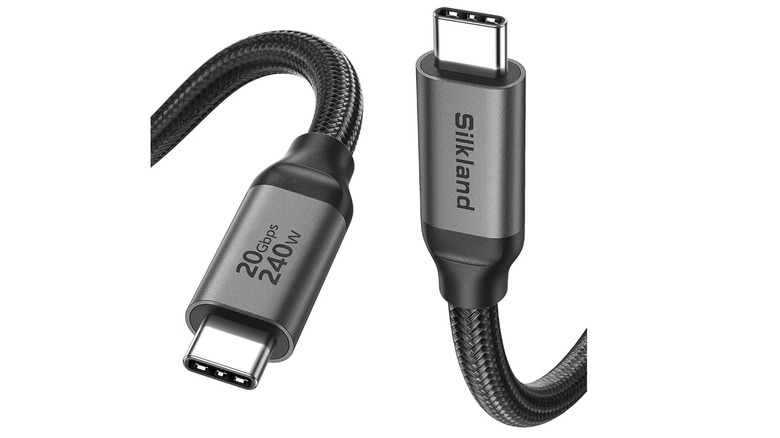
Forget HDMI and DisplayPort — an increasingly common standard is USB-C. After all, if USB-C can do basically everything, why not use it to run your desktop monitors, too? Silkland's USB-C monitor display cable is a good choice if you have a compatible monitor. It claims to support up to 8K at 30Hz in the unlikely event you're one of the two people on planet Earth rocking an 8K monitor. The cable starts with a 1-foot version and goes all the way up to a 15-foot version, so you can fine-tune your cable management in advance by getting a cable just long enough to connect your monitors.
While it is intended primarily for connecting monitors, this is a versatile cable for basically any other situation. It supports USB 3.2 for 20Gbps transfer speeds, as well as 240W charging. Silkland recommends it for a portable monitor; this could be your all-in-one cable for a simpler, cleaner setup on the go. Reviewers give it the thumbs-up.
If you do plan to use this for a display, check Silkland's list of compatible monitors. It supports brands like LG, HP, and Dell. In theory, it should work with any USB-C monitor and laptop that have DP Alt Mode support. With a 4.6-star average across over 3,000 reviews, we'd say it passes muster. Buy this cable if you think there is even the smallest possibility you might connect displays over USB-C.
Anker USB-C right-angle cable
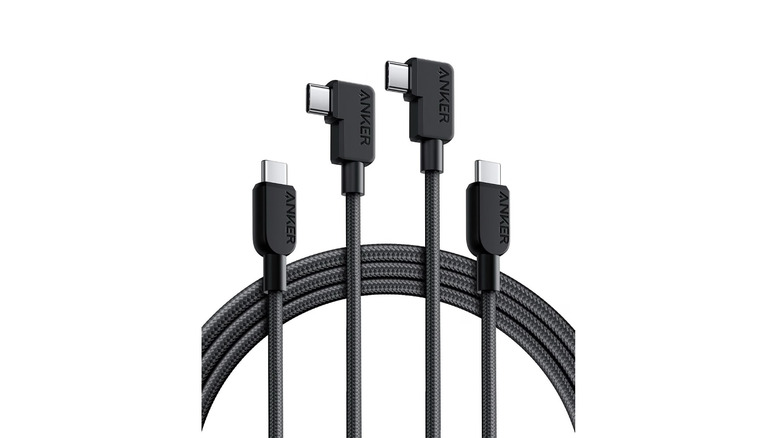
Here's another awkward situation that everyone has run into at least once: having a straight cable that you can't plug into something because there's no clearance to bend the cable near the connector. For example, maybe you have a phone holder on your desk, or you need to connect to a USB-C port that's pressed up against a wall, or maybe you're just tired, aesthetically, of ugly sticking-out USB-C cables. The Anker USB-C right-angle cable is perfect for these situations. One end of the cable is at a right angle. Simple enough.
Except it's not that simple. This is a high-performance cable that supports 240W charging and is rated for 10,000 bends. It also supports USB 2.0 transfer speeds (480Mbps) in case you need it. It is quite long at 6 feet, though if we're being real, you probably wouldn't ever use this away from a desk, a car, or another setup where a right-angle connector is needed.
Futurizta Tech Hydra 3‑in‑1 triple USB‑C
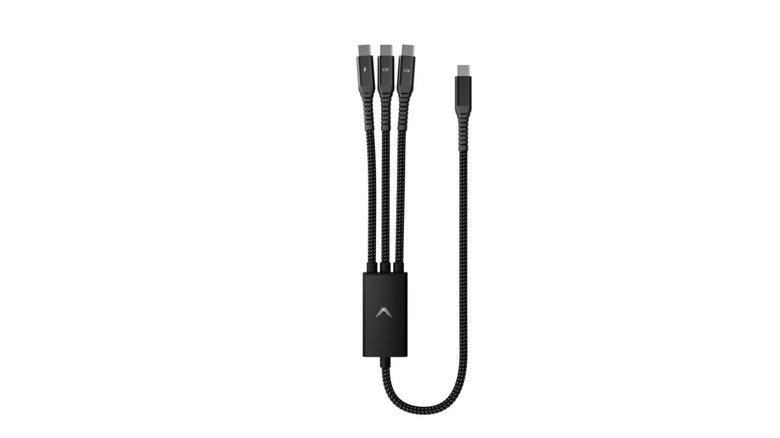
Ultra-slim laptops with way fewer ports than people usually need have become increasingly common these days, especially if you're a MacBook user. Luckily (depending on the port in question), USB-C can easily support charging and data transfer for multiple devices. Anyone who has a USB-C dock knows this. One unique USB-C cable that makes one port do the work of three is the Futurizta Tech Hydra 3‑in‑1 USB‑C 100W Cable. There's a box splitter that gives the business end of the Futurizta three plug heads, like its hydra namesake.
Aside from being able to simultaneously charge three devices, its big selling point is its "Smart Triboost" technology, which claims to give priority to the most demanding devices and supports fast-charge protocols, like Power Delivery (PD). And that claim appears to be true. Reviewers report that one hydra head can feed up to 65W, while other two top out at 30W and 5W.
That aside, it's well built, and the C1, C2, and C3 markings clearly tell you which cable supports the fastest charging speed and which supports the slowest. Our only gripe is the price; it sells for a somewhat steep $39. Further, on Amazon it has only 25 reviews with a 4.1-star average at the time of writing, though that, combined with a glowing professional review, is enough for us.
Plugable data blocker cable
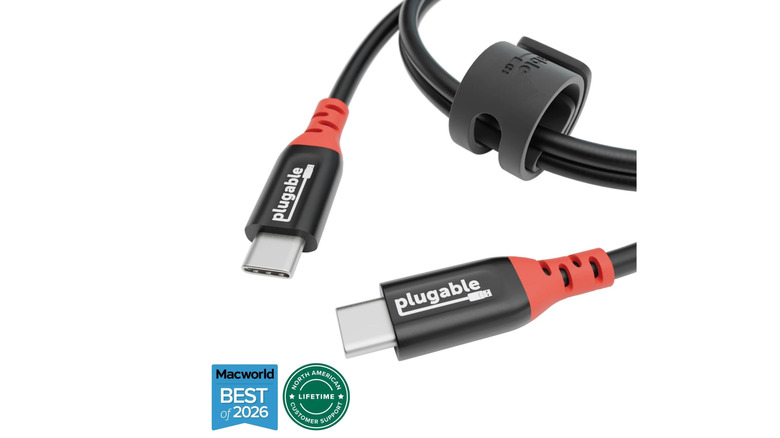
By now, you are hopefully aware that free charging stations (much like free Wi-Fi) are a risky proposition. The reason is simple: Bad actors can compromise these stations knowing how people flock to them for free charging, and so anyone who gleefully jams in their charging cable can get unknowingly infected by malware. However, here's the good news: You can still use those charging stations without that risk. Just grab a data blocker charging cable. We recommend Plugable's USB-C to USB-C Data Blocker.
How does it do this? Simple. The cable physically does not have a data line. Try as a hacker might, they would be utterly unable to compromise your device because there is no pathway for malicious data to travel down. This means you could use this cable anywhere you're not sure you can trust the source, such as another person's laptop.
Aside from that, it's just a good cable. It supports 240W charging and USB PD. If you never need to transfer data, then we'd say it could be your one and only charging cable, so you're always shored up against juice-jacking attacks just in case. Reviewers give Plugable a thumbs-up as much for its data-blocking capabilities as for the cable as a product. Also, this is one of the few Amazon products that have a "Customers usually keep this item" tag.
Cable Matters 40Gbps active Thunderbolt 4 cable
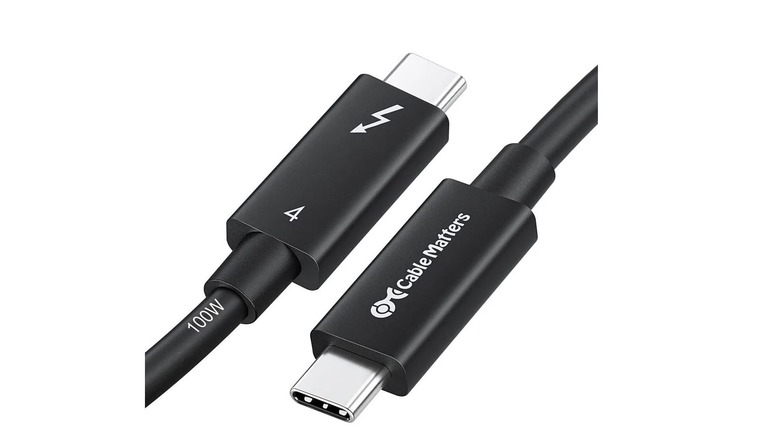
Quick PSA: Thunderbolt is not mere USB-C with a lightning bolt scar like Harry Potter. It does support USB devices and protocols, but it is itself a distinct protocol that can handle high data bandwidth for a number of applications. If you have a MacBook Air or MacBook Pro, then your USB-C ports are likely Thunderbolt ports. The question is, how do you leverage those absurdly fast speeds? The first step is to get a Thunderbolt-compatible cable. Our choice is the Cable Matters 40Gbps Active Thunderbolt 4 Cable.
If you have a Thunderbolt 4-compatible (or older) device, this cable will make the most of it. 40Gbps transfer speeds? Check. PD 3.0 at 100W? Check. 8K max video output? Check, check, check. This cable does it all. Seriously, check your individual devices to see if they use Thunderbolt, or consider upgrading some of them where it would make a difference, like your external SSD. The improvements in speed are biblical.
The big "but" here is the price. This cable costs $64.99, which definitely is not cheap, but in the realm of Thunderbolt 4, it is par for the course; these cables are using an Intel-certified standard and are doing a lot of hardware magic inside that cable enclosure. Reviewers like it, and so do we.
chubbycable 3-in-1 USB-C cable
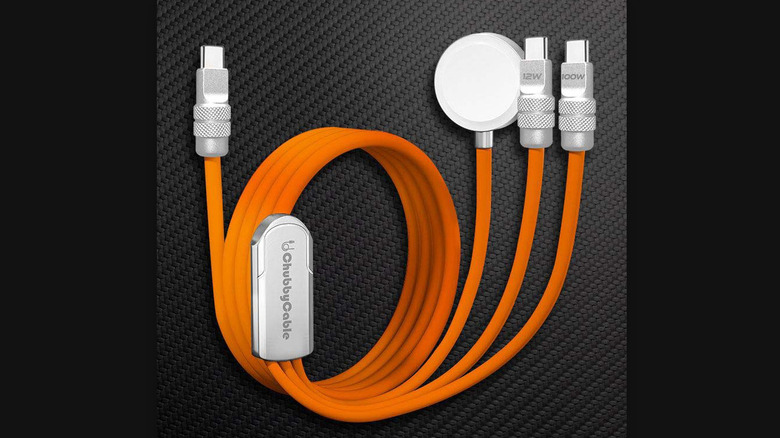
We recommended the Futurizta Tech Hydra for being weird and niche, but there is another three-headed cable that is even weirder and more niche: chubbycable's 3-in-1 USB-C cable. Three heads, same as last time, but this time one of them is an Apple Watch charging pad. Apple Watches rank among the best smartwatches on the market, period, so there's a strong chance you have one. It's common — particularly when traveling — for people to bring a 3-in-1 wireless charger, but chubbycable's version is a nice alternative for those who don't want slow wireless charging speeds that heat up their devices.
The chubbycable supports up to 100W fast charging, too, and — in the unlikely event you need it — USB 2.0 transfer speeds at 480Mbps. So if your three main devices are an iPhone, an iPad/MacBook, and an Apple Watch, this could literally be your all-in-one cable for any situation, whether at home or on the go. Reviewers would agree; it gets praise for its build quality and durability as well. Reviews are solid at a 4.0-star average. The only reason we wouldn't recommend this cable is if you don't have an Apple Watch.
Anker USB-C to Ethernet adapter
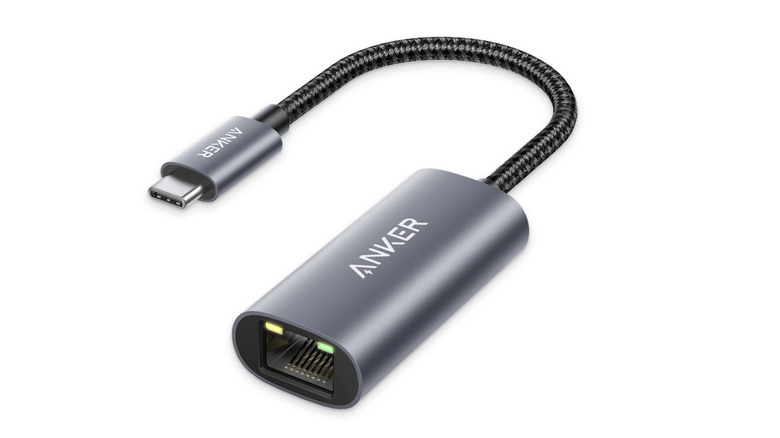
It's pretty rare these days on laptops to see dedicated Ethernet ports, particularly on the thinner and lighter ones. You also often won't find Ethernet ports on small devices, like gaming handhelds. Not a huge issue if you have fast Wi-Fi ... until you want to download big files, like games, or need better latency and/or a more stable connection. So if you have any computing device that doesn't have an Ethernet port, we highly recommend grabbing an Ethernet adapter like this Anker USB-C to Ethernet adapter.
And we make that recommendation even if you don't necessarily need it right now; I can't tell you how many times I've had Wi-Fi issues that were not immediately solvable, and my Anker Ethernet adapter was the only thing that saved the day. Better yet, the Ethernet adapter works on devices you normally wouldn't expect to use it with, such as an iPhone or iPad. It's plug-and-play in my experience. I've never had to fiddle with drivers or troubleshoot. Plug it in, connect your Ethernet cable, and the connection takes at most a couple of seconds to configure itself before it's ready.
Specs-wise, this is a USB 3.0 device that supports a maximum throughput of 1Gbps. It's lightweight, too, and the build quality is exceptional. The 4.8-star average across almost 7,000 reviews would seem to agree with me.
Baseus 100W retractable USB-C cable
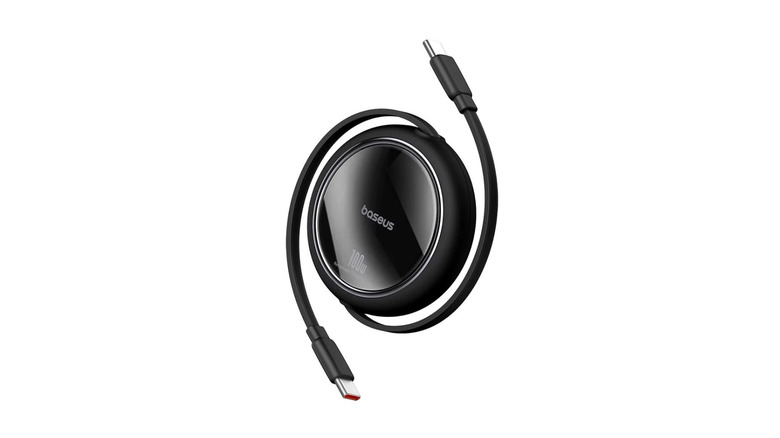
Cables are like shapeshifters. Put them in your bag, come back, and suddenly they're as tangled as the Flying Spaghetti Monster. So eliminate tangles forever with a retractable cable. We recommend the Baseus USB-C 100W Retractable Cable. This isn't the cheap kind you're probably used to that takes a millennium to charge your phone, no, no. The 100W charging capacity should be enough to power phones with some of the fastest fast charging, as well as tablets and laptops. At full extension, it reaches 3.3 feet.
As with a lot of other charging cables, data transfer is an afterthought; you'll only get USB 2.0 speeds (480Mbps) and no support for USB-C monitors. It's compact and light, possibly small enough to put in your pocket and forget about.
Of course, untangling cables will be a thing of the past, and so will the tedium of wrapping and tying them when you're done. Reviewers and users like it — it has a 4.4-star average across more than 2,000 reviews — and for the $14.99 asking price on Amazon, it's quite affordable considering what you get, since other non-retractable cables can cost just as much.
How we chose these cables

Cables are cables, and we could have just made a boring list of the best, fastest-charging cables on the market, but instead we chose cables that try to do something different and cater to a niche: Cables with uncommon designs (like the Hydra), cables with special additional hardware (like the smart display), or one-purpose cables for a specific use case (like the data blocker). Hopefully at least one of the cables on this list was a kind you hadn't seen before that could serve you in your everyday life. We feel these are well-made cables, and in most cases they can do more than just their primary purpose.
To make sure that these are products that actual flesh-and-bone people have used, liked, and confirmed to work as advertised, we gave preference to products where we could find professional reviews of them — which is more challenging than you might expect, since it's not common for professionals to dedicate an entire review to just one cable. As a fallback, we looked for products with at least 100 reviews and an average rating of at least four stars. Check out our buying guide on where to buy your next USB-C cable.