

15 Of My Favorite Tech Gadgets Available On Amazon

We may receive a commission on purchases made from links.
As someone who owns a house full of technology, I have a long list of favorites. Not only did I grow up with technology, like the first MP3 player ever and a desktop PC in my room since I was about five, but as a millennial, it's grown up with me, too. From the essentials like peripherals for my current desktop PC to fun gadgets like portable printers, I've tinkered with a lot of different types of technology.
I even have duplicates of some things — though I have asked myself, do I really need a pair of earbuds and a standalone speaker, or multiple chargers for the same device? Apparently, the answer is yes, which is good news for those who don't want to buy and test each item on their own.
Though one brand generally outshines the others, that's not to say you can't find an alternative that's just as good. However, I've linked the brands I know and love. While not all of my tech gadgets made this list, there are 15 that I would absolutely buy as gifts for others, or repurchase for myself.
Tecknet ergonomic mouse

After nearly a decade as a freelance writer, I've worked my way through more computer mice than I thought possible. It turns out that even if your job is to type all the time, you'll probably be mousing a lot, too. Unfortunately, I never thought much about my mouse until I started having wrist and elbow pain that I couldn't get rid of.
What eventually helped me find relief was changing mice, specifically to an ergonomically styled mouse. My favorite so far has been a Tecknet ergonomic model. Tecknet makes one of the best ergonomic mice, according to reviews, and I swear by my Tecknet mouse for daily clicking. After almost two years of use, my mouse still performs perfectly.
Unfortunately, when I've had to swap mice temporarily, I start to feel the lack of ergonomics very quickly. Your mileage may vary, and I'm no doctor, but the Tecknet mouse is my favorite that I've ever ordered from Amazon — and I've been through at least six. The best part is that it's usually available for $15 or less, and you can choose from some fun colors, too.
Anker Soundcore earbuds

Anker is a household name, and my household definitely knows the brand well. We own a long list of Anker products, from sound products to chargers and battery packs. Though your experiences will vary, I can't think of a time I was ever disappointed by anything with an Anker label.
In my experience, Anker Soundcore headphones are an excellent budget buy for anyone who needs reliable Bluetooth connectivity but doesn't want to splurge too much. My Soundcore earbuds are outdated at this point, but still work just as hard as ever. Some design changes apply to the Anker Soundcore P30i earbuds on Amazon, but my older version isn't available anymore.
The new version has a case that's very Apple-esque, and you can choose from different colors, which is the feature I'm most envious of. Most users will probably care less about the color options and more about the smart noise cancelling features and the fact that you can listen for around 45 hours before needing to recharge.
Logitech ergonomic keyboard

If you work in any industry that requires a lot of clickety clacking, you probably already know about the benefits of ergonomic keyboards. Especially if you rely on a laptop for a lot of your typing, you might experience some wrist strain after a while. Even if you don't (lucky!) have wrist problems, having a keyboard that's more spread out makes it easier to type, in my opinion, and avoid hitting the wrong key.
Throughout my journey with desktop PCs, I've tried a few different ergonomic keyboards. I also use them until they are so beat up I'm embarrassed to have them on my desk. My last purchase was a Logitech MK550 in March 2024, and it's still going strong. That might be thanks, in part, to the silicone cover I also bought for it.
However, it's already outdated by Logitech standards, even if I haven't rubbed off the letters like I usually do. Thus, next on my wish list is the updated version. The Logitech Wave has the same comfy keyboard layout as my earlier model. Not only that, but the price tag on Amazon is reasonable, too.
Anker mini speaker

Anker made SlashGear's list of the best Bluetooth speakers, and that's not surprising to me in the least. I've enjoyed every Anker product I've ever tried, including my now very dated Soundcore mini speaker. Fortunately for those shopping for tech gadgets on Amazon, the Anker Soundcore Motion 300 has fantastic reviews and offers the same reliability as my older model.
The Motion 300 is waterproof, offers up to 13 hours of play time between charges, and has 30 watts of stereo sound. Sure, it won't quite fit in your pocket like my smaller Soundcore Nano, but the size tradeoff is worth it, in my opinion. You can get the Anker Soundcore Motion 300 in either black or blue, for well under $100.
Reviews echo my sentiment that Anker speakers are easy to pair, and the sound quality is impressive for the Soundcore Motion's diminutive size. Bluetooth range is also said to be top tier, and that doesn't surprise me either.
Govee temperature sensor

Govee is one of my favorite brands for various products, but the company's thermometer and hygrometer device is the one that has me singing its praises the most. After four years of use, our Govee sensor has only required one battery replacement and has helped keep our home a comfortable temperature for both the resident humans and our many pets.
Among the many ways to use temperature sensors are things like adjusting your thermostat or automatically closing curtains. However, a simple alert system has worked best for our household, and I love having a complete history of the thermometer and hygrometer readings to reference. Whether you have family members who need a certain climate to thrive or you're worried your pets are too cold when you're not home, the Govee sensor is my top recommendation.
You can find the H5179 WiFi Thermometer Hygrometer on Amazon in a single pack or double pack. When setting it up, you can choose to use the app on your phone or tablet, or tie the sensor into your smart home system.
Blink camera system
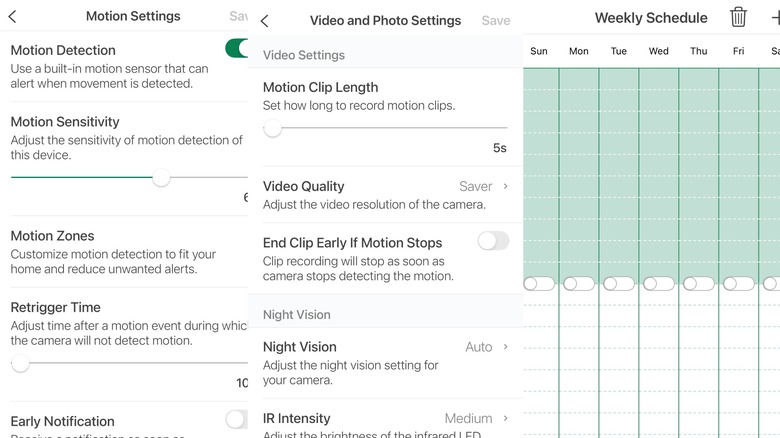
One of my favorite household purchases is our set of Blink cameras. Even after six years of use, I have never once had a problem beyond needing to buy a lot of batteries. Blink cameras do need lithium batteries, but not everyone's camera setup will take as many battery replacements as ours. For example, if you adjust your motion detection settings, you can avoid the camera going off very frequently.
There are sensitivity adjustments that help reduce battery usage and avoid false alerts. Our cameras have detected spiders walking across the lens, which tells you how sensitive these cameras can be and how much energy they can use. You can also set a schedule for the cameras to automatically come on and shut off each day, and opt out of night mode, which may conserve battery life.
I like that I can check in remotely from the app, and we've even moved our outdoor cameras inside to monitor our pets on occasion. Blink's cameras get excellent reviews on Amazon, and a set of four is less than $200.
Liene mini photo printer
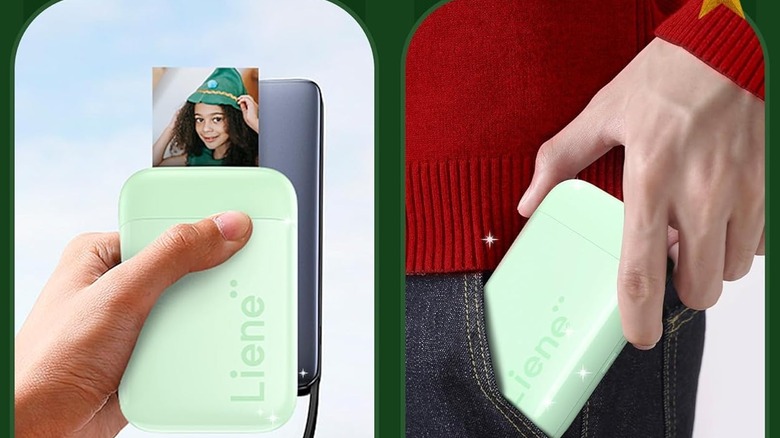
One tech gadget I found on Amazon purely for entertainment purposes turned out to be a solid investment over time. The Liene Photo Printer was intended as a fun gift for my son, and it's easy enough for kids to use on their own. The Liene app works on both Android and iOS platforms (my kid's device is Android). There are no ink refills to worry about, just the special photo paper, although it comes with a package of 50 sheets.
The Liene printer is a great pick whether you like to experiment with different iPhone camera apps and print photos, or just want to play around the way you would with an old-school Polaroid. In fact, my kids originally thought a Polaroid camera would be cool, but this was a suitable alternative. Just make sure you feed the paper in the correct way, otherwise the Zink color paper won't print properly.
Ultraloq smart lock

Everyone and their grandma (and perhaps especially their grandmas) has a smart lock these days, sometimes with a doorbell and camera attached, too. If you're looking for a simple way to keep your home secure but accessible to the people who need entry, my recommendation is the Ultraloq Bolt. Ultraloq is one of the more reputable smart lock brands, so it was a no-brainer for my family.
The Ultraloq works with your smart home system, and it has an app that lets you easily hand out temporary access codes, set fingerprint locks, and get alerts as people come and go. With the older version, which I've had for a few years, there's also a backup key entry hidden behind the fingerprint scanner. In the latest version, the lock appears to be below the fingerprint pad.
The newer version also no longer requires a Wi-Fi adapter to connect to your home's internet. You can find the latest model of the Ultraloq Bolt on Amazon for less than $200, but other versions and models are also available.
Anker magnet battery pack
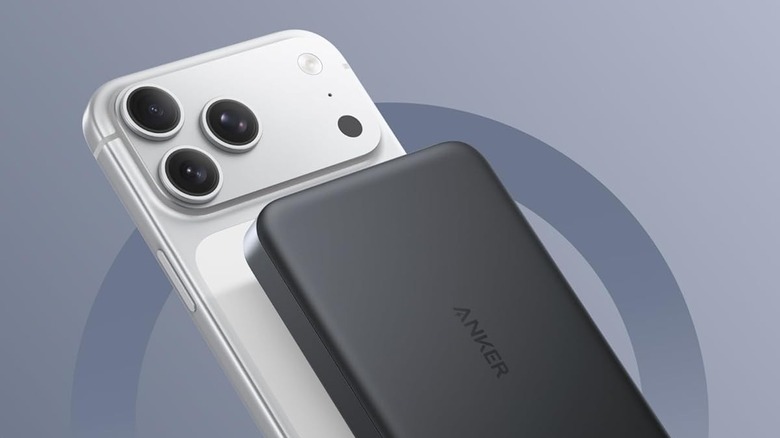
Anker phone chargers are very popular, and there are plenty of models to choose from. A few of my favorites include a magnetic charging station, a power strip with USB-C support, and, the handiest, a battery pack that sticks to the back of my phone. Granted, there have been some recalls on Anker power banks, so it's important to check that you don't have one that could be hazardous.
Also note that some of Anker's power banks are only suitable for specific phones. The MagGo Power Bank, which is my favorite portable charging solution, is compatible with iPhones (14 and newer versions) with the magnetic technology. Anker says it also works with Android devices, but charging won't be as fast, and those phones don't support the magnetic feature.
Keep in mind that to use a MagGo charger, you'll need a case specifically designed to accommodate magnetic charging. You can find the Anker MagGo Power Bank on Amazon for around $80.
Rocketbook reusable notebook

When I got my first Rocketbook notebook years ago, the technology was relatively new. These days, Rocketbooks come in all different sizes and with some new functions. Every Rocketbook uses an erasable pen, which is part of the appeal. After writing, you can use the eraser on the pen or a spritz of water and the included microfiber cloth to clean your notebook. The other perk, however, is the ability to scan each page and preserve your writing long after you erase the ink.
With the accompanying app, you can upload your scans, digitize your writing, and categorize your notes. Honestly, I use those functions very rarely, as the highlight for me is the ability to write all over a page, then wipe it clean.
Rocketbook comes in various sizes, from mini notebooks, which are a useful gadget for multitasking, to full notebook size. The 6 x 8.8-inch model is a good middle option and, like the others, is available on Amazon.
Anker magnetic charging station
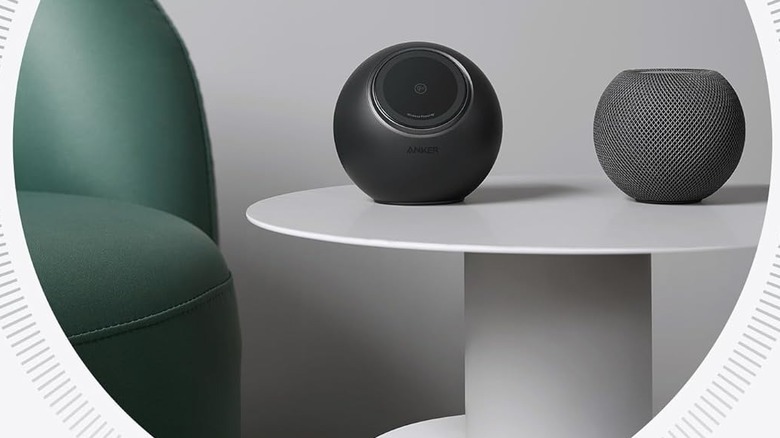
One of the coolest tech gadgets I've received as a gift is the Anker MagGo Magnetic Charging Station. First, the unobtrusive orb-shaped charger has an angled magnetic charger perfect for my iPhone. While it's charging, either vertically or horizontally, I can also charge other devices via the ports on the back. Two USB-C ports and two USB-A ports are probably sufficient for most charging needs, but there are also three AC outlets for even more charging access.
The magnetic charging pad is specific to newer iPhone models, so it's not ideal for Android users. Worth noting, however, is the fact that Anker also makes other charging stations, such as the Nano, with ports for all your devices.
Still, the fact that you can charge other devices while your iPhone is charging is a perk, and I feel like the MagGo is very durable. Even after a tumble or two, I haven't had any problems, and the long, chunky charging cord makes it feel especially durable. Like other Anker products, the MagGo Magnetic Charging Station is available on Amazon and has overall great reviews.
Anker power strip with USB-C ports
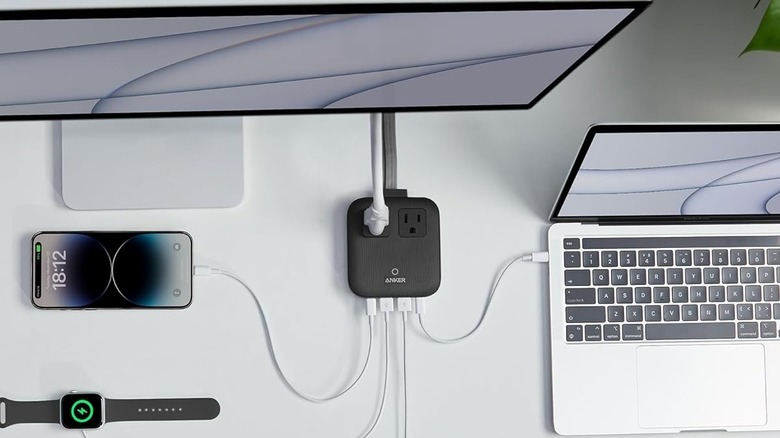
Anker has a variety of chargers for different devices, including iPhone-specific models. One practically universal Anker product is the Nano Charging Station. My version is slightly older than the newer options available on Amazon, but the features are similar. The flat, square-shaped charger has ports for various devices: two USB-C ports and two USB-A ports. On top, the newer version also has two AC outlets.
Users seem to agree that the Anker Nano is pretty good. Perks include the fact that the Nano is so small and relatively easy to travel with (versus a traditional power strip), the way it doesn't heat up like other chargers do, and its ability to charge faster than comparable models. Case in point: Anker claims the charger can fully charge a MacBook Pro 13" in less than two hours.
Anker also boasts compatibility with fast-charging features available from brands like Samsung, Apple, and more. You can find Anker's Nano Charging Station on Amazon, with three color options and a pretty high review average of 4.8 stars.
Apple AirTags
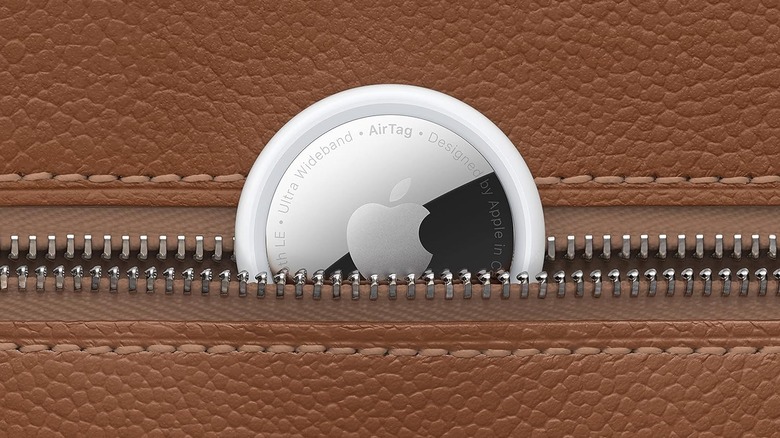
It is true that there are some things you shouldn't track with an AirTag. For example, people, pets, and cars are not ideal places to stick an AirTag. That doesn't mean people don't use them for that; I noticed multiple children with AirTags attached to their shoes and clothing during a recent trip to Disneyland.
However, there are plenty of logical uses for AirTags, such as tracking your car keys, wallet, or other things you might lose around your home. Depending on your needs, you could use AirTags for things like the TV remote, your luggage while traveling, or your car in situations where you need to remember where you parked. Some users report applying AirTags to their musical instruments, laptop cases, and even robot vacuums that tend to get lost and/or stuck under furniture.
Think about what applications you'll need the AirTags for, then check out a bundle of them on Amazon. You can find a four-pack of Apple AirTags on Amazon, or you can buy one at a time; either way, the reviews speak for themselves.
Amazfit smart watch
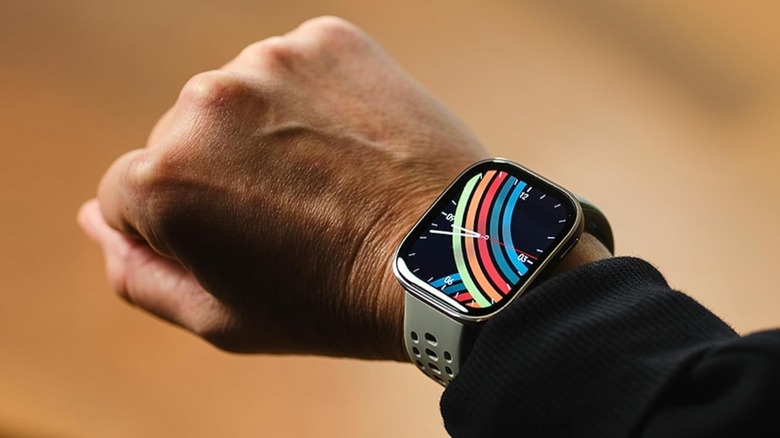
For years, I had a forgettably branded smart watch that worked well with my Android devices. Because I'm usually an early adopter of most tech, that watch is long outdated, but I found another lesser-known brand watch to replace it. Admittedly, I was gifted my Amazfit Bip smartwatch, but that doesn't mean I love it any less than if I had shelled out the money for it myself. And that's the first reason to love it: The latest Amazfit Bip 6 is much more affordable than name-brand alternatives like the Apple Watch.
I love my Amazfit for tracking my steps, alerting me to text messages and phone calls, and, last but not least, the ability to tell time without pulling out and waking up my iPhone. My watch easily lasts a week or two per charge for these basic functions, and while I can't speak for the battery life if you use your watch more often, Amazfit says the battery can last 14 days.
Though I use my watch minimally, the newer version offers features like downloadable maps for directions, biotracker tech to report your sleep quality and stress levels, among other things, and a bunch of different workout modes. For what it's worth, Consumer Reports' top smartwatch pick is also an Amazfit model, which suggests it's worth a try. You can find the Amazfit Bip 6 on Amazon, with multiple band color options.
Avcoo TENS unit

One of my all-time favorite tech gadgets from Amazon cost me less than $20 and has actually relieved pain and stress over the last few years. Though I'm not a doctor, I did have knee surgery years ago, and part of the recovery process involved physical therapy and the use of a TENS machine. Transcutaneous Electrical Nerve Stimulation (TENS) is a therapy that stimulates your nerves with electrical pulses.
The handheld Avcoo TENS unit aims to use the TENS technology to either help block pain or adjust the way your brain interprets it. On your skin, it feels like buzzy stimulation, almost like being zapped by a bit of electricity from rubbing a balloon on your hair. While it's always best to consult a doctor if you have unexplained pain, a TENS unit is one way that nerve issues were addressed during my knee surgery recovery.
My husband and I have both used our TENS unit for various ailments, from painful wrists and elbows (mine from typing) to back pain (his from lifting heavy things) with positive results. The best part of the Avcoo model is the fact that it's only about $20 on Amazon, so it's not a huge up-front cost to test it out and see if it works for you.