

12 Fun USB-C Gadgets For Your Home Office Desk

We may receive a commission on purchases made from links.
Look at your work desk. You will probably find a cable lying across it, and it likely has a USB-C port. That small oval connector flips either way and can do a lot of tasks. It can carry power, data, and video through a single wire. It is also the reason one port on a laptop can run a monitor, charge a phone, and feed a speaker at the same time. There is no shortage of USB-C gadgets on the internet, and most make great gifts.
However, a gadget is only as good as the cable behind it. If a cable keeps dropping the connection between your devices, or a speaker keeps disconnecting, then the cable is at fault. This is why, before you buy any USB-C gadget, it is better to know which USB-C cable brands are actually worth your money.
This list is not only about work, but it's also about bringing a fun element to your work desk. You will see products like a hub that fixes a cramped laptop and a tiny computer that hides inside a keyboard. But the list also includes a camera that clips to your keys, a handheld game with a crank, and a little speaker with a pixel screen. Some picks are cheap, some are not, and a few have some real flaws. Every pick comes with a professional review or a user rating, so you don't have to buy it and test it to know if your should keep it or not.
Dockcase Explorer smart USB-C hub
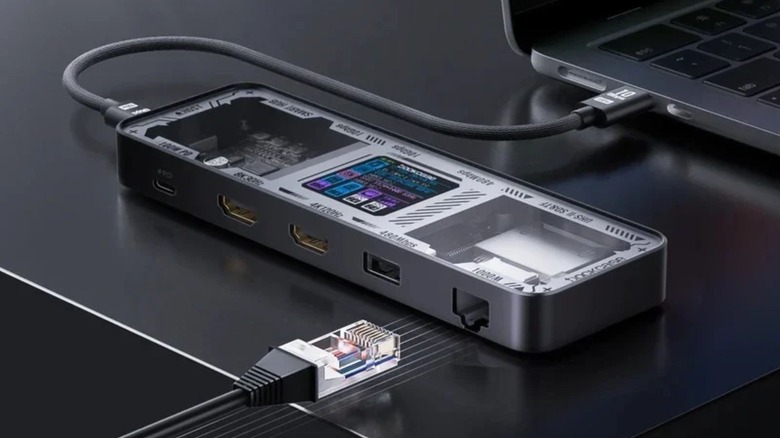
The Dockcase Smart 10-in-1 USB-C Hub Explorer Edition lets you manage all your USB devices from one single place. It has a price tag of $89.99, a small screen on top, and a see-through, transparent body, letting you view the parts inside. The screen shows which ports are being used and at what speed each one is running. This means when a file copy feels slow, you can check instead of guessing. That small detail turns a boring accessory into something you actually look at and add to your daily usage.
It also packs a lot of connectivity options. You get two video outputs, Ethernet, SD and microSD card slots, three USB-A ports, and a USB-C data port. There is a 100W power input, which can keep your laptop charged through the hub. SlashGear's review found it a solid performer, giving it 7 out of 10 and finding it capable of handling two 4K monitors without trouble. The only problem for us was the length of the included cable, as we found it short at only 30 cm.
Another problem with this hub is heat. Reviewers found the device gets a little hot during use, which is normal. They also pointed out that the screen menu gets annoying to scroll after a while. There are alternatives to USB hubs, of course; if you already own a monitor with spare ports, your screen can also run more gadgets through its own USB port than you would guess, which might save you a few bucks.
Elgato Stream Deck Scissor Keys
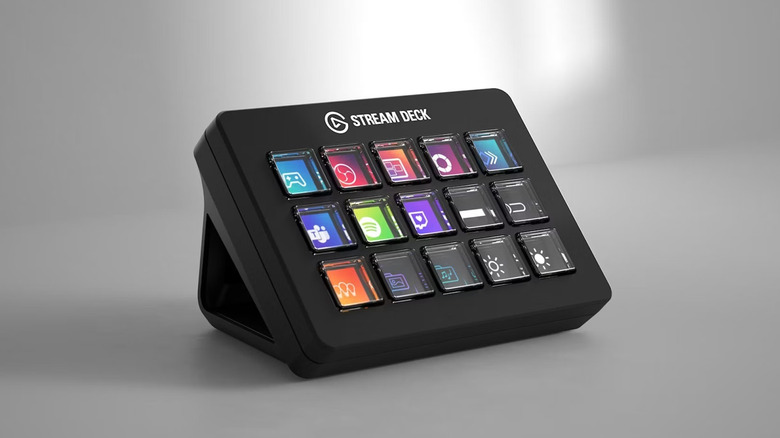
If you've used a Stream Deck before, the first thing you will notice is the click of the buttons. Older Stream Decks had soft, squishy keys, but the USB-C Elgato Stream Deck Scissor Keys replace them with scissor switches. It gives you the feel of a good laptop keyboard. One reviewer says the press is shorter, crisper, and gives you a tactile feel, something missing from the original.
That matters because this pad is there to be tapped, and most of the time without thinking twice. You get 15 programmable keys that can mute a mic, open an app, or run a long chain of steps with one press. Picture a day of back-to-back video calls. A mute key, a camera key, and a share-screen key save a lot of mouse clicks.
Using the Elgato app, you can build several pages and profiles with different key layouts. This way you can have one set of keys for your work apps and another for personal tasks. Although it doesn't change how a Stream Deck fundamentally works, it gives you the ability to customize its feel, which is a major part of its appeal. You can also purchase 32-key and 6-key versions and pair them up with either scissor keys or classic keys. If you think $132 is too much for this Stream Deck, there are cheap alternatives as well worth checking out.
Raspberry Pi 500
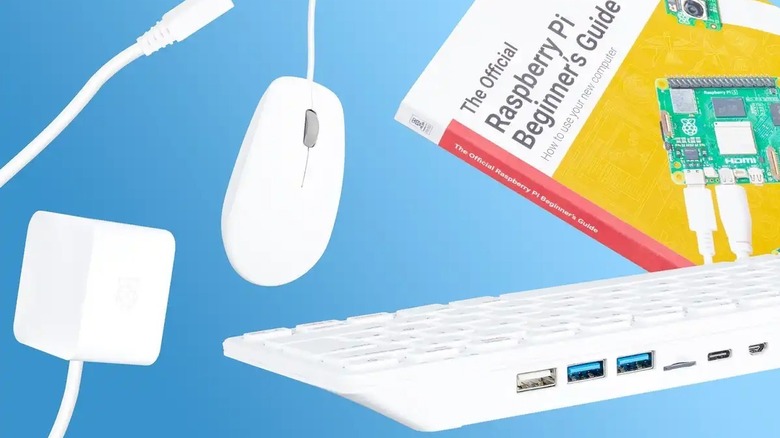
It's a computer. It's also a keyboard. The Raspberry Pi 500 is a Raspberry Pi 5 embedded inside a keyboard case. SlashGear's Raspberry Pi 500 review calls it a big step up from the old Pi 400. On one hand, the Pi 400 scored 249 on single-core Geekbench; the Pi 500 managed to hit 892. Multi-core numbers also jumped from 717 to 2,112. In simple words, that's roughly the triple-speed improvement that Raspberry Pi promised.
Cooling is not a worry because the Raspberry Pi 500 uses a built-in aluminum heatsink, so it's silent. Independent testing found the cooling remarkable, even when overclocked. The Pi 500 also features 2.5Gb Ethernet, Wi-Fi 6, and two micro-HDMI ports that can run 4K screens at 60Hz. You can get the Raspberry Pi 500 starting at $180, with the Desktop Computer Kit with a 2.4GHz Quad-Core processor, 8GB RAM, keyboard, mouse, and 32 GB SD Card costing $239.95 on Amazon.
You won't need a separate keyboard to get started, since the Pi 500's case is the keyboard. You would still need a power supply and an HDMI cable, unless you buy the kit. The Pi 400 was a little over 11 inches across, so some people may find this size cramped for long typing days as the Pi 500 is about an inch longer.
Creative Pebble SE
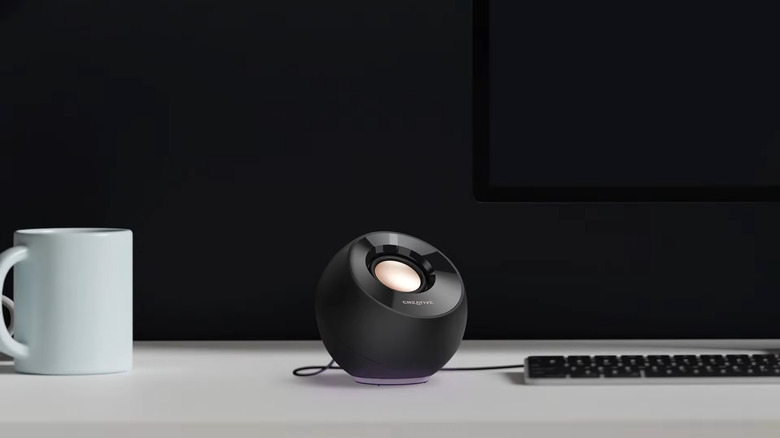
Even the best laptop's built-in speakers don't sound that great. If you really want to hear music, you need dedicated speakers. But big ones eat up space on your desk. The Creative Pebble SE solves this problem; costing about $25, these speakers produce a good amount of bass despite the fact that each speaker is only 4.6 inches tall. You can tilt up the drivers at 45 degrees to point them to your ears.
Features include up to 4.4 watts RMS, 8.8 watts at peak, and a range of 80Hz to 20kHz. There are seven built-in RGB lighting effects. It comes with a USB-C port that is dedicated to charging only. For sound output, it uses a separate 3.5mm cable, so your laptop needs a headphone jack or an adapter. There's also a simple volume control on the speaker itself. It works with Windows, Mac, PS4, PS5, and Nintendo Switch. So, if you have a console, they're a handy companion.
The two speakers are also connected by a cable that can't be unplugged, which can be a downside. There's no wireless option either. So, you may want to run to IKEA for some cable management options. Overall, these mini speakers sound good. You can get them in two colors, Black and White, and they cost $26.59 when ordered from B&H, down from their original price of $27.99. Do keep in mind that shipping charges are excluded if you get them from their official website.
Kodak Charmera
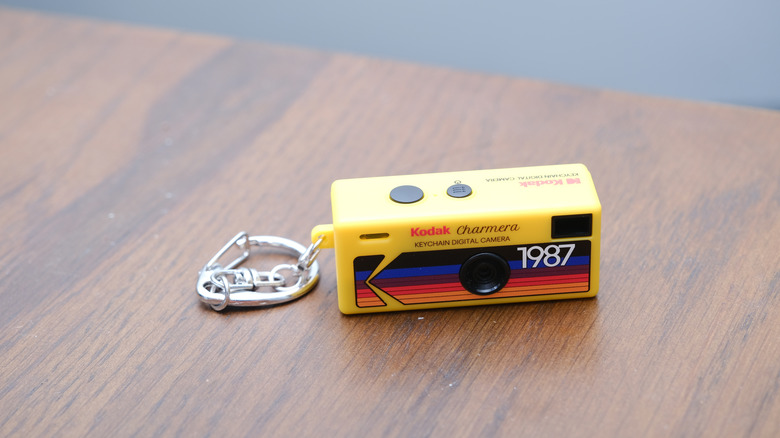
The Kodak Charmera isn't trying to impress anyone. It is a pocket-sized digital camera that you can attach to your keychain. It weighs 30 grams and comes in a blind box. That's the interesting part because you don't know which color you'll get. Kodak also sells a transparent shell version of the Charmera as well, and there's a 1-in-48 chance of you getting a see-through edition.
If you think you will get DSLR-like photos from this gadget, then you should stay away from the Kodak Charmera. It shoots at 1.6 megapixels through a 35mm-equivalent lens, and reviewers call the image quality dreadful. But that is not the selling point of this keychain camera — it is more about design and nostalgia. It is cute, cheap, and lo-fi. You'll need your own microSD card before you start snapping photos. The battery can't be swapped out, though; it charges over USB-C, which also lets you move pictures to a laptop. It comes with a keychain inside, so it is ready to carry.
At a desk, think of it as a fidget toy that also takes pictures. There are multiple filters that really give the images that old-school vibe, and the Charmera camera made our list of keychain-ready mini-gadgets that are portable, useful, and fun.
Fujifilm Instax Mini Link 3
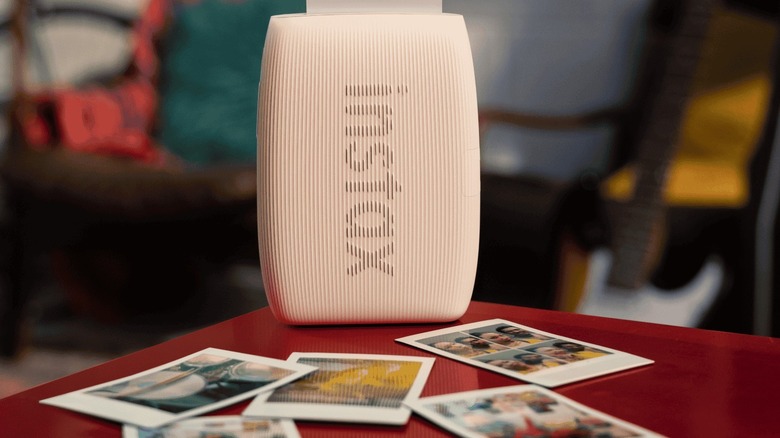
Gone are the days when we used to have a photo book for every occasion. Now, we take pictures on our phones, and the images get lost in the sea of others. A tiny printer is the best solution for this situation. The Instax Mini Link 3 prints credit-card-sized instant photos from your phone, and the images get developed in seconds. Pin a few above your monitor and the desk starts to feel more like yours. The best part is its portability because the printer is small enough to slip into a large jacket pocket.
The biggest change over the previous generation Mini Link is the port. USB-C replaces micro-USB, which is a positive since most modern devices come with a USB-C port. Reviewers say it performs well overall for an instant-film printer. You can use its free app, which comes with augmented reality extras. The design is also cute, and the Fujifilm Instax Mini Link 3 is available in three colors: Clay White, Sage Green, and Rose Pink.
It is a perfect desk gadget because you can instantly print everyday activities with your Instax Mini film from literally anywhere. You can get it for $116.95 from the official website, but we would suggest you purchase it from Amazon, where it is available at time of writing for $107.50.
Nintendo Game & Watch
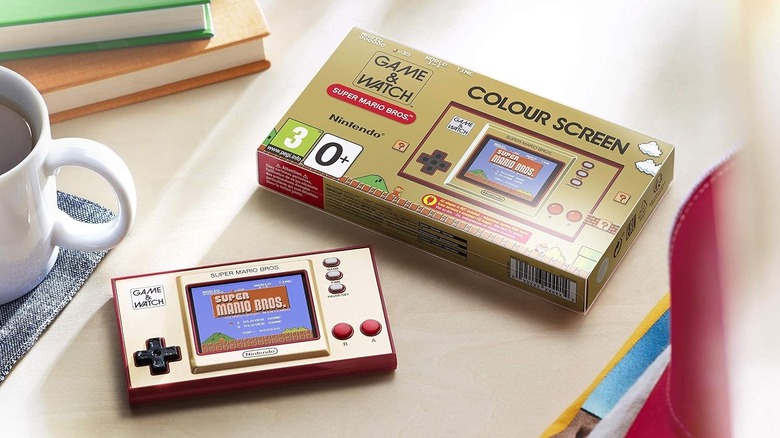
Whether you work from home or from your office, every workspace needs a break room. Nintendo's Game & Watch is a tiny handheld that fits in your hand and can play classic games. Plus, it can tell the time. The Super Mario Bros. edition was launched first, with a Zelda edition after. The games run on a 2.36-inch color screen, with games going back to the 1980s. It includes Ball, the first Game & Watch game ever, with Mario's head swapped in.
It uses USB-C for charging, but you do not get a wall adapter inside the box. That is an separate purchase or you can use one you already own. Reviewers point out that the included cable is very short, so keep a longer one handy. Nintendo Game & Watch lets you freeze a game at any time, which is great for a break between meetings or once you are done with lunch.
The hardware is good but the Mario version comes with a few games, with one Game & Watch title and two Mario games. For more games, you need to get the Zelda edition. You can purchase Game & Watch Super Mario Bros edition for $46.99 from Amazon, while the Zelda edition costs $72.95.
Playdate
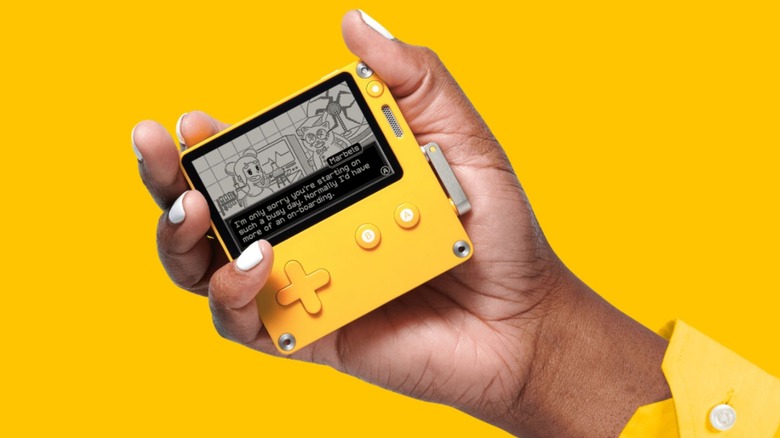
Playdate is another fun desk gadget that you can add to your workspace. It is a small yellow handheld with a black-and-white screen, a D-pad, two buttons, and a fold-out crank. Games are released in a season, a few at a time, like episodes of a show. Notably, the first season had 24 games, arriving twice a week for 12 weeks. Just to be clear, Playdate costs around $230 and is sold only through its official website.
At time of writing, the handheld is sold out, but you can subscribe to Playdate for whenever it gets restocked. The hardware is decent, and reviewers say the battery lives up to its claims of 14 days of standby and eight hours of play. However, the screen can be a bit hard to read without good light. So, it is advised to be used in a brightly-lit environment for the best visibility.
One USB-C port handles charging, and the cable comes in the box. There is also the option to sideload games. A five-minute round between emails feels about right with Playdate. If you like tiny screens, Playdate is a modern, stranger version of that idea, and it's a nice break from your phone.
Divoom Ditoo Pro

This is probably one of the quirkiest gadgets that you can have on your desk. The $99.99 Divoom Ditoo Pro looks like a tiny retro computer with a 16x16 pixel screen, a small mechanical keyboard, and a joystick, but it is actually a 15-watt Bluetooth speaker. Just like most buyers, you might want to purchase it as a decorative piece rather than for the sound. You can use it as a pixel clock, a tiny art gallery, or a timer for short work sprints.
It is a nice option for gifting to kids or just for decoration. Using its official app, you can draw your own pictures or pick from a gallery. Divoom Ditoo Pro also works as an alarm, a timer, and a white noise maker. It plays music over Bluetooth, from a memory card, or over USB-C from a laptop.
The company claims that this speaker produces clear and warm sound. The real appeal is the look, however; if you like retro style, this is the tiny desk gadget that you should definitely own. It won't replace a good studio speaker, and frankly, it doesn't try to. But you'll glance at it far more than you listen. The Divoom Ditoo Pro is like a toy and a speaker in one, and that mix is the whole charm.
Anker Nano power bank (5,000mAh)
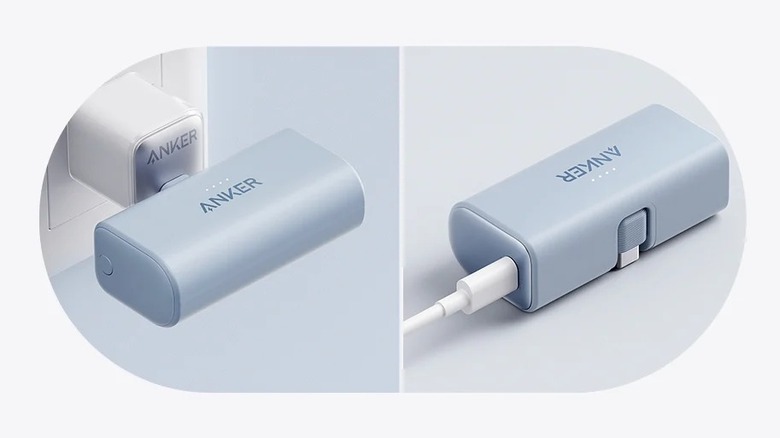
The Anker Nano power bank, available for $26.99 from Amazon, is a 5,000mAh battery with a foldable USB-C plug built in. You've got nothing to carry and nothing to lose. It's about the size of a large lipstick tube, which makes it quite a compact power backup option you can carry, making it the kind of thing you forget about until your phone hits one percent.
It's quick for its size, and the company claims that it can take an iPhone 15 Pro from about 15 percent to 80 percent in just under an hour. Pass-through charging lets the power bank and your phone charge together. Anker says the plug fits phone cases up to 4.9mm thick, and it suggests holding the phone and bank together while charging. The best part is that the Anker Nano power bank charges both ways, so you can charge it through the USB-C port on its side.
Durability can be a bit of a concern, but you should be good if you handle devices carefully. It's also good for about one full phone charge, so it's for top-ups, not all-day use.
Linsoul Kiwi Ears Allegro Mini
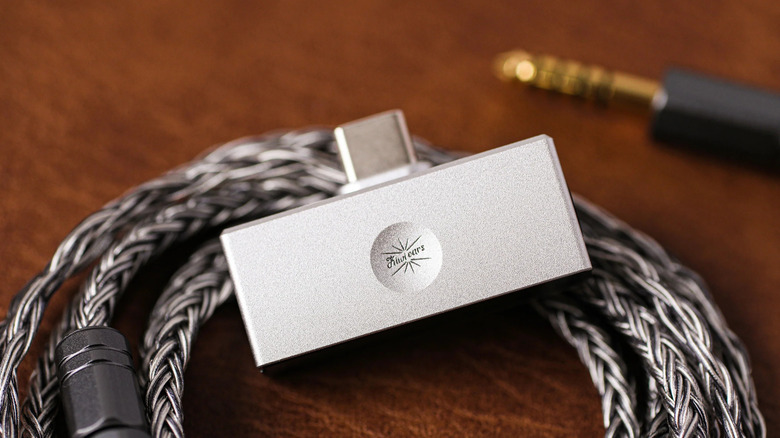
Modern phones and laptops have lost their headphone jacks. The Kiwi Ears Allegro Mini brings one back. It's a tiny USB-C dongle with a DAC and amp built in, which turns digital music into sound and makes it loud enough for earphones. It has two outputs: a 3.5mm jack and a 4.4mm balanced jack. The aluminum body feels premium for the price, and it works with Windows, Mac, Android, and iOS.
Reviewers call the sound neutral, with good separation for its size and also highlighting that it's the smallest dongle in its class. You can purchase the Kiwi Ears Allegro Mini at $22.09 on Amazon at time of writing, but this is a limited-time deal; its MRP is $25.99. It is available in two colors: Titanium and Silver.
It isn't for every ear. If you are an audiophile and just want the best sound quality, then this is a tiny adapter that you can toss in your office desk drawer. That makes it a good partner for wired earphones you already love.
WOLFBOX MegaFlow 50 electric duster
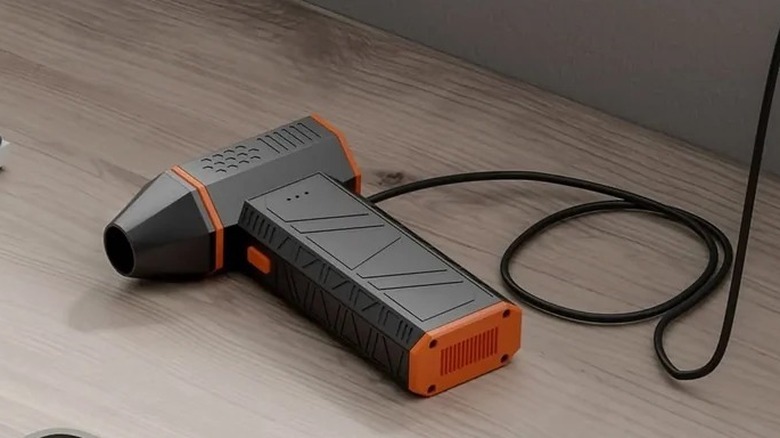
No matter how clean you keep your work desk, dust still piles up. The WOLFBOX MegaFlow 50, available for $39.99 on Amazon, is a small electric duster that does the job of canned air without running out. It spins at up to 110,000 RPM, has three different speeds, and weighs 0.45 lbs. A full charge over USB-C takes about 3.5 hours. WOLFBOX claims the lowest setting runs up to 240 minutes on a charge.
Fans clogged with dust can cause thermal throttling, which slows your PC, but this USB-C rechargeable air duster can clear dust and other particles without much fuss. It comes with four nozzles, a USB-C cable, and a lanyard.
You can use this electric duster on keyboards, PC vents, and even car interiors. If you work on a laptop, some warmth is normal. However, if your laptop gets extremely hot, it means there is a bigger problem. A quick blast of air through its vents is a good first step to fixing the problem.
Methodology

Many of the products we've outlined above have their own SlashGear coverage and we have shared our review wherever it existed. For everything else, we leaned on trusted outlets such as TechRadar, Tom's Hardware, Tom's Guide, PC Gamer, and Amateur Photographer, plus others. We kept only gadgets that use USB-C. Keep in mind that the this article reflects the prices of the products at the time of writing this piece. Prices and stock can change often, so check before you buy.