

7 Of The Coolest Gadgets I Saw At A Tech Con In Taiwan
Computex is the largest tech expo in Asia, and it held annually during the first week of June. I got the chance to go to Taipei this year and cover the show, which features several mainstream tech brands and many more smaller and upcoming companies.
Taiwan is home to many tech firms, including popular ones like Asus and Acer. It's also the home of TSMC, which makes 90% of the world's most advanced chips — including the ones that you find inside many Apple devices and Snapdragon-powered Android phones. TSMC also manufactures chips for Nvidia, which makes the GPUs that you can find in many data centers and is arguably the foundation of the current AI boom. This is why Computex is such an important expo, and many companies take advantage of this gathering to launch their upcoming tech and show off their latest products.
 Jowi Morales/SlashGear
So, we spent several days in Taiwan and trolled the massive show floors for the most interesting gadgets that we could find. We picked seven out of the hundreds (maybe even thousands) of items that we saw to give you a slightly closer look. Take a look and keep in mind: most of these picks will either be available to consumers soon or, (depending on when you read this article,) might be available in a store near you already.
Acemagic Retro X5 mini PC
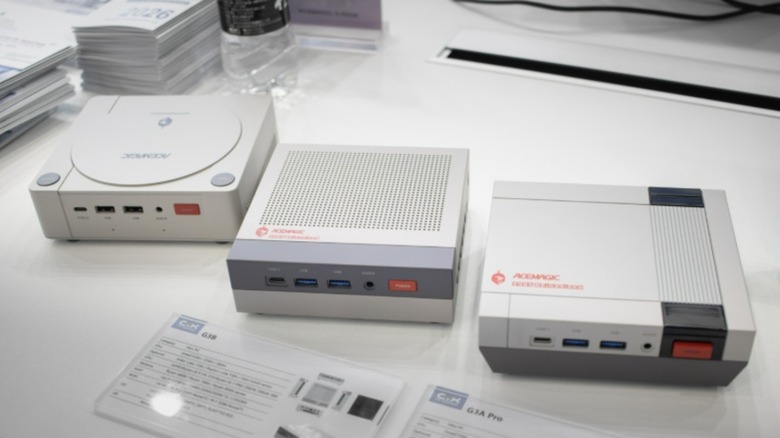
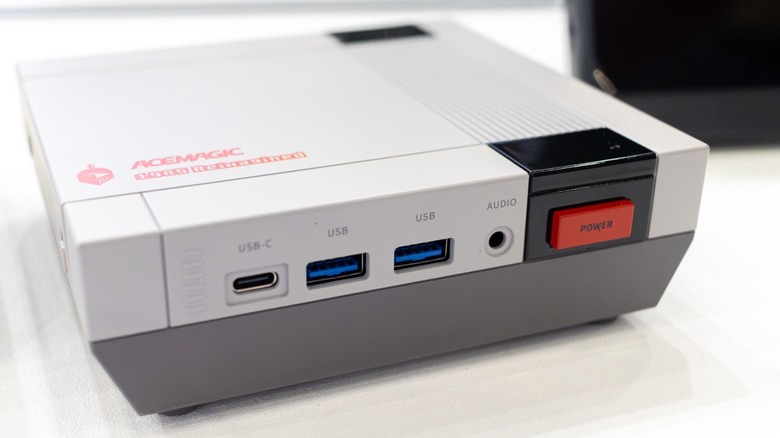
Retro tech is becoming trendier these days, and Acemagic joined the bandwagon with the Retro X5 mini PC. This tiny desktop features the aesthetics of the original Nintendo Entertainment System, making it perfect for millennials and Gen X-ers who grew up with this console in the '80s and want a hit of nostalgia every time they sit at their desk.
Even though this Retro X5 mini PC (which is different from a tower PC but is still designed for desktop use) looks like it was from 40 years ago, it's equipped with the latest components. It has an AMD Ryzen AI 9 HX 370 CPU paired with 32 GB of RAM and a 1 TB SSD. If you need even more capacity, it's upgradeable up to 128 GB of RAM and 4 TB of storage.
Despite its small size, it comes with a lot of ports. You get one HDMI, DisplayPort, and USB4 Type-C port each, allowing you to directly attach three monitors. There are also two LAN ports for high-speed internet, as well as four USB3.2 Type-A ports and an additional USB Type-C port at the front of the PC. Finally, a single 3.5mm combo audio jack lets you use wired headphones or speakers. If you prefer wireless connectivity, it's equipped with Wi-Fi 7 and Bluetooth 5.4.
The main downside is that it doesn't have a discrete GPU, but the Ryzen AI 9 HX 370 should be powerful enough to run some of the most popular games at 1080p and low to medium quality. But if that's not enough for you, you can get an external GPU and attach it to the USB4 port for more graphics power.
Acer Predator Atlas 8 handheld gaming console
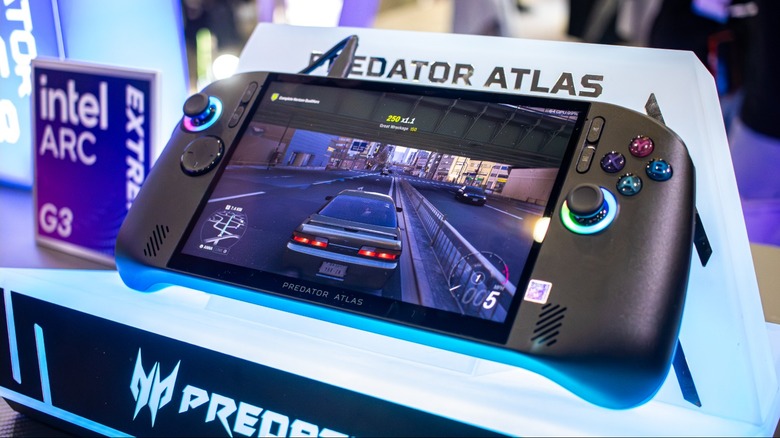
Most handheld gaming consoles are powered by an AMD processor, like the ROG Ally, which some suggest is the best Steam Deck alternative for PC gaming. But Acer is challenging the norm when it launched the Predator Atlas 8 handheld console here in Taipei.
This 8-inch handheld uses an Arc G3 processor, which Intel also unveiled at Computex 2026 to challenge AMD's dominance in the gaming space. Unlike previous Intel-powered consoles which used repurposed laptop chips, the Arc G3 is specifically designed for handhelds, balancing power and performance with efficiency and battery life. While we don't have in-depth comparisons between the AMD and Intel gaming processors yet, the Arc G3 seems like a promising challenger to AMD's entrenched offerings.
 Jowi Morales/SlashGear
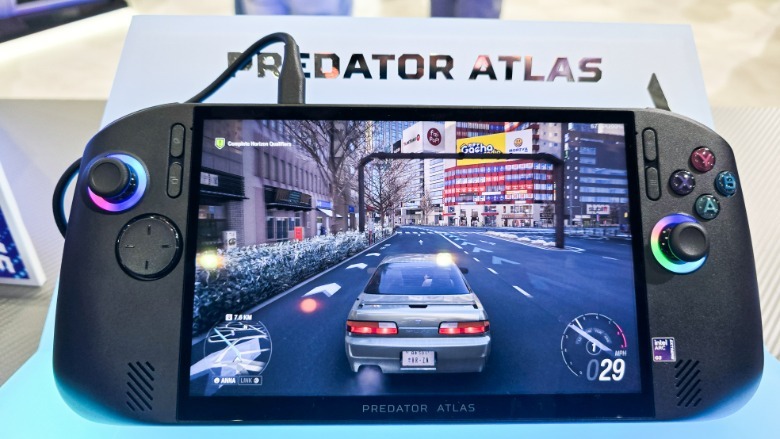
Aside from the new Intel chip, the Predator Atlas 8 comes with a few interesting features of its own. This includes a 120 Hz 8-inch 16:10 display that can hit up to 500 nits of peak brightness, giving you a larger screen that delivers smoother framerates without making the console uncomfortably large. It also comes with a rather large 80 Wh battery; this might sound promising, but we'll have to run the console and its Intel Arc G3 processor through its paces for us to know how much gaming time it will give you. (Note that results may also vary depending on your settings and the game that you're playing).
I got to try the Atlas 8 handheld on the show floor and played Forza Horizon 6 on it for a few minutes. Despite its big screen and larger battery, it wasn't tiring to hold, and I could imagine myself playing on it for hours at a time, whether in bed for a late-night gaming session or while passing the time on the plane.
Alienware AW3926QW gaming monitor
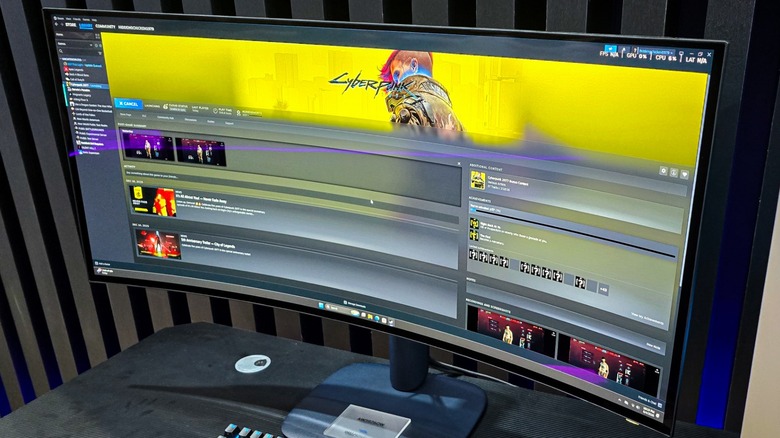
Even though gamers are now spoiled for choice when it comes to handheld consoles, you still cannot replace the glory of playing on a large, ultra-wide monitor. And among the many displays that were shown off at Computex 2026, the Alienware AW3926QW stood out from the crowd.
It might look like just another curved ultrawide display when turned off, but you'll see the magic once your turn on your PC. This display has a 5K (5120 x 2160) resolution, giving you sharper images than a comparable 4K monitor. It also has a 165 Hz refresh rate to give you smooth gameplay at maximum resolution; but if you need an even higher refresh rate for competitive matches, you can boost it to 330 Hz by dropping the resolution to 2560 x 1080.
The AW3926QW also used featured a QD-OLED panel, ensuring that you get vivid, accurate colors with its wide color gamut covering 99.5% of DCI-P3. It can also hit a peak brightness of 1300 nits, allowing you to see your content even in a bright area. Another interesting feature is its glossy screen, which helps deliver a clearer, sharper image. Alienware addressed the reflectivity issue that plagues this finish, though, and even though I was playing "Cyberpunk 2077" in a brightly lit area with a lot of light sources, there were zero distractions on the surface of the glass.
Dell XPS 13 budget laptop
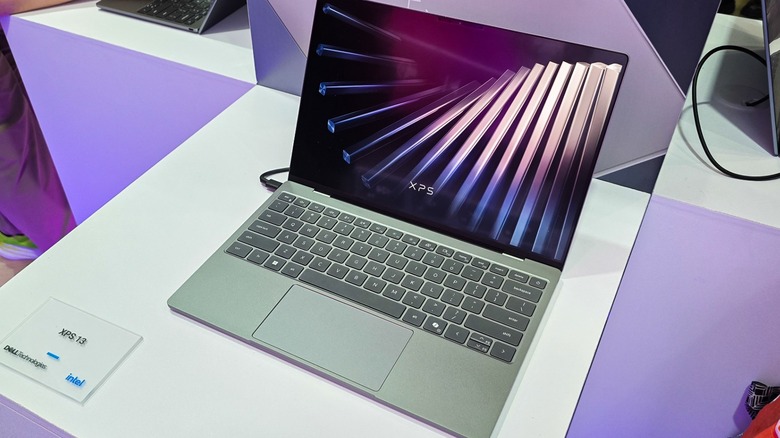
Apple launched the affordable MacBook Neo, which only cost $599 ($499 if you get the student discount) earlier this year, and it caught some industry executives by surprise. However, that didn't mean that Apple's competitors won't do anything about it, and Dell was the first one to come out with what might be the Neo's first true alternative.
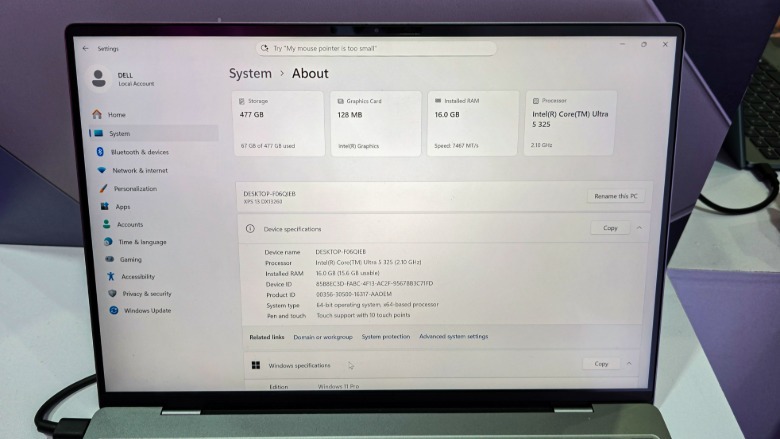
The Dell XPS 13 budget laptop followed in the Neo's footsteps of premium looks at budget pricing, with the new device coming in at a base price of $699, although students aged 16 and up can get it for just $599 (for a limited time). This Dell laptop also has a few features that you won't find on the MacBook Neo: a larger, 13.4-inch touchscreen monitor with variable refresh rate from 30 Hz to 120 Hz. This might not be a "make-or-break" option for most laptop buyers, but it will give users a smoother experience and potentially allow for longer battery life.
 Jowi Morales/SlashGear
The MacBook Neo has also a few must-know limitations which Dell has addressed with the new XPS 13. This includes that availability of higher configuration options, which allows the laptop to have as much as 32 GB of memory and up to 1 TB of storage (versus the Neo's 8 GB of unified memory and up to 512 GB of storage), processors specifically designed for laptops, and a backlit keyboard.
I tried out this exact laptop on the show floor and, honestly, I couldn't feel or see any significant differences between this and other more premium laptops on display. It was only after the Dell representative pointed out that it was new budget model that I realized I'm looking at something that will change the entry-level PC laptop market.
FormulaV Line Solen gaming chair
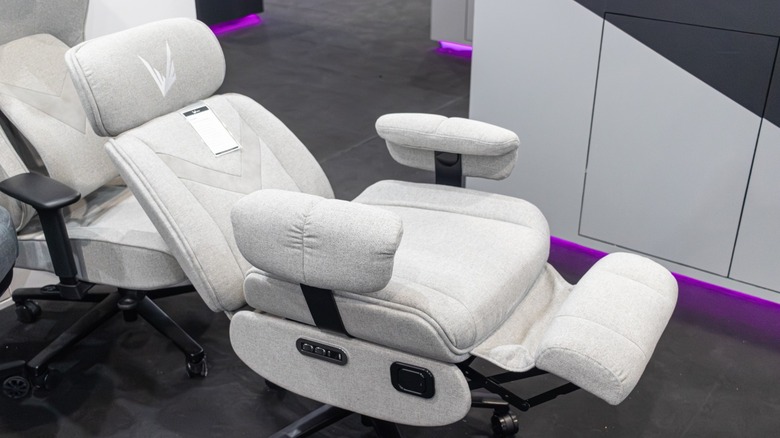
Many enthusiasts focus on PC specs when it comes to building their gaming station and up choosing a generic gaming chair as their seating solution. But if you intend to spend hours seated in front of your computer, it's best to invest in a chair you can adjust as necessary to keep you comfortable. FormulaV Line, a Taiwanese startup that's coming to the U.S. soon, wants to level up comfort with its Solen gaming chair.
What makes this stand out is that you can change its recline and footrest angle using the switches on the right side of the chair, allowing you to set it at just the right position. This makes it easy to get into a leaning position with your feet off the ground if you want to kick back and relax with a casual game using your controller. But if you plan to engage in a serious match while playing your favorite e-sports title, you can easily move move the chair's support back up into action.
It also comes with a USB-C and USB-A port to let you charge your devices — like your gaming controller — without leaving the chair. It's powered by a removable rechargeable battery, allowing you to keep it topped up via USB-C. For those who need a little more distraction, the seat also has a vibrate function that's meant to help you relax after a long day at work. I tried the Solen gaming chair for myself, and while I cannot compare the vibrating function to a real massage chair, the fact that I can easily set the recline and footrest to whatever angle I need is more than enough to convince me to consider getting one when they're released.
Thermaltake GR900 racing sim cockpit
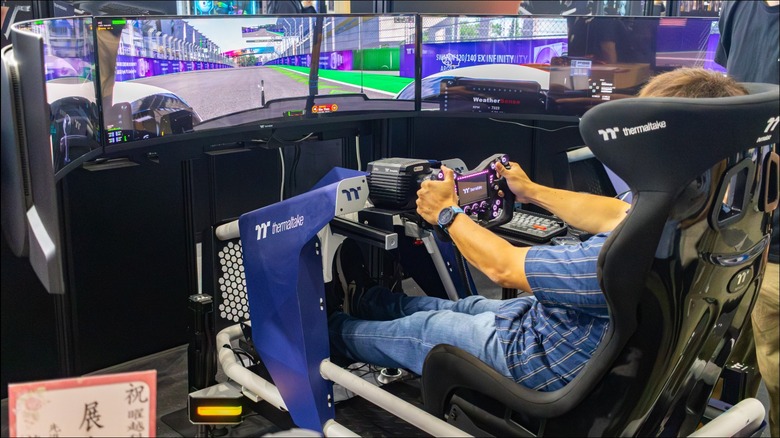
Many gamers would be happy playing on one excellent monitor and a good keyboard and mouse combo or one of the many excellent handheld gaming controllers you can use on a PC. But for the sim racing enthusiasts, a complete sim racing cockpit is a must-have to complete the experience.
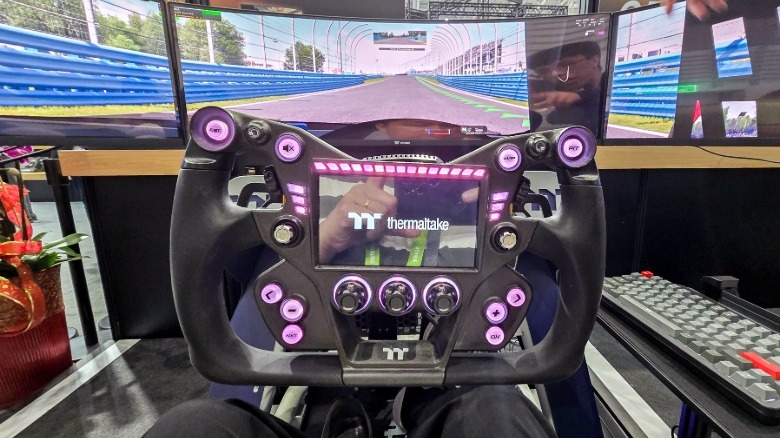
The Thermaltake GR900 racing sim cockpit starts as a base that lets you mount your desired racing chair, driving wheel, pedal, and shifter set up. It also accepts up to three monitors to give you the wide field-of-view that you'd expect in real life. But what made this stand out is the GM5 3DOF motion system that you can attach it, allowing you to feel the acceleration, braking, and every bump you hit as you race around the track.
 Jowi Morales/SlashGear
I tested this out myself, and the combination of the curved triple-monitor setup, driving wheel and pedals, plus the motion system made it feel like I was actually trying to set the best American lap time at Nürburgring (not that I'd actually get anywhere near the real record). The Thermaltake representative told me that this system starts at around $800 and you can actually build it yourself at home in about three to four hours. However, if you add the desktop PC, the triple monitors all the other accessories to turn into a fully-fledged motion simulator, expect the cost to go beyond $4,000.
Gigabyte Eagle entry-level gaming laptop
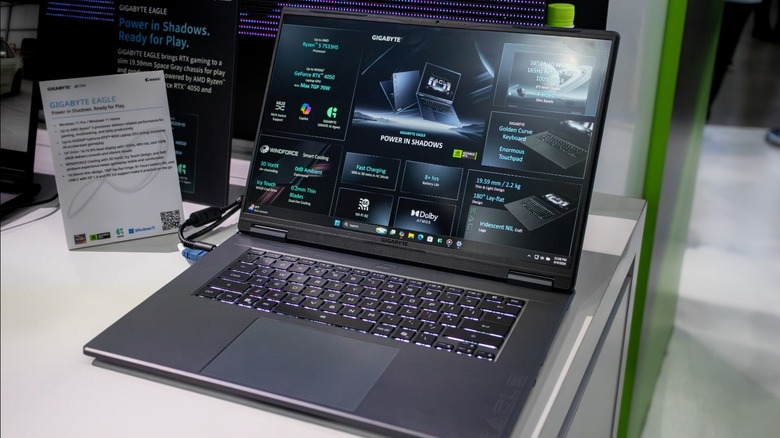
When people talk about gaming laptops, they usually think of devices that cost thousands of dollars, keeping it out of reach for many gamers. But Gigabyte showcased the Eagle entry-level gaming laptop at Computex 2026, aiming to (hopefully) make gaming more affordable. We don't have exact pricing yet, but a company representative told me that it will cost less than $1,000 and could even go as low as $800 for base configurations.
While the upcoming Dell XPS 13 and the MacBook Neo are still cheaper, they're not specifically designed for gaming, and you might run into trouble if you want to play the latest top-tier games.
The Gigabyte Eagle comes with an AMD Ryzen 5 processor and a discrete GPU. Even though you won't find the latest, most powerful RTX 50-series GPUs on this line of laptops, it still comes with either an RTX 4050 or RTX 3050, which should be good enough to let you play games at the lowest quality settings. And if you pair that with NVIDIA's DLSS technology, you should get a reasonable frame rate without breaking the bank or your computer.
You also get a large 16-inch display with a 165 Hz refresh rate, making it easier to see your games without relying on an external monitor. More importantly, this gaming laptop is upgradeable, unlike other models, allowing you to increase its RAM and storage capacity in the future if you need to.