

5 Drawbacks Of Using An External Hard Drive (SSD Or HDD)
We may receive a commission on purchases made from links.
Whether your computer is running out of storage space, you want to store large files in an easily accessible location, or you are trying to move them between computers, an external drive is a great storage solution. It's also useful when you want to use the highly recommended 3-2-1 rule of data backups. In a nutshell, the rule states that you need three copies of your data backed up in at least two different storage media. The aim is to eliminate a single point of failure. One of the copies needs to be kept offsite, and an external drive is one of the best ways to make this work. Plus, it's extremely portable, easy to use since it's plug-and-play, and can be found in various storage capacities (up to 30TB).
Getting an external drive sounds like a no-brainer, but there are some drawbacks worth considering. Cost is one because it's gone up over the years. Then there are all these things that can happen should you lose one, whether you forget it somewhere, it's stolen, or, in the case of hard disk drives, dropped. Your data could be lost or compromised, especially if it's sensitive. Also, if you experience connectivity issues, it can even lead to data corruption. Knowing the cons of external drives can help you understand how to overcome them. Sometimes, this requires pairing them with a relatively inexpensive accessory.
The cost of external storage is on the rise
External storage is getting more expensive, especially if you need high-capacity drives. SSDs are the most expensive option, and their increase in price is tied to the high demand for NAND flash memory. This is the part of an SSD that stores data when it's powered off. It's a major reason why an SSD's memory is non-volatile, as compared to volatile memory like RAM.
Costs have skyrocketed because generative AI models need large amounts of fast SSD storage to store training data and the content they generate. Supply chains are failing to keep up, leaving little left for the consumer market, which is driving costs up. According to the German tech site ComputerBase, the prices of both SSDs and HDDs it tracked skyrocketed by an average of 146% between mid-September 2025 and mid-October 2026.
The rise in HDD prices has more to do with major cloud storage providers in the U.S. gobbling them up for long-term data storage. One reason they don't use SSDs for long-term storage is that NAND flash memory can leak electrons when not powered for long periods. AI data centers are also using HDDs as a cheaper alternative for storing older, less speed-critical AI data. Forbes estimates that AI will account for 58% of HDD capacity demand by 2030.
You can forget or lose an external drive quite easily
It's easy to forget an external drive at a coffee shop or at home when you're rushing out the door. Only when you need it do you discover it's not there. If you've been backing up your data, you can still access the files that were on the hard drive since they also reside on the computer. They can also be stored somewhere they can be accessed remotely, like a reputable cloud storage service. But if everything you need was on the external drive, you're out of luck.
To ensure that you don't forget your external drive, always pack it in your bag the moment you finish using it. Don't unplug it and tell yourself you will remember. Also, when you're leaving, make sure you haven't left anything behind. If you're prone to forgetting, put something on top of the drive that you know you have a very low chance of forgetting when leaving, such as your keys or wallet (provided it's a safe enough environment).
Alternatively, you can attach the external drive to your computer with an accessory like the Afterplug 2-Pocket Drive Holder for $16.99. You can easily stick it to the back of your laptop or the side of a desktop tower and slot your hard drive in, which also reduces desk clutter. The bigger pouch can fit a 2.5-inch external drive, while you can insert cables into the small pouch instead.
External drives can be a security risk
On top of external drives being forgotten or lost, external drives are easier to steal than internal drives. The problem with a stolen hard drive is that whoever has it may be able to read its contents. Generally, it's safe to store important files on an external drive. These include IDs, legal documents, medical records, crypto wallets, work files, or private photos and videos. You just need to keep it safe.
You don't want a thief to get their hands on them and do all sorts of nefarious things. If it's a personal hard drive, they can blackmail you or commit fraud. If it's a work drive, they can extort you or use the information to infiltrate a corporate network. If you're going to keep sensitive information on an external drive, the best thing to do is encrypt it just in case it ends up in the wrong hands. Windows and Mac have their own encryption tools, but you can also use a popular third-party alternative like VeraCrypt to encrypt the drive.
Dropping an external HDD can mean the end
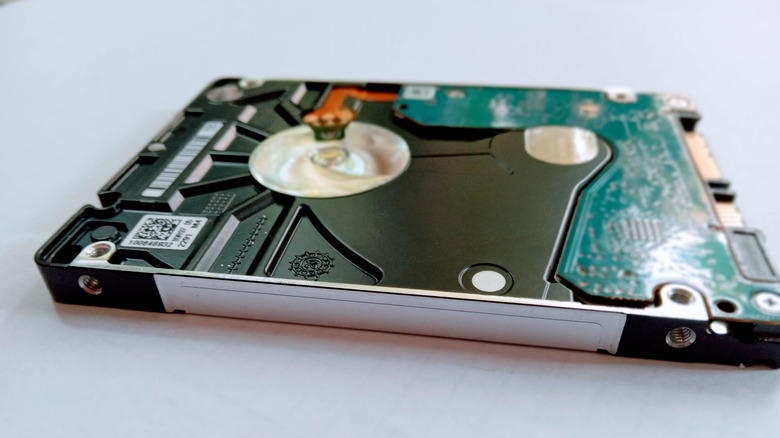
External drives can be easy to drop if you forget they're connected to your computer or aren't secured properly. It can happen when picking up your laptop while the hard drive's attached to it, or it can slip out of your bag if you don't secure it properly. The resulting drop can be fatal for a hard drive, especially if it happens while it's operational. While an external SSD can still get damaged after a fall, it will likely survive a minor one because an SSD doesn't have any moving parts. A standard hard drive, on the other hand, can easily get damaged if it falls from table height.
Several things can happen, including the read/write head scratching the platters, the motor failing, or the platters becoming misaligned. You can prevent falls by ensuring that the drive is placed near your computer, without any of its cables sticking out or dangling to prevent accidental pulls. When storing it in a bag, make sure it's in a dedicated pocket or compartment. If you accidentally drop an external drive and suspect it's damaged, stop using it immediately, as further use can make the damage and data loss worse. Use a professional service to help you recover your data.
You can experience connectivity issues
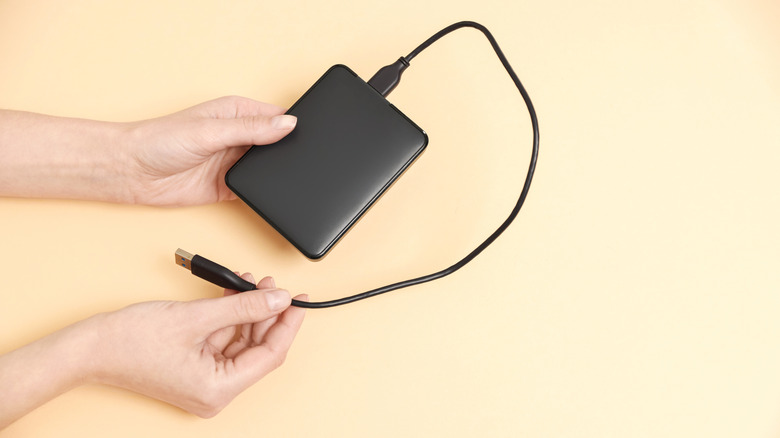
External drives are usually connected to your computer via a USB cable, which opens up several connectivity issues compared to a drive attached to the motherboard. Even though there are some cheap USB cables that users swear by, some of the ones found at your local gas station or convenience store can be so cheaply made that they bottleneck the speeds of your external drives. Some fray easily, leading to frequent disconnections, which can cause data corruption if they happen while data is being transferred. They might even refuse to connect. Even if you have a high-quality cable, you need to know which USB ports to plug them into so that you don't experience slow speeds.
If you're going to buy an external drive, ensure you're using a USB cable from a reputable brand with it. Also, learn the types of ports that you have on your computer to avoid using slower standards like USB 2.0 and lower. Don't move the external drive around while it's operational, as that can cause it to suddenly disconnect if you accidentally pull out the USB cable. Also, sudden movements like jostling an HDD can be detrimental since they can shake the internal mechanical parts, leading to data loss if the drive fails.