

11 Space-Saving PC Accessories Built For Small Office Desks

We may receive a commission on purchases made from links.
Whether at home or in the office, working at a small desk can be a daily negotiation for space. You probably have a monitor or two taking up the middle, a keyboard pushed right to the edge, and a stack of files and papers that you just keep knocking over. Before you know it, there's no room to rest your coffee, never mind find enough space for a mouse pad. Cables snake across the surface, power bricks hog wall outlets, and that domineering PC tower either crowds the floor or sits heavily on the desk, encroaching on what little territory you have. Small desks simply aren't designed to handle all this, and it's time to plant the flag and reclaim some of that territory.
The good news is, you don't necessarily have to get a bigger desk. There are accessories designed to help with space management. Some lift screens off the surface, others ensure towers disappear under the desk, and a well-designed power strip can replace three separate chargers. To find the best space-saving accessories, we've turned to expert tech reviews with real-world testing as well as customer opinions from thousands of verified buyers.
We only considered accessories that genuinely deliver on space-saving promises. Some are premium gadgets worth the investment in the long run; others are simple, affordable accessories that punch well above their price tag. Here are 11 PC accessories designed to help you make the most of a small office desk.
Lofree Flow Lite 100 low-profile keyboard
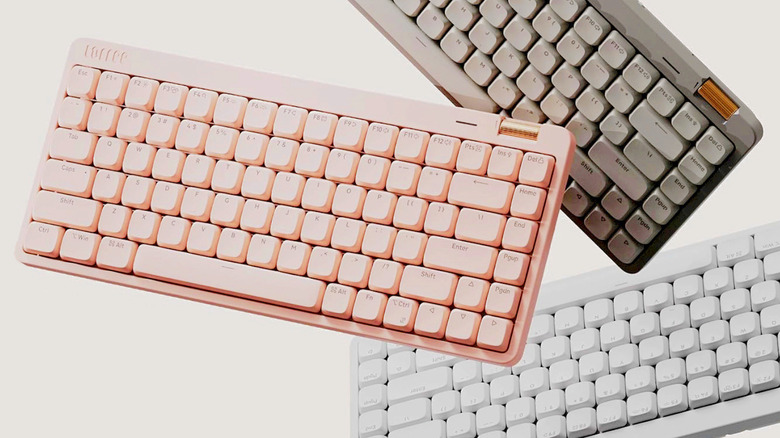
The Lofree Flow Lite 100 features a near-complete set of keys but has a significantly smaller footprint than that of a standard keyboard. It's a low-profile wireless keyboard that's ideal for small desks, keeping things like the numpad but removing the spaces between key sections. The textured PBT keycaps feel premium to the touch, and the low-profile switches press down smoothly and quietly, making it well suited to a shared office where you'll want to keep the clicking and the clacking to a minimum. Our reviewer at SlashGear was highly impressed with the keyboard, saying, "Once I got used to it, I absolutely loved the feel of the keys on my fingertips and the extra space I got on my desk."
You can connect it to your PC with a cable or a 2.4GHz wireless dongle with a 1000Hz polling rate. The connection is highly responsive, and the keyboard can also connect to three other Bluetooth devices simultaneously. It's compatible with both Mac and Windows, and there's a nifty bronze volume roller in the top-right corner to adjust or mute your PC. What's more, the battery can run for up to 100 hours (with the backlight off), so it won't constantly need recharging, and it comes in three different colors: Marble, Flamingo, and Off-White.
CalDigit TS5 Plus docking station
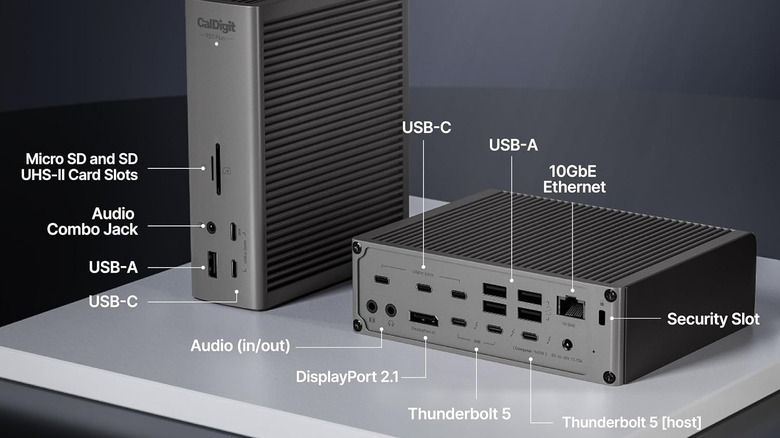
You can reduce desk clutter by connecting all your peripherals through a single hub instead of taking up space with separate adapters and cables for each of your devices. If you have a lot of them, the CalDigit TS5 Plus is a premium Thunderbolt 5 docking station with no fewer than 20 ports. Among them are USB-C and USB-A, DisplayPort, and 10 Gigabit Ethernet, the last of which eliminates the need for a separate Thunderbolt-to-10GbE adapter.
But it's the TS5 Plus' performance that gives it the edge over competitors. When testing the docking station, TechRadar's reviewer said they had it in an office "with a single 4K monitor attached, several hard drives, a keyboard and mouse, and a Monogram control deck, all of which operated without issue." They then went on to test SD and microSD card transfers, external SSDs, and the dock with both Thunderbolt 4 and Thunderbolt 5 computers. Faster card-reader performance, smooth operation with multiple devices, and nearly double the SSD transfer speeds on a Thunderbolt 5 PC were the tech expert's findings.
The TS5 Plus supports up to three 4K displays at 120Hz on compatible PCs and offers up to 140W charging for your laptop. It can even charge peripherals when disconnected from the computer, while its dual USB controllers help maintain bandwidth when you connect multiple high-speed USB devices. That said, it is pretty pricey at $500, so it's best suited to those who actually need extensive connectivity and high-speed transfers. The CalDigit TS5 is a bit cheaper at around $400 and offers 15 ports and 2.5 Gigabit Ethernet instead.
Obsbot Meet 2 compact 4K webcam
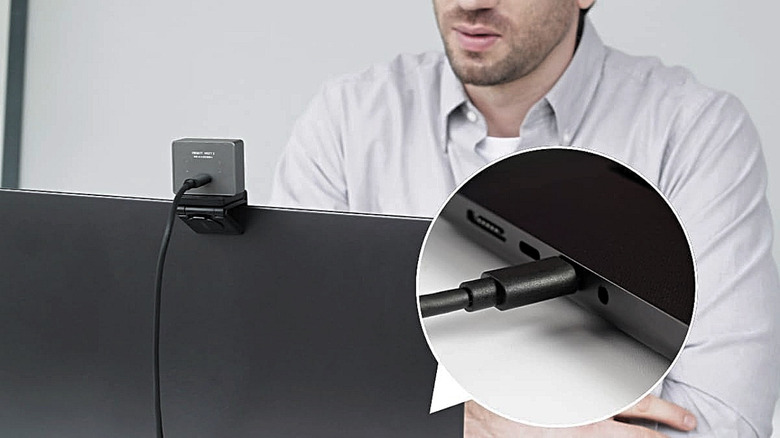
A compact webcam is always a welcome addition to a space-saving setup, but one with a magnetic mount that clips onto your monitor is the best type when desk space is at a premium. The Obsbot Meet 2 4K webcam is both compact and mountable, so there is no need for a separate stand or tripod cluttering up your desk. It weighs just 1.4oz, so it's very light in the hand. "I absolutely loved the convenience of simply unclipping the mount from my MacBook and putting it atop my desktop," said our reviewer at SlashGear. That convenience means it's particularly useful if you switch between computers or share a compact workspace.
Our reviewer tested it for a couple of weeks and was also impressed by its image quality. It supports 4K resolution at up to 30fps, or 1080p at 60fps, while the built-in microphones give you decent audio for calls in enclosed spaces. Its ability to track movements accurately also impressed. The AI-powered auto-framing keeps you in the picture as you shift in your chair or wander around during a Zoom meeting. Gesture controls are another useful touch. They let you adjust the framing and zoom with a wave of your hand or a point upward rather than through the app or software settings.
DJI Mic 2
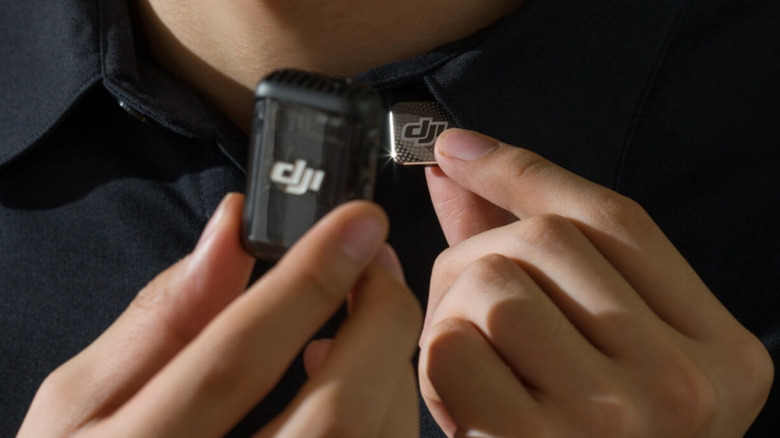
If you're tired of that bulky microphone and stand hogging space on your desk, why not consider a compact wireless mic that you can clip onto your shirt? The DJI Mic 2 does just that. It comes with two microphone transmitters and one receiver. The small receiver plugs directly into your PC via USB-C, and the wireless mic connection keeps things clutter-free.
The mic itself is fine for casual gaming and video calls, but content creation when you're pushed for space is where it comes into its own. You can record voiceovers for videos, narrate tutorials, or produce podcasts on your PC. It's also ideal for creating content on the go with your smartphone, and the second mic is there for anyone doing interviews. Additionally, the 32-bit float recording helps prevent sudden loud sounds from ruining your audio, while excellent noise cancellation cuts down on unwanted background noise.
Our reviewer at SlashGear heaped praise on the intelligent noise cancellation, saying it was "highly effective." In our 2024 testing, we also praised the sound quality. That said, it is, understandably, expensive, though at the time of writing, it has been listed for some time at the discounted price of $199. However, you can save a substantial amount when buying the one-transmitter package, which is ideal if you will only be using the mic at your desk.
Bose QuietComfort Headphones (2nd Gen)

Ditching the desk speakers goes a long way toward reclaiming valuable workspace — and you can easily replace them with a quality set of cans. The Bose QuietComfort Headphones (2nd Gen) are one of four new Bose audio products to keep on your radar in 2026. They might have a premium price, but they are wireless, and they offer superior noise cancellation and excellent audio. When it comes to having a little downtime at the desk, Bose's Immersive Audio adds depth to music, while Cinema Mode enhances dialogue when you're watching movies. Over on our sister site, one of Engadget's reviewers said the headphones "provide plenty of fine detail" while also "providing adequate low-end thump when a song demands it."
But when it is time to work, that noise cancellation lets you focus without the distractions an office tends to create, while the background-noise filtering ensures your voice is loud and clear during calls. They're lightweight, too, so they are comfortable enough for a long working day (or an epic movie). The 24-hour battery life with noise cancellation on also helps here, while solid Bluetooth connectivity keeps your work desk free of cluttering cables. When you're done for the day, hang them up on a hook to keep them off the work surface and ensure your setup remains tidy, or pack them away in the included carry case.
Logitech MX Ergo S trackball mouse
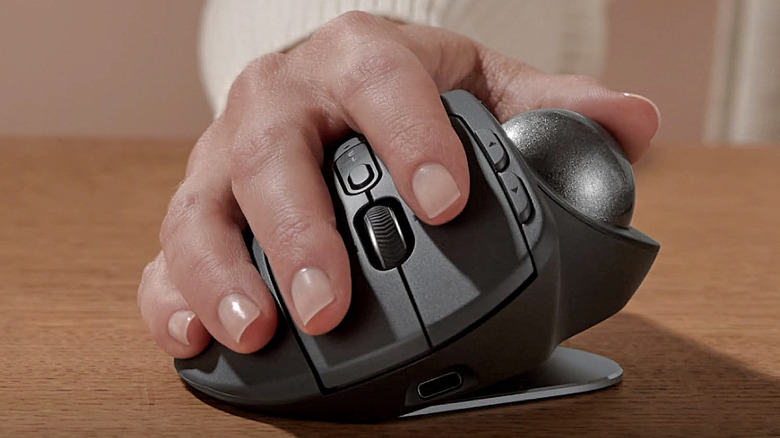
If you've never used a trackball mouse before, it'll take a couple of seconds to get your head around the concept. Instead of sliding the mouse across a pad to move the cursor on screen, you keep the trackball perfectly still and roll a ball on the device with your thumb. That's it ... genius. The Logitech MX Ergo S is among the best of this type of mouse. PCMag even called it "the most polished and capable trackball mouse we've tested in recent years." Its weighted aluminum base keeps the device firmly anchored, which is what you want when space is limited. There's no need for the mouse to move, there's no need for a space-hogging mousepad, and there's no running out of room mid-scroll.
It tilts at a 20-degree angle, which Logitech claims reduces forearm muscle strain by 27%. With your wrist sitting in a more relaxed position than it would with a conventional mouse, long PC sessions start to feel more manageable. If you're using it in an office, you'll appreciate that the buttons are whisper-quiet, and it basically never runs out of power. According to the manufacturer, just one minute of charging gives you 24 hours of use, while a full charge will take you up to 120 days. The Logi Options+ software rounds things out nicely. Press the dedicated button and a shortcut menu will appear on your screen. From there, you can assign tasks like copying and pasting, taking a screenshot, or muting the sound to a single click rather than having them inconveniently buried in keyboard shortcut combinations.
Vivo under-desk and wall PC mount
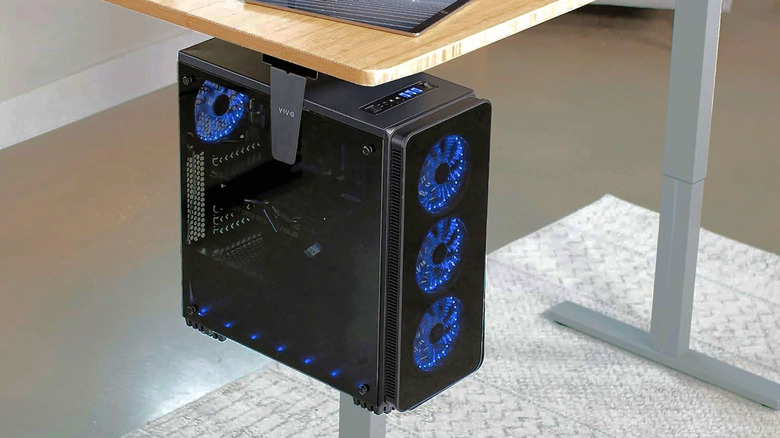
If your PC tower sits on the floor, eating into your foot room, or, worse, sits on your desk whirring and blinking at you as it claims precious desk space, a solid mount is what you need. The $35 Vivo under-desk and wall PC mount solves this by clamping the tower under your desk off the floor. And while it is primarily designed for PC towers, any other similarly sized device can get clamped in, too. One Amazon customer said, "I have a small desk with no space available underneath it ... this mount is a perfect way to get the UPS out of the way, yet keep it accessible."
The adjustable frame fits towers between 3.5 and 7.8 inches wide, and the height extends from 11.5 to 20.5 inches. It covers most standard mid-tower builds and supports up to 22 pounds. If you have a larger tower, don't fret. For $15 more, Vivo has another model that fits towers from 8.3 to 13 inches wide and 14.6 to 25.2 inches in height, with support for up to 44 pounds.
Build quality is solid, with Amazon buyers singing its praises. "Very solid, very well designed, very well made," wrote one, while another mentioned it "definitely helped improve the aesthetics of my desk." The best part is the 135-degree swivel, which allows easy access to cables and ports on the back of the tower. So no more contortionist impressions under your desk while trying to plug in the HDMI cable.
Ergotron LX Desk Monitor Arm
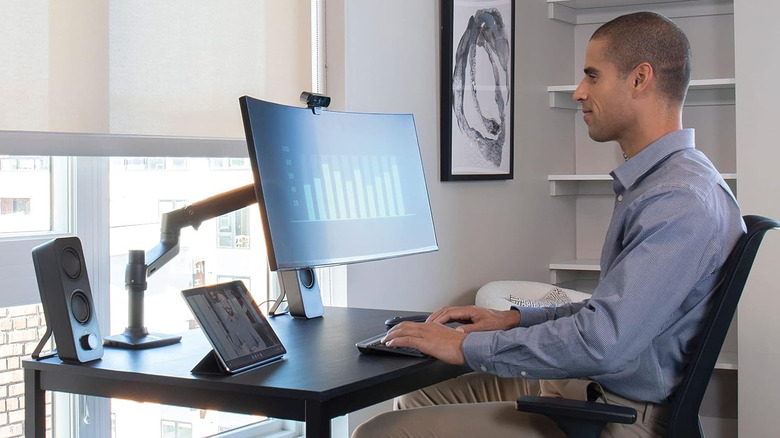
A monitor arm is designed to lift your screen completely off the desk, thus saving space where it once sat. The Ergotron LX Desk Monitor Arm could very well be one of the coolest and most useful gadgets for your desk. It is one of the highest-rated monitor arms on Amazon and is backed by thousands of positive customer reviews. However, you might wince at the price tag. At $310, it isn't cheap. But its all-metal build is solid, and it should last for years. Ergotron even backs it with a confident 10-year warranty.
The 13-inch pole version fits single monitors up to 34 inches and 25 pounds. It gives you 13 inches of vertical lift (rising up to 22.1 inches above the desk), 360 degrees of rotation, and 75 degrees of tilt, so you should be able to find the perfect viewing angle without issue. When it's time to turn the monitor off, the arm folds back, and the desk is all yours again. Cables are tucked away inside the arm, too, so your desk is consistently tidy.
If the price is a sticking point, the 5-inch pole version is $100 cheaper — but it only raises your monitor up to 17.3 inches. There's also the newer 5-inch LX Pro Arm, which is even cheaper at $199. It also pushes the tilt a little further and lifts monitors a full inch higher than the 5-inch LX Monitor Arm. However, it can only handle weights of up to 22 pounds.
Orico 4-port USB 3.0 clamp design mountable hub
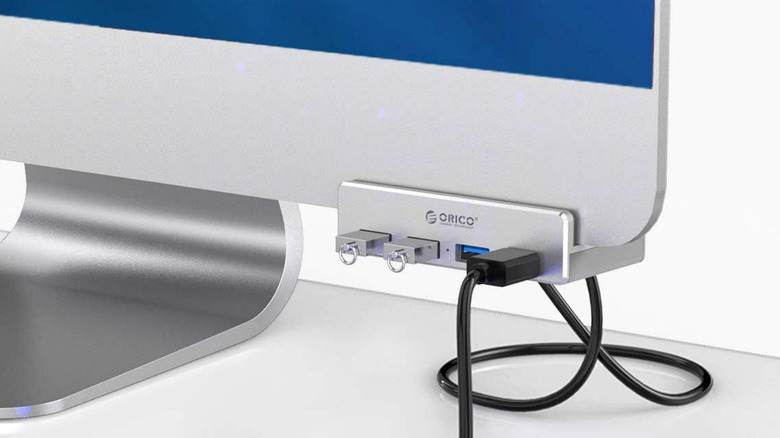
If you have USB ports that are hard to reach or you need a few extra ports, the Orico 4-port USB 3.0 clamp design mountable hub is a neat little fix. It clamps to your monitor or desk edge, so it doesn't take up any surface space at all. This is exactly the kind of convenience Amazon customers appreciate. "Love the design and materials. And that it doesn't take up a ton of real estate on an overcrowded desk," one wrote.
There really is nothing to it. Just attach the clamp and plug the cable into your computer's USB port. That is the catch, though. As it doesn't come with a power adapter, it's not really designed to charge devices or run power-hungry accessories like external hard drives out of the box. But it will run things like mice, keyboards, and webcams, and you can also plug in a flash drive, card reader, or other similar item.
It transfers data at up to 5Gbps, so it's plenty quick for everyday use. The clamp opens from 10mm to 32mm, covering most monitor bezels or desk edges. The aluminum exterior is solid, and the clamp screw has a rubber cap on it to avoid scratching whatever you attach it to. At just $20, the Orico hub solves a specific problem cheaply without overcomplicating things.
Ugreen HDMI KVM switch
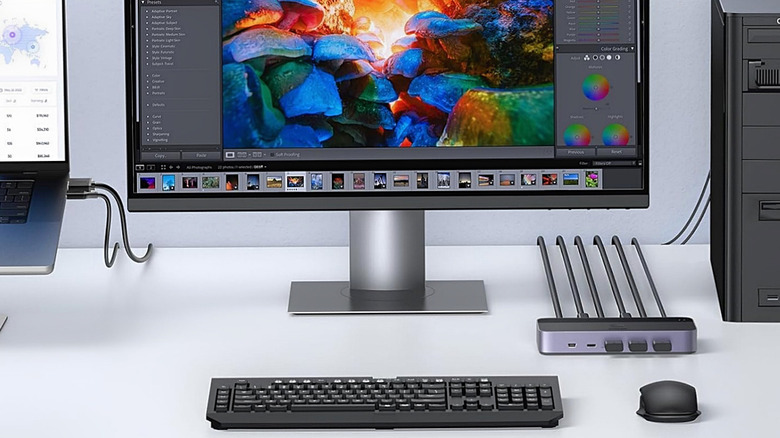
If you run a work PC and a personal machine, the usual solution is two of everything cluttering up your desk. But a KVM switch like the Ugreen HDMI KVM switch should help. If you're wondering what it is and who should use one, it connects both your PCs to a single monitor, keyboard, and mouse. It also has four USB ports for sharing other peripherals like a printer or a hard drive and supports monitors up to 4K at 60Hz. So if you are a photo or video editor or just enjoy watching movies in your downtime, you won't notice any drop in quality. Additionally, its USB 3.0 ports transfer data at up to 5Gbps, which is fast enough for everyday use.
Switching between your two computers is as simple as a single button press. You can also use the included desktop controller if you have the unit tucked away somewhere out of reach. One Amazon customer said, "Setup took maybe five minutes, and the button switch between computers is seamless, no lag, no fuss." It isn't exactly premium-priced at the listed $60, either. And if you check its price history on the Amazon webpage, you'll see it's often available for even less.
Tessan surge protector flat extension cord
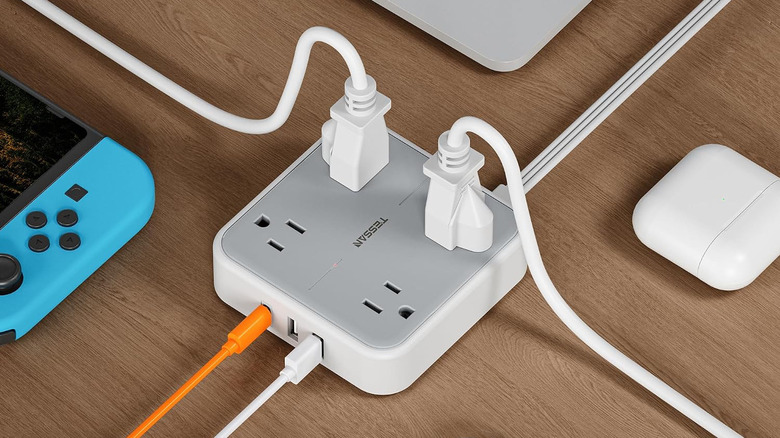
Most power strips are bulky and take up space on the neighboring wall outlet, so you can't plug anything in below. Tessan is one of the best power strip and surge protector brands, and its surge protector flat extension cord has a flat cable to prevent tangling and a flat plug head just 0.31 inches thick. It not only sits flush against the wall behind a desk without issue, but it also leaves the outlet below free for another plug.
One Amazon customer said, "The flat plug design is a game-changer. It allows me to easily plug the power strip into any wall socket without obstructing other outlets." The strip has two wall-mount holes, meaning you can fix it to a wall completely out of the way rather than leave it on the floor under your desk. It comes in cord lengths from 1 to 25 feet, and you can choose options with a USB-C port. The ring-pull versions let you pull the plug out of the socket more easily.
The extension cord has four AC outlets, which is enough for most people. It also has three USB ports, one of which is USB-C, so your phone or tablet doesn't need its own wall charger. Surge protection is built in at 900 joules, and there's an automatic cutoff if the circuit overloads.
Methodology
To build this list, we started by searching through expert recommendations on renowned tech sites like TechRadar and PCMag, as well as our own expert reviews here at SlashGear and our sister site Engadget. For more niche categories of space-saving accessories where no editorial reviews existed, we turned to customer opinion, particularly on Amazon. We only considered recognizable brand names, and all the chosen products have a minimum 4-star user rating and at least 100 ratings. We sincerely hope our recommendations are useful for those of you with small desks, and if you also live in a tiny home or small apartment, we have even more space-saving gadget recommendations for you.