

Costco Shoppers Can Score These 5 New Tech Items In March 2026

The members-only warehouse club Costco isn't the first place we think about when it comes to blazing new tech. If you're a PC enthusiast, you won't find individual computer parts for sale, but it does stock some laptops, tablets, and other tech. Occasionally, as is the case for this March, products that are new at Costco have been available elsewhere for a little while already. However, there are some good reasons for buying electronics at Costco.
First of all, if you're already at Costco or you have to make an online order anyway, you might as well get your new electronic toy from there, too. Another great reason is Costco's generous return policy for electronics, which gives you 90 days to return certain products to a Costco store and either replace the item or get a refund. Plus, any PC bought at Costco, be it a laptop or a desktop, comes with a two-year warranty. Sadly, although the policy includes computers, projectors, TVs, and "major appliances," it doesn't cover tablets. That's a shame, considering that this month's new tech products are mostly Apple devices, and include the new iPad.
iPad Air M4

The new iPad Air, equipped with a very capable M4 chip, comes in two sizes: 11 and 13 inches, both available with 128GB and 256GB of space. The cheapest of these tablets — the 11-inch, 128GB model — comes in at a reasonable $559. Upgrading to the bigger screen costs about $200, and getting twice the storage is valued at $90. Considering how cheap even the best SD cards for Android devices are, almost $100 for 128 GB of space sounds ridiculous, but remember that Apple tablets do not have a Micro SD slot for extending storage.
Now, there's a lot you can do with your iPad, even if the small screen and 128GB of space might make it hard to turn it into a laptop replacement. And according to some early reviews, the M4 iPad Air appears to be a significant improvement over the previous generation. But if you think the cheaper option works for you, go for it. One thing that might make you want to upgrade to the iPad Air M4 is the marketing phrase, "Built for Apple Intelligence," which was also used for the iPad Air M3. While these products are compatible with Apple Intelligence, it's not clear how being "built for it" affects the product. For all we know, it might not really mean anything.
MacBook Air and Pro M5

We're putting the MacBook Air and Pro in the same category because the two Apple laptops are quite similar in many regards, and because a user is unlikely to buy both. These laptops use the M5 Chip, and even though the Pro uses a more powerful version, they are both "built for Apple Intelligence." Every MacBook also has the same smart, high-resolution integrated camera, which is beloved by users, even if it can't quite compete with a good 4K webcam.
Even the cheapest MacBook Air will be able to deal with any low- and mid-intensity tasks you throw at it, from writing emails and documents to image editing, and even some video editing. However, if you plan on using your laptop for tasks that weigh heavily on the GPU and CPU, you should aim for the MacBook Pro. Getting one with an M5 Max chip might be the best option, but even the cheapest MacBook Pro, coming in at $2,149, will be a noticeable improvement over the MacBook Air, since the latter doesn't use fans to keep the internals cool.
The price difference between the cheapest ($2,149) and most expensive ($3,849) MacBook Pros is massive: a whole $1,700. Whether the improvements are worth the price is up to you, but 36GB of RAM, a very capable CPU and GPU, and a high-resolution screen make it an excellent laptop for pretty much any purpose.
MacBook Neo

The MacBook Neo is the Apple laptop everyone's talking about, mostly with excitement, often followed by a list of caveats. The Neo is certainly cheap, especially for an Apple product, but it comes with some serious limitations that even cheaper laptops don't have to deal with. That said, it also has a 16-hour battery life (according to Apple), a great resolution to go with a 13-inch screen, and a 1080p camera — a luxury on a product this cheap.
While you might have seen the Neo touted as the best laptop under $500, that price is only for qualifying students. The cheapest MacBook Neo is $598.99, but you might be better off with the $689.99 version, which has 512GB of SSD space and Touch ID. On a phone or tablet, 256 GB is quite a lot of space, but a heavy user on a PC tends to accumulate a lot more stuff. This totally depends on you, but it's easy to run out of space just by occasionally dealing with photo editing, sound design, or music, or if you download a lot of PDFs, or if you want to keep high-resolution videos on your laptop... the list goes on.
You can keep a fast portable SSD constantly attached to the Neo, but that's going to use one of just two USB-C plugs on the machine (one of which you're going to need for charging). You can solve that by picking up a USB hub, but are you going to bring all that stuff with you? This is still a laptop, after all. All in all, the 512GB version just makes sense.
Lenovo A100 23.8-inch All-in-One Desktop
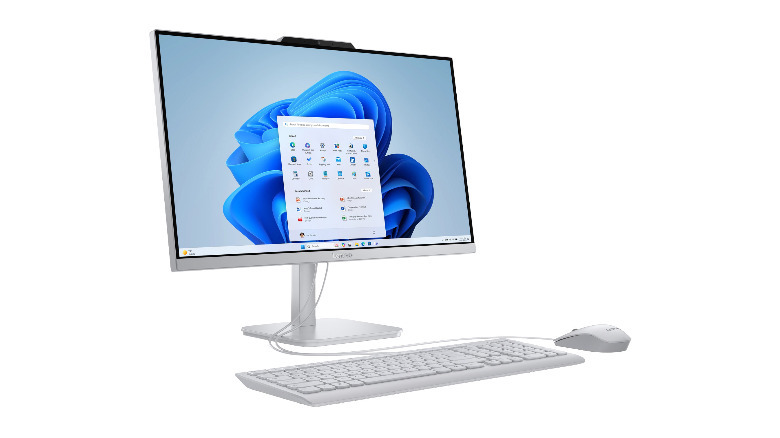
The Lenovo A100 is something you don't see every day, or not anymore, at least. While the Apple iMac is still around, with the M4 version releasing in 2024, the all-in-one, PC-plus-monitor combo is not very popular anymore. This makes the A100 All-in-One Desktop kind of a throwback machine, and one that could be appealing to a specific kind of user who wants a fixed, desktop computer with separated monitor, mouse, and keyboard, but doesn't much care about performance.
To be fair, the all-in-one desktop machine is not very popular for some good reasons. Laptops are smaller, much more portable, and they've gotten pretty good these days. The main advantage of a desktop, the extra space and replaceable components, is absent in all-in-one desktops. That's why we can't recommend the Lenovo A100 for most users. That said, if you know you won't need a better machine in the future, if you want to avoid a laptop, and if keeping the entire package — PC, monitor, mouse, and keyboard — under budget is essential, then this might be the machine for you.
16GB of ram, 512GB of SSD storage, and no dedicated GPU sure don't sound great, especially not for a $500 desktop PC, but that's just how heavily RAM and SSD price hikes have hit budget builds. The decent monitor (which even includes a webcam) and the packaged mouse and keyboard help sweeten the deal.
Shokz OpenFit 2

Shokz isn't known for making cheap headphones, but it's considered one of the best companies in the open-ear and bone-conducting headphone market, and the Shokz OpenFit 2 shares that reputation. They're expensive (about $150), especially compared to most open-ear headphones, and share many of the problems common to this type of earbud. They don't block sounds coming in from the outside (though, to be fair, they're designed not to), and when a loud environment forces you to increase the volume, you might find that others can hear what you're listening to quite easily.
Sound quality is generally considered great for the standards of open-ear headphones. The gadget is beloved by runners and other athletes, for whom spatial awareness and long battery life are much more important than a transparent EQ curve. This is what the OpenFit 2 really excels at, with a design that — for safety reasons — always lets some sounds in, and a battery that lasts 11 hours, or 48 hours when adding the extra charge stored in the case.