

5 Free AI Tools That Might Actually Save You Time In 2026

AI tools are absolutely everywhere these days. Even if you don't want AI on your phone, badgering you to let it rewrite your emails or summarize your shopping list, there it is. We live in a world where any one of us can get AI to create a picture of a 1950s robot in the style of Van Gogh at the drop of a hat. We may well be living in an AI bubble, where hype is unsubstantiated and tech companies are becoming wildly overvalued. But that doesn't mean that all AI is useless. Like the dotcom bubble of the late 1990s, the good stuff remains after the bubble bursts.
And there is good stuff out there, amidst the AI slop. There are AI apps that give you back more time than they take away. The apps on this list can help you tackle overwhelm, become more productive, and learn faster. They're not a magic fix, of course, and as with all AI, supervision and skepticism are a must, because AI can make stuff up. But here's the thing about AI: it's really, really fast (like, hundreds-of-words-a-second fast) and sometimes that's exactly what you need if you want more hours in the day.
This is a collection of things that I've found useful. There's an explanation of how they were selected at the end of the article. Everyone's requirements are different, but these have worked well for this one particular, middle-aged, female writer with ADHD and depression. And even if you don't tick a single one of those boxes, they could still help you get things done and start seeing AI as a useful ally rather than a persistent annoyance.
Notebook LM can speed read your documents to find the bit you're thinking of
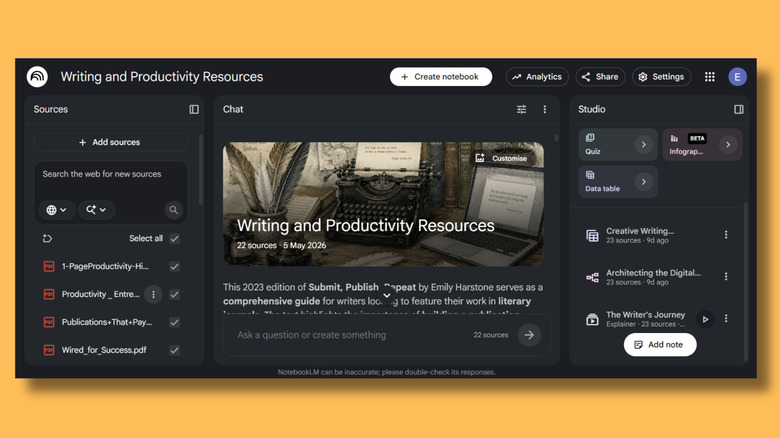
NotebookLM is a genuinely useful AI tool for anyone who has to deal with lots of information. It also feels less AI than other apps, because it's only using the information you have provided it with, and not pulling answers from a million unverified web pages and hallucinating the rest. I use it to collect together my own notes and saved PDFs, although you can also upload web links.
Everything you place in the sources section can be viewed on the left side of the screen. In the middle of the page is NotebookLM's chatbot, which uses your sources to answer questions and provide citation links so you can check it. It will also suggest questions you can ask based on the sources. There's also the studio panel, which will create mind maps, quizzes, and more. I only really use the Chat section though. I ask it questions like, "Which study had the barber's pole analogy?" and Notebook LM reads through all my stuff in super-speedy bot time and provides an easily verifiable answer. It's easier than searching documents because you don't need to remember the exact phrasing of the bit you're looking for.
You might find a use for flashy NotebookLM gadgets like videos, if, for example, you're revising for exams. They won't necessarily save you time as they take a while to generate, but they could give you a new perspective on things. Some outputs, including videos and mind maps, are less transparent about their exact sources, so you'll need to do a bit of digging to check that it's correct. Again, this won't save you any time, but it's probably quite useful if you're trying to learn something new.
Goblin Tools' Magic ToDo gets you started when you're stuck
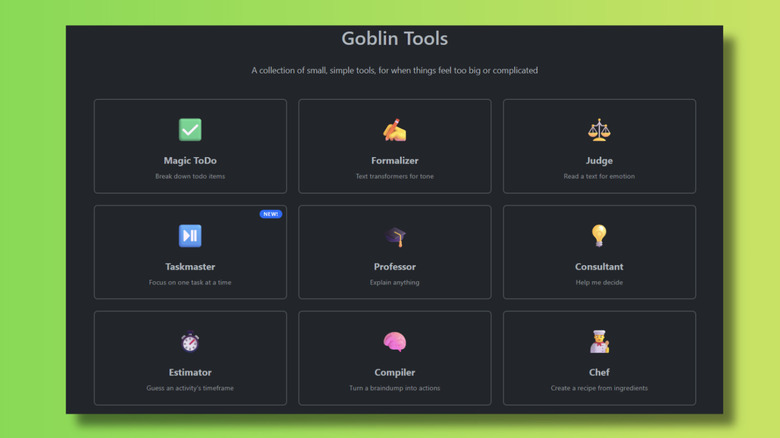
The Goblin Tools suite has a bunch of tools, including ones that help you make decisions, work out how long something is going to take, or judge the tone of an email. I almost exclusively use the Magic ToDo tool. I've spent my life battling what I used to call "procrastination" and what I now know is "ADHD Paralysis". Unsticking your brain when it gets stuck is something that AI, on the whole, is surprisingly good at. It's been a game changer for me when my head is in buffering mode.
With Magic ToDo, I type in a task, and Goblin helpfully breaks it down into smaller, manageable tasks. You can change the "spiciness" level so you get a smallish number of sub-tasks with low spiciness and an impressively long list with high. If you're planning to use Magic ToDo as a productivity tool, I recommend setting aside some time to play around with it first. Not because it's difficult to use — quite the opposite — but because there's enormous fun in turning mundane tasks into absurdly detailed checklists. At maximum spiciness, Goblin will turn "do laundry" into dozens of separate steps. And each of those can be expanded further, so even the smallest sub-task becomes a miniature to-do list.
That's not the time-saving part, obviously. Its value lies in helping you get started when you don't know how to begin. If you don't get stuck on tasks, because maybe the executive function part of your brain works correctly, using Magic ToDo would actually make tasks take slightly longer. But if you're like me, this friendly bit of AI kit will increase your productivity by freeing up time you'd have otherwise spent in a self-hating spiral of inactivity.
Eightify saves you from sitting through YouTube videos

Eightify is a useful tool for people who much prefer reading text to watching videos, but who have to use YouTube for research purposes sometimes. Specifically me, in fact. When I'm reading an article or scientific paper, I quickly skim-read it to see if it looks like it's going to be relevant. I find it frustrating that there's no "skim read" function on YouTube. Previously, I have tried to get around this by watching at double speed or by copying and pasting the transcript into Word, searching for keywords, and hoping that the closed captions haven't turned "Nvidia" into "India" for some reason.
Eightify works much better. It's a Chrome extension that provides summaries of videos directly on the YouTube site. It's also available on Android and iOS. Eightify describes itself as a way to "save time on long videos and get key ideas instantly", but I wouldn't recommend using the tool as an alternative to actually watching videos. All the usual "AI can make mistakes" caveats apply here. However, it can cut down on the number of unnecessary videos you watch, so you only need to sit through the ones that will actually be valuable.
The free version comes with different settings of varying usefulness. While setting it to Q&A mode might be beneficial for students and the option to set "short" or "detailed" summaries is quite handy, the "funny" and "controversial" tone options feel gimmicky. And if you're serious about never watching another YouTube video that you don't have to, you'll probably need to sign up for Eightify's paid plan. The free version limits you to videos under 30 minutes and only allows you three or four goes before you run out of credits for the day.
Napkin will turn words into diagrams
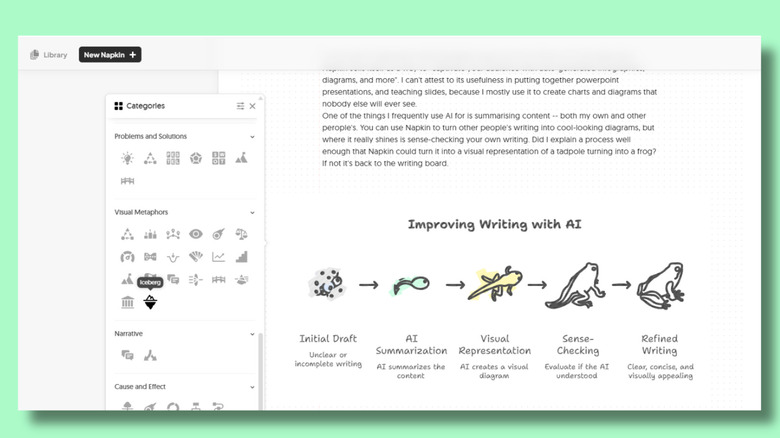
I'm not sure if I genuinely think that Napkin saves me a lot of time or if I just really like it. Napkin sells itself as a way to "captivate your audience with auto-generated infographics, diagrams, and more". I can't attest to its usefulness in putting together PowerPoint presentations and teaching slides, because I mostly use it to create charts and diagrams that nobody else will ever see. One of the things I frequently use AI for is summarizing content — both my own and other people's. You can use Napkin to turn other people's writing into cool-looking diagrams, but where it really shines is sense-checking your own writing. Did I explain a process well enough that Napkin could turn it into a visual representation of a tadpole turning into a frog? If not, it's back to the writing board.
To use it, you simply highlight the relevant bit of text and click an icon to get an impressively comprehensive list of diagram styles. The AI will try to find the most appropriate visuals for your text, but it doesn't always get it right. You can override its suggestions anyway and Napkin will try to shoehorn your data into whatever style you select, even if it doesn't make any sense. That's a big limitation if you're trying to use it to understand something you're not familiar with, because you won't know if the end result is necessarily useful. However, when you're working on something you do understand, Napkin provides a great way to visualize it. Things often get clearer when you can see it, and sometimes it helps to sketch out a diagram — or get AI to do it for you.
ChatGPT can help you save -- and waste -- time

I've included ChatGPT on this list rather than Copilot, Grok, or Gemini, but this section applies to all large language models. The big names are improving all the time, and it's less about which one is better these days and more about personal preference. These LLMs can take care of many of the time-saving features that other, more specific AI tools promise. You can get specific tools that will help generate mind maps, price-check hotel rooms, or help you with Excel. But ChatGPT can do all those things and more from one interface.
It can even do the work of several of the tools on this list. You could ask it to create a flowchart from a block of text, or break down your to-do list into manageable steps. The difference is that you'll need to write a prompt that explains exactly what you need, whereas with Napkin or Goblin, that's already taken care of for you and presented in a pretty interface. So, while it makes sense to use dedicated AI apps for functions you need frequently, for one-off tasks you'd be better off speaking to ChatGPT or one of its similarly-minded rivals.
The biggest problem with using ChatGPT as a time-saving tool is that it's very, very easy to waste time on it. Because it can do so many things, it is easy to get distracted. You might open it to summarize a report, but instead have ChatGPT perform quirkier tasks like doing a personal color analysis or creating an escape room. And if you get sidetracked by all the things you can create in Image Generator, your productivity could plummet as you waste hours creating the perfect picture of your cat in a canoe.
Methodology

To create this list, I relied on tools that I have tested. Each of these tools saves me time, improves my productivity, or helps me get unstuck when I'm mentally blocked. Although I have paid plans for some of them, I have focused entirely on the features available in the free plans at time of writing — however, these are subject to change. This is a subjective list and there are AI tools out there that don't suit me but would be great for people with different requirements. Voice generation tools, like ElevenLabs, are great for people who prefer listening to information rather than reading text.
There were a lot of tools that didn't make the list. In some cases, it was because the free plan was very limited or non-existent. Sanebox is a nifty email organization tool that I quite like, but there isn't a free plan available — just a two-week trial period. Other productivity tools weren't included because they were much too specific or because I've used them and didn't find them helpful. Perplexity, for example, is a popular productivity app with an always-free version, but I found it doesn't do much that you can't get from tools like ChatGPT. If you subscribe to the paid plan, you get more features, like AI agents, but the free version seemed quite underwhelming.
The apps included in this list are all intended to help with the admin and organization that get in the way of real work. I don't want AI to do my actual job for me, which is why I haven't included any article-writing apps here. I've avoided image generation and vibe coding apps for the same reason.