

12 Highly-Rated iPad Apps To Help You Manage Your Daily Life

Even if they're often seen as glorified, overpriced Netflix machines, iPads definitely give off productivity energy. They feel like something you'd expect to see in an executive assistant's hands — a scheduling, accounting, and note-taking device that still manages to look sleek and premium. The portability of the platform certainly lends itself to that, and iPads are powerful enough that, if you squint a little, they can function as a true MacBook alternative. The app ecosystem on the iPad is responsible in large part for its versatility and capability, even if you just want to manage your everyday life, rather than an executive's.
I've been using the iPad daily for years, and the following are apps I regularly use — plus some that are strongly recommended by users for other workflows — that make note-taking, organizing, planning, you name it, easy. Not all of them are free, so we'll provide free alternatives where we can that meet the same "highly rated" standard. Give these 12 recommendations a shot.
Things: a leveled-up Reminders app

iPads already have an excellent Reminders app that is surprisingly powerful. Reminders can handle everything from a simple grocery checklist to more complex reminders that activate based on your location or who you're talking to in the Messages app. Reminders is our free recommendation if it suits your needs, but Things takes the Reminders concept to a new level. Things is oriented more toward daily planning and breaks different aspects of your life — work, family events, personal projects — into clear, actionable items. For busy people with a lot of time-sensitive to-do items who lean heavily on their calendars, Things is for you. The app even provides pie-chart progress indicators, so you can get a rough idea of how far along things are.
The app closely adheres to iPad design language; power users don't need to look at an ugly, poorly designed UI. It's also one of those apps that can be as deeply customizable — or as simple and straightforward — as you like.
There are only two things you should know about Things. One, although it's available on every Apple device, you have to purchase it separately on most of them. Pricing varies by platform. While having a one-time purchase that works for life is commendable, buying the current version (Things 3) for your iPad, iPhone, Apple Watch, and macOS would cost you about $80 in total. Upgrading to a possible Things 4 someday would, presumably, cost as much or more. Second, Things uses its own proprietary Things Cloud syncing service and does not support third-party options. This might not be an issue if it weren't for the fact that it lacks end-to-end encryption. You will have to trust the developers of Things with your data.
Bear: simple, beautiful, organized notes

Which kind of note-taker are you? Are you the messy kind that lets your thoughts pour out like water from a fire hydrant, and then (maybe) cleans them up later? Or do you meticulously organize them with headings and beautify them with pictures? Bear caters to both types of people. The marquee feature of Bear is that it doesn't organize notes into folders and subfolder hierarchies, but rather into collections of hashtags. Any note that contains a particular hashtag automatically goes into that grouping, so you can deploy a sort of write-first, organize-later methodology — a halfway point for both kinds of note-takers.
Bear is also a Markdown-based app. TL;DR: Markdown makes your text look great (bold, italics, highlights) while ensuring that when transferring that text elsewhere (such as to a Google doc), it looks the same. Bear goes a step further than its competitors by handwaving away Markdown syntax so it looks like a non-Markdown app. The best of both worlds, if you will.
Bear is free on iPad and other platforms and only restricts a handful of features. Bear Pro, unfortunately, is a yearly subscription. The kicker is that Bear locks iCloud syncing behind the Pro subscription. So if you plan on syncing your notes beyond your iPad, it will cost you. As an alternative, we highly recommend Apple Notes. Though simple in appearance, there are lots of things Apple Notes can do that you might not have known about — perfect for organizers drawn to Bear's productivity features.
Crouton: digital recipe book
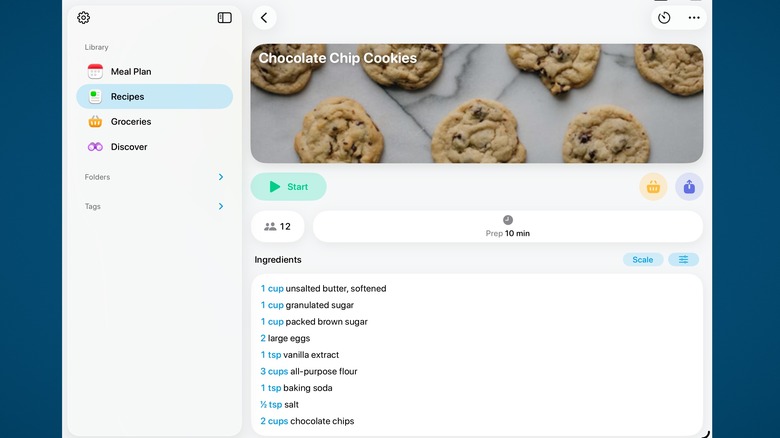
One of the ways an iPad makes a great kitchen gadget is as a stand-in for grandma's recipe book. Crouton is that stand-in. It uses iPad design language, so it feels like an Apple-made recipe book that never was. Aside from being a handy digital repository for your recipes, Crouton makes it easy to scan or import new recipes from physical recipe books and the web. It can intelligently scale them up to serve more people. Beyond that, it supports meal planning, recipe timing, and unit conversions. The app includes versions on iPhone and macOS, so you can easily keep recipes at the ready wherever you are.
Crouton allows you to store five recipes for free, but after that you will need to upgrade to Crouton Plus to store an unlimited number of recipes and sync them — which, to the devs' credit, is a reasonable one-time $24.99 purchase for all devices. It's pretty rare to see an app with this much functionality that doesn't require some kind of subscription, especially one that has a functional free version. Crouton's 4.8-star rating average proves it's worth the price of entry, and the app has a very active developer who constantly patches bugs and adds new features.
Streaks: build good habits
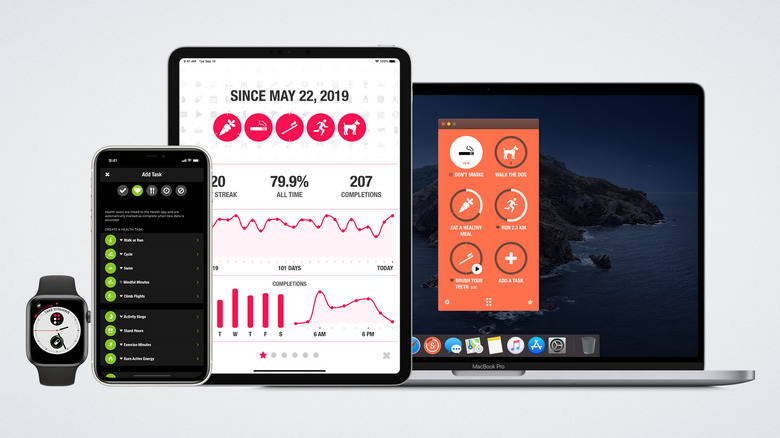
Maybe it's just me, but an app that helps you track habits and goals should do exactly that. Nothing else. So when trawling through the iPad app store for a simple app to measure the things you want to be doing every day, you'll find that your options often try to be a goal tracker and a million other things you don't want or need. Streaks is possibly the simplest and most straightforward habit-tracking app I've seen. Program your goals, your daily to-dos, and/or habits you want to break, add an icon, set how often you should (or shouldn't) do it, and voilà.
The app almost never, in my experience, gets in the way or blasts you with unwanted pop-ups. If you want more detailed metrics on how successful you've been, or how often you've kept up with a particular habit, Streaks has you covered. There's also some basic Apple Health integration, such as workout tracking. For even more streamlined use, you can add widgets to your home screen to quickly strike off finished tasks.
Streaks does cost $5.99, but for an app like this, that's a steal. Most similar apps will happily charge you a monthly or yearly subscription to unlock full features. For the price of a cup of coffee, you can track your habits on iPad and other Apple platforms.
Book Tracker: personal reading log
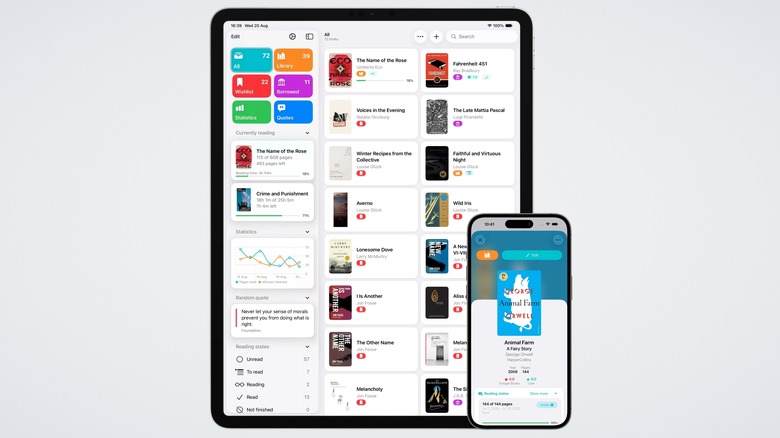
Book Tracker is the ultimate way to keep detailed records of all the books in your personal library, as well as which ones you've read and which ones you're currently reading. Seriously, I haven't seen anything that does this as well as Book Tracker. Anyone who's an avid reader and owns an iPad (or any other Apple device, since it syncs with them) should highly consider the app.
The app manages to be simple for those who only want to add books and give them a reading status, or robust enough for those who want to organize by genre, collect quotes, and time daily reading sessions — and so much more. The minimalist design stays out of the way, and I've yet to see any pop-ups other than the one asking me to upgrade. Privacy is at the forefront; Book Tracker syncs everything through iCloud. The only thing Book Tracker doesn't do is function as an e-reader. For that, you may want to consider one of the many dedicated e-readers available.
Book Tracker is free to use, but the free version is quite limited unless you just want to track five books or fewer. The paid version may be controversial for some, since you can't buy it once for all platforms. It costs $15.99 on iPad/iPhone, plus $19.99 on macOS. To be fair, it's a one-time, lifetime purchase and remains ad-free.
Movie Tracker: personal watchlist tracker
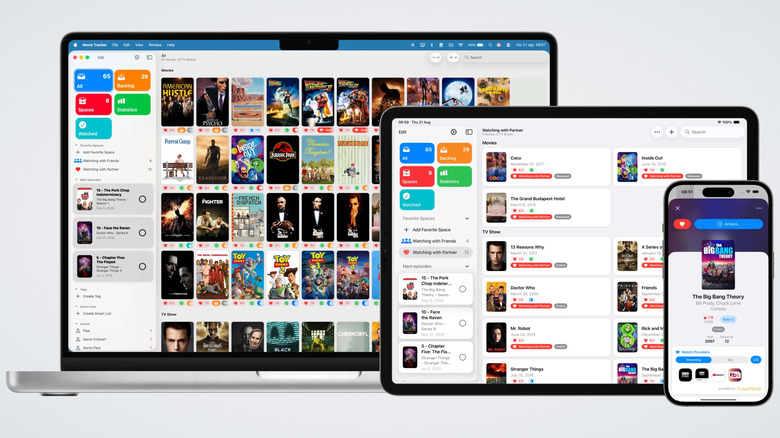
Movie Tracker comes from the same developer as Book Tracker and is basically the same app, this time for movies. Curate your personal movie and TV show watchlist like no other app to prepare for movie night. I find this app to be immensely helpful, since keeping a mental list of movies and shows that I want to watch inevitably leads me to forget them. With Movie Tracker, it's effortless to plug anything you've been thinking of watching into one place.
Similar to Book Tracker, Movie Tracker grabs the box art, helps you track which episodes you're watching in a TV show, and supports categorizing content — family movie night, date night, what have you — for any situation. Then, when you actually sit down to watch, you don't have to waste time scrolling through streaming-service recommendations. It's just awesome.
Movie Tracker does have the same (potential) problem as Book Tracker: It's a fairly limited free app, with a paid version that could be pricey for some at $34.99. This time, however, it's a universal purchase for all platforms. You'll definitely be getting your money's worth. The developer is quite active in updating and maintaining the app; the recent 2.3 version incorporated the new Liquid Glass UI and rebuilt Shortcuts, for example.
Blip: send files anywhere and fast
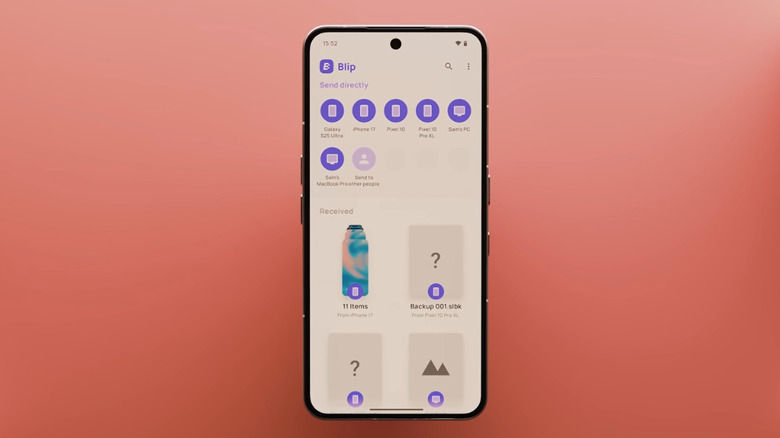
Wirelessly transferring files between devices is easy when you use AirDrop, until you want to transfer to a non-Apple platform. Android's Quick Share now works with AirDrop, but not the other way around. There are tons of local device-to-device transfer solutions out there. They all pale in comparison to Blip — at least, in my personal experience. Blip achieves speeds AirDrop, Quick Share, and other options could only dream of, and it works fast whether you're sending to someone in the same room, another city, or even another country.
What I love most about it, though, are two things. One, it can send huge files and/or entire folders without having to zip them up or upload them to a shareable link. Even better, interrupted transfers don't fail and force you to start again from the beginning; I dare you to find a file transfer app these days that can reliably resume an interrupted transfer.
There is really very little friction when sending files. The drag-and-drop interface allows you to start sending a file to a specific person with a single click-and-drag, and you can set it up so that devices you own auto-accept any sent files. For moving files between your iPad and, say, your Windows computer, this is about as convenient and fast as it gets — and it's free for personal use.
Flighty: track flights more easily

Flight tracking is often fragmented across airline apps, websites, and third-party flight-tracking tools. Unless you always fly on the same airline, it feels like you have to download a new app for every trip (which isn't ideal) to stay fully up to date. Flighty centralizes flight tracking and makes it the best it's ever been.
See detailed flight information — delays, gate changes, and changing departure times — through every stretch of your journey until you land. Flighty gathers a lot of information that airlines don't typically care to tell you, such as issues on the tarmac that could indirectly delay your flight. Built-in sharing features allow multiple people to watch the same flight. Unlike a lot of apps out there, the iPad version doesn't feel like an afterthought added just so the developer could claim it's multi-platform; it's genuinely excellent.
There is one big, meaty asterisk with Flighty: the price. The app has a free plan for the basics, but to really see it at its best, you'll have to upgrade to Flighty Pro. Pro works as $4.99 per month, billed annually, or a lifetime $299 plan. The only other option is to pay only when you need it; you can use Flighty Pro for one week at $4.99, which is probably the option most people would go for unless they travel a lot more than a handful of times a year.
Google Sheets: free budget tracking and more
It's pretty ironic that there are so many budgeting apps out there that, in almost every case, require a subscription. If you're looking for a free way to track expenses, look no further than Google Sheets. A lot of people swear by it. If you'd like a plug-and-play budgeting template, there are tons of free ones you can look up online. Since Google Sheets is available on all your devices, you can use it on your iPad, iPhone, computer, or anywhere else with a browser. The sharing options make it a great choice for shared or family budget tracking as well.
Budgeting is only the beginning. There are a ton of unexpected uses for Google Sheets. Like Excel, mastering Google Sheets formulas dramatically expands what the app can do, making it an effective solution for almost anything — taxes, party planning, event sign-up sheets, the list goes on.
The only potential concern is, you guessed it, Google's mixed reputation when it comes to privacy. Storing sensitive information like finances means trusting Google won't do anything with it. To be fair, the company claims it doesn't use user-created content in its document apps for advertising, and that data is encrypted in transit and at rest, though not end-to-end. At the very least, don't use this to store social security numbers, passwords, or bank account information.
Documents: a beefier Files app
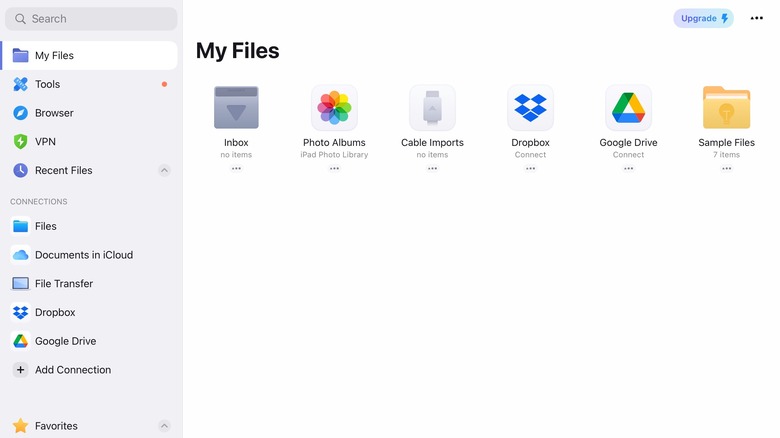
One of the biggest updates to iPadOS 26 was a more polished Files app. Better than the previous version by a mile, to be clear, but still frustratingly limited in some ways. Perhaps iPadOS 27 will be the year it reaches its final form, but until then, the Documents app gets strong reviews for being a more feature-rich, comprehensive file manager.
A big selling point of the app is its built-in preview and editing options. Annotate PDFs, tweak images, and watch or listen to media files, all without ever leaving Documents. It integrates other cloud storage services, like Dropbox, as well as personal FTP servers. Take a couple of seconds to peruse the app and you'll be shocked by how much you can get done in one place. There are tools for file conversions, trimming or extracting audio, and so much more, much of which is free to use. You can upgrade to Documents Pro, but so far I haven't needed to — or been confronted with a Pro pop-up — with basic usage.
Insight: an actually free meditation timer
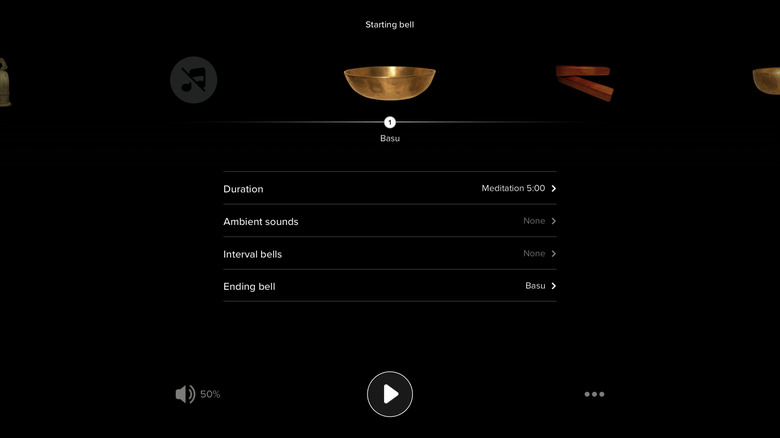
Meditation apps, like budgeting apps, are another contradictory market. We won't name any names, but if you're into meditation, you're no doubt aware of the apps that talk about distancing yourself from the world and reducing stress while quietly juicing your wallet for yet another overpriced subscription. Insight bucks that trend as a free-to-use meditation timer that only offers paid meditations and breathing exercises if you want them. It also includes Apple Health integration, making it one of the few ways you can track daily meditation or mindfulness minutes via Apple Health.
The app lets you choose starting and interval sounds — think singing bowls, wood blocks, those kinds of things — and the duration. The addition of soothing soundscape backdrops, unfortunately, does require subscribing to the Plus option. Timer presets save your preferences for meditation sessions with varying lengths or intervals.
Insight does a lot more than just act as a timer. There's a whole gamut of guided meditations and breathwork, as is common in apps of this kind. However, we give it major props for offering a free, no-frills way to track meditation. And not only does it let you actually use some of the features for free, it doesn't nag you relentlessly to upgrade.
Spark: a quality Apple Mail alternative

Apple Mail on iPad is a great default email app kneecapped by one small limitation: You cannot get push notifications for Gmail. A huge shame, since Gmail is probably the most popular email provider around. The iPad Gmail app does support push notifications, and it's probably fine for most people, but in my experience, it has too many annoying advertisements and could be a lot more feature-rich. Spark may be a good stand-in.
Spark has a lot of great features for a productive, focused email experience. It sifts priority email to the top, and push notifications get greater customization than you're probably used to with Apple Mail. Emails that don't need immediate attention, like newsletters and promotional messages, go to a non-priority section. Unwanted senders can be blocked, and emails from the same person can be grouped into one place. Any time you get roped into an ongoing email thread you're no longer interested in — but can't yet delete — you can mute the thread so it stops pinging you. And that's just the start.
Of course, there is a paid version. The big focus there is on AI features, which, if you're like me, are an immediate pass. In my experience using Spark, it's been one of the best email clients available, despite the sheer number of options on the iPad App Store.