

15 Things You Should Never Ask Siri
Ah, Siri. When Apple came up with Siri, it was at the top of its game, the chatbot everyone knew even if they didn't have an iPhone. Not anymore. Other chatbots have gone to the moon, as it were, while Siri has stayed down on Earth playing in the mud. It's now famous because of how bad it is, struggling to handle sometimes even the simplest requests. So bad, in fact, that it had to call in a friend, i.e., start using Google Gemini to handle requests when it gets its major 26.4 revamp slated for 2026. Unsurprisingly, there's a lot you shouldn't ask it as a result.
We've talked about things you should never ask ChatGPT, but those tips had more to do with being unable to trust the information. This time we're looking at things more from a practical perspective. I've been using Siri for years and have a pretty good feel for what it's good at, and where it falls flat on its face. Many simple requests you might think are well within its wheelhouse are not. The following are my recommendations on things you shouldn't bother with — at least until we see that massive 26.4 upgrade.
Anything complex

Shocker, I know. There are a ton of useful ways you can use Google Gemini AI on your phone, but most of that complexity is a nonstarter with Siri. I think some people mistook the UI overhaul and the minor upgrade that we got with iOS 18 as Siri being better — at least, good enough to handle some complexity. Post iOS 18, it sounds more human, can understand "natural" language, and retains some memory of previous related requests. You can also chain together requests one after another, or change something that you just had it do — like a date on an event. Whenever it falls short, it can lean on ChatGPT. Keep in mind, this was all limited to Apple Intelligence-capable phones, so anyone with an iPhone 14 or earlier missed out. Even so, it's still mostly the same as it always was.
In my experience, Siri excels with simple, straightforward tasks. It does a great job setting reminders at specific times, setting alarms, or turning off smart lights. Anything that benefits from first-party Apple app integration — adding events to your calendar, writing out simple notes — usually works. If you limit yourself to those things, it rarely stumbles over them. It's once we get to the other stuff coming up that the cracks begin to show.
For medical assistance

ChatGPT hasn't been banned from giving medical advice, so the risk with asking ChatGPT is that the information could be wrong — possibly to an injurious or deadly extent. With Siri, it might say, "Sorry, I didn't get that," while you're bleeding out. Especially if you're in a dicey situation where you're breathing heavily, slurring your words, and perhaps surrounded by noise and other voices. This will be a continuing theme, but its language comprehension skills are not great beyond the simple stuff. When I use it, it often misunderstands common, clearly spoken words. Imagine a dire situation (say, being in a flipped-over car after a crash) and instead of helping, it plays "Stayin' Alive" by the Bee Gees.
Luckily, Apple has programmed Siri with some basic emergency response features that require only simple phrases. The quickest method is to tell it to call or text 911. It actually will do this, so don't test it unless you mean to. Better yet, set up Apple's other emergency safety features by ensuring crash detection, fall detection (on the Apple Watch), and emergency SOS are enabled. These kick in automatically and therefore aren't dependent on you being able to patiently tell Siri something.
For help doing something illegal

Possibly the most obvious tip in the world, but people have actually gotten in trouble (to some degree) for Siri requests. Convicted murderer Pedro Bravo was put behind bars, in part, because there was evidence he'd asked Siri where to hide a body. Now, obviously the police nabbed him with a mountain of non-Siri evidence, so it's unlikely his chatbot requests did much to tip the scales. And since then, Siri has become smart enough to at least not tell you where to hide bodies. Regardless, it contributed and could have drawn suspicion even if he'd done nothing wrong.
I say all of this because people used to jokingly ask Siri questions about how to do illegal things as a gag, even though they had no such intentions. Around that time, a meme-ified version of Pedro Bravo's Siri request was doing the rounds on social media, telling people swamps and dumps are good places to hide corpses. It's impossible to know how many people did this, but curiosity killed the cat.
To be fair, law enforcement would have to move mountains to get access to your Siri requests thanks to Apple's privacy policy, but you're trusting that Apple will abide by its privacy policy. Law enforcement doesn't mess around. Authorities have sent fighter jets after a plane upon the smallest whiff of suspicion when one guy made a joke in a private group chat about bringing a bomb (via BBC). So even asking Siri something like "how do I roll this blunt" in a place where weed's a scheduled drug is not worth the laugh.
Anything personal or sensitive (especially via ChatGPT)
If you've used Siri to any serious extent since the iOS 18 update, you've probably let it redirect a request or two to ChatGPT. It works fine for getting quick-ish, Google-style answers, and Apple does put a bunch of privacy guardrails in place — including allowing account-free usage — but that doesn't change the fact that this is still ChatGPT. Any prompt you send goes to its servers and is retained there, to be used however it chooses.
So let's say it together: Don't send a tech company anything you want to keep private. Privacy policies in Silicon Valley are like the pirate's code in "Pirates of the Caribbean," they're guidelines, not rules. They haven't stopped tech companies in the past from collecting, mining, and selling data that they previously winked and said they weren't. Even if ChatGPT were run by a saint, it's not immune to security breaches. Use the same restraint you'd use anywhere else on the internet with any other app, and be cautious about what you choose to divulge.
Most web searching
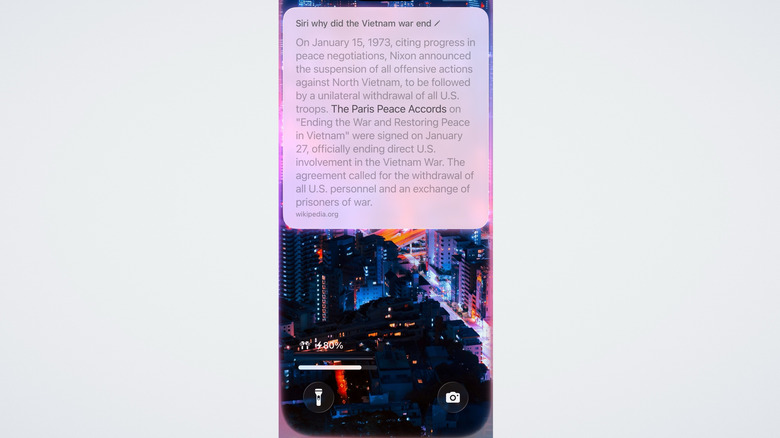
Some days, I feel like the only person left who'd rather trawl through Google results poisoned by SEO to find an authoritative source than asking chatbots that could lie to me. Unlucky me, Siri can't help much. When asking a Google-able question, Siri's famous for saying, "Here's what I found on the web," and then hitting you with a bunch of search results instead of, you know, giving you the SparkNotes.
It's definitely gotten better in this regard. When I asked it a simple question like, "why did the Vietnam War end?" it grabbed the information directly from Wikipedia. But then when I rephrased the question, saying, "why did the war in Vietnam end?" it got confused and offered to either web-search or consult ChatGPT. I had to repeat this request because the first two times it mistook my "why" for a "when" and gave me a quick date as an answer.
If there's something you want to search for without ChatGPT, in my view, it's best to just type it in yourself. I can remember at least a half-dozen times being in the middle of a conversation with a friend and wanting Siri to weigh in on our debate, only for it to resort to its old "I found this on the web" tricks when not allowed to use ChatGPT as a fallback. Don't waste your time, just Google it by hand.
To send text messages

Funny story. A friend of mine wanted to text his girlfriend and asked Siri to deliver the message. He dictated to Siri: "Tell her I love her." Siri being Siri, the assistant messaged the girlfriend an unaltered, "Tell her I love her." Cue the girlfriend confronting him to ask if he'd sent the message to the wrong person, and who, specifically, he loved. Luckily, my friend was able to smooth things over with an explanation, but the point still stands: Siri can mess up your messages big time.
I give this recommendation more for situations where your hands are busy and your phone isn't close enough for you to check the message before sending it off. More specifically, if you have Siri set up to automatically send messages, since it doesn't — at least in my experience — read messages back to you first. Plus, Siri integration may not work for the alternative private messaging iPhone app that you prefer to use.
To make a call

You can probably guess where this is going. Siri can handle very basic words that have been clearly enunciated, but even then it can mishear. You can ask it to call a specific number, treating it like an operator by giving it the number directly. Although it does ask you for confirmation before making the call, I tested this several times myself in a quiet room with clear pronunciation, and it bungled the numbers on one of my requests. There's a good chance you might scan the number quickly, think it's right, confirm, and get the wrong number. Not much of a risk calling the wrong person, but still an annoying waste of time.
Apple does have pretty good integration for having Siri recognize (verbally) the names of your contacts, but this is also very hit or miss. Again, doing my own testing, it fails to identify contacts with less common names, or nicknames and made-up names — especially names from non-Western cultures. You'll spend less time scrolling through your contacts to make a call than gently, patiently coaching Siri to an eventual wrong answer.
To unlock your phone
It's funny how just a couple of decades ago there was that sci-fi trope of using voice authentication as a near-impenetrable means of security. You'd have someone like Batman safeguarding his multi-billion-dollar secret lab with one of his grunts. That didn't age well in our era of AI-enabled voice cloning scams. You cannot unlock your iPhone with your voice, thank God. Siri (in my experience) easily gets confused by other voices that don't sound even remotely like yours, so it'd be defeated without a voice cloner.
Some people have found clever workarounds for this, such as using the Voice Control accessibility function to have Siri put your passcode in for you. Nonetheless, it can't officially unlock your phone. You're either going to have to trust another person with your passcode or change the settings for what is allowable without an unlock. If there's something you want to be doable by a friend or family member — like replying to a message or accessing your wallet — you can change this in Settings > Face ID & Passcode.
To use your wallet (or other financials)

Siri can send money, though it appears to be limited to Apple Cash. Options like PayPal aren't supported, but you can check if the particular app you use works. That said, you will have to unlock your phone first before you do this. I did some brief testing and, in each instance, it got the sum right. The fact that it asks for confirmation certainly gives peace of mind.
Other apps, like banking apps, will depend on whether they're supported. My bank — a major financial institution — is not, and perhaps thankfully so. This may change when Siri improves with Apple Intelligence after iOS 26.4, since one of the long-awaited Siri features is the ability to control what's visible on your screen by having Siri handle it.
Even if your preferred means of sending money or doing something financially related is eventually supported, we still wouldn't recommend it. Times are tough financially, so the last thing you want is for Siri to mistake your "Send $15" for "Send $50," and then mistakenly tap through the confirmation prompt when you wanted to cancel. It's that small margin for error that, in my view, makes it unreliable.
To play a specific song

In most cases, Siri makes for an okay-enough DJ to play music. Apple Music has an entire page dedicated to the ways you can have it play your music, including having it play the latest song from your favorite artist or a song based on lyrics. This mostly works. However, over the years of asking it to play everything under the sun — even if the artist or song name wasn't a weird one — it has produced very mixed results. More often than not, it gets it wrong, and obviously there are some songs that aren't even worth trying. Imagine asking it to play "Mmm Mmm Mmm Mmm" by the Crash Test Dummies. I tried it three times just to be sure, and yeah, it couldn't.
I find it does much better when you ask it to play music genres — perhaps even some of your own playlists, assuming they've got easily pronounceable names. This is not me saying you shouldn't use it to play music, just that you're probably going to get frustrated and waste time if you do. Either go with a more general category or open the phone and do it yourself — don't bother with Siri.
To perform basic phone operations
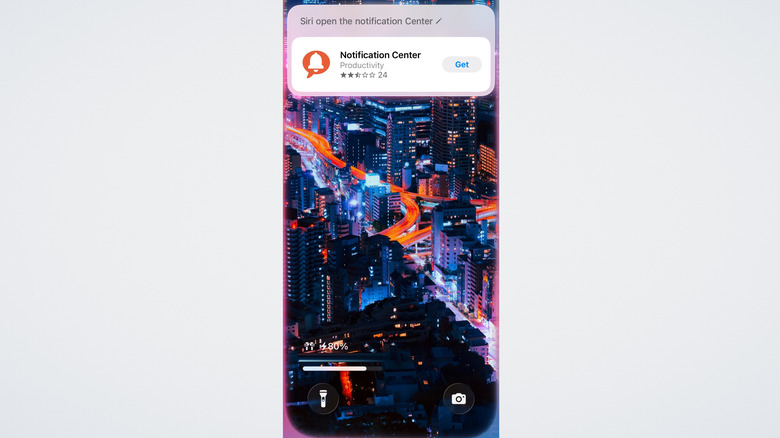
Until that iOS 26.4 update comes, Siri can only control your phone to a very basic extent. System settings like toggling Wi-Fi and Bluetooth on or off work, and it can open apps and perform basic tasks in supported (mostly first-party) ones, such as making a new note. However, just beyond those limited situations, most things don't work; try asking it to open the Notification Center or the Control Center. Something only marginally more complicated, like adding to an existing note, is an exercise in futility. Don't waste your time on this one, we've really tried everything.
If you do need to control your phone verbally, there's an accessibility setting exactly for that: Voice Control. Basic commands system-wide are supported, so you only need to unlock your phone, activate it, and let your voice do the work. If you'd rather have a certain feature activate automatically with a specific phrase, you can use Vocal Shortcuts.
To find files or pictures

It would seem like asking Siri to find a photo of a specific person in your library should be pretty straightforward. The iPhone Photos app has had people recognition for years now and can neatly sort your photo library based on who's in the picture — including pets. So I tested this by asking it to find pictures of family members and friends by name. Instead, I got random pictures off the internet. Luckily, this isn't a huge issue since the iPhone Photos app recently fixed its biggest problem and now puts its excellent search utility front and center, letting you find photos using natural language.
It would also be helpful to have your voice assistant locate a specific file. That's another lost cause. No matter how I phrase the request, including saying that Siri should look in the Files app specifically, it can't seem to help. The Files app also got a big update recently, so at the very least, using it won't be a pain like it used to be.
To perform in-app functions (in third-party apps)
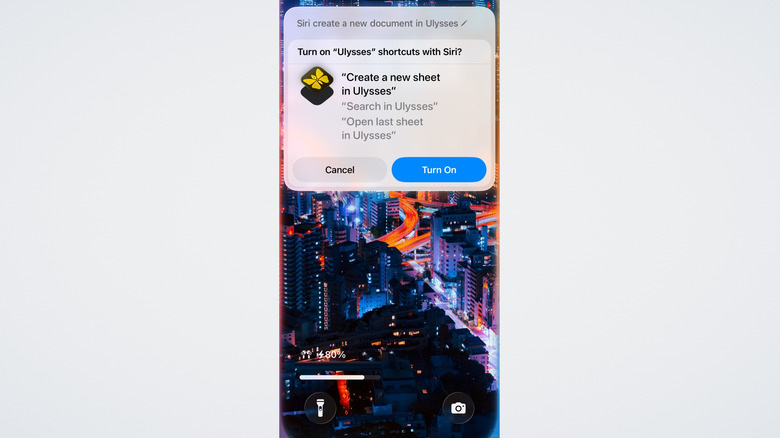
Apple's App Intents framework was meant to be a complete game changer for Siri, since it would basically let it do almost anything in any app. In layman's terms, an App Intent is a predefined in-app function that Siri can activate. Provided there are properly defined app intents in place, Siri should — in theory — be able to control almost anything in an app. That was the theory, and that was what Apple pitched at the infamous 2024 WWDC, where it demoed a fictional version of Siri — one we still haven't gotten.
This is all a very roundabout way of saying that serious support for apps that don't specifically integrate Siri is pretty weak, particularly third-party apps. Some apps have a fair amount of integration with the voice assistant, while others have no support whatsoever. In some cases, it supports shortcuts via Siri. That's great, but let's be honest, you can activate any Shortcut via Siri, so this is more of a workaround than true integration. While you can search for directions or make notes in first-party Apple apps, third-party functionality (shortcuts aside) is barely there.
To connect to a VPN

This is another one of those things that, if it worked, would be super helpful. Connecting to a VPN isn't hard by any means, but it's a simple task that — when you do it frequently — can get tedious compared to enabling it vocally. Doing so manually requires waiting for your VPN app to load, choosing a connect option, then waiting while it finds a server and finally gives you the green light to watch what's on Netflix in Great Britain. Siri flat out tells you that it can't connect to a VPN, and that's before you even specify an app.
Just to be sure, I tried specifying one of the best VPN services available in 2025. Its response? It didn't understand the command. Classic Siri. Obviously, there are security concerns, but all Apple would have to do is require unlocking your phone first before connecting. I'm honestly surprised it allows you to switch off Wi-Fi but won't let you connect to a VPN. Maybe with iOS 26.4 — maybe.