

5 Apps You Might Not Realize Work With Android Auto
Largely gone are the days when we had glove boxes full of mixtapes and CDs to listen to music when driving a car. Navigation was up to how well we knew the roads. Now, you can't really buy a modern car without getting Android Auto and Apple CarPlay — the two in-car infotainment systems from Google and Apple. Even though I carry both a Galaxy S25 Ultra and an iPhone 17, I always prefer Android Auto as my in-car navigation and entertainment partner. I not only prefer Android Auto's user interface but also love the large arsenal of apps that the Play Store has to offer compared to limited, app selection that you have on the App Store.
Popularity-wise, Apple CarPlay and Android Auto dominate the market. Numbers show that around 83% of 18+ people in the U.S. in the month of June 2025 that had them used either of the two in-car infotainment platforms. Fortunately, you don't have to rely on paid apps to upgrade your dashboard. There are a bunch of free Android Auto apps that everyone should use to get the most out of every drive.
While apps such as Google Maps, Spotify, and WhatsApp are the most commonly-found apps, the Android Auto ecosystem has some lesser-known gems that go beyond basic navigation and music streaming. We are talking about apps that will help you track mileage and costs, find parking spots in cities, or games that will help kill time while your wife shops. Here is a list of five apps that you might not realize work with Android Auto.
Pocket FM
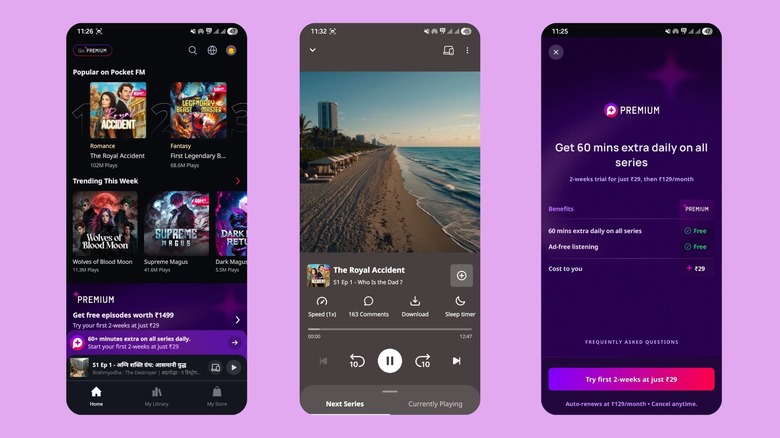
For decades, music was the only food for ears when driving. However, now there's a multitude of option, including an app called Pocket FM – an Indian audio series platform — and I instantly fell in love with it. Pocket FM offers binge-worthy audio stories catering to different genres. There is something for everyone. After its success in India, Pocket FM entered the U.S. in 2022 and became a hit.
All you need to do is install the app on your Android, and that's it. As soon as you connect your phone to your car via Android Auto, you will see the app on the interface. From here, you can access a library of over 100,000 hours of content including over 75,000 audio series. Pocket FM often boasts actors and celebrities as storytellers for certain audio series. The Play Store description claims that the app has over 200 million active listeners worldwide and a 4.4-star rating from 4.3 million reviews.
You can download episodes so you can continue listening to your favorite series even if there is no network coverage. You can adjust the playback speed, and you can sync your listening from one account on all devices, letting you continue from where you left off. Purchasing the premium subscription unlocks ad-free listening, premium audio content, no waiting for new episodes, offline listening, and more.
Fuelio
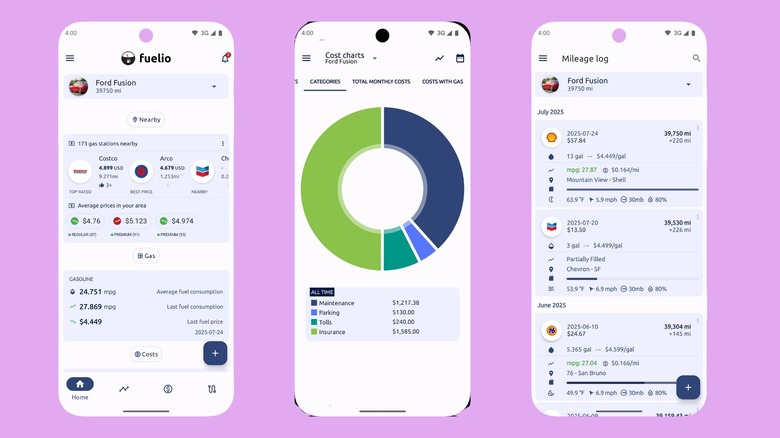
Aside from things like groceries and housing, one area where we are required to spend is fuel. If you are someone like me, who loves impromptu long drives, or simply just loves driving a car, then fuel is a major expense. A few months ago, out of curiosity, I thought of tracking my expenses and started searching for fuel expense tracking Android Auto apps. After trying a couple, I installed Fuelio, which has a 4.6-star rating, and it has made its permanent home in my phone's app drawer. Fuelio does exactly what I want: track fuel consumption, mileage, and costs.
The app is user-friendly, and so is its interface. You can log fuel consumption and expense data, location, and gas costs. Not only gas expenses — Fuelio also lets you input your car servicing costs and parking and toll fees so that you get an overall idea of how much you have spent on your car in a nice donut chart. The app also offers information on where you can get the best price for fuel depending on your location and get notified on the next service due date.
Some other notable features include bi-fuel (gas + LPG) tracking and showing fill-ups in Google Maps. If you have multiple vehicles, then you can add each vehicle's data separately. Fuelio lets you back up data on Google Drive and Dropbox. The downside is that the free version is limited, and the cloud backup and multiple vehicle feature are locked behind a paywall.
VLC
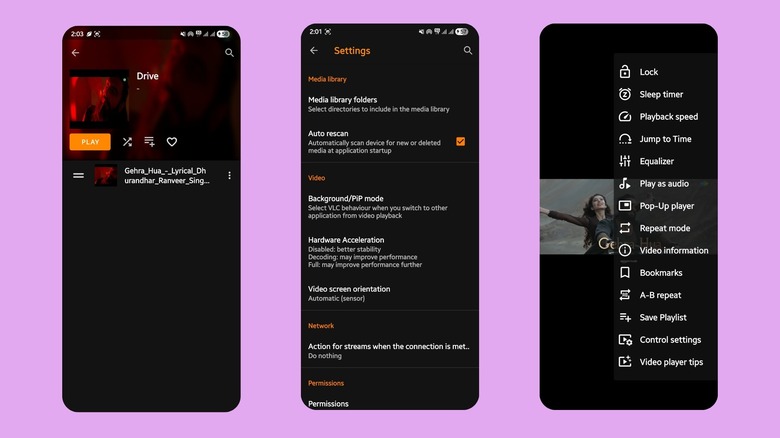
VLC is one of the most loved and used video player apps on PCs, and has also gained traction on smartphones and tablets. However, did you know that you can use VLC media player with Android Auto as well? The app boasts a 4.3-star rating on the Play Store. You just need to install the VLC media player app from the Play Store on your Android phone, and when you connect it to Android Auto, the app will show up. One thing you should note is that, unfortunately, VLC won't work as a video player.
You will be able to play all of your files but as audio. So, if you have a playlist of audio tracks in your phone's storage, then you can use VLC media player to play them in your car. Additionally, if you have a library of concert performances, stand-up comedy or video podcasts, then you can also play them through this media player. Why VLC has been included is the simple fact that it can play both your local audio and video files while you are driving, giving you a distraction-free experience.
However, playing video as audio through VLC in Android Auto isn't straightforward. Before connecting your phone to your car, you need to put the video files in a playlist. Then connect your car to Android Auto and select the playlist containing the video files to play them as audio. Otherwise, you can use the background play option and continue to listen to its audio after connecting it to Android Auto.
Angry Birds 2

It is no hidden fact that the quality of games has improved drastically. There are quite a number of console-level games that you can play on an Android phone. But games such as Angry Birds, Subway Surfers, Fruit Ninja, Temple Run, etc. were some casual games with not-so-high-end graphics but were addictive through gameplay. These games, along with some other popular titles such as Cut the Rope, Where's My Water?, Paper Toss, and Flappy Birds, were launched in what is considered as the "Golden Age" of mobile gaming.
And these types of casual games are perfect for playing when you're waiting inside your parked car. Angry Birds 2, in particular, can be played with one hand, and even after so many years, it has been one of the best casual games available. With 4.2-star ratings on the Play Store, Angry Birds 2 is also one of the best Android Auto apps that you can install on your phone and enjoy on your car's infotainment screen.
Simply install the app and enjoy. However, do note that your car needs to be parked for you to play Angry Birds. I tried Angry Birds 2 in my car and absolutely loved it. The game automatically closes as soon as your car moves.
EasyPark
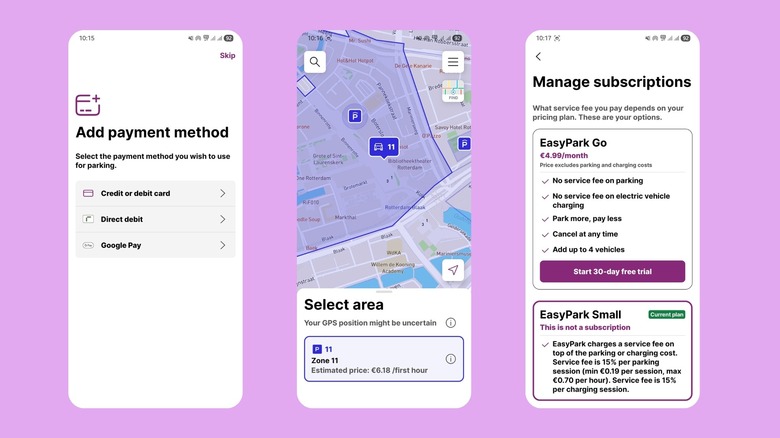
There is no shortage of parking spot finder and booking apps on the Play Store. EasyPark is available to use in over 20 countries and also claims to be the number one app in Europe, which is where I used it. The app is simple. You search for parking spots in a particular city or area, find one, book it, and pay for the spot from within the app.
The EasyPark app charges a fee every time you use it to book a spot. However, there are several benefits of using this app. You can start your parking session, stop it, or even extend it if you need more time, right from the app itself. The app also lets you split your parking bill with other passengers. The app supports different payment methods such as Visa and Mastercard credit or debit cards, PayPal, and Google Pay. You can also generate monthly invoices for a particular parking spot. There is an automatic camera parking feature that automatically starts your parking session using any CCTV camera, and opens any gates once your license plate is read by the camera.
If you have an EV, then you can use EasyPark to find electric charging stations and pay for both parking and charging from the app. This feature is available in Rome, Madrid, Melbourne, Berlin, Paris, Amsterdam, Stockholm, Helsinki, and a bunch of other cities.
How we chose these apps
The basic criteria for an app to make it to this list was that it is free to download and use, with in-app purchases remaining entirely optional. On top of this, we also relied on extensive hands-on experience. I have personally used these apps for a prolonged period to make sure that the apps listed provide a genuine and value to your daily driving needs. We have also selected apps from different categories — fuel saving, parking, podcasts, media and entertainment and games. These apps have high ratings on the Google Play Store, which also back their popularity.