

SteelSeries Arctis GameBuds Review: Still Great In Fancy New Cozy Collection Colors
We may receive a commission on purchases made from links.
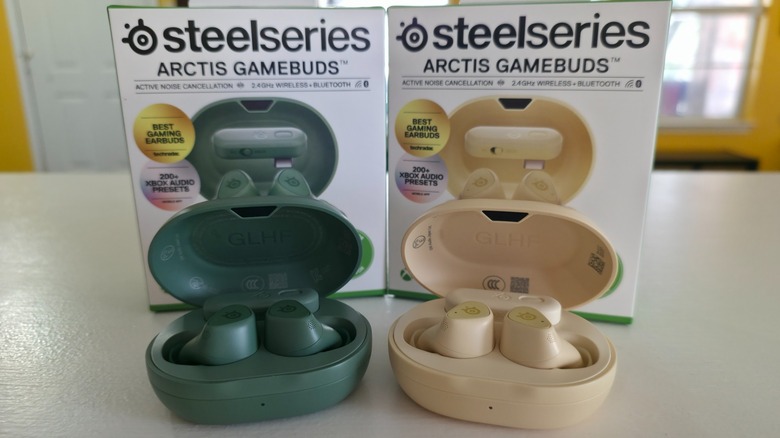
SteelSeries has been hard at work producing all kinds of gaming accessories, and if you read my review on the SteelSeries Arctis Nova Elite high-end headset, you already know I'm a fan. The company makes everything from high-end mice to programmable LED gaming keyboards, but it's probably best known for its audio devices, and one of the company's best sellers is the SteelSeries Arctis GameBuds. They launched in October 2024 in black and white, and in the years since, more colors followed.
The Glorange buds hit the market in May 2025, and now SteelSeries has done it again with the Matcha and Yuzu colors, launched in September 2026. I received the latter two buds for testing, and like anything I write a review about, I put them through the paces for a solid week. This gave me ample time to test the earbuds' technology as well as get a feel for how they work while playing a variety of games. The two sets I received are marketed for PC and Xbox users, while SteelSeries makes others marketed for PC and PlayStation 5, so there are a few options available.
 Jonathan H. Kantor/SlashGear
While the technology that goes into the $199.99 SteelSeries Arctis GameBuds Cozy Collection, which encompasses the Matcha and Yuzu colors, remains the same as earlier color versions of this hardware, I made sure to test them out as much as possible. I played FPS games like "Halo: Campaign Evolved" and "Call of Duty: Black Ops 7," but I also spent hours playing games like "No Man's Sky" on the PC. Here's what I discovered after using the SteelSeries Arctis GameBuds for a solid week of gaming.
The look and feel of SteelSeries' Artis GameBuds in all new colors
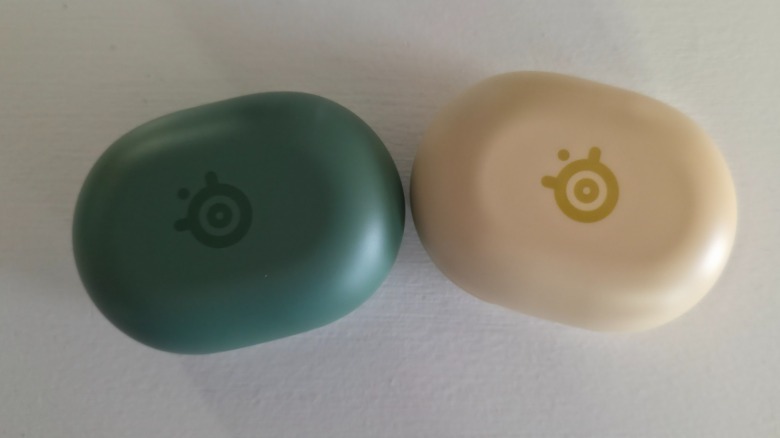
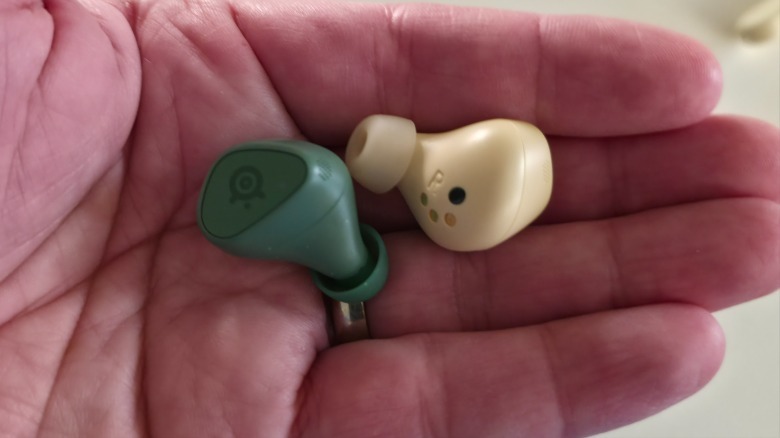
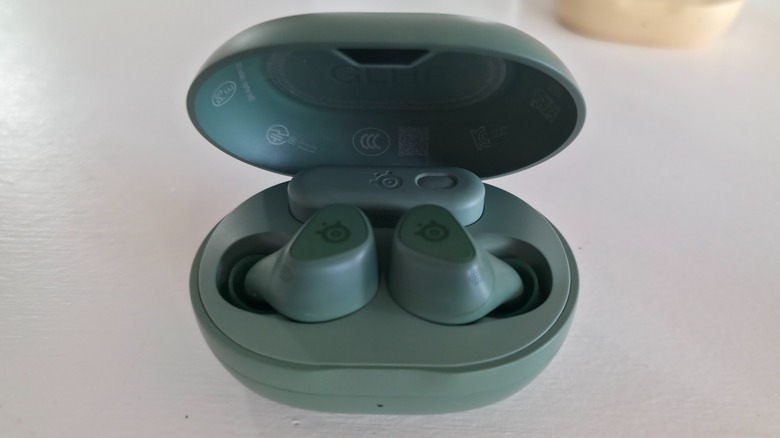
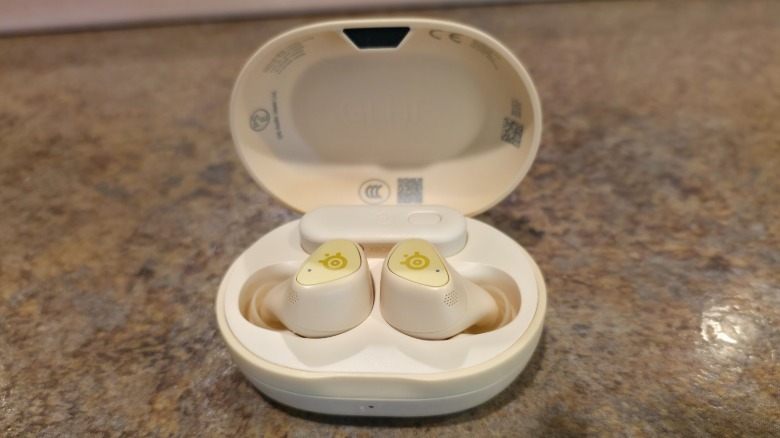
Because this new release is all about color, I'd be doing SteelSeries a disservice if I didn't go into detail. The Matcha color actually looks like Matcha, as it captures that green sheen nicely. The Yuzu color refers to an Asian citrus fruit that looks a bit like a lemon, and it too honors this color well. Each bud is adorned with the SteelSeries logo, which hides a button, and it looks fantastic as a slightly darker color than the overall buds.
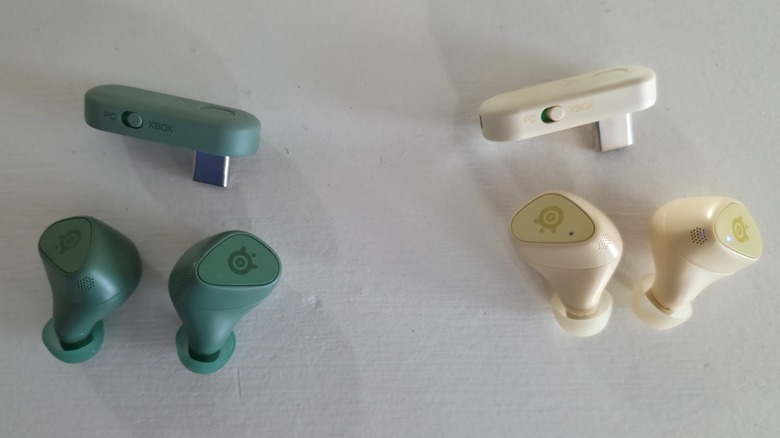
The case and dongle (pictured above the buds) match the color scheme, and they look quite nice. The case with the buds and dongle inside weighs just 0.139 lbs., and its size and shape aren't bulky, so you can throw them into your pocket or handbag without taking up much space. The clamshell case opens to reveal the GameBuds and dongle inside. The buds magnetically settle into their indentations for charging, while the dongle takes up the top-center of the inside of the case and fits snugly in place via the USB-C port.
 Jonathan H. Kantor/SlashGear
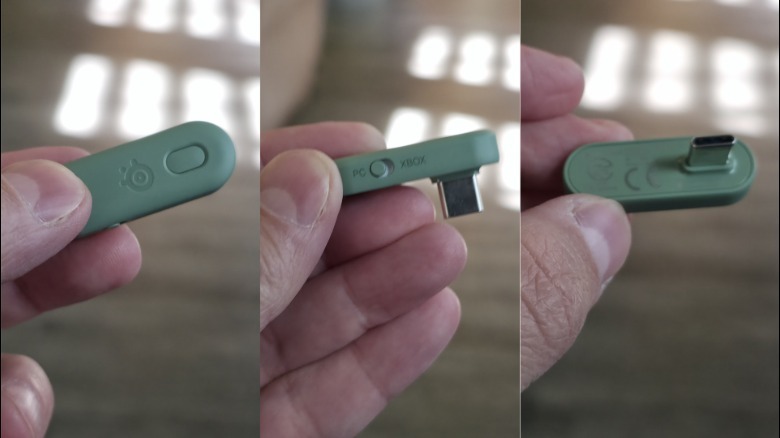
Regarding the Wireless Nano-Dongle, which comes out of the box already paired with your GameBuds, you can see that it also features a small button and a slider switch. The button is used to pair the buds if you need to do that for any reason, though I never had cause to push it. The switch is labeled PC and Xbox, so you can already guess what it's used for. Additionally, SteelSeries makes color-matching thumb grips that you can use on your Xbox Wireless controller or, if you have one, the SteelSeries Aeon Pro controller.
Comfortable for extended periods of gameplay
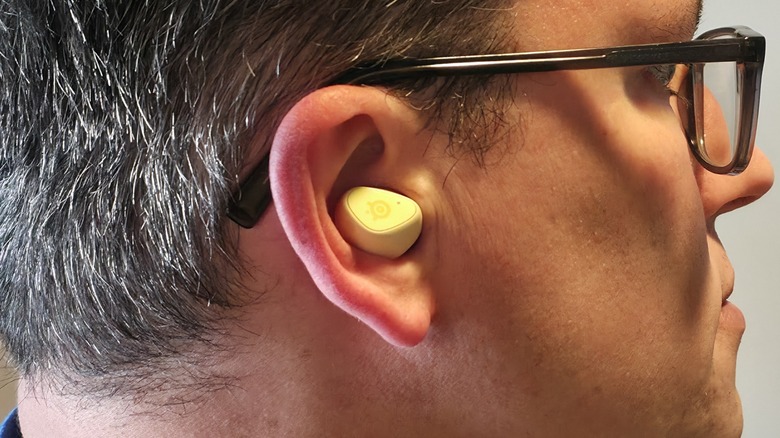
To me, one of the most important factors in any in-ear bud is how comfortable it is because you can have the highest-end device on the market, but if they hurt your ears, fall out too easily, fail to properly capture your voice, or don't produce enough sound, they're not worth the expense. Fortunately, the SteelSeries Arctis GameBuds' form factor doesn't have this problem, so I can say that they're comfortable to wear in the ear for several hours.
The longest I wore them without taking them out was a little over four hours, and seeing as I didn't have any of the problems mentioned above, that to me speaks to the GameBuds' quality. One problem I have with my personal buds that I use with my phone (not for gaming) is that they work their way out of my ear the more I talk. I typically have to push them in periodically, which can be a nuisance, especially during a phone call. I assumed this was typical of earbuds because it's been that way with every model I used.
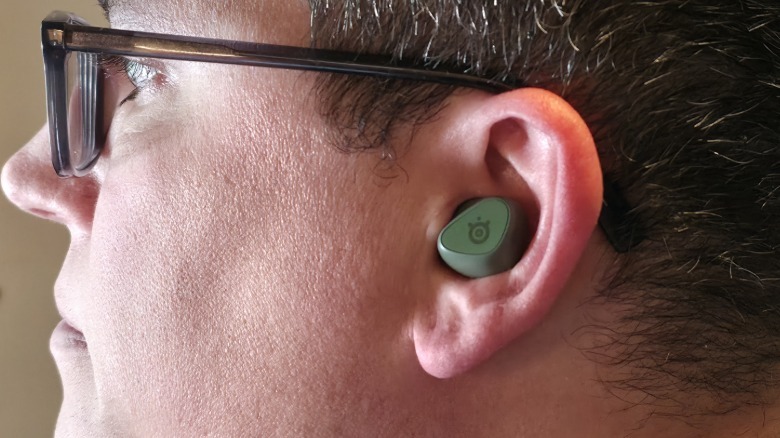 Jonathan H. Kantor/SlashGear
That's why I was shocked to find that I didn't have this problem with the SteelSeries Arctis GameBuds. Once they were pushed into place, they remained there for the duration of use, which makes them far superior to what I used... or used to use before getting these buds to test out. They fit snugly, feature incredible audio, capture my voice without issue, and they remain in the ear until you remove them, which is something I appreciate in any earbud.
A convenient and small dongle
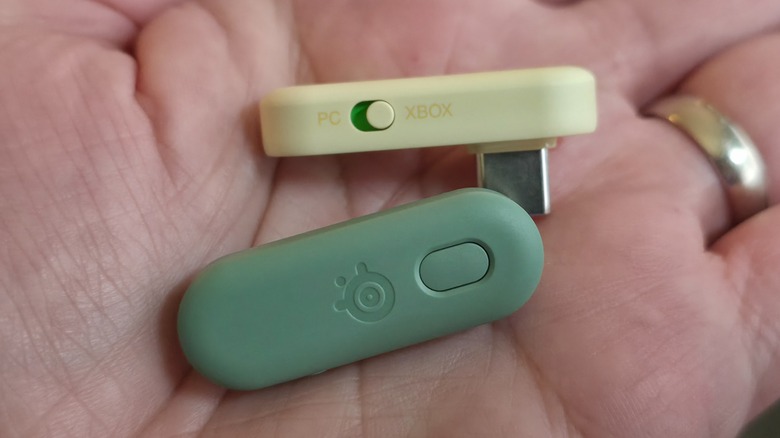
There's more to the USB-C Wireless Nano-Dongle than meets the eye, as it enables 2.4GHz wireless connectivity and low-latency gaming audio. A recent firmware update improved the power output for connectivity, which is more than seven times faster than Bluetooth. That said, the GameBuds are also Bluetooth-capable, so you can connect them to your phone, computer, or anything else that features such connectivity. Moreover, because the GameBuds use both 2.4GHz and Bluetooth, you can instantly switch from one device to the other by simply tapping three times on the GameBuds.
The two sets of GameBuds I received were designed for the Xbox, as well as other Bluetooth-capable devices, but I checked them out on other systems. When you plug the dongle into any video game console that isn't in the Xbox family, it doesn't work. At least, it doesn't work if the switch is set to Xbox. I moved the slider to PC, and it immediately worked. I found this to be true on the Nintendo Switch, Nintendo Switch 2, and the PlayStation 5. Outside of the non-Xbox consoles, I used it primarily on my Xbox Series X, and it worked incredibly well.
 Jonathan H. Kantor/SlashGear
Despite the marketing material and details on the boxes, SteelSeries explains that the USB-C Gaming Dongle works with pretty much any device for plug-and-play high-speed gaming, which I confirmed through testing. It also works without the dongle on my phone, and seeing how comfortable they are compared to what I'd previously used, I quickly swapped them out. Another great feature is the case, which has a 40-hour battery life, while the buds themselves hold enough juice for up to 10 hours of continuous use.
The Arctis app
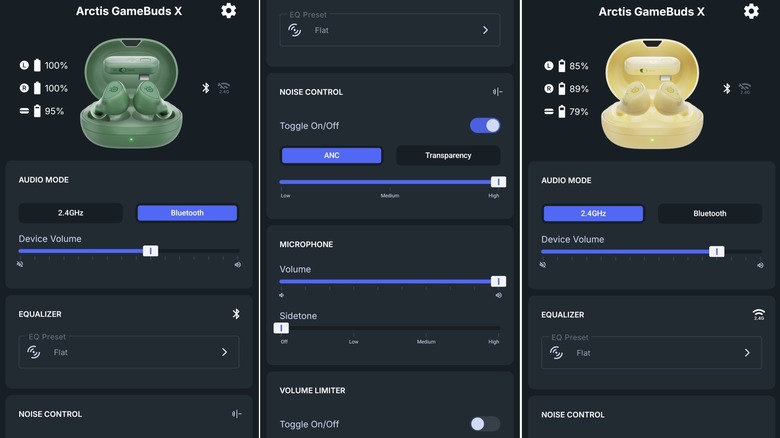
SteelSeries' app easily connects with your SteelSeries Arctis GameBuds in exactly the same way you'd connect to over-the-ear headphones or other audio devices the company produces. Once you open up the software and it finds your buds, you can make several tweaks depending on how you want to use them. As you can see, you can switch the audio mode from Bluetooth to 2.4GHz with the tap of a button, and you can also adjust the volume. This extends to the microphone as well, and you can also change from transparency mode to active noise canceling.
The app is incredibly easy to use, and all of the information is self-explanatory, which makes using the GameBuds with your personal customized options a breeze. As you can see from the above images, the different colors of Matcha and Yuzu that make up the SteelSeries Arctis GameBuds Cozy Collection feature the exact same interface. There's no hardware difference between the two outside of the color, so you can choose whichever ones you prefer without sacrificing anything in your decision to go with one set over the other.
 Jonathan H. Kantor/SlashGear
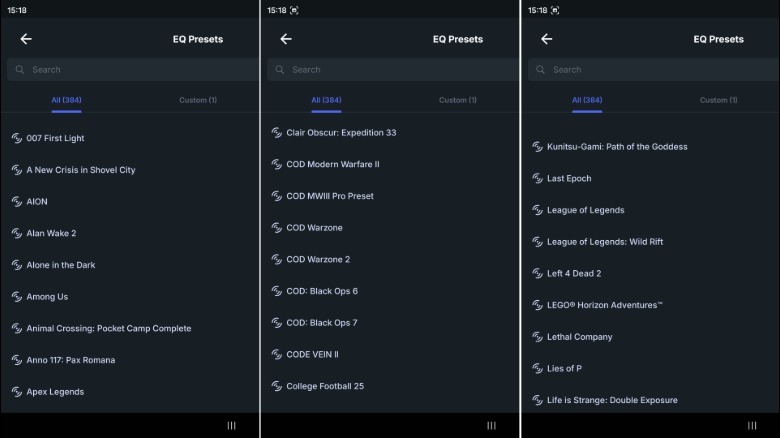
Perhaps the most notable feature of the SteelSeries app is its equalizer, which comes with game-specific audio tweaks. This isn't a small list either because, as of this writing, there are more than 200 distinct audio options for the equalizer, including for games like "007 First Light," "Call of Duty: Black Ops 7," "League of Legends," and many more. I had a lot of fun playing with this feature as I checked out how each preset choice differed from the others across several games.
My verdict on the Arctis GameBuds
Before I got my hands on the Arctis GameBuds, I'd never used earbuds for gaming outside of playing something like "Balatro" on my phone. Instead, I'd used a variety of over-the-ear headphones, many of which are comfortable, so I wasn't sure how I'd like swapping them out for GameBuds. After spending a week playing games with them tucked snugly in my ears, I can say that earbuds are excellent for gaming for a variety of reasons.
First and foremost, over-the-ear headphones often make me hot and sometimes sweaty... especially during intense firefights. SteelSeries' GameBuds didn't have this problem, and because they feature excellent active noise canceling, I had no pesky outside noise to interrupt my gameplay. This alone made me more than happy to continue using the GameBuds for my regular gameplay, so I spent plenty of time tearing through enemies in "Marvel's Wolverine," backtalking rude gamers in "Call of Duty: Black Ops 7," and I also used them to listen to audiobooks on my phone.
 Jonathan H. Kantor/SlashGear
Given all of these features and aspects of using the Arctis GameBuds, I can wholeheartedly recommend them to casual and expert gamers alike. They're comfortable, function perfectly, and I encountered no connectivity or audio issues whatsoever. Given how well they're made, if you're in the market for a high-quality pair of earbuds for regular use and gaming, look no further than the SteelSeries Arctis GameBuds Cozy Collection in Matcha and Yuzu colors.
You can order your own set of Arctis GameBuds in either color for $199.99 from the SteelSeries website.