

How Many Years Of Software Updates Do LG Smart TVs Typically Get?
In the past few years, TVs have become smarter and now feature dedicated smart TV operating systems. And as is the case with other devices that run a dedicated OS, your smart TVs also need software updates. With LG's Re:New program, LG smart TV owners get five years of software updates for webOS. In other words, eligible TVs get four more software updates, one each year. So, for an LG TV bought in 2026 with webOS 26 preinstalled, you will get software updates until 2030.
LG made the decision to offer five years of software updates in 2024, starting with the Re:New program. The best part about the initiative is that it doesn't just benefit newer models, as this even extends to eligible LG TVs launched in 2022, which will also get the latest webOS 26 update. However, since the update is being gradually rolled out, it may take some time for older models to receive webOS 26. Of course, LG TV models purchased in the near future should come with webOS 26 preinstalled. Keep in mind that LG still recommends installing all pending updates when you first set up the TV.
LG isn't the only major smart TV brand offering years of software updates for its models. Samsung, for instance, offers seven years of updates on Tizen, its smart TV OS. Basically, more and more companies are moving away from planned obsolescence as users look for devices that will actually last. On the smartphone front, even Apple's latest iOS 27 is compatible with iPhone 11 and newer models.
Updates aren't just about new features
When it comes to software updates on smart TVs, users usually think about newer features and the upgraded interface. And while these are important if you want to enjoy a modern interface and streamlined experience, there's more to it. Software upgrades also improve performance in many cases, keeping your TV as good as new. Besides, with the significant rise in threats that now target different devices, software updates can keep your TV secure.
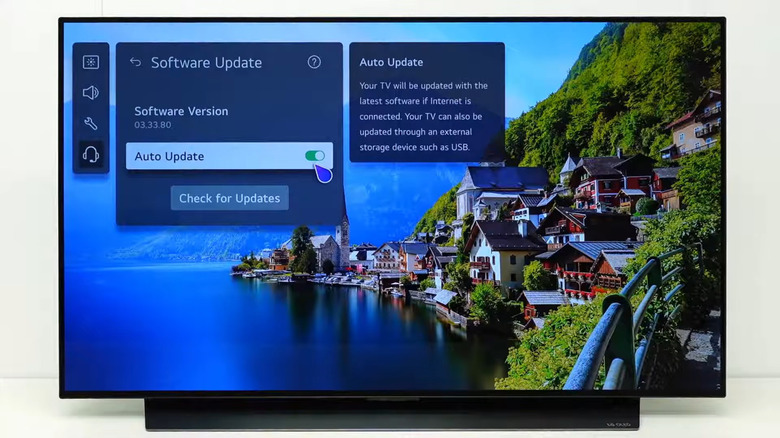
In most cases, your LG smart TV will automatically install any pending updates or software upgrades as soon as it's available for your model. However, you can also do this manually. The easier option is to go to Settings > Support > Software Update, then select Check for Updates. If an update is available, your TV will install it. It's worth highlighting that you can't natively downgrade or uninstall software updates; once webOS 26 is installed, you can't revert to the previous version. Lastly, in case your TV is not connected to the internet, you can also update it using a flash drive, although it will require a PC with internet access.
You must also realize that software updates and upgrades alone won't guarantee the best experience. Changing key settings on your LG TV could lead to a better, more streamlined experience. Of course, if you have a new LG TV that's eligible for the Re:New program, the four new webOS upgrades over the next five years may improve the user experience without you changing any settings or your preferences.