

5 Tech Brands Selling Typewriters With A Modern Twist
We may receive a commission on purchases made from links.
Are you a writer who finds it difficult to write because your writing device also gives you access to your shopping list and the World Wide Web? Maybe you're sick of not being able to open a Word document without AI muscling in and offering unwanted advice like a modern version of the paperclip guy. If this is you, maybe you should consider spending more money than you would for a laptop on another device that gives you almost no features at all.
It sounds like a joke, but this is literally where we are in 2026. Our phones, laptops, and tablets can do so much that people have become overwhelmed, and there's now money to be made from selling gadgets that don't do very much. These modern-day answers to the typewriter generally give you a keyboard, a modest screen, and a way to save words, while leaving out the web browser and most of the applications that make a computer useful. They promise to remove the distractions and add enough friction to help you unleash your creativity.
They don't come cheap. While the cheapest option on this list is only $199, you only get a screen for that price. The most expensive is $699, and you can buy a laptop for a lot less than that.
Of course, a notebook and pen will also give you a notification-less, friction-ful writing experience at a considerably lower cost. But it's the 21st century, and you won't be able to send a handwritten manuscript to your publishers without first typing it up or using a handwriting-to-text app. So if you want something that's dumb while you're writing but smart enough to export it elsewhere when you've completed your masterpiece, there are a few options you can consider.
Astrohaus delivers a range of Freewrite writing devices
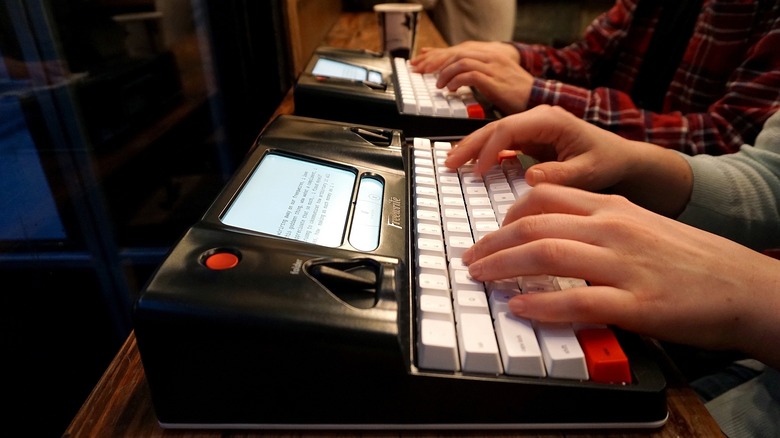
Let's start with the priciest option. Astrohaus's $699 Freewrite Smart Typewriter is a digital device cosplaying as a classic typewriter. It has a full-size mechanical keyboard with Kailh Box Brown switches, which means something if you're into tactile switches. (More 'clicky' than a Cherry MX Brown, less so than a Gateron Melodic.) It has a retractable handle built into its die-cast aluminum body, and weighs about four pounds, making it slightly heavier than a 14-inch MacBook Pro. There are other, lighter Freewrite products available though, like the 1.6-pound $549 Freewrite Traveler.
The Smart Typewriter is not an actual typewriter, of course. It comes with a six-inch E-Ink display with an adjustable frontlight. But it has no browser, notifications, app store, or built-in AI. You can do a bit of onscreen navigation and correction, but E-Ink tech is slower to respond than LCD, and anyone inclined to rearrange every paragraph as they go may find its deliberate pace more exasperating than liberating.
This retro-looking object offers enough local storage for a million words and some pretty good connection credentials. It saves drafts locally and syncs through Postbox to Google Drive, Dropbox, OneDrive, or Evernote. USB-C handles offline transfers. Freewrite claims million-word storage and roughly four weeks of battery life at 30 minutes daily. Freewrite is for the writer who wants the act of sitting down to feel ceremonial, and who is willing to pay for that feeling. Some actual writers who have written actual books swear by it. Crime writer Michael Jecks called it "the very best tool I can use for creating my books"
Nakajima still sells old-school word processors
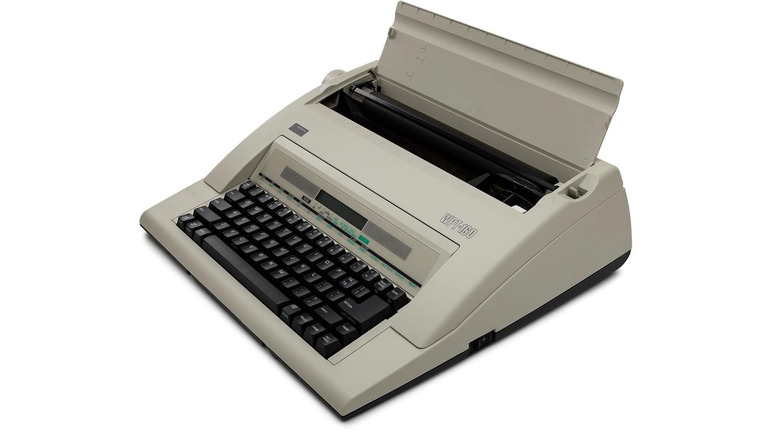
The somewhere-between-a-mechanical-typewriter-and-a-laptop nature of the products on the list is nothing new. Back in the 1990s, 'word processors' were sold as a cheaper alternative to PCs. While the big names like Brother and Canon may have quit the word processor game at the end of last century, there's still one company making these things: Nakajima. Its WPT-160 Portable Electronic Word Processing Typewriter is the only device on this list that lets you type directly onto an actual sheet of paper, like an old-school typist. Although, if you prefer, you can choose 'line print' mode, that way you'll be able to reread your work and use the spell-check feature before committing to paper.
The WPT-160 costs $299.99, which is less than all but the cheapest laptops, although you can still get a decent laptop for under $300. You'll need to pay for replacement ink cartridges, though, which cost around $9 each. The WPT-160's electronic assistance is modest by current standards but slightly fancier than its looks might suggest. It has 16K bytes of storage that can hold about 16,000 characters across as many as 50 text, phrase, and format files. You can search and recall files, insert saved phrases, and copy, move, or delete blocks of text.
You can't stick your work on a memory card like you can with other digital typewriters, but the WPT-160 deserves a place here for being an electronic gadget that's still basically a typewriter. Sure, you can edit and save, but the finished object still smells, folds, and occasionally jams like paper. If your dream is to stack chapters on a desk and admire their height, the WPT-160 will oblige.
Pomera produces pricey tiny writing machines
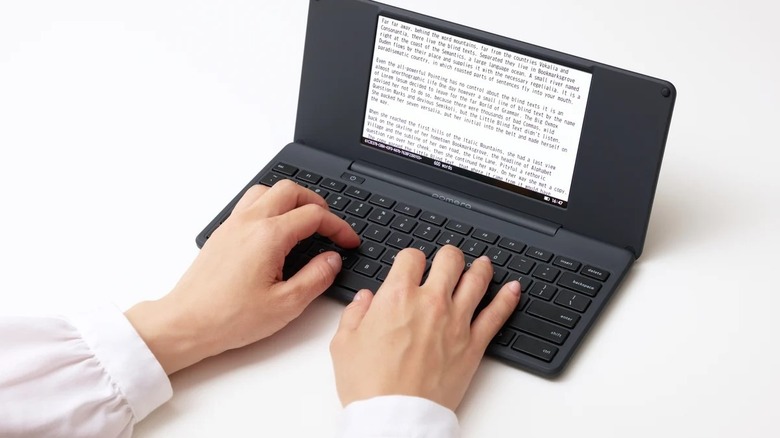
The Pomera DM250US weighs about 1.37 pounds, and you can fold it closed when you want to pop it into your bag. It has a 7-inch screen with an LCD that looks like it belongs in the previous century. At $549, it is an expensive way to avoid opening another browser tab, but it has its fans. Jordan McMahon of New York Magazine said it "removed my urge to edit in real time and focus on getting something written".
Although the Pomera's main purpose is to help you write quickly, there are also some basic editing functions like copy and paste, spell checks, and word count. The backlit monochrome LCD works in dim conditions and responds quicker than an E Ink page. The keyboard is basic, though, compared to Freewrite's tactile mechanical keys. When you're done with your distraction-free writing session, you can transfer your words to a different device using a USB-C cable or SD card. There's also the option to turn your words into QR codes that can be scanned with your phone.
There's also a limited Wi-Fi connection feature, although it's strictly intended for file transfers. Wi-Fi was introduced with the 2025 model, and it feels like a slippery slope. Pomera's lack of features is its main selling point. With no browsers, games, notifications, or messaging apps, the idea is that if you take this on your next train journey, you'll have no option but to write that thing you've been meaning to write. Unless you stare out of the window instead, of course. Dedicated procrastinators will always find a way.
Zerowriter offers customizable distraction-free devices
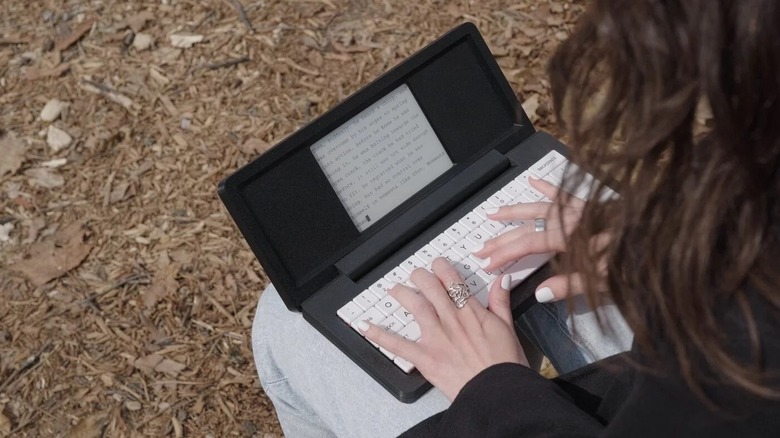
All the gadgets on this list are selling you a dream. Buy this thing, and you will become a productive, non-procrastinating person who writes lots of words. Zerowriter promises "Zero distractions.
Zero exceptions". Its products are also very appealing to tech nerds due to its open source code that invites you to extend the software to suit your own needs. The hardware is customizable, too. It comes with a mechanical keyboard, pre-installed with Kailh Choc Pro Red switches, but these are hot-swappable so you can replace the keys and switches with something that suits your writing style better, although obviously, that's going to cost you a bit more than just using the pre-installed ones.
There are two digital typewriter options from Zerowriter. The Ink is currently available (although it ships in batches and sells out fast), and the upcoming Fold is preorder only. Both devices have the same basic idea. It's a pared-down laptop-like device, not unlike the Pomera or the Freewrite Traveler. The Ink costs $285 and measures roughly 12 by 7.5 inches with a 5.2-inch E Ink display. The Fold is similarly priced at $289 and lets you fold up your typewriter like a little book. It's a lighter, more portable option with a slightly larger screen, but you have to be prepared to wait until at least March 2027.
Like the Pomera, Zerowriters have export options that include microSD cards, USB connectors, and QR-code transfer. In fact, in many ways, it's like a cheaper, more customizable Pomera. Unlike some of the other options on this list, a Zerowriter is slightly cheaper than a cheap laptop, although it does much, much less. And that is, of course, the whole point.
BYOK expects you to bring your own keyboard
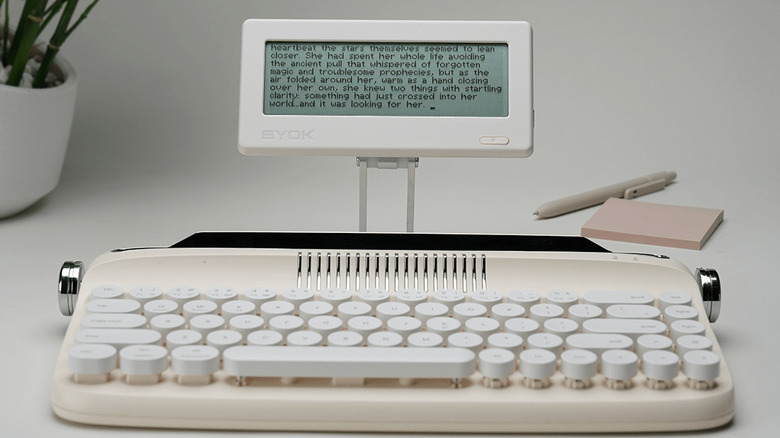
The BYOK is the least typewriter-looking device on the list. BYOK stands for Bring Your Own Keyboard, so all you're getting for your money is a little writing screen. Not surprisingly, this is the cheapest option, but it still costs a not inconsiderable $199. The logic here is pretty straightforward. All the devices here are basically keyboards attached to very simple viewing screens. You can already buy keyboards for every style and budget, so why not just sell the other bit? In practice, this gives the BYOK a huge amount of versatility. It's up to you whether you attach it to a clunky old-school keyboard or a lightweight traveling one.
The display is a monochrome LCD with an adjustable backlight. The whole thing measures 6.5 by 3.1 by 0.6 inches. On its own, it's the size of a large phone, but if you like to write on the go, you'll need to balance the pros of your perfect keyboard against how much of a nuisance it's going to be to lug it about. You can save drafts to a microSD card or move them by USB-C. There's no QR code option, but you do get access to the BYOK Studio, an online resource for editing and research separate from the distraction-free bubble of using the BYOK device itself.
This transition from offline writing to online editing is something that these sorts of devices do better than old-school typewriters (and writing things by hand). The appeal of a digital device with almost zero features may be lost on some, but for others it's a godsend. Writer Phil W. Bayles used a BYOK to get words down during his commute and while his daughter was playing, and said it "proved to be worth its weight in gold".