

5 Common Problems With Starlink Internet
Many of us remember the days of dial-up internet and "You've Got Mail!" For years, downloading large files took hours while our parents bemoaned the tied-up phone line. By the early 2000s, broadband was changing how we used the internet, and it evolved into a foundation of modern life, so it may surprise you to learn that millions of Americans still don't have access to high-speed internet.
High-speed internet is defined by regulators in the U.S. as any service that has download speeds of at least 100 Mbps and upload speeds of at least 20 Mbps. It's typically delivered to households in one of five ways: DSL, cable, wireless, fiber-optic, or satellite. There are several satellite internet providers in the U.S., but Starlink is widely considered to be one of the best available choices. Conceived by SpaceX in 2015, Starlink launched in 2019 with 60 satellites. Today, it has thousands of satellites in orbit and millions of subscribers. Plans start at $55 per month, with faster speeds available for $85 and $130 per month. Billed as reliable and resilient, Starlink is meant to connect the most rural and remote populations, but, like any modern technology, it sometimes has hiccups. Here are five common Starlink headaches and what you can do to fix them.
Complete loss of signal
It's the refrain all parents dread hearing. "Mom or Dad, the internet isn't working!" Fortnite aside, a complete loss of internet service can spell disaster for both kids and adults. Many Americans work and learn from home, and it can disrupt communication, smart devices, and streaming services. While users generally say Starlink is reliable, if you find yourself without service, there are a few things you should check before panic sets in.
First, is it a network-wide issue? Widespread outages are reportedly rare, but you can check for official notifications using the Starlink app or use a website like Downdetector to see if any other users are reporting outages. If it doesn't appear to be an outage, check your cables and connections next. It's possible that something is damaged or unplugged. You can also simply try resetting your system — the good ol' turn it off and turn it back on again routine.
Because Starlink uses satellites, weather can also be a factor. While Starlink is "engineered to melt snow and withstand sleet, heavy rain, and harsh winds," according to the company's website, these conditions and other extreme weather still have the potential to disrupt service. You should also check the position of your Starlink dish. If you're unable to successfully troubleshoot the problem, visit the Starlink Help Center for assistance.
It's wreaking havoc for astronomers

Many customers may be pleased with their Starlink service, but some in the science community have a different take. Have you ever looked up and spotted a light streaking across the sky and thought it was a shooting star, only to realize that it was a satellite? Even if you haven't, astronomers have, and they're annoyed.
Backyard enthusiasts with simple telescopes can easily spot satellites and may not be too bothered. But professional astronomers use ground-based observatories. When a satellite, whether Starlink's or not, passes through the view of one of those observatories, it reflects sunlight and creates streaks in photographs, potentially destroying high-resolution pictures. There are more than 17,000 active satellites in orbit, including almost 13,000 in low-Earth orbit. SpaceX owns thousands of those satellites. Starlink collaborates with astronomers to help reduce the impact, but with more satellites expected to launch in the coming months and years, astronomers say more change is necessary.
An organization called the International Astronomical Union Center for the Protection of the Dark and Quiet Sky from Satellite Constellation Interference is working with satellite companies to help reduce this interference, but says it can't possibly reach all operators. Astronomical observation leads not only to a greater understanding of the universe, but also helps us study climate change, monitor near-Earth objects, and predict potential hazards.
It can be expensive
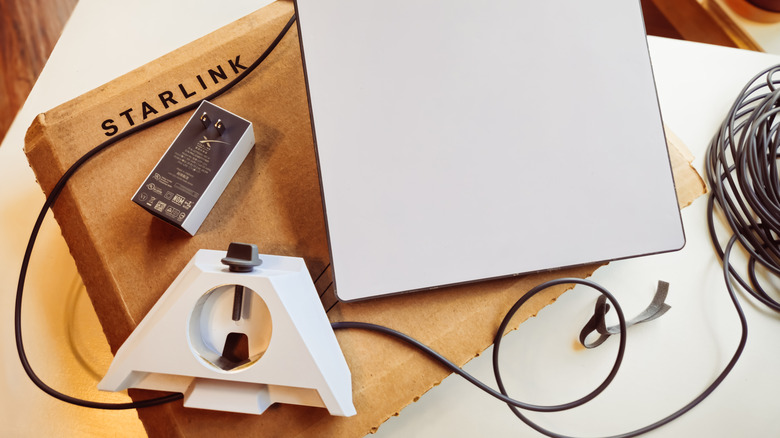
While Starlink may offer affordable monthly options, the upfront costs can be steep. In some areas, Starlink offers hardware rentals, allowing you to avoid buying the kit outright, but this deal is only available in select regions. To see if equipment rental is available in your area, visit Starlink's website and enter your address. You'll be given prices for the different available options, along with any upfront hardware costs.
If equipment rental is not available to you, you'll have to purchase a hardware kit. These are widely available at retailers like Amazon, Home Depot, Best Buy, and more, or from the official Starlink website or app. At the time of writing, kits range in price from $249 for the Starlink Mini to $349 for the standard kit. If you don't feel comfortable installing the equipment yourself, you'll also pay a $199 professional installation fee. You may also have to pay a demand surcharge fee, depending on your location and plan.
Compared to other satellite providers, Starlink falls in the middle when it comes to monthly fees, with plans starting at $55 per month. Hughesnet prices start at $39.99 per month, while Viasat is typically $69.99 per month, though the provider does run deals occasionally. Additionally, Hughesnet only offers the starting price for 12 months, while Viasat's welcome price is only guaranteed for three months.
Customer support may be lacking

We've all experienced the frustration of needing help for a service we pay for, yet finding ourselves unable to reach a human being. Many companies rely on online tools that are often powered by AI, or phone support that requires you to move through several computer prompts before you might be lucky enough to talk to an actual person.
Starlink's customer support is widely viewed as difficult and exasperating. PC Magazine even included the lack of helpful customer service in a list of things it hates about Starlink! If you experience a problem with your service, you can try contacting the company through the app. You'll first need to walk through a troubleshooting guide, and if that doesn't help, you'll be prompted to send a message detailing the problem, which will open an official service ticket with Starlink. Some customers have experienced timely responses, while others have reportedly waited weeks to hear back.
You can also visit Starlink's complaints page to submit a Customer Support Request through the Customer Support Portal. Finally, you can try calling Starlink support at 1-866-606-5103. This number was reported by PC Magazine and verified by SlashGear; however, it is not widely advertised on Starlink's website. Your call will be answered by an automated system asking what you need help with. Ultimately, Starlink provides several ways for customers to reach out for support, but reaching a person may be an altogether different challenge.
You may experience slow service

On paper, Starlink is not slow, especially to those of us who remember the days of dial-up internet. If you go with the Residential Max plan, which costs $130 per month, Starlink advertises download speeds of up to 400 Mbps. Those speeds aren't too shabby at all, but some fiber-optic and cable internet services provide speeds of up to 1 Gbps or higher. Many Starlink customers live in areas that don't have fiber-optic or other internet options, however, making Starlink one of their only options. It's also faster than the other two main satellite options, Hughesnet and Viasat.
If you're experiencing slow speeds with Starlink, it likely has to do with the time of day. During peak hours, when many other users are also online, the system may be more sluggish than normal. If you're experiencing slower speeds during non-peak hours, the Wi-Fi signal between your device and the router may be weak, or something may be blocking your dish's line of sight, like trees or a roofline. Try running a speed test first. If you don't see any speed issues, the problem likely lies with your Wi-Fi range. If the speed test is slow, try moving your dish.