

Does Your USB Cable Support Fast Charging? Here's How To Tell
We may receive a commission on purchases made from links.
Fast charging can mean the difference between comfortably topping up your device's battery while you're in the shower and waiting hours just to get enough charge to last you through the rest of the day. But those improved charging speeds require every point in the power chain to support fast charging, from your charging brick to your USB cable and, of course, the device itself. But what if you're not sure whether your USB cable supports fast charging? Is there any way to determine its capabilities?
The bad news is that there often isn't a way to tell at a glance, mostly because most manufacturers don't print charging speeds or data transfer rates on their cables. The good news is that we don't have to do that; you can often figure out what a cable can do by referring to the manufacturer or, failing that, by doing your own testing. In this article, we'll cover several ways of determining the charging speed of a given USB cable. These include a physical examination, referencing external documentation, and using some simple math to calculate the speed yourself. So, here's how to tell if your USB cable supports fast charging.
Check the cable, its packaging, and product listings
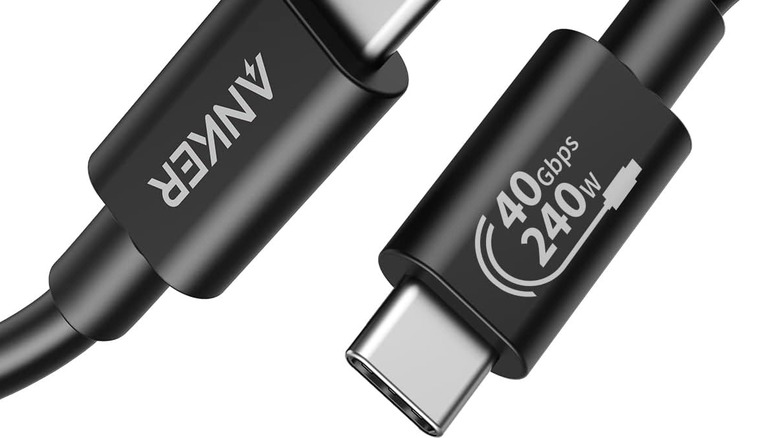
If you're lucky, the USB cable itself will list its charging and data transfer speeds directly on the enclosures or cable shielding. If the cable is registered with the USB-IF (the governing body that sets USB standards), it may display a USB-branded icon that tells you exactly how many watts of power it can deliver. However, this is rather rare, since most companies don't want to go through the hassle of certifying their products. That said, some may still print specs on the cable or the packaging. If you bought the cable from a retailer like Amazon or Best Buy, you can also check the product listing for specs.
If your cable is USB Type-A (meaning the plug is shaped like a thin rectangle), it will likely charge slowly. That's because only USB Type-C supports the latest USB Power Delivery standards. Power Delivery, or PD, is a protocol that allows communication between a USB device and a power source to ensure that the battery charges safely and efficiently.
This is what's most commonly referred to as "fast charging," although it has multiple generations that vary in speed. The fastest type of USB is USB4, supporting speeds up to 240W — enough to power a beefy gaming laptop — but USB-A cables, for which support was dropped after USB 3.x, top out at 100W over USB 3.2. It's worth noting that you may find USB-A cables that claim to offer fast charging. However, those likely only support a proprietary standard, such as Oppo's SuperVOOC, and aren't compatible with USB-C PD.
When in doubt, just plug the cable in
If you can't glean the charging capabilities of your USB cable from external information, you can plug it in and see what happens. To be very clear, this only applies to a cable you trust, as USB cables can hide malicious hardware. If you cannot verify the origins of a USB cable, do not use it. Additionally, do not use a USB cable if you think it may be damaged.
If you have a device that supports fast charging, use the cable to connect it to a fast-charging power brick. This will quickly give you a rough idea of whether the cable supports the standard. Some phones will indicate the charging speed or protocol — Samsung Galaxy phones show the type of fast charging in use on the lock screen — while laptops, for example, may require a third-party tool like HWiNFO64 on Windows.
You can also use a charging brick with a display that shows its power output, such as the Anker Prime A2687 160W charger. If your cable and device both support fast charging, you'll see that reflected onscreen in cold, hard numbers. Finally, you can also use some basic math to find a rough estimate of your charging speed. Because power equals energy over time, all you need to know is the total capacity of your device's battery, its voltage, and the time it takes to charge from empty to full. Multiply your battery's voltage by its capacity in milliamp-hours, then divide by charging time in hours. For instance, a 5,000 mAh, 3.8V battery that takes two hours to charge fully would have been drawing 9.5 watts — well below fast charging standards.