

4 Ways Pixel 10's Magic Cue Can Give Your Productivity A Boost
Smartphone makers have been trying to make their users' lives much easier for years, including with features like voice assistants. However, these have historically been limited to simple tasks, like making calls or answering basic questions — that is, until the advent of generative AI tools like ChatGPT and Gemini. But even then, these large language models are often limited unless you give them access to your data, and that's what Google did with its latest Pixel 10 series.
This tool is called Magic Cue, and it's only available on Google's Tensor G5-powered Pixel 10 phones — which means the budget-priced Google Pixel 10a is out, as it has the older Tensor G4. The company claims that the feature, which uses Gemini Nano, processes everything securely on-device and in the cloud. While this should offer better privacy and security, Google thankfully gives users the option to turn it off if they don't feel comfortable with the level of access this AI tool has to their info.
But if you trust Google and are okay with giving this tool practically all your data, Magic Cue unlocks several features that can make using your smartphone so much easier. So, even though Google never needed to add AI to phones like the Pixel 10 Pro XL to make them feel special, the technology has its benefits and can significantly improve your productivity if you choose to use it.
Tells you what your day looks like
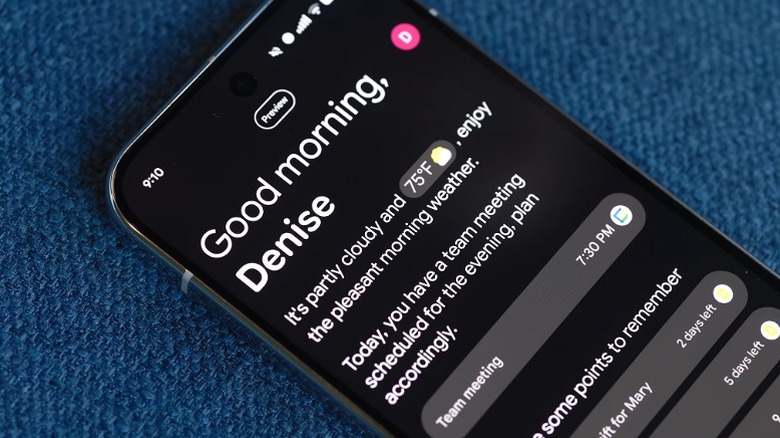
Most of our lives revolve around our smartphones these days; after all, our phones have everything from our emails and notes to our calendars, to-do lists, and more. That's why it's just natural for many of us to check our phones first thing in the morning. However, that can be distracting, especially with all the notifications we get from the various apps installed on our devices. So, to help you avoid that, Magic Cue comes with the Daily Hub feature.
The Daily Hub gives you an overview of what your day will look like. It shows you what's scheduled on your calendar, as well as reminding you of events (like birthdays and anniversaries) and tasks you need to do (like buying gifts) that it pulls from other apps on your phone. When you scroll down, it will also show entertainment content that you can jump back into, like playlists and podcasts across different apps, as well as other topics you might be interested in.
More importantly, this information evolves through the day, adjusting to give you the exact information you might need when you need it. And if you don't find what you need, you can directly access Gemini at the bottom of the Daily Hub view to ask it questions and do whatever it is you might need to use Gemini for.
Finds details, information, and photos when you need them
Arguably, Magic Cue's most useful feature is its ability to pull up details and information when you need them automatically. It does this by monitoring your phone's screen and then offering you whatever you might need at the moment. For example, if you're texting with someone about a planned flight, your Pixel 10 phone will show your flight details as a pop-up at the bottom of Google Messages, and you can then just tap it to send it.
Another example that Google has shown off is how Magic Cue can automatically pull up all the pictures you took during a trip from your gallery when a friend asks for them, allowing you to send them with a few taps. This will save you from scrolling through the hundreds of photos that you've taken since then just to find what you're looking for.
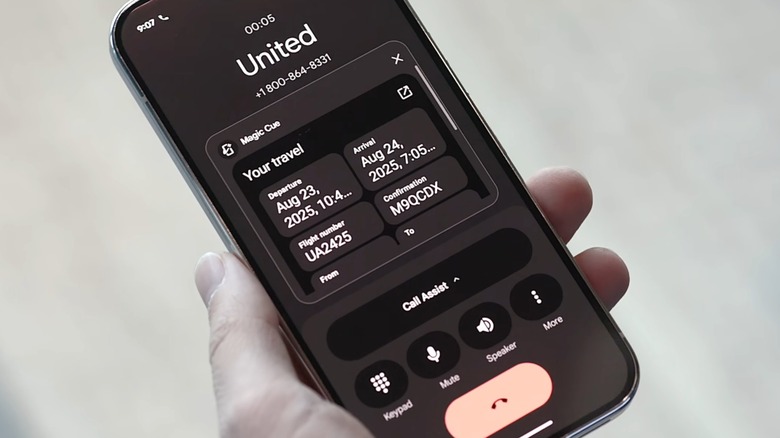
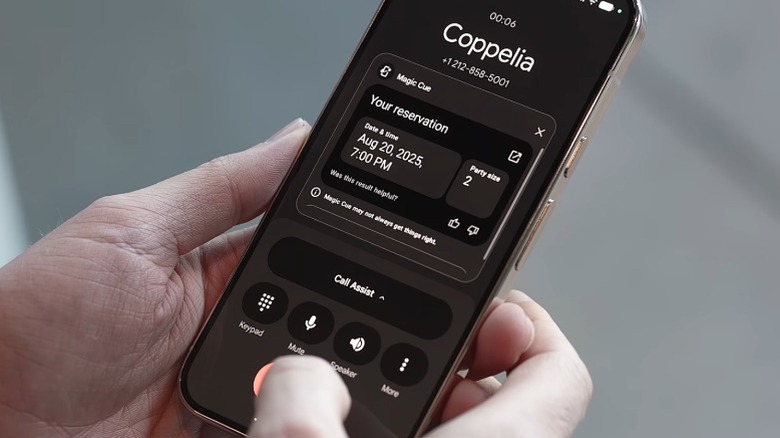
It's also not limited to text messages. If you're calling a hotel or restaurant about a reservation and the Pixel 10 finds information related to that in your email inbox, it will surface details such as the date, time, and confirmation number on your screen automatically without you having to go through your inbox. All these are delivered by Magic Cue's ability to understand the context of what's on your screen through natural language processing, allowing it to offer up relevant information as needed.
Sets reminders based on your conversations
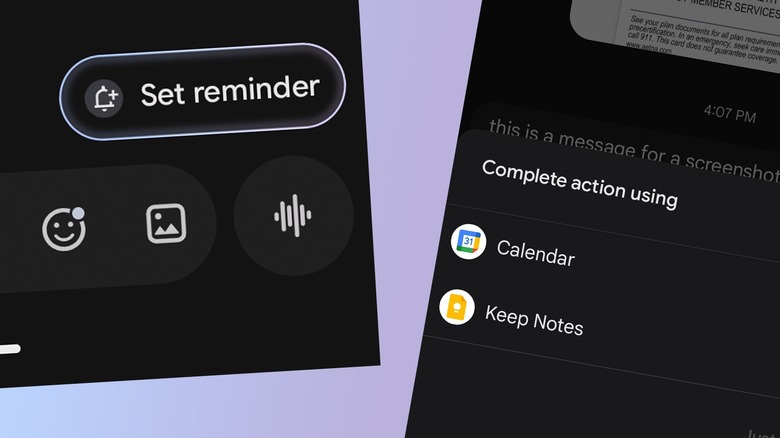
One common use of a smartphone is to quickly set reminders and schedule events, usually based on conversations you're having. You can easily do this manually on your device, but it can be inconvenient if you're doing something else, like catching a cab or rushing to catch a flight. You may even forget to set that reminder, potentially causing you to miss an important event.
Magic Cue helps you avoid that by creating a reminder for you. Say you're heading home from a 10-day work trip, and you tell your partner that you're on the way to the airport. If they text back with "Remember to buy a souvenir at the airport," the AI app will show a "Set reminder" button at the bottom of the conversation. When you tap it, it will automatically create a reminder with the required details, ensuring that you don't forget what you need to do — even if you receive the text message while you're quite busy with something else.
Now, if you find this quite useful and want a device-agnostic way to organize your life, you might want to try Todoist, an AI-powered organizing app. It helps you manage your tasks and, more importantly, works on other devices, too.
Offers suggestions when making plans
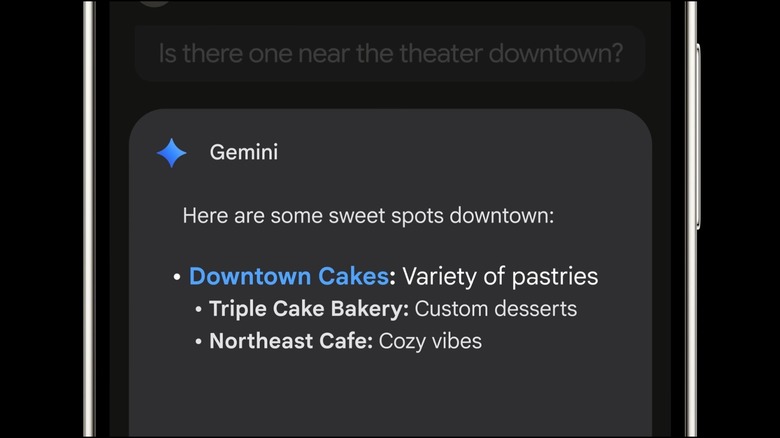
It's sometimes hard to make plans, especially if you're trying to cater to a group with diverse interests. If you're talking about going out with friends and can't agree on a place to go, Magic Cue can actually make suggestions based on what everyone has said so far. Let's say you're all thinking about getting some coffee, but are tired of the neighborhood Starbucks — the AI tool will then show a "Find restaurants" button and connect it with Google Maps. From there, it will offer some cafés you can visit, and you can tap the one that appeals to send it to the group chat.
This feature goes beyond messaging apps, too. If you use the Weather app on your Pixel 10, it will also offer suggestions based on your upcoming trips, helping you prepare and make the most of your travel. Google says that this functionality also works with shopping and streaming apps, potentially helping you make decisions much faster and prevent yourself from wasting time scrolling through the near-infinite number of options available on these apps.