

10 Wireless Mechanical Keyboard Models Worth Buying For Beginners
We may receive a commission on purchases made from links.
If you spend a lot of time typing emails, documents, or more recently, ChatGPT prompts, a good mechanical keyboard is an excellent investment. Traditional membrane keyboards have a shorter lifespan, and the keys can start feeling mushy after a while. Mechanical keyboards, on the other hand, have mechanical switches that provide tactile feedback when typing. They provide a better typing experience while also offering additional perks like better longevity, cool designs, and more importantly, customization. Unlike a traditional keyboard that takes a one-size-fits-all approach, mechanical keyboards can be customized as per one's requirement. There are multiple types of keyboard switches, keycaps, and sizes to cater to various needs.
This is a big reason why mechanical keyboards are so popular. With so many options, though, it can get tricky to find the perfect keyboard — especially if you're new to the world of mechanical keyboards. Additionally, wireless mechanical keyboards are hard to come by, but those are the onesis that make most sense, since they don't have to be tethered to a device. Considering these factors, we decided to jot down the best wireless mechanical keyboards worth buying for beginners. The list includes options for students, gamers, professionals, and pretty much anyone who jams their fingers on keys. We've also thrown in boards with different types of switches, so you can choose whether you want a keyboard that's creamy and silent or one that forces your co-workers to use noise-cancelling headphones.
Epomaker Galaxy 100 Lite
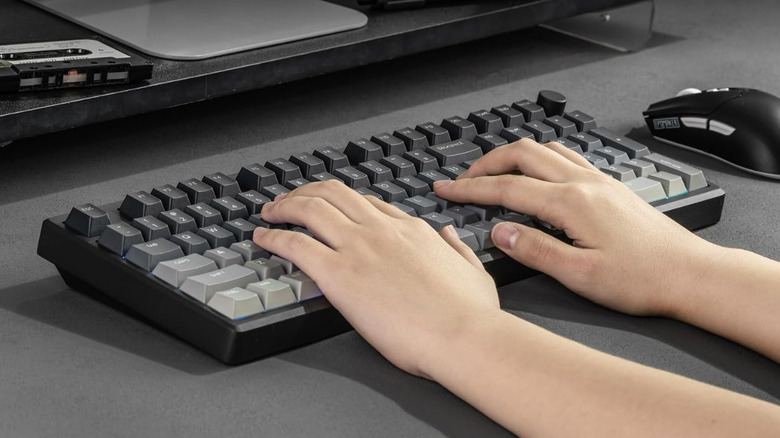
Epomaker is a well-known brand that makes solid mechanical keyboards at attractive price points. The Galaxy 100 Lite is no different, offering a 96% keyboard with a massive 8,000mAh battery, an aluminum chassis, hot-swappable switches, and a customizable knob — all for $109.99. You can connect the Galaxy 100 Lite to your devices either via Bluetooth or the provided 2.4GHz wireless dongle. If you're a gamer and prefer a wired connection to avoid latency, you can also use the bundled USB-C cable. Epomaker sells the Galaxy 100 Lite in several configurations. We would recommend picking up the one with Wisteria linear switches in the Creamy White colorway. These switches are extremely smooth to actuate and also sound pleasing to the ears when typing. Since this is a hot-swappable board, you can change the switches at a later stage if you don't like them.
There's also a knob in the top-left corner to adjust volume levels when playing media. Support for VIA means that you can customize each key via software. You can also toggle between multiple predefined RGB LED patterns and set up your own. The keyboard works with Windows, macOS, and Android, and you can connect up to three devices at once and switch between them. Whether you're a gamer or you type thousands of words every day, the Epomaker Galaxy 100 Lite is one of the most versatile keyboards on this list. Perhaps the only gripe is that it doesn't have adjustable feet, so you're stuck with a fixed angle when typing.
Logitech Pop Keys

If you're more of a form over functionality person when it comes to your desk setup, you will certainly love the visual appeal of the Logitech Pop Keys. It's a beautiful keyboard that looks rather unique, thanks to the use of circular keycaps instead of the traditional, rectangular ones. Thanks to these custom keycaps, the Logitech Pop Keys resembles an old typewriter, giving it a vintage look. Apart from looking cool, the Pop Keys keyboard also occupies less space on your desk compared to a full-size keyboard, thanks to its 75% layout. It does so by ditching the numpad, which can be a deal-breaker for those who spends hours on an Excel sheet every day. To make up for it, though, Logitech has added eight customizable keys that can be assigned as emojis.
This is an excellent addition for those who primarily chat via their computers. The brand also provides replacement keycaps with popular emojis in the box. While you can replace the keycaps, the switches are soldered in place, which means the keyboard isn't hot-swappable. Even if you don't like the switches, you're stuck with them. Speaking of which, the Logitech Pop Keys uses TTC Brown tactile switches, which are not especially popular. However, users seem to enjoy the typing experience, as evidenced by the excellent 4.6 rating on Amazon, with 1,700+ reviews. Like most wireless mechanical keyboards, you can quickly switch between three devices. If you want a retro aesthetic and reliable keyboard that just works, the Logitech Pop Keys is a good option.
Royal Kludge RK S98
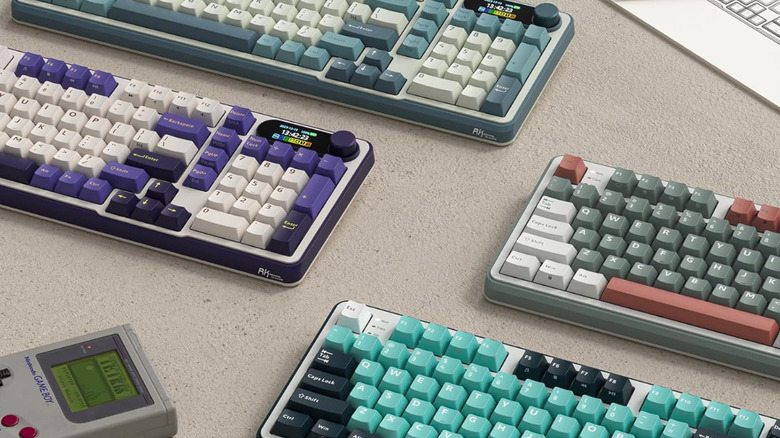
Royal Kludge is yet another popular brand in the mechanical keyboard world. Curious buyers who don't want to spend a lot but still want a customizable keyboard with good features generally lean towards the brand. The RK S98 is one of the best keyboards from Royal Kludge under $100, making it an excellent choice for beginners. As the number suggests, the keyboard has 98 keys, which makes it a 96% board with a dedicated numpad. There's also a knob at the top-left to control media volume. Another interesting inclusion on this keyboard, apart from the knob, is a smart display. The screen can display useful information, such as date and time, battery level, connection status, etc. You can also set custom GIF images that you want to display.
Apart from these bells and whistles, the RK S98 is a reliable keyboard with a solid feature-set. It has RGB lighting for typing in the dark, it can connect to three devices via Bluetooth or a 2.4GHz dongle, has a hot-swappable PCB, and is available in a variety of colors. We would recommend going for the Linear Cream Switches variant if you're a gamer and want the keys to actuate quickly when gaming. If you type long emails or articles like this, the variant with Tactile Beige Switches might be a better option. The only potential downside is that the keyboard is entirely made of plastic. With more than 2,450 reviews and an average rating of 4.6, though, it seems like users aren't bothered by the plastic build and instead appreciate the nice typing sound and quality of keycaps.
Aula F75 Pro
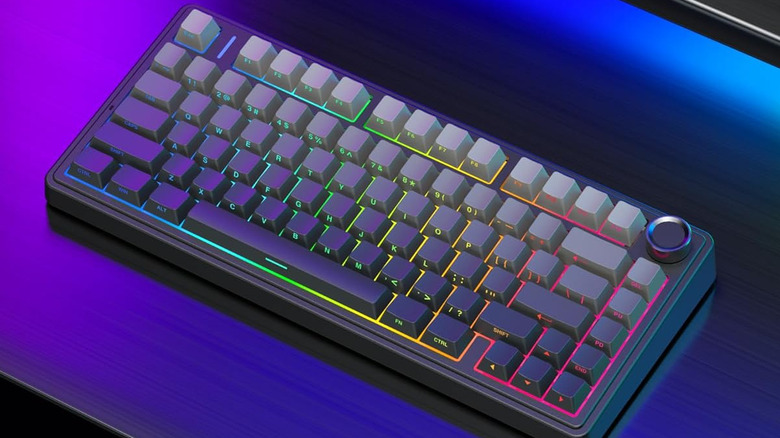
The Aula F75 Pro offers excellent value for those who are looking for a portable keyboard that doesn't occupy too much space on the desk. It's a 75% keyboard, which means you only get the essential keys along with a dedicated function row and a nice-looking knob in the top-right, to adjust volume levels and the brightness of the onboard RGB lighting. Despite being compact, the brand has managed to cram a 4,000mAh battery into the keyboard, so you don't have to charge it too often. You can connect it with up to three devices, and there are dedicated modes for Windows and macOS (and support for even more OS).
The feature that sets the Aula F75 Pro apart from the rest is that these keycaps do not have a legend on the face. Instead, the letters are printed on the front side of the keycaps. This gives the keyboard an extremely clean look. If you prefer a minimal and symmetric look, you will absolutely love this design. The board is also hot-swappable, so you can use any switch you like. By default, Aula ships the F75 Pro with pre-lubed Leobog Reaper switches. According to the brand, these switches are multipurpose, ideal for both gaming and long typing sessions. Reviews indicate that the keyboard is fast and smooth to type on, although it's not super silent. Nonetheless, it's an excellent first keyboard for under $79.99.
Logitech MX Mechanical Mini
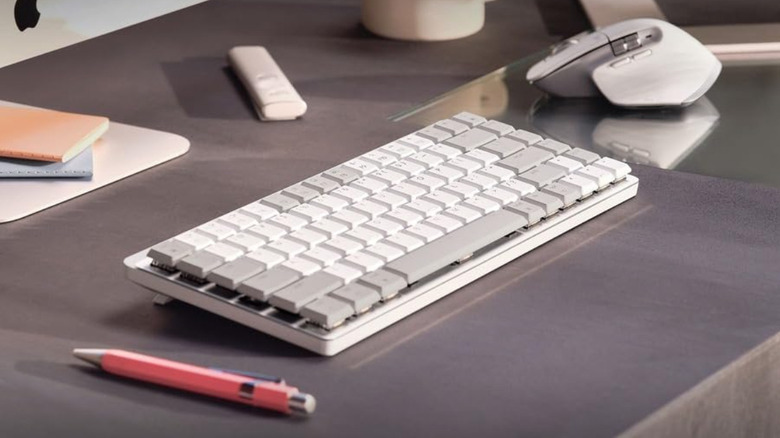
Compared to all the other options on this list, the Logitech MX Mechanical Mini is rather expensive, coming in at $159.99. What you're getting, however, is a sophisticated keyboard packed to the brim with useful features. For starters, the MX Mechanical Mini takes advantage of Logitech's proprietary software for customization. You can customize the keyboard and set shortcuts for specific apps. Moreover, the MX Mechanical Mini also has smart backlighting, which means the keyboard adjusts the backlight's brightness based on your environment.
Notably, this specific version has been designed for Apple products, so it is worlds better when used with a Mac or iPad. According to Logitech, the MX Mechanical Mini works for up to 15 days on a single charge when used with the backlight enabled. If you turn off the backlight at all times, the brand claims a rather impressive endurance of up to 10 months.
A distinct feature of the Logitech MX Mechanical Mini is its low profile. This is the only low-profile mechanical keyboard on this list, since a form factor like this comes with its own quirks. For instance, key travel is significantly lower, which means it's not ideal for gaming. That said, it's more silent and sober-looking than most wireless mechanical keyboards, making it an ideal choice for office environments. You lose out on the hot-swappable capabilities, however.
Epomaker RT85
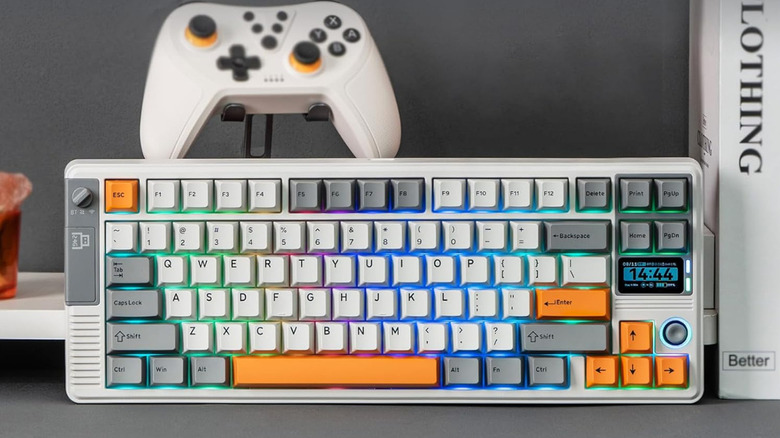
While the typewriter-esque Logitech keyboard definitely provides a nostalgic touch, the Epomaker RT85 screams "throwback" in a different manner. It goes for a retro gaming look, bringing to mind consoles that ran on bulky cartridges. The orange and gray aesthetic is definitely attractive, and the RGB lighting gives the design a modern look. It's nice how the brand has paid close attention to detail, whether it's the USB icon to indicate the location of the charging port or the dedicated old-school knob to change the keyboard's modes. Continuing the trend of an old console, Epomaker has thrown in a customizable joystick to control certain aspects of your computer or quickly scroll through menus.
Then, there's a TFT screen right above the arrow keys to display useful information, such as the date and time, connection status, battery life, or even custom animations. The massive 8,000mAh battery is definitely a highlight, considering the power required to run the RGB lighting and the display. Another impressive feature is the build quality of the keyboard, which users claim feels very solid. You don't want the keyboard to move, slip around, or flex when jamming your fingers at those keys, and Epomaker has ensured the aluminum frame doesn't budge. Some users claim the Creamy Jade switches also sound great, making the Epomaker RT85 one of the best overall packages for $85. It's a hot-swappable board, and you can customize the keys via software.
Keychron R5

The Keychron R5 is one of those products that doesn't excel in terms of features or functionality, but scores high when it comes to aesthetics. As you can probably tell from the image, the Keychron R5 goes for a nostalgic look, like some other options on this list. This seems to be a popular theme among mechanical keyboard manufacturers. Keychron has opted for an industrial design, resulting in a keyboard that looks like it was made at least two decades ago. While it achieves this effect very well, a user notes that the brand has cut corners in the build quality department, resulting in a keyboard that's rather light. If you can look past this issue, thought, this is yet another solid wireless mechanical keyboard that can give your desk a brand-new look.
Compared to most mechanical keyboard in this price range that look jazzy and scream "gamer," the Keychron R5 has a sober look with white and gray keycaps. You can use them in an office environment, and nobody will bat and eye. This 96% board uses Keychron's Super Banana switches, which are some of the best ones you can get from the brand. They sound nice and also offer a smooth feel when typing. Moreover, the Keychron R5's keys are programmable with the help of software, and there are adjustable feet to achieve the right typing angle. Keychron has been a reputable name in the mechanical keyboard industry for a while now, so if you want a reliable board that offers a no-frills experience with a nostalgia kick, the R5 is worth considering.
Asus ROG Strix Scope 2

With over 1,000 reviews and an average rating of 4.6, the ROG Strix Scope 2 is a clear fan-favorite when it comes to wireless mechanical keyboards for gaming. It's definitely on the pricier side, at close to $200, but there are certain aspects of the Strix Scope 2 that make it a great option for gamers. For starters, Asus uses its own pre-lubed ROG NX Snow linear switches, specifically designed for gamers. The switches are smooth and have a high actuation point, which means you don't have to apply a lot of force to register a key press. Then, there's the aluminum top plate that not only adds weight to the keyboard to prevent it from moving around, but also gives it a premium look.
Asus has also added a few nifty features to the Strix Scope 2 keyboard. For instance, the keycaps of the function keys have shortcuts embedded on them indicating different functions inside the Xbox Game Bar app. Whether you want to take a quick screenshot or record your next action, you don't have to memorize the right button combo. Additionally, there's a multi-function customizable button and a scroll wheel that can be programmed to adjust volume or brightness levels, skip tracks, cycle through various lighting modes, and more. It's also worth noting that the keyboard comes with an attachable wrist rest, giving you an extra layer of comfort when gaming for long hours. Users say the RGB lighting is also among the best, which might be important to you, considering the keyboard is meant to be part of a dedicated gaming setup.
Redragon K556 Pro
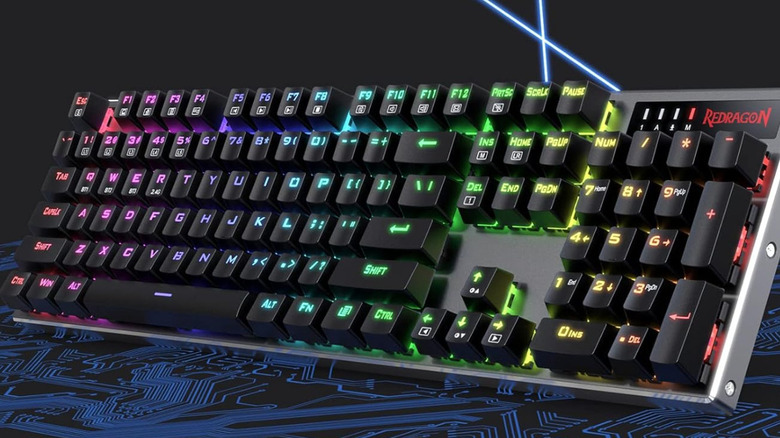
If you're on a strict budget and don't want to spend too much on your first mechanical keyboard, you simply cannot go wrong with the Redgragon K556 Pro. At just under $80 (often discounted to $60), you're getting a complete package in the form of a full-size keyboard that has practically every key you would need, a hot-swappable motherboard, red linear switches, RGB lighting, Bluetooth and 2.4GHz support, and customizable key binding. A lot of these features aren't present on more expensive keyboards, so it's commendable that Redgragon has managed to provide such an attractive package at an affordable price point. While the K556 Pro is an excellent first for those who want to experiment with mechanical keyboards, it has certain quirks that may put some people off.
For instance, a few users experienced multiple key presses or key presses without actually pressing a key when typing on the Redragon K556 Pro. Some of them also mentioned that the keyboard doesn't have an auto sleep function, which leads to the battery draining quickly even when the keyboard is not in use. Thankfully, it seems like Redragon has good customer service, as some users have received replacements for their faulty keyboards. Thanks to this, the overall rating of the keyboard sits at 4.2, with over 2,000 reviews. The solid set of features and good customer support definitely make the K556 Pro a good contender for the best budget gaming keyboard.
Royal Kludge RK65
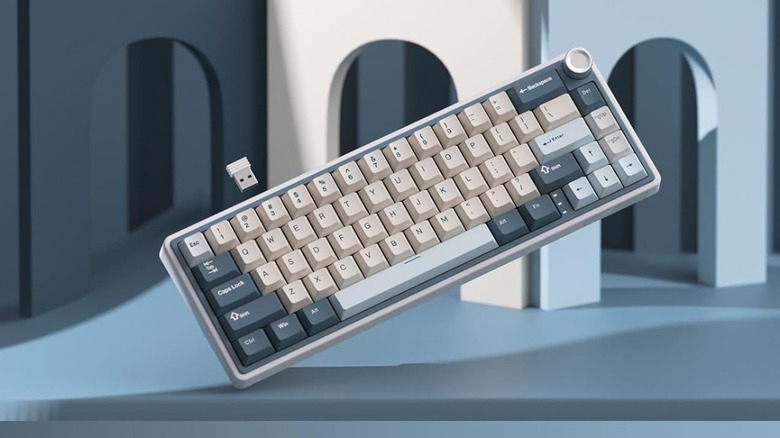
All the keyboards mentioned so far either had a 75% or 96% layout, with some even having a full-size deck with all keys. The common factor in all of these keyboards is that they have all essential keys, including the function row. The 96% and 100% keyboards even have dedicated numpads for number-crunching. But what if you don't have enough space for a large keyboard on your desk, and you only need a nice keyboard for gaming? That's when 60% keyboards like the Royal Kludge RK65 come into the picture. A 60% keyboard does away with function keys in favor of a compact form factor that's easy to carry around, while retaining all the vital keys you need to type.
Despite being small, the RK65 doesn't skimp on features. It has a hot-swappable board, triple-device support, and creamy switches that give it an excellent feel and sound when typing. There's also a metallic knob in the top-right corner that you can use to control media volume. It's also noticeable that the Royal Kludge is fully customizable with VIA software, an important factor when you're dealing with a small keyboard. This way, you can make up for the missing keys with macros and custom shortcuts. If you're looking for a compact gaming keyboard that's also feature-rich, the RK65 is the perfect option. The only downside is that, according to some reviews, the RGB lighting doesn't shine through each individual key when typing in the dark, and instead, only shines through the gaps between the keys. This could be an issue for those who work or play games at night. A quick solution for this is to use custom keycaps that allow the light to shine through.
How we picked these keyboards
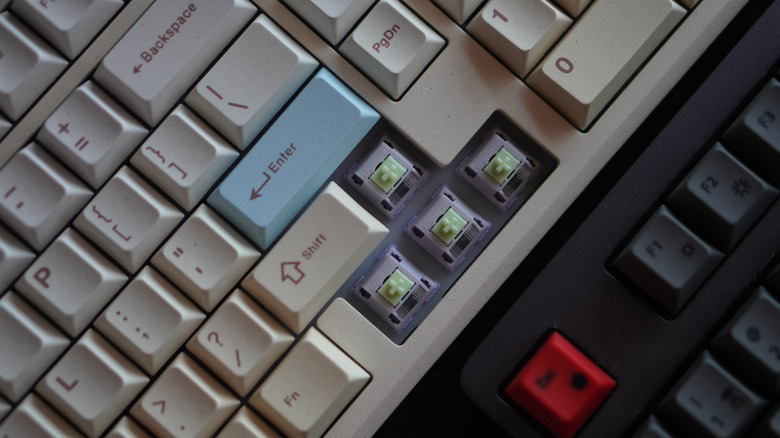
The most important factor when recommending mechanical keyboards is variety. Since there are so many sizes, profiles, switch types, and keycaps, we've included a range of products that cater to several use cases. From linear switches to clicky and tactile ones, 60% and 75% layouts to 100% ones, hot-swappable boards to low-profile ones — we've covered them all. Additionally, since the list caters to beginners who are just entering the world of mechanical keyboards, we've made it a point to include affordable options that are priced under $100.
All the keyboards mentioned here are from reputable brands, and products have a minimum rating of four out of five stars on Amazon. We've also ensured that all keyboards work well with all major operating systems, including Windows, macOS, Linux, Android, iOS, and iPadOS.