

10 Mobile Apps You Should Be Using On Your Phone In 2026
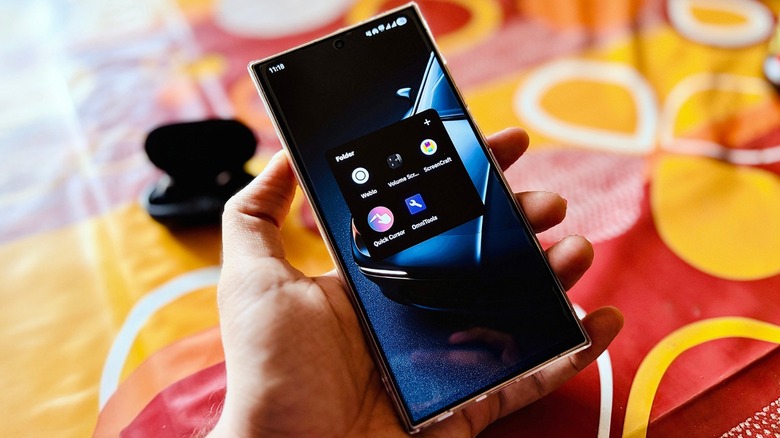
There are many apps on our phones that we barely touch, while some apps that are actually beneficial fly under the radar. By 2026, the Google Play Store and the App Store have become so saturated that finding a truly beneficial app feels like a task. The best apps shouldn't be just about navigation or streaming music or movies. They should also be capable of easing our daily lives and adding a layer of excitement to our mobile usage experience that we didn't know we were missing.
While we continue using the most common apps, such as Google Maps, Spotify, Netflix, TikTok, Instagram, and VLC, we keep ourselves distant from a bunch of underrated apps. In the modern scenario, settling for default apps is a waste of the supercomputer that you have inside your pocket. Let's be real for a second and evaluate how many apps on your phone you actually open. Most of you would agree that a better part of our device's battery and screen time is consumed by the same five favorites every single day.
But this year, limiting yourself to just the big names is like living under a rock. This is where this list comes into the picture by skipping the obvious choices. You don't need another article recommending that you install Netflix, Spotify, or Google Maps. I have hunted down 10 underrated apps — split between Android and iOS — that you have likely never heard of. But once you try them, they will likely have a permanent place on your phone.
Volume Scroll (Android)
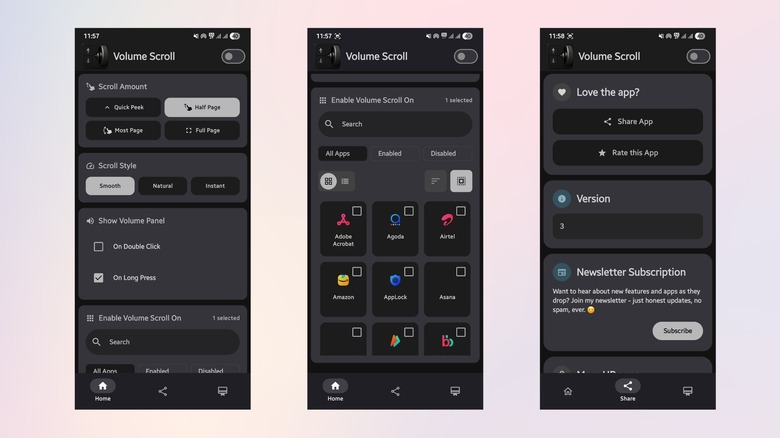
Volume Scroll is one of those apps you don't realize you need until you start using it. Frankly, after installing it and using it for a few days, it's one of the apps that I've started recommending to people, especially those with big-screen phones. The aim of the app is simple — it allows you to scroll web pages, social media feeds, or documents using your phone's volume buttons. Once you start using Volume Scroll, you may feel that it should have been a native Android feature.
It may sound like a small change to scroll using the few physical buttons left on a modern-day smartphone. But for a person who loves pushing buttons and misses the tactile click in everyday life, the Volume Scroll app immediately solves that issue. It also helps reduce what's often called the smartphone pinky fatigue. Research cited by Hinge Health, including a 2024 study published in BMC Public Health, found that nearly 60% of frequent smartphone users report discomfort or pain in hand, including in the pinky, often linked to supporting the phone's weight or prolonged use.
This app ended up on my phone while I was searching for a solution to scroll through my social media feed while eating messy wings. Instead of greasing up the phone's display, I just tapped the volume buttons to scroll. You can use it across most apps, adjust the scroll speed, scroll amount, style, double-press, long-press, and more. The free version unlocks all features for just one app. For unlimited apps, you need to purchase a weekly or yearly subscription.
Quick Cursor (Android)
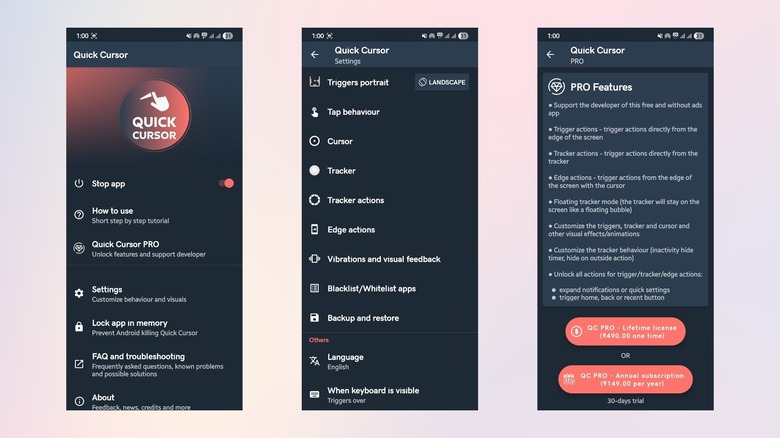
Quick Cursor is another app that solves one of the main issues with big-screen phones — reaching the top of the screen without adjusting your hand. Smartphones have become massive over the years. A 6- to 7-inch phone is released every month. While extra screen real estate is great for media and content consumption, reaching the top of these oversized displays requires stretching your fingers, basically doing hand gymnastics. Quick Cursor solves this issue by adding a computer-style mouse pointer to your Android phone, activated from either of the lower side edges.
I have been using Quick Cursor for several years, and it has been one of the apps that gets rolled over to every new phone. Without Quick Cursor, I had to make hand adjustments to reach the notifications panel or the Quick Panel to access notifications or shortcuts, respectively. But after installing this app, all I had to do was swipe from the edge of the screen to reveal a cursor. You can control the tracker with your thumb, and the cursor mirrors the movement at the top of the display. This way, you can easily click buttons that are out of your reach.
The free version lets you customize the size of the trigger areas, the speed of the cursor, and even includes a nifty feature for my Galaxy S25 Ultra, where it automatically disables itself when the S Pen is detached. With the paid version, you can unlock trigger and tracker actions directly from the edge of the screen, edge actions, floating tracker mode, advanced tracker and cursor customization features, and more.
Screencraft: 4K Wallpapers (Android)
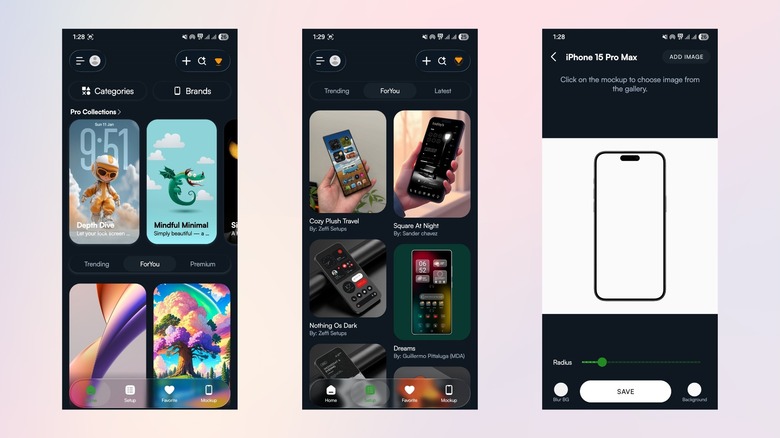
The only ways to actually make your smartphone truly yours are by changing the cover or the wallpaper on it. Think of wallpapers as the clothes your phone wears. And by that rule, Screencraft is one of the best tailors in town. While searching for the term "wallpaper," you can find an enormous list of wallpaper apps, most of which are filled with aggressive ads or low-resolution content. Screencraft is a different option, as its interface resembles the Liquid Design of iOS and gives you true 4K-resolution wallpapers without any fuss.
There are only a few ads, which appear less frequently. You can unlock premium wallpapers by getting a monthly, yearly, or lifetime subscription. For those looking for free wallpapers, there is plenty of room to play. The wallpapers are divided into categories, allowing you to easily search for the one that best fits your needs. The wallpapers are not just static JPGs; you can convert them into parallax wallpapers within the app itself. There is a huge collection of stock wallpapers, which has a dedicated space in the app and can be found under the Brands section.
You will also find home screen setups, giving you direct links to the apps, wallpapers, and widgets used to create a particular setup. Another highlight of this app is the mockup section for creating mockups for different devices, from laptops to smartphones to smartwatches to TVs.
Weblo (Android)
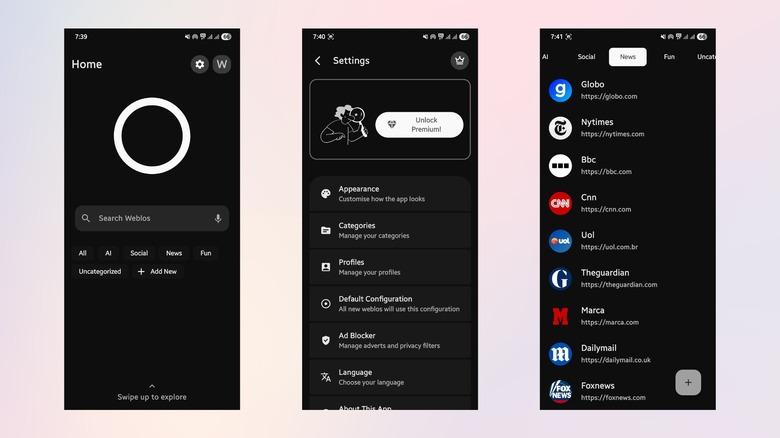
If you are fed up with web browsers promising safety and security on paper but delivering a different reality, then Weblo can be a good alternative. Weblo is a privacy-focused web launcher that lets you run multiple instances of websites in parallel. This way, you keep your professional and personal life separate. It is fast and simple, and it significantly reduces ads, trackers, and pop-ups that get in the way of your browsing experience. Private sessions within the app are reset every time you exit.
Notably, it lets you run web apps as native apps. This way, you can be logged in to your work profile in one instance of the web app while enjoying personal time on the other, without needing to switch browsers. The Page Keeper feature lets you save articles and documentation for later, offline reading. One of my favorite features is the background playback capability, where you can run YouTube or videos from other websites in the background. Such features are mostly locked behind premium subscriptions, but with Weblo, you get them for free.
You browse in incognito mode by default, and Weblo creates a new session unless you tell it otherwise. In the world of resource-hogging browsers, Weblo comes as a breath of fresh air. It feels light because it doesn't load dozens of trackers every time you go online.
OmniTools (Android)
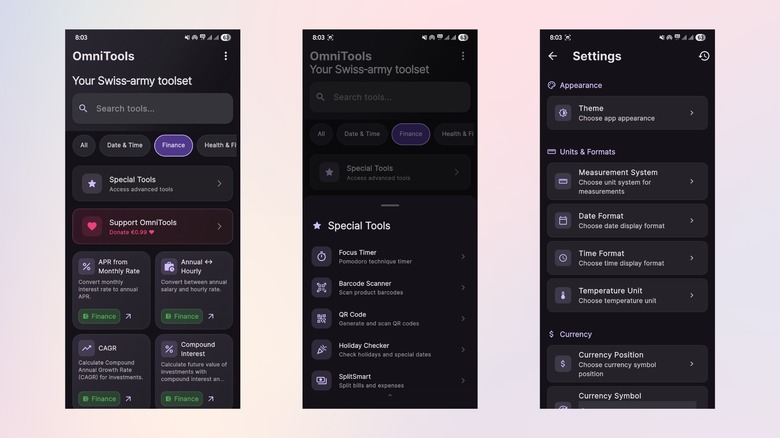
I am an avid traveler and love spending time in new countries instead of being inside my house. Before the OmniTools app, I had a separate folder that was stuffed with unit converters, currency converters, QR scanners, and calculators. But after I stumbled upon this gem called OmniTools, that folder no longer exists on my phone. It is a Swiss Army Knife of digital utilities and brings all your productivity tools into one place, making them easier to access, all inside a free app.
It packs everything from a Pomodoro timer and currency converter to a bill splitter and noise meter. The beauty here is minimalism, as there isn't much to distract you, and you can focus on what matters. On the home page, you can start calculating percentage increase or decrease, APR from a monthly rate, age, BMI, BMR, barometer, bubble level, CAGR, compass, compound interest, currency conversion, and more. I use the currency converter a lot, along with the health tools. Bill splitting between friends no longer requires wasting time and energy on mental calculations.
The best thing about this app is that, apart from being free, it runs offline. It's fast, lightweight, and respects your privacy, as it doesn't require any unnecessary permissions. OmniTools is a hidden gem for those who want to keep productivity tools handy, as it eliminates the need to search for apps specifically for each task.
Editor Pro (iOS)
We all know how good iPhones are at taking images and videos. While Android phones from Vivo, Oppo, and Samsung can be quite good at taking still images, there is still no competition when it comes to iPhone videos. I have a Galaxy S25 Ultra and the iPhone 17 Pro as my daily drivers, and it is the iPhone I trust for shooting videos. But for editing purposes, I had to get those files on my Android phone and use third-party video editing apps. Don't get me wrong, there are video editing apps for iOS, but the better ones are paid.
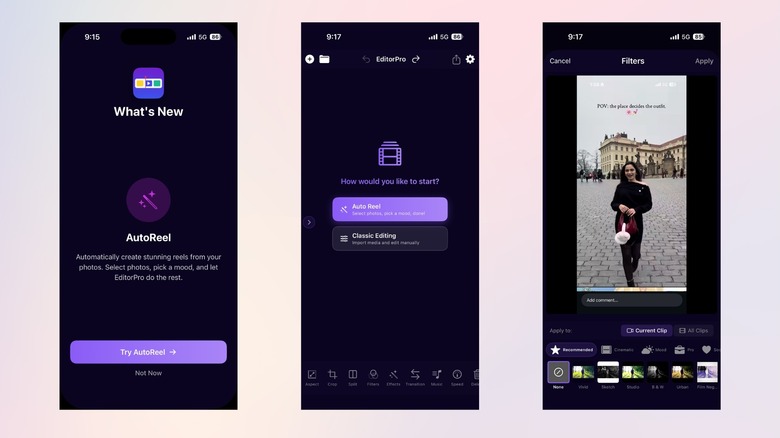
Thankfully, Editor Pro is absolutely free, and it brings desktop-level editing straight to your iPhone. This app processes files and edits locally on the device, making it quite fast compared to other cloud-based editors. With Editor Pro, I no longer stress out even if I am not carrying my Android phone with me, as I can do on-the-go editing on my iPhone. Opening the app shows you the option to create an Auto Reel, where you just need to select a few photos and bam! The app automatically creates a ready-to-post Reel.
You can export your videos in 4K without a watermark; there are tons of effects, filters, and transitions that are pro-grade. It has a powerful timeline, a library of sound effects, and all the other necessary editing tools. Since it processes videos locally, your data remains private.
Random Wallpaper 8K (iOS)
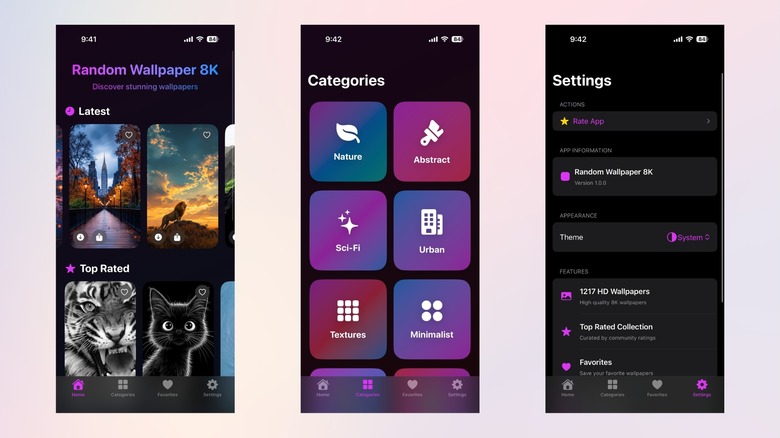
Talk about an actual hidden gem, Random Wallpaper 8K has to be on that list. Interestingly, at the time of writing this piece, the app has only gotten two 5-star reviews. But once you install it on your iPhone, you will likely fall in love with the wallpapers on offer and instantly want to give it a 5-star rating. Of course, you will find apps that offer a huge variety and a large library of wallpapers, but for my current taste and the setup I am going for on my iPhone, Random Wallpaper 8K fits the bill.
The interface is clean and doesn't throw unnecessary game ads at you. There is a decent collection (1,217 wallpapers, to be exact) but one that is high-quality throughout. Wallpapers are divided into different categories for quick discovery. On the home page, you will be presented with the most downloaded, the latest, the top-rated, and the top-shared wallpapers. If you like one, simply tap on the wallpaper and set it as your phone's wallpaper.
The app lets you switch between dark and light themes. You can download wallpapers and create your own collection. Turning on the notifications will alert you when a new wallpaper is added by the developer. Currently, this totally free app is my favorite wallpaper app.
Crossfade (iOS)
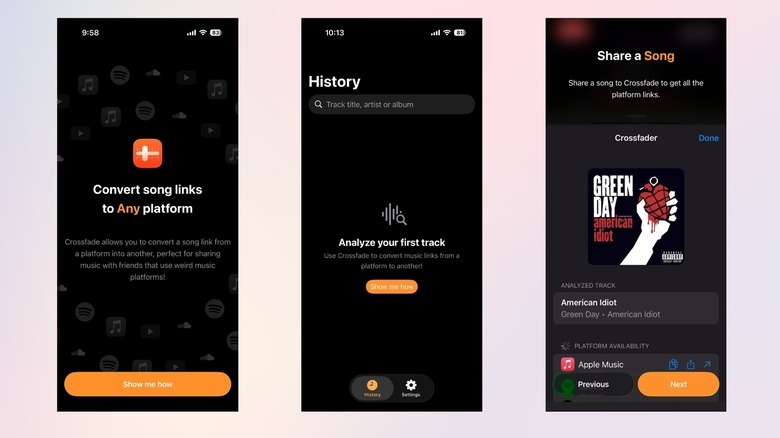
Crossfade addresses one of the most annoying social problems between the Green Bubble and Blue Bubble worlds of music streaming. Imagine you find a song interesting and share a Spotify link with your friend, but they only use Apple Music, so they can't open it. Crossfade acts as a universal bridge, and in my opinion, it is a great app for people who have friends with similar tastes in music. When you copy a song link from any major streaming service and open Crossfade, it generates a universal link that finds the song on the platform you use.
I use this constantly in my friends' WhatsApp group, where we have a mix of Spotify, Apple Music, and YouTube Music users. Before Crossfade, sharing a song in the group meant either sharing the complete track name along with the artist name or sharing a screenshot of the album art so that others could find that particular song in their preferred music streaming app. Now, I can just paste the link into Crossfade, and it gives me a single link that works for everyone.
The app is incredibly lightweight and appears to be less well-known, as there is only a single 5-star rating at the time of writing. This eliminates the need to download and open separate apps just to share songs with your friends.
PDF Fox (iOS)
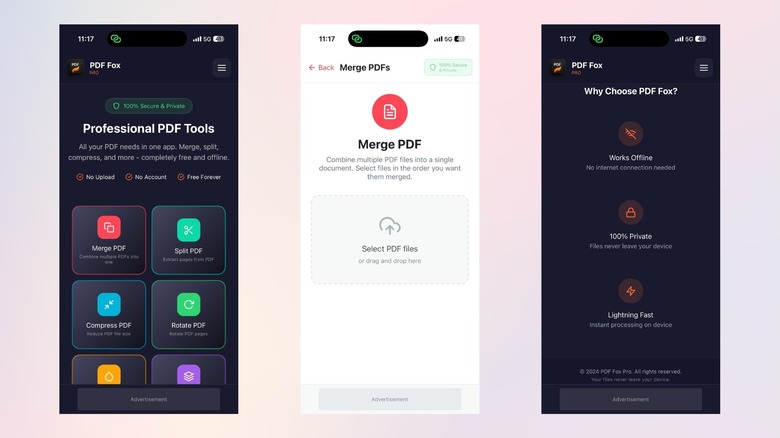
Let's face it. Managing PDFs on an iPhone is quite a task, and you often have to navigate through a minefield of expensive apps that throw subscription pop-ups at you. Having a fully equipped PDF editor, and that too for free, is just a treat. PDF Fox is the ultimate answer to all your PDF needs. It offers professional-grade features for free in a clutter-free interface. Most PDF editors require you to upload files to their servers for manipulation, but PDF Fox works entirely offline on your device.
It gives you immediate access to essential utilities like merging, splitting, and rotating pages. The best part is that you don't have to go through a lengthy setup process or create an account to use this app. I came across this app when I was stuck with only my iPhone and had to sign a really important personal document. After trying a bunch of online tools, where I had to either create an account just to download a watermarked document or purchase a Pro subscription, my research ended with PDF Fox.
When it comes to features, you can compress PDFs, add a watermark, convert PDFs to PNG or JPG and vice versa, and even organize or reorder the pages within a PDF. It makes use of your device's processing power, so the tasks are handled and the output is generated almost instantly.
Dynamic Lyrics (iOS)
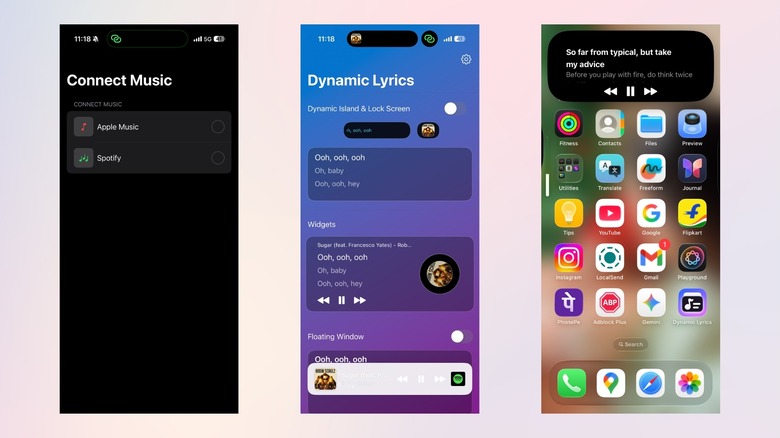
Many of us love listening to music and have long playlists filled with our favorite tracks. However, not many of us know the complete lyrics of those songs. To sing along or do a karaoke session, we often have to either search for the lyrics on Google or use the built-in feature of Spotify. Dynamic Lyrics is the app that finally brings the lyrics of any song directly to the lock screen. Not only the lock screen, but it can also sync in real time with Spotify or Apple Music and show scrolling lyrics on the Dynamic Island or the CarPlay dashboard.
This is great for long rides when the group starts singing their favorite song, as this app ensures that everybody is singing correctly. You can have a dedicated Dynamic Lyrics widget on your home screen or have a floating window that shows you the lyrics while you are using a different app. This app also supports instant lyrics translation, letting you understand each word of the song in your preferred language.
My sister-in-law loves this feature because she listens to a lot of K-pop. It is a fun app that adds a layer of engagement to music. It may not be a productivity tool, but it takes advantage of the hardware in a clever way.
Methodology
To come up with the list of the mobile apps you should be using in 2026, I tested dozens of apps with a single goal: finding apps that genuinely improve an average person's daily phone experience. I did not include most commonly used ones like Google Maps and Spotify because they are already on most people's phones.
The app compilation is based on lesser-known tools that not only improve your productivity but also enhance your overall Android or iPhone usage experience.