

Check Your Android Device: Google's December 2025 System Update Is Live
Google's monthly system services update went live on December 1, 2025. The updates always pertain to an update for the Android operating system and/or key system services with security, new ways to customize your Android device, or bug fixes. The patch notes from Google say this release updated "system management services that improve Device Performance and Stability." It goes on to list two updates for the Google Play Store.
One of these updates brings a new warning with apps that failed to pass Google's Play Protect verification. The other gives users the ability to "...resume watch, read, and listen content from your installed apps right from the Play Store." It's important to know that just because a feature appears in the changelog doesn't mean it's available for everyone yet. Some features take time to implement.
For instance, Google rolled back the Android QR code scanner redesign earlier in 2025, but it is now appearing for some. This is only the first system update for the month, so keep an eye out throughout the month for more updates.
How to update your Android device
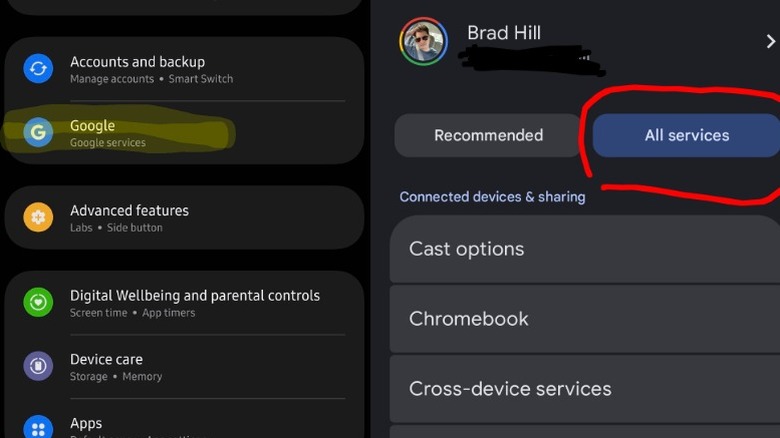
The method for initiating the update might be slightly different for each person, depending on the device they're using. My only Android device is my Samsung Galaxy S24, so to update I had to:
- Open Settings.
- Scroll down and tap on Google (Google Services is written in a small font underneath).
- Tap on All Services.
- Scroll down to the Privacy & Security section.
- Tap on System Services.
Google Play services will appear in a list of software that needs an update. Simply tap on it and select Update. It takes less than a minute for the update to finish and doesn't require a restart, which is always nice. Again, that was on a Galaxy S24. On a Google Pixel 10 Pro Fold, or just a regular Pixel, things are a little different:
- Open Settings.
- Tap on your name at the top for Google Services.
- Tap the All Services tab.
- Look for Privacy & Security.
- Tap on System Services.