

How To Auto Drive In GTA 6 (And Why You Might Want To)

In typical "Grand Theft Auto" fashion, "GTA VI" gives players plenty of freedom behind the wheel. But with the full map unlocked, not everybody wants to take the time to manually drive across Vice City. Lucky for those folks, the game includes a lesser-known Auto Drive feature that lets Jason and Lucia travel to set destinations without requiring you, the player, to literally control their every movement.
To enable Auto Drive, first enter any land or water vehicle and set a waypoint on your map. Then, press and hold Down on the D-pad to open the camera settings (you'll see these in the bottom right corner of the screen). From there, choose Cinematic view using the Options/Menu button. Once in Cinematic view, hold Circle on PlayStation or B on Xbox to let Auto Drive take over.
If you're in the middle of a marathon session (or simply want to sit back and take in more of the game's mise-en-scene), Auto Drive gives you a nice little break from the controls while still getting you where you're trying to go. There's always the option to fast travel, too, but it'll cost you.
What you can and can't do in Auto Drive
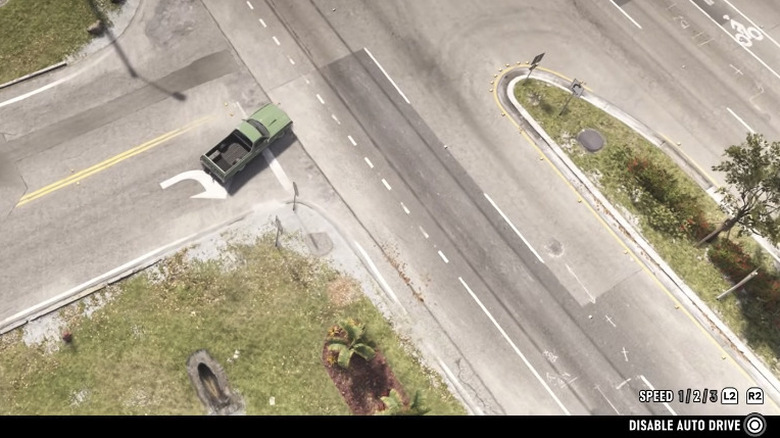
For some "GTA" fans, Auto Drive might seem like sacrilege for the way it intuitively observes the rules of the road — especially when the AI gets you caught in traffic or stuck behind an accident, both of which are bound to happen with the game's massive map. Nevertheless, if you need a break, but still want to progress forward, Auto Drive is there for you.
And while you don't have to worry about steering, you can still control some things in Auto Drive. Players can adjust the vehicle's speed using L2 and R2 on PlayStation or LT and RT on Xbox. You have three speed options to choose from and can cycle through them as much as you'd like. When you're ready to take control again, just hold Down on the D-pad to exit Auto Drive.
Lastly, at risk of stating the obvious, you should also know that Auto Drive won't let you travel from water to land in a boat or from land to water in a car. In either situation, Auto Drive will only take you as far as the edge of the terrain before shutting itself off.