

What Does The H+ Symbol At The Top Of Your Android Phone Mean?
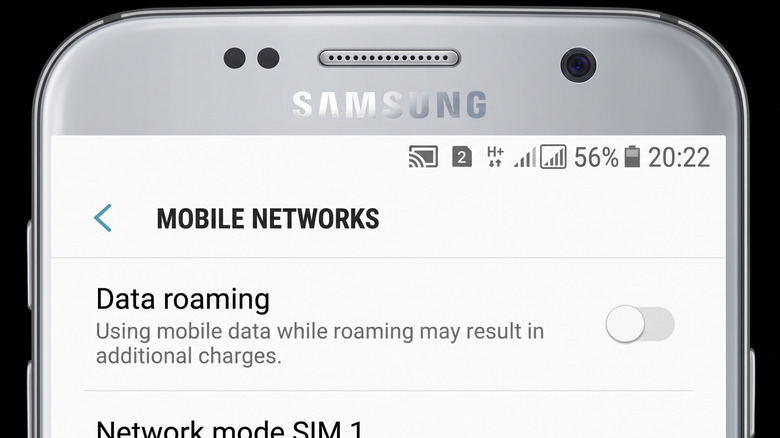
As phones have gotten smarter, they've also gotten much, much more complicated. As a result, there can be all kinds of different symbols, settings, and features that you don't know anything about. That includes the indicators in your status bar at the top of your phone, especially those related to your device's network connection.
You might've noticed a few different connection-related icons in your phone's status bar before, like the 4G or 5G symbol showing what type of data connection you're using, or an R showing that you're currently data roaming outside of your usual local service area. Another, less self-explanatory network indicator you might've seen looks like it says "H+" with two up and down arrows underneath it. That shows that your phone has detected and connected to what's known as an HSPA+ network. It appears roughly where you might usually see a 5G, 4G, or 3G symbol.
HSPA+ (HSPA Plus) stands for Evolved High Speed Packet Access. HSPA networks are a group of high-speed digital data services that use 3G and 4G. HSPA+ is a little like a faster version of 3G. Meanwhile, right where you find the H+ icon, or any other data connection icons, you might also sometimes see an H icon, again with a pair of up-and-down arrows. That shows that your phone is connected to an HSDPA network, which stands for High Speed Downlink Packet Access — another type of HSPA network.
How do other connection types compare to HSPA connections?
Regular HSPA networks offer data speeds of roughly up to 21 Mbps. Meanwhile, HSPA+ networks are twice as fast, offering data speeds of up to 42 Mbps. The average download speeds of HSPA and HSPA+ networks sit somewhere between 3.5 and 14 Mbps, with HSPA dropping to around 1.5 Mbps in some areas, like in northern Canada.
3G HSPA+ is significantly faster than regular 3G, which only maxes out at around a 2 Mbps upload speed and a 7.2 Mbps download speed. However, HSPA and HSPA+ connections alike fall massively short of even 4G's maximum speeds, with 4G LTE reaching download speeds of 150 Mbps and upload speeds of 50 Mbps. Naturally, that means that connections like 4G LTE-Advanced and 5G outspeed HSPA+ even further; 4G LTE-Advanced can reach 300 Mbps for downloads and 150 Mbps for uploads, while 5G can reach a substantially higher download speed of 20 Gbps and an upload speed of 10 Gbps.
That said, while HSPA+ connections improved on the speeds offered by earlier generations like 2G or 3G, they're still much slower than most networks we're used to now. It's worth bearing in mind, though, that these figures are based on hypothetical maximum potentials. So, your connection speed is unlikely to actually be that fast in real life. There are all kinds of things that can make your phone's connection faster or slower, like latency, bandwidth use, and which carrier you're with.