

If Your Samsung Phone Has A Shield In The Battery Icon, Here's What It Means
Over the years, the differences between Android and iOS have gradually narrowed. Both operating systems now support many of the same apps, offer very similar features, and often use the same UI and UX ideas for ease of use. A distinguishing factor, though, is how the two operating systems handle the status bar. It's far more informative on Android phones, giving you glanceable information about app notifications in addition to system indicators like network status and the battery percentage. Every manufacturer has a slightly different set of icons they like to use in the status bar.
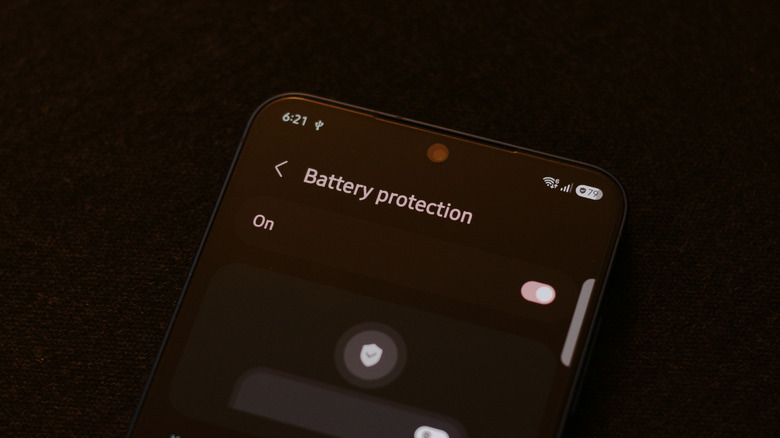
On Samsung phones, you might sometimes spot a shield icon next to your battery percentage. This new indicator was added in One UI 7 and serves as a visual reminder that the Battery protection option is turned on. The feature, which has also started appearing on other Android and iOS devices, is designed to slow down battery degradation. It works by setting a limit on how much your phone charges. If you have a limit of 80% set, your phone will stop charging when it reaches that level.
You may even occasionally spot a leaf symbol inside your battery icon. This indicates that your phone is in power-saving mode, which adjusts things like your screen's brightness and refresh rate, and optimizes background activities to make your phone last a bit longer. To view more information about how your Samsung phone handles charging and power consumption, navigate to Settings > Battery.
Do you need to enable Battery protection?
There are countless Reddit posts with people sharing their phone's battery health numbers and worrying about squeezing every last bit of lifespan out of their batteries. It's true that lithium-ion batteries typically age the best when they aren't kept at a full charge for extended periods. Samsung's Battery protection feature can therefore help preserve your phone's battery health a bit.
Enabling this feature does mean your phone now has less battery to offer you because it's not fully charged. It's a good feature if you often end the day with 20% to 30% left, but if you're already charging more than once a day, preserving a bit of the long-term battery health may not be worth the sacrifice right now. Another factor that can be detrimental to your phone's battery health is temperature. If your phone is constantly running hot, especially while it's being charged, the added heat can accelerate the chemical aging of the battery.
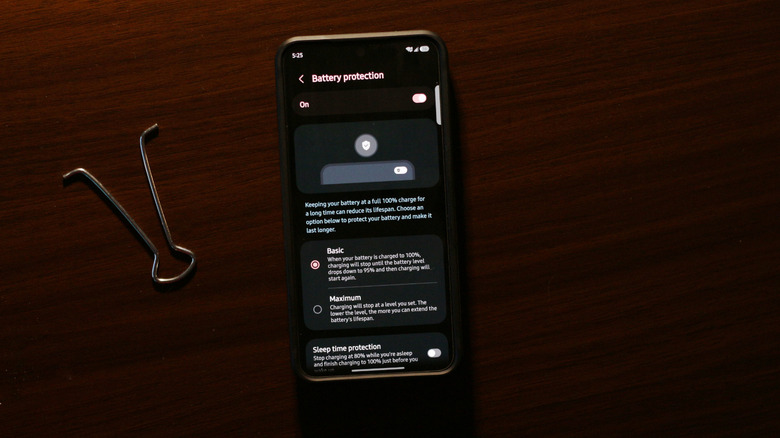
If you tap the "Battery protection" option on your Samsung phone, you can actually change how aggressively this feature limits charging. The "Basic" mode lets the battery level drop to 95% before it starts charging to 100% again. The "Maximum" option will set a hard limit of your choosing. Samsung's Sleep time protection mode is better suited for those who leave their phones plugged in overnight. It learns your usage patterns, keeps the battery at 80%, and only resumes charging to 100% shortly before you wake up.