

What Is A 30-30-30 Reset & How's It Different From Just Unplugging Your Router?
Killing the power for about 10 seconds and flipping the switch back on is a standard operating procedure for most internet problems — or problems with any electronic device for that matter. While this can make problems with your router go away lots of the time, other times you may run into an issue that is more persistent. That's when you pull out the 30-30-30 reset.
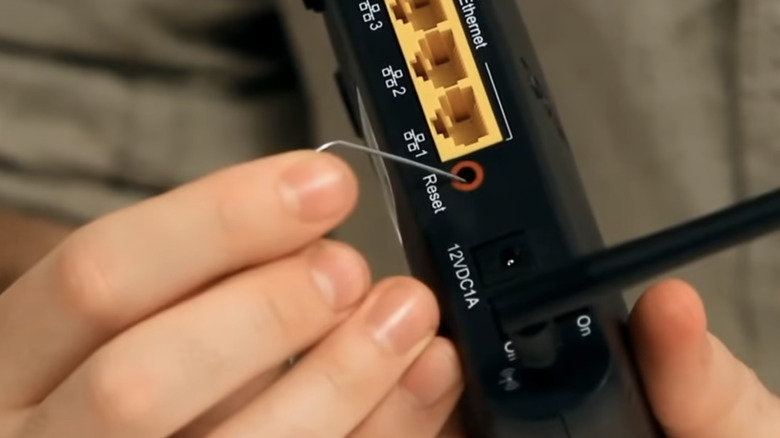
The 30-30-30 reset returns a router to its factory settings. It starts with pressing that tiny recessed reset button on a router, which is by design small enough that you can't press it with your finger. Instead, you'll need a paperclip or tiny screwdriver to push it.
Hold it down for 30 seconds while the router is powered on and running normally. Then, without releasing the button, unplug the power cable and keep holding it down for another 30 seconds. At the end of those 30 seconds, plug it back in and hold for the last 30-second stretch — all without releasing the button. The whole process with your finger pinned to that button comes out to a full 90 seconds.
What the 30-30-30 reset does (and how it originated)
This method is designed to nuke every custom setting you've created on your router. That includes your Wi-Fi name and password, port forwarding rules, custom DNS entries, any VPN tunnels, and the admin login itself. That means you will afterwards have to log in using whatever default username and password are printed on the sticker underneath the router.
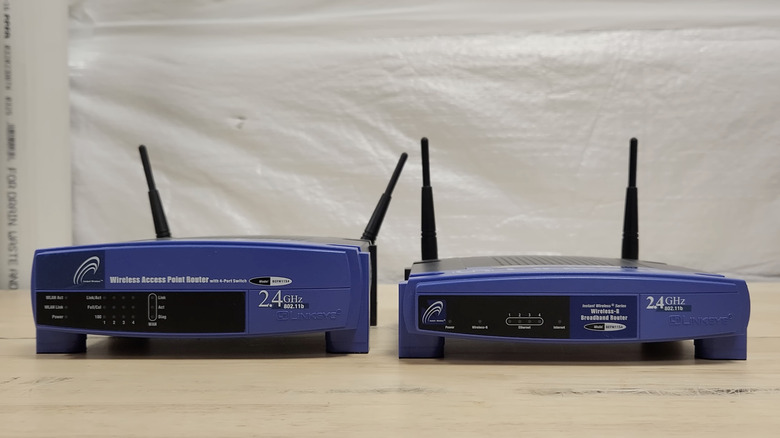
It's worth mentioning that this isn't a commonly recommended fix these days. You may, however, stumble upon it after lurking on old forums for long enough. It reportedly traces back to the Linksys WRT54G, an early-2000s router that pretty much defined the DD-WRT custom firmware scene.
When the hack first emerged, it was meant for older routers that used a specific kind of memory chip, the type you could wipe clean by holding the reset and cutting power at the same time. But since newer routers don't store settings the same way, the extended button-hold doesn't really accomplish anything extra. In fact, OpenWrt's documentation comes right out and says there's no 30-30-30 reset on its system, chalking the technique up to old DD-WRT habits. On most modern routers, holding the reset button for around 10 seconds does the same job.
How the 30-30-30 technique differs from unplugging the router
Many people use the word "reset" for simply pulling the plug and letting the router sit for several seconds before plugging it back in. However, that's technically a reboot, not a reset. A router reboot simply shuts everything down, so when you fire things back up all your settings remain intact. It's generally the first thing to try when your router is acting weird. The process can clear things up if you're connected to Wi-Fi but have no internet access, connections keep dropping, or the admin page won't load. It can also be helpful to do this after a power outage, if the box has been running non-stop for over a month, or you ned to flush the DNS cache.
A full 30-30-30 reset, on the other hand, wipes the whole configuration and gets you back to square one. It's designed to be a last resort, which you may try if you have forgotten the admin password, you suspect somebody might have wandered into your network, or a reboot doesn't fix whatever's not working. Just keep in mind that all of the hoops involved won't do anything that simply holding down the reset button can't already do on most newer routers.