

You Can Make Your Phone Look Transparent With An App - Here's How

For as long as the smartphone has been around, people have been obsessed with transparency, convinced that transparent phones are among the coolest looking phones around. Of course, these days, that transparency usually revolves around seeing the insides of the phone. It's a "how the sausage is made" kind of vibe. Nothing, in particular, has leaned into the transparency of its products, going to great lengths during the manufacturing process to make sure that the insides that people see remain dust-free.
But what about making the whole phone itself transparent? What if you could see through the entire phone? That's a different conversation and one that has been going on for a while too. There was a viral TikTok post of someone using a transparent phone in a boba shop. Samsung has held patents for transparent screens for almost a decade, but thus far the idea of a transparent phone has eluded us; until now.
Actually, it's still eluding us, but there are apps out there that can utilize your phone's camera to give your phone a pseudo-transparent look. They're available for both iOS and Android, though they work differently. Here's how you can find them.
Transparent Wallpaper on Android
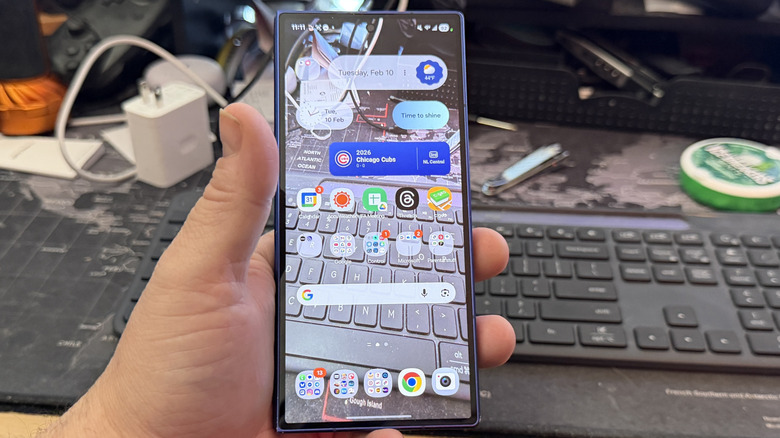
On Android, the app you'll want to pick up is called, simply enough, Transparent Wallpaper. It does exactly what it says it does. It takes the image your camera sees and makes that your wallpaper. As a result, you can see through your phone. When you install the app and launch it, you're immediately prompted to sign up for a free trial of the app. This is optional, and all it really does is remove ads, but most of the time you're only going to launch the app once, set your wallpaper, and then forget it.
Once you skip past the trial, press the big, friendly, blue button that says Start. From there, tap Transparent Wallpaper, and you'll get a preview of what it'll look like. Basically, it'll load what your camera sees. From there, tap to make that your wallpaper on your lock screen, home screen, or both, and just like that, you'll see the background behind your phone as your wallpaper. Your apps all still work, and you can scroll through your home screens, all while seeing what your camera sees.
It's worth mentioning that when I tested this on my Samsung Galaxy Z Fold 7, it started to get a little warm after not too long. It's not clear if that's because the camera is active or it's requiring more processing power, or whatever, but it's safe to assume this will put some stress on your battery if you use it long term. But the cool part is, you are actually setting your camera's view as your wallpaper, which is different from how iOS works.
Glass Phone on iOS
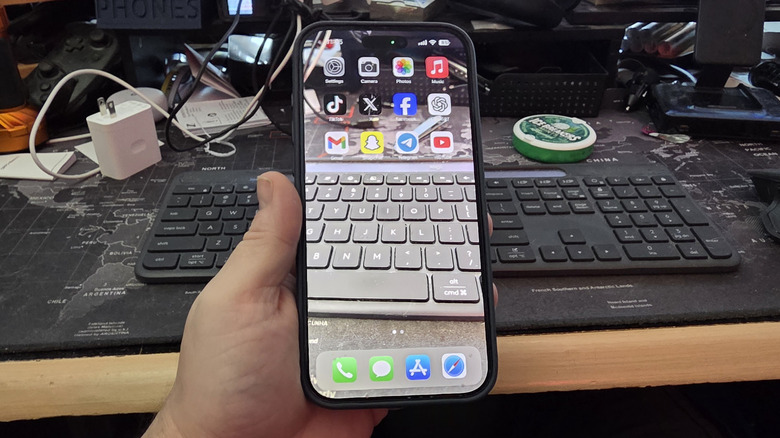
Meanwhile, on the iOS side of things, there is an app, but it's not as feature-complete as the Android version. The closest an iPhone can get is an app that emulates your launcher with the camera view but doesn't actually replace your wallpaper. Apple has security in place to make replacing your wallpaper with your camera view difficult, if not impossible, for those who have not jailbroken their phones.
The app is called Glass Phone, and when you launch it, it runs a pseudo launcher. You can launch apps, just like you can on your actual home screen, but the apps are limited to those icons that are built into the app. The first time you try to launch an app, like YouTube, for example, you have to give the app permission to run — subsequent launches work seamlessly. However, this is as close as iOS will let you get to having your camera server as your wallpaper. Overall, it's not a terrible implementation, but it's more like a party trick and less like a real "configuration."
Once you install the app and tap on it, you'll be prompted to set up Rear-transparent phone, Front-transparent phone, or Set icon. The first two options determine if you use the rear or front camera, respectively. The Set icon command allows you to configure what apps appear on the "wallpaper" and in what order. Again, this is just an app designed to look and act like a launcher, but it's not really a launcher. Still, it's neat, and it's fun to talk about at parties.