

What Are The Back Buttons On A Nintendo Switch 2 Pro Controller For?
We may receive a commission on purchases made from links.
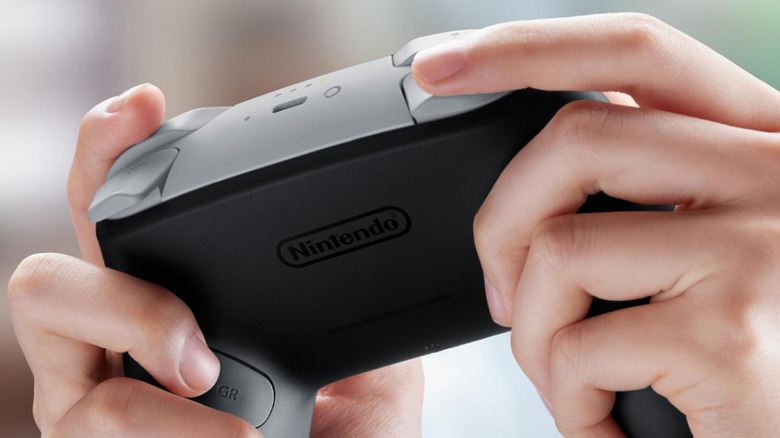
Nintendo gamers know that a Pro controller is one of the most essential Switch accessories. And sure, you can use your old Nintendo Switch Pro controller with your Switch 2, but then you'd be missing out on the benefits of the new GL and GR buttons on the back. Nintendo's Switch 2 Pro Controller comes with two new fully remappable rear inputs. That's what those buttons are for!
The GL and GR buttons let players assign whatever frequently used actions they want to more ergonomic locations. It's meant to reduce strain on thumbs and allow for quicker, more efficient inputs during gameplay. It's the first time Nintendo has included programmable back buttons on one of its own first-party controllers. And interestingly enough, Nintendo has tied the functionality of the GL and GR buttons directly to the Switch 2 system software. Rather than using a dedicated remap button on the controller or a static settings menu, Nintendo requires players to be actively in a game to program them.
How Nintendo's new back buttons work
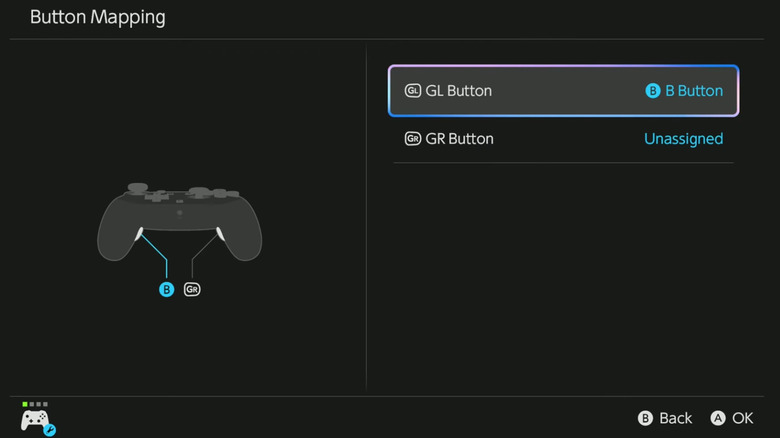
To customize your controller, just hold the HOME button during your game. This opens the Switch 2's Quick Settings menu. From there, select either GL or GR and choose the action you want to assign. The system saves these assignments on a per-user, per-game basis, so there's no need to reconfigure the buttons every time the game is launched. When players switch games, the controller automatically changes the button assignments to match how they were last used in that specific game. They can even be mapped to system-level functions like taking screenshots.
But remember: Unlike other consoles that let you remap and tweak controllers through the main menu, the Switch 2 Pro Controller's back buttons are configured entirely through Quick Settings during gameplay. There's no direct option to map the buttons outside of a game. This design choice means GL and GR cannot be used for things like moving around the system interface. Nintendo has also extended the feature to the Joy-Con 2 Charging Grip, which includes smaller GL and GR buttons that function the same way. And while the concept of rear buttons is nothing new in gaming hardware, it's nevertheless one of the features that make this console special.