

This AI App May Be The Perfect Tool For Keeping You Better Organized

Being organized is hard. I have literally no idea how other people manage it. Now, I have an official diagnosis of ADHD, so I can at least stop feeling like my disorganization is a personal and moral failing and just accept that the "being organized" part of my brain, along with the rest of my executive function, has just been put together a bit wrong. Of course, I'm far from alone in needing a bit of help getting my life organized. It's something that lots of people — both neurodivergent and neurotypical — struggle with. There are many, many tools available. A whole industry has been built around helping people manage their to-do lists.
And these days, of course, many of them include AI features. If this keeps me organized, then I'm all for it. Artificial Intelligence has a lot of faults, but it's useful for some things. For example, I highly recommend it as a procrastination-beater. When I have literally no idea where to start or how to overcome whatever mental block has decided to erect itself, I ask ChatGPT for advice. It comes up with some generic and unusable suggestions, and I find rejecting those is just the thing I need to kickstart my brain back into independent action.
The best app I've found to keep more organized and improve my productivity is Todoist. This tool helps me set and manage tasks and organize my thoughts. It also makes sure I actually do the tasks on my list rather than just writing them down and forgetting about them. You can use it without the AI features if you want to, but I think they make the app even more useful.
Todoist has many useful features
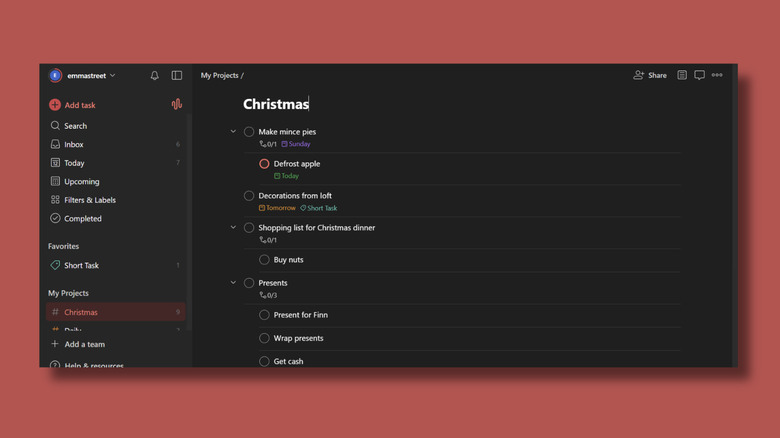
At its simplest, Todoist is a collection of task lists organized into different projects. There's a free version, as well as a Pro version for $7 per month or $60 per year. If you use the free Beginner plan, you can set up lists, projects, and reminders. Each entry can contain as little or as much detail as you want to include. You can start by writing a quick reminder to yourself and then add a completion date, priority, and a more detailed description later on. You can also forward emails to your projects, which I found was an incredibly useful way to keep track of things. With the free plan, you can make limited use of Todoist's Ramble feature, where you just talk to the app, and it will turn it into actionable tasks. I let loose a stream-of-consciousness ramble about everything I need to do for Christmas, and Todoist managed to make sense of it and created tasks for me.
If you want AI features, you'll want to subscribe to the Pro Plan because that's where most of the good stuff is. As well as unlimited Ramble opportunities, you also have access to its Email Assist feature, where it uses AI to pull out all the relevant information in an email and create tasks. The Pro plan also gets you access to the Task Assist AI feature, which can help you turn vague notions and roadblocks into a workable to-do list. Todoist's interface is intuitive and uncluttered, and it's easy to control how hands-on you want the AI to be. You can use it in whatever way works best for you. I also really like the name. It sounds like a philosophical movement – you can tell people you practise todoism.
Other apps that can help you stay organized

Todoist is my go-to to-do manager, but there are several other apps that are worth checking out. Goblin has an AI task-generating feature called the Magic To Do list, which is fun to use. Enter a task you want to get done, and it will break it down into separate steps. You can adjust how much detail you want it to go into. At full power, it gave me 33 actions for "Make a cup of tea". You can then break down any step on the list and then any step within that, creating subsets within subsets. It might not be enough to organize your whole life, but it will certainly get you started.
The Fabulous app is more about becoming your best self than being productive, but it looks very pretty. It has enough task-setting features to count as an organization app, although the AI options feel a bit tacked on. Notion helps you create and organize task lists, manage your calendar, track projects, and update your reading list. Notion's AI features include a chatbot, writing assistance, and summarizing tools.
And, of course, all the big-name AI tools, like ChatGPT, Gemini, and Copilot, can be organizational tools if you want them to be. Copilot, especially, is now so embedded in Microsoft's applications that if you want AI to organize your emails, it's already there. You can ask if there are any emails from last week that need a response, or ask it to find the email the dentist sent you last week. We may not be able to get robot butlers to carry out all our tasks just yet, but at least AI can help us stay on top of things a bit better.