

These Hidden Codes Enable Waze Features You Won't Find In The App Menu
Waze is a community-driven navigation app that provides real-time traffic updates, turn-by-turn navigation, and road alerts obtained through user uploads. But did you know that the software has hidden features not normally accessible through its menus? By entering certain codes, you can do things like unlock a unique user icon and reveal additional information. All you have to do is enter the corresponding command into Waze's search bar.
Admittedly, some of the codes are more useful than others. And to save you all the trouble of digging through commands, we've rounded up a group of the most interesting Waze codes worth knowing about. We've focused on features that are either fun to play around with or offer a practical utility. You can find a list of these Search Codes on the official Waze Discuss forums. It includes a list of known commands alongside brief descriptions of what each one does. There's also one code not in the Waze Discuss that we'll mention later on. Also, before you start, make sure you enter these codes only after you've safely parked your vehicle or are at home.
Our favorite Waze codes
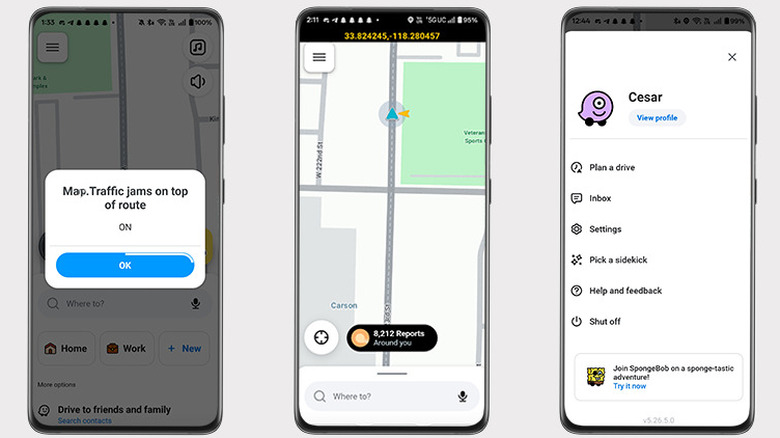
If you've ever been curious to know exactly where you are in the world, type ##@coord into Waze's search bar to display your current coordinates. The numbers will appear at the top of your phone's screen, as seen in the image above. This comes in handy if you ever need to share your exact location, but can't or don't want to rely on street names. Another code worth trying is ##@traffic. Entering this command toggles additional traffic lines on the map, providing more road information for your journey. To disable both features, enter the same codes again.
Waze has a text-to-speech feature that provides voice navigation, but it doesn't always work perfectly. The robotic voice may not pronounce street names properly or even speak at all. If you run into issues, you'll need to clear out the text-to-speech cache, which can be done by entering ##@cctts. If you're experiencing more general problems with Waze, you can type in ##@resetapp. As the name suggests, this resets Waze. Treat this command as a last resort because, according to the search code list, it resets the app as if it were just installed. It removes locally stored information, like your account information.
One of Waze's biggest draws is its customization options. The app has a social aspect that lets users represent themselves on the map with avatars known as Moods. There is a hidden option not available through the selection menu. Enter ##@morph into search, and your Mood will transform into a cute, one-eyed purple monster.