

What Could Happen To Your Google Accounts After You Die?
Every few months, I get an email reminder from Google, the Google Inactive Account Manager, to be precise, that my account is configured to be handed over to my wife in the event I perish. After four months of no activity, my specified contacts will be notified, and after six months, my wife will be given direct access. This is all part of a recommended plan to direct Google on what to do with my accounts and data if I'm not around to make those decisions anymore. However, if you haven't designated someone to pass your account on to and it remains inactive for long periods, Google says it "reserves the right" to delete associated data after an account has been inactive for at least two years. Google began deleting unused accounts at the end of 2023.
There are exceptions that can flag an account as "active" even if it hasn't been used or accessed within the last two years. If a Google Account has a current or ongoing purchase or subscription, contains a linked gift card with a monetary balance, has been used to purchase digital goods — books, movies, and games — or manages a currently used minor's account, it will be considered active. So, even if you're not using an account to log in to Google products or services, if an action you complete falls under one of the "exceptions," your account will still have an active status. If someone dies without setting up the inactive policies, family members can send a request to Google to close the appropriate account(s). Google does make it clear that not all data will be available, and passwords and other login details will remain private and secure.
How to set up Google's inactive account system
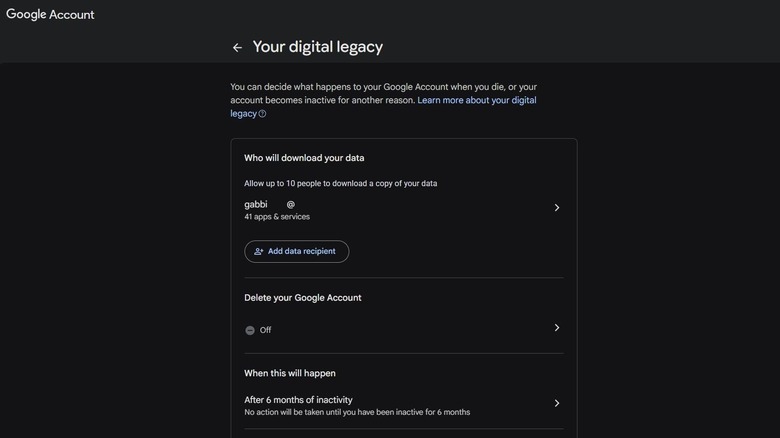
If you want to make sure Google deletes your account and data or shares it with the right people, here's what you can do. Head to myaccount.google.com and tap the Data and privacy menu tab on the left. Scroll down to Make a plan for your digital legacy and select it. If you want someone or multiple family members to have access to your account, add them in the top section that says Who will download your data. You must add their email, though it doesn't have to be a Google email. Under Delete your Google Account, select "yes" if you want your account data to be completely wiped after a period of inactivity. You will get regular warnings when this is enabled, so as long as you're checking your email and accounts periodically, it shouldn't come as a surprise.
Finally, under When this will happen, specify the time period. You can choose between three months of inactivity up to 18 months, with smaller increments in between. I have mine set to activate after six months because if I'm not around for six months, there's probably something wrong. That might be a longer or shorter period for you. Under the last option, Settings, you can also set up reminders, automatic replies, and review your contact details associated with your Google Account. You can also manually delete your Gmail account altogether if you don't want to bother with the inactive account manager. You should check to see if there are any old Google or Gmail accounts you forgot you had, while you're at it.