

What Does The Blue Circle Symbol With Arrows And Lines Mean On An iPhone?
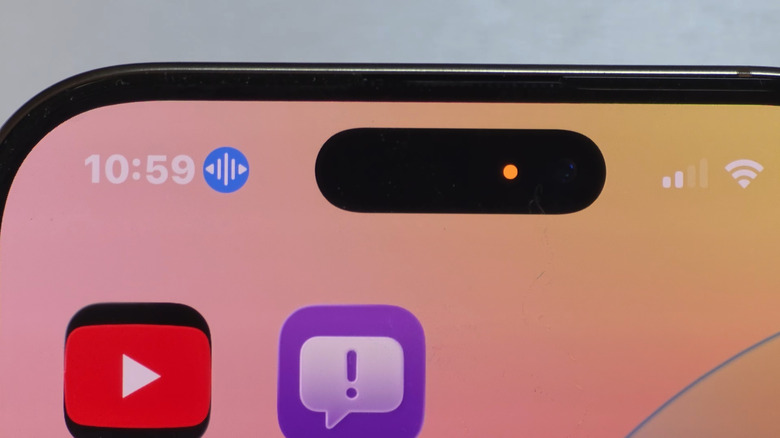
The iPhone is one of the most popular smartphones and commands a loyal user base. The phone's strength lies in its user-friendly and privacy-oriented features. And sometimes, it can get a little confusing, especially as Apple keeps adding new features to iPhones or adjusting those that are already present. The more puzzling part is usually the iPhone status icons because there are so many. One such symbol is a blue circle with three vertical lines in the middle and outward-facing arrows on both sides, which appears near the top-left corner of the screen, right next to the time.
For those of you who don't know, the blue circle symbol indicates that your iPhone's built-in Voice Control is activated. Voice Control, as the name suggests, lets you perform actions through voice commands. For instance, if you want to open Instagram, simply say "Open Instagram," or for the Control Center, say "Open Control Center." You can also use voice controls to capture screenshots, turn the volume up and down, or add labels to on-screen items in case you are not sure what the option is called. With Apple Intelligence, Voice Control is even better, allowing you to describe an action or icon if you are not certain about the exact name or label.
So, if you have ever enabled Voice Control and the feature is active, you will see the blue circle with arrows and lines icon in the status bar. It's nothing to worry about, but if you don't use Voice Control, you can quickly disable it.
Turning off Voice Control on iPhone
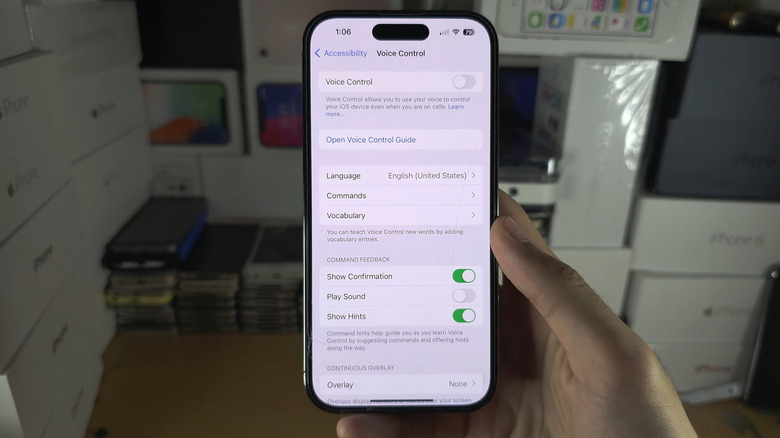
To turn off Voice Control, open "Settings" on your iPhone, go into "Accessibility," scroll down and tap "Voice Control," and then disable the toggle for it. You will no longer see the blue circle symbol. If you don't want to get rid of the feature entirely but just want Voice Control to stop listening, simply say "Stop Listening" out loud. The blue circle symbol will disappear, and only the vertical lines and arrows remain, with a line running diagonally across them.
If you notice that your iPhone keeps turning on Voice Control randomly, it could be tied to the side button. To fix that, open "Settings," go to "Accessibility," then into the "Side Button" option, and set "Press and hold to speak" to either "Siri" or "Off."
Keep in mind that Voice Control is just one of the many features on iPhones. There are other accessibility features worth exploring too if you are interested. Also, while we are on the subject, it's worth noting that Apple changed Voice Control's status icon a few years ago. Earlier, when you activated Voice Control, a microphone symbol showed up instead of a blue circle with three vertical lines and two arrows. On newer versions of iOS, you will see the latter.