

Why The Fire TV App Is Actually Worth Downloading

Amazon is largely known for being an online marketplace where you can buy items from other sellers, but the company sells a good variety of its own hardware. The Fire TV Stick is perhaps the most popular device in Amazon's catalog. It's the quickest and easiest way to turn your old TV into a smart one. The device slots into your TV's HDMI port and instantly breathes new life into it — allowing you to watch on-demand videos across all popular streaming platforms like Netflix, Disney+, and Apple TV.
Fire OS has grown over the years to now support more apps and offer a greater set of features. This includes things like being able to control your smart home devices using a Fire TV Stick, or enjoying cloud gaming through Amazon Luna or Nvidia's GeForce Now. The bundled remote is all you need to control your Fire TV device, and with support for Alexa, voice control simplifies things even further.
If that weren't enough, the Amazon Fire TV app that's available on Android and iOS also lets you control playback or summon Alexa, just in case you misplace the remote or need an easier way to type. The app has been around for a while, but has only recently received an overhaul in both design and function. The Fire TV app is no longer just a TV remote replacement — it can act as a companion hub for your Fire TV device.
What's new with the Fire TV app?
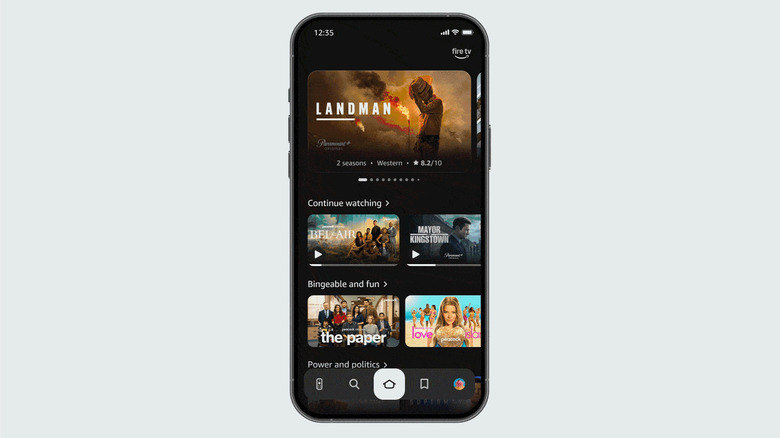
Amazon recently updated its Fire TV interface with a new look and more features, including new ways to use Alexa on your Fire TV. As part of the update, the Fire TV companion app for mobile has also received a new design, which is now more in line with the TV interface. You can still use the app to control your Fire TV device as before, but it now also doubles as a watchlist aggregator, allowing you to browse new content and play it on your TV.
Amazon emphasizes that the Fire TV app is now essentially a "second screen" for when you're watching TV. Instead of pausing what's already playing to head back and find something else worth watching, you can use the Fire TV app on your phone to queue up the next thing to watch on your TV. It's also a better way to add movies or TV shows that others recommend to your watchlist. Since the app lives on your phone, you can curate your library even when you're away from home.
If you can't spot the new features yet, make sure the app is updated to the latest version. To do this, check for updates in the Google Play Store on Android or the App Store on an iPhone. You will have to sign in with the same Amazon account as the one that's in use on your Fire TV.