

Google Just Gave Gemini Users A Powerful New Vibe Coding Tool
One of the buzziest use-case scenarios that emerged out of the generative AI wave was vibe-coding. Think of it as your usual back-and-forth conversation with an AI chatbot, but instead of asking it for answers or doing chores such as generating an image, the AI assistant generates code for you. So far, Lovable, Cursor, and Replit have maintained their status quo as the top vibe-coding platforms, while models like Claude Opus have emerged as hot favorites. Google is now throwing its hat in the ring with Opal, a vibe-coding platform that can now be directly accessed within the Gemini dashboard on desktop.
Opal was introduced in July this year, and by November, it had expanded to over 160 countries. So far, it has been available as an experiment via its own microsite at the Opal.Google hub. Now, when you open the Gemini web interface on a desktop, you will have built-in access to Opal. Notably, Opal has been baked into the core Gemini experience not as a dedicated mode, but as a custom Gem. The classic Opal.Google will continue to work as usual and serve as the hub for all user activities if you need more advanced controls.
Now, Opal is slightly different from other vibe-coding platforms mentioned above. It's fundamentally a no-code platform, but you don't actually see any code as you build your AI-powered product. Additionally, Opal is tailor-made for mini-apps, which run on the web, unlike a proper app for Android or iOS, which is published from an app store. Additionally, Opal lets you pick up mini-apps published by others and give them your own unique twist by modifying the underlying workflow. The mini-apps you create with Opal can handle tasks such as web research, text generation, and even image or video creation.
What exactly are Opal mini-apps?
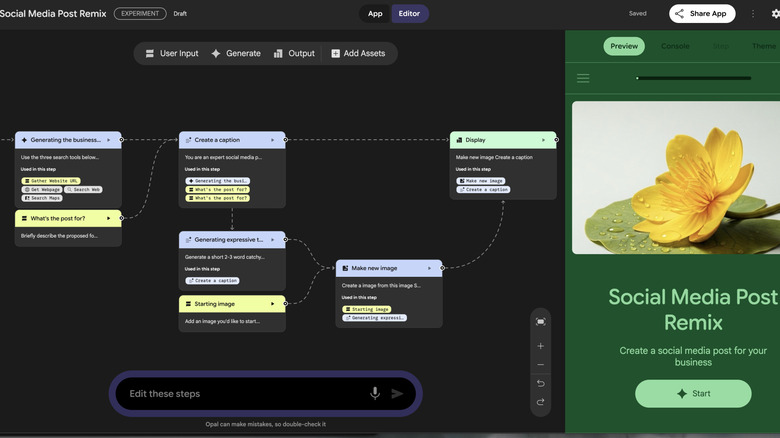
Opal, as mentioned above, is not a platform for building apps that can run natively on Android, iOS, Windows, or Mac devices. Instead, these are mini-apps that run in a web container and are tethered to your Google account. The idea is not too different from creating a custom GPT in ChatGPT or Gem for Gemini. Essentially, these are tailor-made versions of Gemini that are instructed to perform a specific task. The only difference between Gems and Opal is that the mini apps created by Opal can deploy multiple Google AI models in a workflow.
The other crucial difference is how Opal mini-apps handle a task compared to a regular task assigned to Gemini, or a custom Gem. In Opal, you start with a basic natural language prompt to describe the function of a mini-app. The AI then segments it across multiple steps, which appear as nodes linked to a chain. Each node is assigned a specific set of instructions, and each one can be edited to change the task or output. For example, you can assign web research to one node, turn it into a document on the next node, and then use Nano Banana image generator or Veo to turn the output into a series of images or a video.
The overarching idea behind Opal is to push multi-modal AI and to use it appropriately at different stages of a workflow. For example, you can create a mini-app that takes a topic or passage as input, then conducts comprehensive research to turn it into teaching material, and uses that research to develop slides and brief interactive videos. Simply put, you are creating a multi-stage AI agent in which you can fine-tune each step to achieve the desired output for some creative inspiration.