

This iOS 26 Bug Is Turning Certain Photos Red - Here's How To Fix It
Apple has just started rolling out the incremental iOS 26.2 update for iPhone users worldwide. The update adds a handful of new features, but it has seemingly missed a weird "red tint" bug that iPhone users have been reporting for the past few weeks. It appears that one of the minor iOS 26.1 updates has broken photo viewing on iPhones by giving a red color cast to pictures. On Reddit, multiple users have reported that older pictures clicked by another phone instantly get a deep red coloration when they tap and zoom into them on their iPhone.
It appears that the problem only surfaces when pictures that were saved in the Google Photos library (and clicked by an Android phone) are viewed in the Photos app on the iPhone. The problem is not limited to a particular smartphone model, as users have reported it for pictures captured with Samsung and Motorola phones. Apparently, the image tinting bug persists after installing the latest iOS 26.2 update, as well.
"Mine is doing this too. Any photo originally taken on my partner's Android turns red when I zoom in. They also turn black & white when I try to crop," one user wrote on Reddit. However, the issue doesn't appear to be widespread. I tried recreating it with pictures clicked as far back as 2020 using a variety of Android phones, and viewing it on an iPhone 17 Pro and an iPhone 14 Pro, both running iOS 26.2 software. However, the red tinting didn't pop up in any of those cases.
How to get rid of the red tiniting?
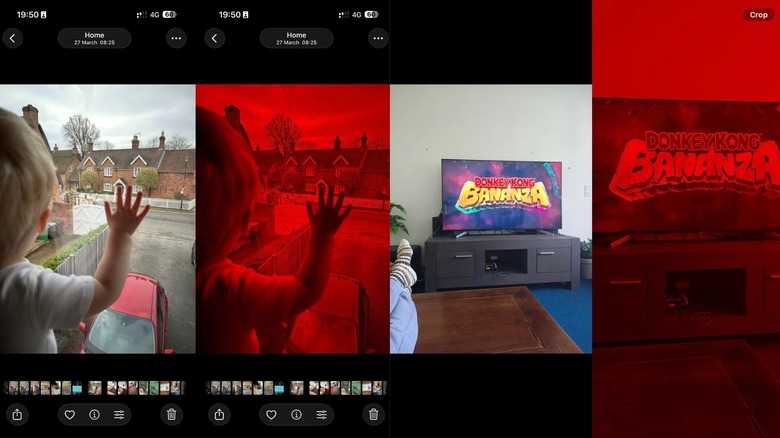
There's some speculation going on that it's an HDR issue, which is giving an unexpected red color cast to images. But so far, Apple hasn't commented on it. Moreover, no Android smartphone maker has mentioned the issue, either. Some Reddit users are claiming that it's due to corrupted files, in which only the Red color spectrum is being decoded out of the RGB collection, and that's why the images are appearing red. However, it's unclear why only a specific few files are affected and not the entire gallery of pictures clicked by a certain phone.
As far as a solution goes, nothing is official yet. However, a few users have suggested (and confirmed) that reverting to the original, unedited state fixes the red color problem. If you're seeing the aforementioned image discoloration issue on your iPhone, follow these steps:
- Open the reddened image in the Photos app on your iPhone.
- Tap on the three-dot option button in the top-right corner of the screen
- In the context menu that opens, select the Revert to Original option. Doing so will wipe all the edits done to the photo.
Since it's not a widespread issue, we would recommend against taking measures such as doing a device reset or wiping the gallery. If the edit revert doesn't work, it's best to wait until a corrective software patch is released or the involved brands issue a guideline.