

5 Apps You Might Not Realize Work With CarPlay
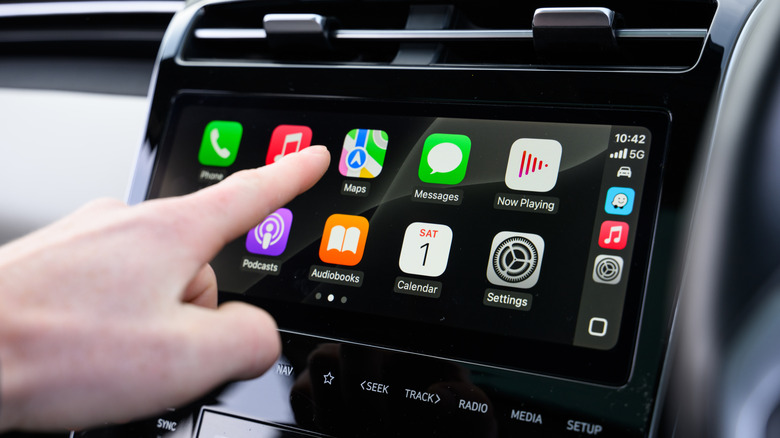
Once you've started using Apple CarPlay in your vehicle, it's difficult to imagine a time when you didn't have it. Being able to so easily access your music, podcasts, text messages, navigation system, and more without ever having to look down at your iPhone while driving, which could potentially compromise the safety of you and everyone else on the road with you, is tremendous. Because we are so attached to our smartphones nowadays, Apple CarPlay allows you to continue that connection when you had to sever it before. That being said, there are ways that you can use CarPlay that may not have ever occurred to you before.
Most CarPlay usage goes to the apps you expect to use in a car. You have your driving app of choice, be it Apple Maps, Google Maps, Waze, or other navigation alternatives. You also have your music, such as Apple Music or Spotify. These apps are simply extensions of things that we have been using in cars for many, many years at this point. However, there are many other apps that are Apple CarPlay enabled you can install. Here, we're going to look at five different CarPlay-ready apps for you to download, from providing you with further entertainment options for your drive to providing important information about the route you are traveling to connecting you with your workplace.
Audible
When it comes to what we listen to in the car, more often than not that ends up being music. However, with the advent of podcasts, that has become a popular way to pass the time for your long commutes. Of course, there is another major source of audio entertainment out there, which is audiobooks. Maybe even more so than podcasts, having an audiobook lets you make the most out of a long car ride, and if you are listening to audiobooks nowadays, you are most likely using Audible, the audiobook app owned by Amazon. Luckily, Audible is an app that can be used with Apple CarPlay.
Being able to listen to Audible audiobooks with CarPlay is nothing new. Audible first introduced CarPlay capabilities all the way back in the spring of 2015, just one year after the initial launch of CarPlay. Because this service was so new at the time, people may have been consumed by the basics of what CarPlay can do, so they may not have even realized that an app like Audible was possible to use with it. Some people still connect their iPhone with a USB or auxiliary cable to play their audiobooks, after all. Well, Audible is ready and waiting for you to use with Apple CarPlay.
Libby
Although Audible may be the most obvious provider of audiobooks, there are other, cheaper ways to get them as well. Just like with physical books, audiobooks are readily accessible from your local library. This has long been true in years past with CDs and cassette tapes, but as most people have moved away from these physical media methods, libraries have turned to apps to distribute their audiobooks. This is where Libby comes into play. Libby is an app that has partnered with over 22,000 different libraries that allow you to get your checked-out audiobooks straight to your smartphone. All you need is a library card to get them, and if you want to listen to them in your car, Libby is compatible with Apple CarPlay.
Compared to Audible, this is a much newer feature for Libby. The app only became compatible with CarPlay in the summer of 2019. Considering that the Libby service didn't launch until 2017, getting that enabled in just two years is pretty quick. Because of the mid-2019 launch for CarPlay though, many people may not have realized that this was even an option. Because our driving would drastically reduce only nine months after the launch due to the COVID-19 pandemic, the awareness of Libby and CarPlay may not have been very wide. If you are someone who loves to check out audiobooks from your local library, you can enjoy them with Apple CarPlay.
PlugShare
The popularity of electric vehicles is undoubtedly on the rise. Many people cannot resist the desire to drive a car that is not nearly as harmful to the environment, while also saving themselves quite a bit of money when it comes to the cost of fuel. There are plenty of pros and cons to having an electric vehicle, but one of the more annoying aspects is that the accessibility of EV charging stations is still relatively minimal, particularly when compared to the number of gas stations. If you drive an EV and intend to take long trips and don't own a portable charger, you need to know where the EV charging stations are along your journey. One of the best apps for doing that is PlugShare.
You may think you need to look up the stations along your journey before leaving, but PlugShare can connect to Apple CarPlay. That way you can see the stations on your route without having to look down at your iPhone. On the PlugShare map, the app will not only tell you what chargers are in your area, but it will also designate between public and high-power chargers as well. Also, if a charger is in use already, it will also let you know, so you can go to the next-nearest one on the map. PlugShare includes 48 different EV charging networks to choose from, including Tesla Superchargers, so you can customize your network preferences as well. For those with electric vehicles, PlugShare on CarPlay could be an invaluable resource.
Weather on the Way
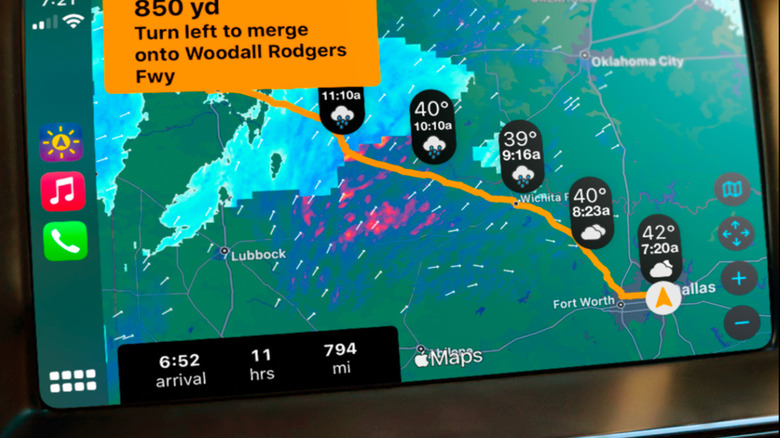
One of the key features of Apple CarPlay is navigation. Rather than relying on your vehicle's internal navigation system that could possibly be not up to date or unacle to provide real-time traffic updates, you can use services like Google Maps, Apple Maps, and Waze that give you about as up-to-date driving stats as possible as you make your way to your destination. What these navigation apps do not really account for is weather. If you are on a road trip that is hundreds of miles long, you might want to know real-time weather updates along your route, and that is where an app like Weather on the Way comes in handy.
Whether you want real-time weather updates, forecasting what weather is along your route for the future, or seeing live radar of certain areas of a map for rain and snow, Weather on the Way can accommodate you, and thankfully, it is perfectly compatible with Apple CarPlay. The display interface of the map should look quite familiar on CarPlay because Weather on the Way uses Apple Maps for the actual navigation but overlays weather information on top of it. Weather on the Way does require a subscription fee to use it, including monthly, annual, and lifetime fee options, but if you are frequently traveling long distances, having these weather updates on your CarPlay display could be incredibly important for keeping you safe and making your drive as easy as possible.
Zoom
Nobody likes to have to do work in the car. Frequently, a car ride is the place where we have our last minutes before we start work or first minutes after we put our work behind us. However, sometimes you just have to make work calls while you are driving. Traditional conference calls used to be the way people did this, but ever since the COVID-19 pandemic, Zoom has been the big way for employees to connect. Because many use Zoom as a video conferencing platform, you may not think that it is something that can be easily used in your car, but that just isn't the case. Zoom is another app that is compatible with Apple CarPlay.
You don't need to worry about the safety concerns that could come with Zoom video. When Zoom is connected to CarPlay, all calls are audio-only. You have the option to either make your own Zoom call or accept call invitations with CarPlay, and if need be, you also have the option to mute yourself on the call as well. Making your own calls can be done simply with your voice, but accepting a call is done with just a tap of your vehicle's infotainment screen. Making work calls in your car may not be something we want to do, but Zoom does indeed make it possible with CarPlay.