

The Kindle App For iPhone & iPad Has Features Amazon's Own E-Readers Don't

For those who don't own a physical Kindle device, there are options to download the app on your phone and/or tablet and read your books. In some instances, these apps receive features and updates that may not be available on Amazon's own e-readers, especially the older Kindle models. As of July 2026, Amazon rolled out three features for U.S. users of the Kindle iOS app and certain Kindle devices: Recaps, Story So Far, and Ask this Book.
While they are innovative updates that transform how people interact with their books, there have been concerns raised, especially surrounding the Ask the Book feature. Since it utilizes AI, the Author's Guild questioned the legalities of this update without the permission of authors and publishers. In addition to this, there's the general concern that the works are being used to train LLM models. According to Amazon, "the feature only uses content from the book as a prompt which is not retained or used to train the underlying AI model."
Recaps
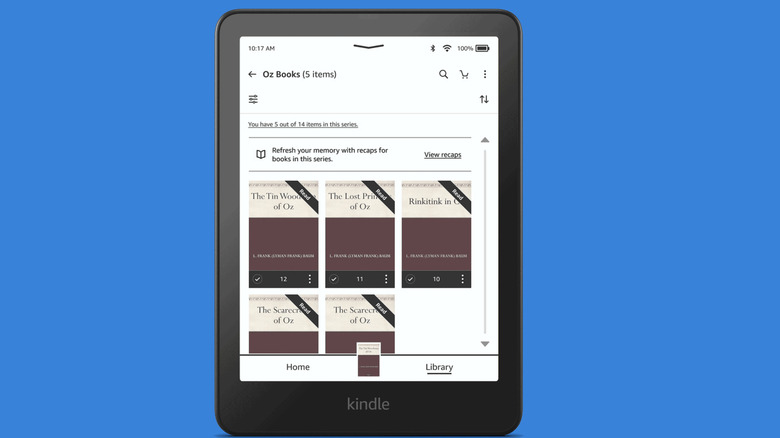
How often do you read a book series then put it down and only pick it up a few months or years later? Most of us experience a moment where we can't quite remember the specific details of what happened before, needing only a brief refresher to get back up to speed and get back into the world with the characters. That's what the Recaps feature is meant to do.
Amazon compares it to the "Previously on..." montage that airs before most TV shows. This feature is seen as a quick way for readers to catch up on a series and the major details of what happened up until the last book they read. It certainly marks an interesting step in the evolution of Amazon's Kindle and how it goes beyond being an e-reader. In the past, readers may have just headed to Wikipedia for a summary or simply gone with the flow in the new book until their memory was jogged.
On the Kindle iOS app, the Recaps feature can be accessed by pressing and holding the series grouping until the "View Recaps" option appears. An important note, though: this feature is only available for certain books.
Story So Far
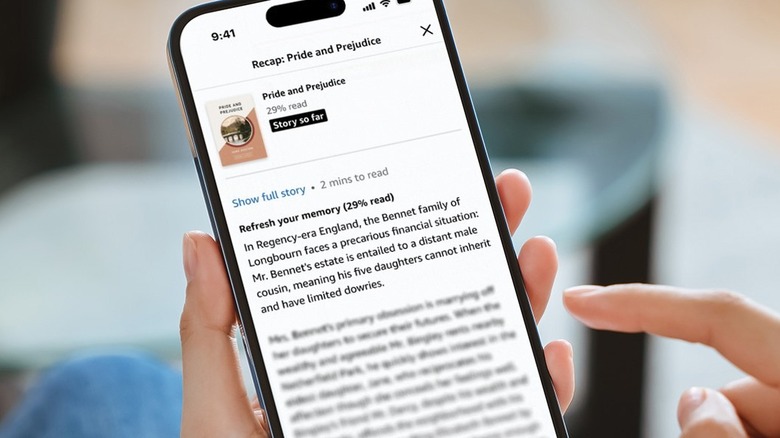
The Story So Far feature can be seen as the natural and logical extension of the Recaps function. It focuses on the current book that the reader is busy with — more specifically, the last point they reached in the story. According to Amazon, it's meant to be "spoiler-free," only providing details on the characters and plot until the specified location in the book.
There are mixed feelings about this feature among readers, though. While some welcome the ability to catch up on the story and its characters whenever necessary, others believe that's why there's the option to go back and re-read chapters for clarity.
Again, not every book has the Story So Far feature available, but readers can check by pressing down on a book in the library to see if the "Read recap" option pops up. If so, then the feature can be used at any time via the in-book menu.
Ask this Book
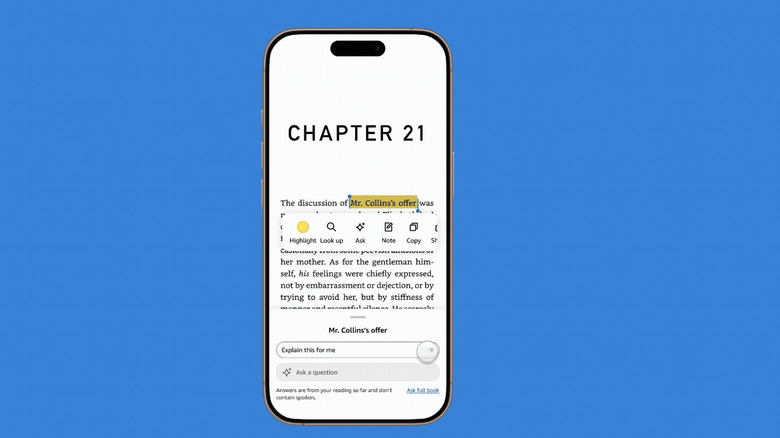
As of July 2026, the Ask this Book function was exclusive to the Kindle iOS app, with the plan to roll it out in the future. The controversial feature certainly changes the way in which readers engage with a book. Essentially, it's a chatbot that allows the user to ask a series of questions about the characters, themes, and plot of what they're reading.
The way it works is that a reader highlights a section on the page, then the Ask this Book feature pops up. The feature is meant to be spoiler-free in its responses and only up to the point in which the reader is in the book; however, there is the option to switch to "Ask full book," as well as to prompt further questions.
Undoubtedly, Ask this Book allows for a reader to probe and interact with the book beyond what's on the page, and it remains to be seen if it becomes the new standard for e-reading. Perhaps it might well be a Kindle trick that makes an e-reader (or app) more useful.