Thursday, May 10th 2007 by Vincent Nguyen


Worth Reading?


YesNo


+61 [63 votes]
Loading ... Loading ...

The Helio Ocean is well covered on SlashGear, so everyone should be familiar with its features as well as what it’s capable of. In case you need to get up to speed, take a look at this page then you can come back to this article and understand why I’m so excited about the Ocean.

Helio Ocean

As you already know, the Ocean arrived this morning and I’ve spent the last eight or more hours diving into this beast. The most important point I want to get across to anyone looking to purchase the Ocean is this: keep your expectations in check. It’s a well-featured device (don’t just call it a “phone”), however Helio never intended the Ocean to act as a smartphone in the traditional sense – future versions of the Ocean, perhaps, just not this one. Okay, that being said lets delve first into the “personal entertainment center”, or media player. It supports MP3, AAC, WMA, MPEG-4, H.264, VOD and MOD files formats. While in video mode, flipping from portrait mode to landscape mode is as easy as clicking the down button on the D-Pad or you can simply flip up the Ocean’s screen. Since the Ocean isn’t a smartphone, it doesn’t handle multi-tasking; you can’t use any other applications such as IMing while listening to music or watching a video. The software does allow you to surf or buy music from Helio Music store, though. While you enjoy your tunes, you’ll still be notified when someone send you an instant message.

IMG_1871_thumb


Ocean’s integrated messaging dashboard includes out-of-the-box built-in access to AOL email and AOL Instant Messenger, Yahoo! Email and Yahoo Messenger, Windows Live Messenger, Windows Live Mail, Hotmail, Gmail, Earthlink email and Helio Mail. Whew, that was a mouthful and I’m not even done with the list yet. In addition, Ocean also supports personal and business email accounts, although right now direct push email, calendar and contacts synchronization from an Exchange Server isn’t available. Helio informed me that it’s still being heavily tested and should be available in the upcoming months with no specific time frame. I discovered two features that

IMG_1871_thumb

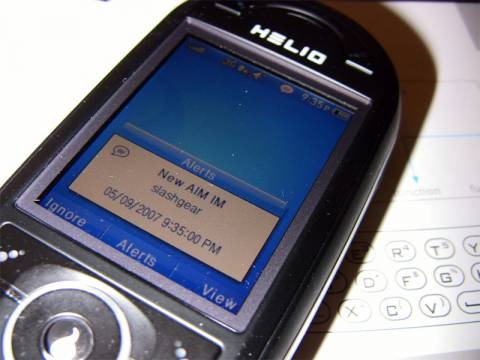
I really don’t like: not being able to turn off the audio notification for all incoming and outgoing messages without having to put the entire device in silent mode. Better yet, while in silent mode, it vibrates on all outgoing and incoming instant messages; trust me, this gets really annoying after a few minutes. This has been reported to Helio and I’m hoping there’ll be a fix for it shortly. The second annoyance is not being able to hide offline contacts in AIM. The feature is available for Yahoo! IM, so I just don’t understand why Helio didn’t include it in AIM. Helio added a nice touch by visually notifying of incoming messages while in the home screen, at which point you can choose to either ignore or view the messages. Also, while in other applications, there’s a message icon on the top right hand side to the left of the clock notifying you that you still have unread messages. To answer the several people who’ve asked, yes, IM does allow you to sign in as invisible. Ocean will allow you to send images from your album or newly taken photos to friends via instant messenger. In my tests, however, the images were apparently too big to go through, and even after sizing down the image the transmission failed again for some unknown reason. If you get this feature to work, make sure to drop me a comment.

Helio Ocean

It’s important to note that the Ocean’s contact list seamlessly syncs with Yahoo!, AOL and Helio Mail address books, allowing you to quickly find your friends, family and coworkers. You can either pull up a contact through Helio’s UI or just type a name from the Ocean’s idle screen and Smart Dialer searches the handset’s address book and pulls up full contact information, complete with icons to show if a person is online whether they’re using Yahoo!, AIM or Windows Live IM. The integrated search is a cool feature, eliminating a dedicated, space-consuming search box. Ocean will even initiate a web search, simultaneously querying multiple search engines including Yahoo, Google, Amazon and Wikipedia, all of which present their results in individual browser tabs.

Ocean sports a 2.4-inch, 260K color high-resolution QVGA display, two external speakers residing on the back of the device and support for various Bluetooth protocols such as A2DP. I didn’t having any problems pairing the Ocean up with the Plantronics 665 and Gennum nX6000 Bluetooth headsets. However, the Plantronics 260 Stereo Bluetooth headset managed to pair up but was unable to connect to the Ocean. Luckily I had the Etymotic ety8 Bluetooth Stereo Headset to test – and yes, they mated well. I bought a couple tracks from the Helio Store and downloads were relatively fast, considering Helio is using Sprint’s EV-DO network. I also bought and played a couple of games, all of which were entertaining. Ocean does not allow you to save downloaded video or music files to external media directly. You have to download them to the internal memory then manually move them over to the microSD card. It’s the same with emails; the Ocean doesn’t allow you to save emails to external storage.

I’m not a big fan of MySpace, so I didn’t even bother with it. If you’ve tested this feature, make sure to add your experience to the comment area. One of my favorite features of the Ocean (of all Helio devices for that matter) is the built-in GPS for Google Maps for Mobile and Buddy Beacon. Google Maps works as expected and comes with all the usual Google Map goodies. There isn’t much to add other than the built-in GPS, which provides your approximate location. For a run-down on Buddy Beacon you can check out my review of the Helio Drift, as the two systems are the same.

Ocean doesn’t allow editing of Microsoft Office documents. You can only view them as text files. If you’re crossing over from a Treo, Windows Mobile or Pocket PC Phone, don’t expect too much from the formatting, because it’s not pretty. I suspect that Helio will introduce new software that will at least allow documents to display properly.

Ocean is the first device that Helio designed from the inside out. It sports one of the first dual slider form factor featuring both an alphanumeric keypad and full QWERTY keypad available. I found the keyboard easy to use, but it inevitably required some retraining from years of using a tiny keyboard on the Treo and Blackberry devices. I don’t like how the space key is only slightly longer than the other keys, and I found myself mistakenly hitting the backspace key instead of the enter key quite often. Other than that, the keyboard is easy to use and very comfortably spaced out for typing with your thumbs.

The keyboard’s upper set of keys on the Ocean is too close together and cramped but you’ll find a way to get use to it. As far a comparing the Sidekick 3’s keyboard to the Ocean, I have to say I like the Sidekick 3 more. Again, this is a matter of preference, and I also like the cramped layout of the Treo 755p’s keyboard so don’t take my word for it! You need to test the Ocean out for yourself to see what’s best for you.

Ocean vs. Sidekick3’s keyboard layout:

Ocean vs Sidekick3's keyboard
Physically turning the Ocean horizontally and flipping it up will automatically change the screen orientation, and vice versa. This feature already exists in other devices such as the HTC 8525, so nothing new here. But what’s really cool is that if for some reason you answer a call while in horizontal landscape mode and you’re not using your headset, the call automatically is placed in speakerphone made. If you slide the keyboard closed, the call will continue and the speakerphone is automatically turned off. Unfortunately, Ocean doesn’t allow you to do anything else while using the phone; incoming instant messages, for instance, don’t get delivered until after the call ends.

Voice calls, whether you’re using the mic or speakerphone, were clear and crisp. Helio makes it very easy to add numbers to existing contacts or simply create a new contact based on a phone number in your recent call list.

Helio is actively working on a solution for Mac owners. As of now, there’s no easy way to sync the Ocean with OS X.

What’s in store for the Ocean in the near future? Expect more downloadable apps, MySpace v2 (coming early next week), Helio UP is being enhanced for integration with more services that will take advantage of GPS coordinate tagging of your pictures (that’s all I know for now so stay tuned for more info). According to Helio, Ocean is a platform upon which Helio will keep innovating and delivering firsts. So it looks like the Ocean is a sure bet and won’t be obsolete in the near future if you’re flirting with the idea of getting one.

Would I recommend the Ocean? The short answer is a definite yes, with the understanding that what you’re looking for is a well-featured device and not a smartphone. It’s still too early for me to rate the Ocean, since I’ve had just 12 hours of usage on it, but you can be sure that SlashGear will bring you a follow-up report very soon!

The Ocean costs $295. Plans with unlimited data access starts from $65 to $135 per month, depending on the number of voice minutes. If you want an all-you-can-eat plan for data and minutes, be ready to shell out $145 a month.

UPDATE 5/10/2007:

Ocean CAN multi-task, but does only for specific apps. The IMS client is always running in the background. You can surf the web while listening to music. Etc. It’s just that Ocean was designed to multi-task around specific use cases. Remember, it’s not a smartphone (but it’s starting to blur the lines between a featurephone and a smartphone).

I stated the following in the review:

“Ocean will allow you to send images from your album or newly taken photos to friends via instant messenger. In my tests, however, the images were apparently too big to go through, and even after sizing down the image the transmission failed again for some unknown reason.”

It’s important to note that I got Ocean as a pre-release, before market availability. Helio’s IMS servers are still undergoing preparations for production. This stuff is to be expected and that particular function may not yet be enabled.

Relate article: Make your own Helio Ocean ringtones


Walkthrough video of the Helio Ocean:

Helio versus Sidekick3, HTC 8525 and Treo 755p:

Sample video taken with Ocean’s 2.0 megapixel video camcorder:

Sample pictures taken with Ocean’s 2.0 megapixel camera:

Helio Ocean

Helio Ocean

Subscribe via RSS or Email | Read 7,718 times


  1.  Chris Scott Barr   View all comments by Chris Scott Barr  +7  Add karma Subtract karma Quote

    Awesome, I can’t wait to get mine in!

  2.  Mo   View all comments by Mo  +3  Add karma Subtract karma Quote

    nice review bro!

  3.  Vincent Nguyen   View all comments by Vincent Nguyen  +3  Add karma Subtract karma Quote

    forgot to mention that NO you cannot use MP3 as ringtones. This was never available from Helio and I don’t anticipate it to be available in the near or distant future.

  4.  Mo   View all comments by Mo  +4  Add karma Subtract karma Quote

    I just don’t understand how they couldnt just allow you to Hide your offline contacts, or allow us to make our mp3’s our ringtones, almost a scheme to make us buy from their “store” for ringtones

  5.  Chris   View all comments by Chris  Neutral  Add karma Subtract karma Quote

    Can you use M4A/AAC files as ringtones?

    As far as the offline contacts in AIM - not sure what you mean? In the screen shot it shows a category for offline contacts. If you drop into any other category does it show offline contacts there as well?

    For the vibrate issue, has anyone at Helio gotten back to you? I can’t believe a bug like that could pass through…Changing the alert volume (page 48-49 in the manual) doesn’t affect new message notifications?

  6.  Chris Davies   View all comments by Chris Davies  +6  Add karma Subtract karma Quote

    I am SO jealous right now.

  7.  draco8988   View all comments by draco8988  Neutral  Add karma Subtract karma Quote

    So what happens to instant messages when your out of reception or in a roaming area since you don’t get data in roaming do you receive it once your in a regular coverage area or is that instant message gone? Dose eveything closes down when you slide the device down or dose it give you the option to switch from number pad to landscape mode with out shuting down your current app or text message?

  8.  Vincent Nguyen   View all comments by Vincent Nguyen  +1  Add karma Subtract karma Quote

    Can you use M4A/AAC files as ringtones?

    [NO - nada!]

    As far as the offline contacts in AIM - not sure what you mean? In the screen shot it shows a category for offline contacts. If you drop into any other category does it show offline contacts there as well?

    [I manually closed the categories]

    For the vibrate issue, has anyone at Helio gotten back to you? I can’t believe a bug like that could pass through…Changing the alert volume (page 48-49 in the manual) doesn’t affect new message notifications?

    [Helio confirmed this tonight - you have to set silent mode, but doing that will cause the device to vibrate on incoming and outgoing messages]

  9.  Chris   View all comments by Chris  Neutral  Add karma Subtract karma Quote

    So it won’t let you load any ringtones on the device?

    What I meant is - on the other categories, do they show offline contacts inline with online contacts? Or are all of the offline contacts grouped in “offline contacts”

    That sucks about the vibrate - was there an indication that this is a bug and will be addressed or is it intended behavior?

    Thanks a million for the review and answering the questions!!!

  10.  Vincent Nguyen   View all comments by Vincent Nguyen  +1  Add karma Subtract karma Quote

    So it won’t let you load any ringtones on the device?

    What I meant is - on the other categories, do they show offline contacts inline with online contacts? Or are all of the offline contacts grouped in “offline contacts”

    That sucks about the vibrate - was there an indication that this is a bug and will be addressed or is it intended behavior?

    Thanks a million for the review and answering the questions!!!

    No self-made ringtones can be loaded - period. I’m too tired right now, will address all the questions tomorrow. Right now, I just wanna tuck the Ocean somewhere for a few days before playing with it again :).

    Please keep the questions and concerns coming, I’ll do my best to address all of them.

  11.  Cameron   View all comments by Cameron  Neutral  Add karma Subtract karma Quote

    Is Google Talk included in the list of Instant Messagers available on the Helio Ocean? I’m also shocked that you’re unable to make your own ringtones. How open is the Helio platform? Any chances that there’ll be hacks to allow people to play their own tones?

    Looking forward to reading more!

  12.  Vincent Nguyen   View all comments by Vincent Nguyen  +2  Add karma Subtract karma Quote

    Google Talk is not available at first launch but according to Helio, their working on something. That’s as far as I know.

  13.  Daniel Christen   View all comments by Daniel Christen  +1  Add karma Subtract karma Quote

    When and where will the device be release???
    Can’t wait!

  14.  Chris   View all comments by Chris  Neutral  Add karma Subtract karma Quote

    Helio allows you to load custom ringtones on every other phone: http://www.helio.com/page?p=su.....ads_pcsync

    Should be something similar for the ocean.

  15.  Mo   View all comments by Mo  -1  Add karma Subtract karma Quote

    Chris that page you just linked, what part of it allows you to load your own ringtones? cuz i wish i knew this about my hero

  16.  Jason   View all comments by Jason  -1  Add karma Subtract karma Quote

    SMAF-MA5 Ringtones are the highest bitrate format ringtones are supported.

  17.  Whammy   View all comments by Whammy  -1  Add karma Subtract karma Quote

    Does the ring around the D-Pad have the same rainbow color thing like the Hero did?

  18.  Lori   View all comments by Lori  -1  Add karma Subtract karma Quote

    Any word on SSH coming for the Ocean?

  19.  Thomas   View all comments by Thomas  +1  Add karma Subtract karma Quote

    random question….. does it happen to have some kind of setting to make a sound when u slide it open like the sidekick?

    oh and does it come with decent ringtones?

  20.  Vincent Nguyen   View all comments by Vincent Nguyen  -1  Add karma Subtract karma Quote

    Does the ring around the D-Pad have the same rainbow color thing like the Hero did?

    Not that I’ve seen.

  21.  Vincent Nguyen   View all comments by Vincent Nguyen  -1  Add karma Subtract karma Quote

    Any word on SSH coming for the Ocean?

    Not that I’m aware of.

  22.  Vincent Nguyen   View all comments by Vincent Nguyen  -1  Add karma Subtract karma Quote

    random question….. does it happen to have some kind of setting to make a sound when u slide it open like the sidekick?

    oh and does it come with decent ringtones?

    Not that I can tell.

  23.  Vincent Nguyen   View all comments by Vincent Nguyen  Neutral  Add karma Subtract karma Quote

    oh and does it come with decent ringtones?

    Listen to the free rings that comes with Ocean and decide for yourself:
    http://www.slashgear.com/helio.....115203.php

  24.  DashTheHand   View all comments by DashTheHand  -1  Add karma Subtract karma Quote

    Is there any talk to add even the oldest available of personal ringtones such as midi’s?

  25.  JiveKooly   View all comments by JiveKooly  +1  Add karma Subtract karma Quote

    I may be interested in getting this phone but im a little nervous. Ive had the sidekick for years so im really nervous.

    Im not a big phone person, Im an AIM and email person. I just want to know if the IM works as well as the sidekick AIM. Is it easy to navigate from conversation to conversation?

    Im a little concerned with the sound thing. I like to have different sound settings for different features. like I ususally keep the email, text and IM messaging silent, but I keep the phone on vibrate. this is impossible with the Ocean? Would it be wise to wait a few months for them to iron out the kinks before purchasing this?

  26.  Chad D   View all comments by Chad D  +1  Add karma Subtract karma Quote

    Can you tether the Ocean to your laptop to use as a modem?

  27.  Vincent Nguyen   View all comments by Vincent Nguyen  -1  Add karma Subtract karma Quote

    Can you tether the Ocean to your laptop to use as a modem?

    I confirmed with Helio representative that no tethering is permitted.

  28.  Vincent Nguyen   View all comments by Vincent Nguyen  Neutral  Add karma Subtract karma Quote

    I may be interested in getting this phone but im a little nervous. Ive had the sidekick for years so im really nervous.

    Im not a big phone person, Im an AIM and email person. I just want to know if the IM works as well as the sidekick AIM. Is it easy to navigate from conversation to conversation?

    Im a little concerned with the sound thing. I like to have different sound settings for different features. like I ususally keep the email, text and IM messaging silent, but I keep the phone on vibrate. this is impossible with the Ocean? Would it be wise to wait a few months for them to iron out the kinks before purchasing this?

    IM works great - as good or better than SK3. Existing contacts are listed in another tab keeping all your conversastions conveniently in one location. Yeah, the sound thing needs to get fixed - extremely annoying to get a “ding” everytime you send and receive a message.

  29.  MichaelLee   View all comments by MichaelLee  -1  Add karma Subtract karma Quote

    Does it support MMF ringtones? If so, can this be done when/if the sync manager comes out for the Ocean? Also, can I change backgrounds on the Ocean using the sync manager?

    If it does support MMF ringtones, I can definitely upload customized ringtones!!!!!!!!!

  30.  MichaelLee   View all comments by MichaelLee  -1  Add karma Subtract karma Quote

    Also, I’m aware that the background is 240*320……..When you switch to landscape mode, how does the background change? —> Does it stretch out the picture or is it basically just the same picture as in vertical mode, and the sides are left blacked out?

  31.  Tyler   View all comments by Tyler  -1  Add karma Subtract karma Quote

    When do you think they will fix the sound problem with AIM?

    If you have the phone on vibrate, will the IM’s vibrate or does the phone have to be In Silent mode for the IM’s to vibrate?

  32.  Vincent Nguyen   View all comments by Vincent Nguyen  Neutral  Add karma Subtract karma Quote

    When do you think they will fix the sound problem with AIM?

    If you have the phone on vibrate, will the IM’s vibrate or does the phone have to be In Silent mode for the IM’s to vibrate?

    No idea if and when the sound thing with IM will get an update. You must put the device into Silent mode for IM to vibrate.

  33.  Tyler   View all comments by Tyler  -1  Add karma Subtract karma Quote

    Also, I have heard that there is a way to make MP3’s ringtones. There is an option somewhere in their software you can download from their site that allows you to make it a ringtone file..
    http://www.phonescoop.com/arti.....;fi=886024
    It is on this forum, I know it says drift but I’m sure it would work for the ocean as well..

  34.  Tyler   View all comments by Tyler  -1  Add karma Subtract karma Quote

    I’m thinking about getting an Ocean very soon, but if I were to get one would I be able to get the fix for the IM sound problem if they release one, or would they just start manufacturing them with the fix?

  35.  Vincent Nguyen   View all comments by Vincent Nguyen  Neutral  Add karma Subtract karma Quote

    I don’t think it’s a bug or anything like that - but Helio simply didn’t think to add it as a feature to turn “off or on” the notification within the software.

    The other thing I noticed with Gmail is you cannot select “labels” to display. So what’s in your inbox is what you get. This is a problem for me because I label all my emails and archive 99% of them. Since there’s no search function and I can’t view archive emails I’ve labeled, this is an inconvenient. Gmail app allows search and select labels to view - I hope Helio will provide these two enhancements in the future updates.

  36.  Vincent Nguyen   View all comments by Vincent Nguyen  Neutral  Add karma Subtract karma Quote

    Also, I’m aware that the background is 240*320……..When you switch to landscape mode, how does the background change? —> Does it stretch out the picture or is it basically just the same picture as in vertical mode, and the sides are left blacked out?

    background in portrait mode are full (which is nice). But in landscape, they’re sized down leaving the about half an inch on either side with nothing. Looks kind of weird but it doesn’t matter much to me. Only time I’m in landscape mode is when I’m using some applications so I hardly see the background. This is going to the a problem with the iPhone as well.

  37.  Tyler   View all comments by Tyler  -1  Add karma Subtract karma Quote

    Sorry to keep annoying you with questions and stuff but, if I were to get the ocean before they release the update for the IM sound thing would I be able to download it or do I have to wait and get one?

  38.  Tyler   View all comments by Tyler  -1  Add karma Subtract karma Quote

    You do just log into AIM on the Ocean and other messengers, rather than setting an away message for like aim saying you are on your mobile phone. You don’t need to change your aim settings on your computer for the messages to be sent to your phone right? You can just log into it on your phone…

  39.  Vincent Nguyen   View all comments by Vincent Nguyen  -1  Add karma Subtract karma Quote

    Sorry to keep annoying you with questions and stuff but, if I were to get the ocean before they release the update for the IM sound thing would I be able to download it or do I have to wait and get one?

    I don’t know the answer to this.

  40.  Casey   View all comments by Casey  -1  Add karma Subtract karma Quote

    Nice review. I’m currently using a drift, and was really disappointed at the performance (switched from a SideKick3) of pretty much all the apps. There was zero multi-tasking… AIM and MSN rarely worked (when I ‘received an IM’, i’d run the program, but nothing would come up…) and everything takes forever to load… even just going into the ‘games’ or ‘apps’ menu takes about 30 seconds to load…

    How does this device perform comparatively? SK3 was a great device, but the internet was too slow… switched to helio for faster web connection, and got shafted w/ a laggy interface…

    I like my Drift, but I’m really hoping for a more powerful phone. EV-DO +HTML is a grand idea…

    I don’t know how much you’ve played w/ the Drift, but I’m hopin’ for a solid comparison between the two… Is it worth switching over? $300 isn’t too much, and i’m more than willing to pay it for a jump in performance… WAP browsing is the pits and being without instant messaging apps (due to the fact that they simply don’t work well on the drift) is something I’ve grown accustomed to, but not by choice…

    To me, the drift is more of a phone, and less of a ‘device’ than my Sidekick was… But the ocean looks like everything the Sidekick 3 should’ve been…

    What’s the word?

    Buy it? or don’t?
    -Casey

  41.  Tyler   View all comments by Tyler  -1  Add karma Subtract karma Quote

    What do you know about promo codes?
    Are any fake, and can they hurt you like identity theft or stealing your credit card number?