JP REGISTER LOGIN

Worth Reading?

NoYes

+46 [52 votes]

Talk Bluetooth headsets and the two key names in the business are BlueAnt and Aliph.  The two companies take it in turns to hold the top-spot, each trying to outdo the other with noise reduction, added features and general audio quality.  For the past few months, Aliph have arguably ruled the roost with their Jawbone 2; now BlueAnt are back with the V1, flaunting a new level of user-independent voice control.  Has the headset market flip-flopped back to the Australian company?  We’ve been testing out the BlueAnt V1 for the past few weeks to find out.

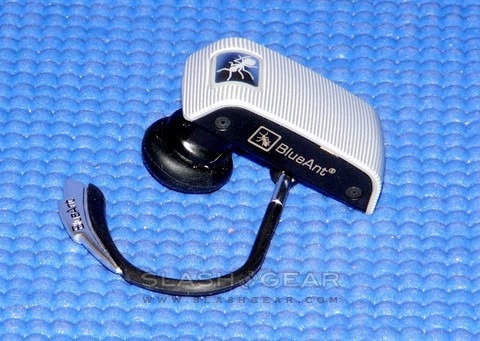
BlueAnt V1 Voice Control Bluetooth Headset 11

It wasn’t all that long ago that you’d be looked at oddly for using a Bluetooth headset – people assumed you were talking to yourself – but with the recent proliferation of hands-free driving laws the wireless earpieces have become far more common.  At the budget end there are plenty of cheap options, but if you’re looking for something more comprehensive then your choices have generally been Aliph or BlueAnt – with the $129.99 price tags to match.  Both have above-average sound quality, comfortable fit (with interchangeable ear-buds as standard) and various degrees of background noise cancellation.  What BlueAnt bring to the table now is an unprecedented method of voice control, which they’re calling BlueGenie.

In terms of hardware, the V1 measures in at a short though mildly tubby 41 x 17.5 x 11.2mm; with the ear-hook it weighs 11g.  A non-replaceable Li-Ion battery is quoted as good for up to 5hrs talktime or 200hrs standby, with a MicroUSB socket for recharging (or performing firmware updates).  Controls are limited to a multifunction button (with built-in red and blue LEDs) and volume up and down.  The V1 supports Bluetooth v2.1 and has a quoted range of 10m; it can hook up to your phone either via the Headset or the Hands-Free profiles. 

BlueAnt V1 Voice Control Bluetooth Headset 16

In the box you get the headset, a range of rubber ear-buds and Comply foam tips, interchangeable rubberized-metal and translucent plastic ear hooks, and a gooseneck USB cable for use with the supplied car charger and AC adaptor.  If you’d rather use your cellphone charger (assuming it has a MiniUSB plug) BlueAnt supply an adapter to plug it into the MicroUSB socket.

Voice Isolation uses the dual microphone array to offer echo suppression, noise reduction and wind noise cancellation, with BlueAnt’s usual two strength levels: Standard and Max.  Switching between them in-call is a matter of pressing the multifunction button.  The V1 can pair with up to eight devices (although only one can be active at any time) and uses the standard 0000 passcode.

Comfort is good, with enough ear-bud choice to suit all but the most unusual of wearers.  Although you can remove the ear hook and wear the V1 without it, we had mixed results and preferred the security of having it in place.  We actually prefer the fit of the earlier BlueAnt Z9i, which felt more snug, although build-quality overall is on a par.  Buttons are easy to press.

BlueAnt V1 Voice Control Bluetooth Headset 9

Of course, BlueGenie is the headline feature here, and it requires a little explanation.  Basically, all of the V1’s features and settings are controlled by voice commands, using relatively normal speech rather than stilted keywords.  Triggered by a press of the multifunction button, the headset prompts you to “Say a command” to which you have a variety of choices.  Asking “What can I say?” gives a contextually-relevant list of the current options; for instance, say “Check battery” and the V1 will tell you how much charge it has left.

It might not sound like much, but in practise it’s incredibly straightforward.  Rather than using the hardware buttons to scroll through interminable menus, trying to decipher multiple coded beeps, you can simply navigate the V1 by voice.  Each option or setting is confirmed with another voice prompt, letting you know exactly what it is you’ve changed, and at any point you can say “Cancel” and start over.

BlueAnt V1 Voice Control Bluetooth Headset 10

Accuracy is, considering the absence of any training, very good.  Different versions of the BlueGenie software will be made for different accents; right now, the US version understandably works best with an American accent.  Ironically, this is a headset you could really begin using without looking at the manual – say “Tips and Tricks” and it will verbally explain some of the cooler features, even – but if you do that you’ll probably only be enjoying half of its abilities.

The V1 supports voice-activated favorites dialling, which can be set up in two different ways.  Out of the box, it assumes you have programmed your cellphone’s speed-dials with Voicemail as key one, home as key two and office as key three; saying “Call home” will then automatically trigger the key two speed-dial.  Of course, if your home number is key three, then you’ll need to say “Call office” to dial it; the V1 doesn’t know what the number is, only associates the command with the speed-dial position.

Alternatively, you can programme specific numbers into the V1 itself.  This requires you to receive a call from that number; you then hold the volume down button for three seconds.  The headset asks you which voice command to associate with that number.  BlueAnt have pre-programmed Google’s GOOG-411 voice-guided directory enquiries number into the headset, triggered by saying “Call GOOG-411″ (the company tells us that future versions of the headset could see other services added, although right now it’s a Google exclusive).

It’s a good system in that it’s phone-independent, although the inability to change the tags (”office”, “home”, etc) is a little restrictive.  We would’ve liked to be able to actively voice dial, too, telling the V1 which number to call.  However it puts the BlueAnt ahead as it means – with some careful Favorites list planning – you can now use voice dialling with the iPhone.  The second number in your iPhone Favorites list will correspond with telling the BlueAnt to “Call Home”, and so on.

BlueAnt V1 Voice Control Bluetooth Headset 13

BlueGenie handles incoming calls, too, reading out the number (though not the caller ID name) and letting you answer or reject by saying “Answer” or “Ignore” (alternatively you can press the multifunction key once or twice to do the same thing). 

Audio quality is a mixed bag.  The Voice Isolation goes from Standard, suitable for normal environments, such as the office or at home, to Max, which is a lot more draconian.  BlueAnt describe the Max setting as intended to make your voice “more intelligible”, and in the process you do lose some intonation and subtlety.  However it does a reasonable job of cutting out engine noise or wind. 

What’s revolutionary about the BlueAnt V1 is the BlueGenie voice control engine.  Nothing else on the market can come close to it, and that’s backed up with sound quality that’s the equal of Aliph’s Jawbone 2.  If we had any criticism, it would be about the fit: while the V1 is okay, it’s slightly edged out by the Jawbone 2’s snug fit and the Z9i’s super-comfortable earpiece.  Undoubtedly subjective factors, though; what we can say with far more certainty is that the V1 is one of a kind.  BlueAnt might not score a knockout blow against Aliph in terms of audio, but it’s the voice control that eventually gives the V1 the edge.

The BlueAnt V1 is available now, priced at $129.99.  Check out the full SlashGear V1 gallery here

Unboxing Video:

YouTube Preview Image
Subscribe via RSS or Email | Read 18,106 times

17 Responses to “BlueAnt V1 Voice Control Bluetooth Headset Review”

  1. Chris Brogan... August 26, 2008

    I was just about to buy another Jawbone, but because of your review, now I’m thinking a bit about the blue ant. Thanks for sharing your detailed review.

    +3  Add karma Subtract karma  
  2. refused9150 August 26, 2008

    I absolutely love everything about this headset. I was really thinking about getting a Jawbone as well but this is a must have. Perfect!!

    +1  Add karma Subtract karma  
  3. Janie August 26, 2008

    How did “unboxing videos” get to be so popular online?

    I would MUCH rather see a demo… than waste all that time watching someone
    opening the box. (And in this case… struggling to open the box.)

    How can this headset “redial the iphone” by listening for the “redial” command… when the phone itself doesn’t have any ‘redial’ feature?

    -1  Add karma Subtract karma  
  4. willjill September 15, 2008

    Decent sound quality, good standard bluetooth headset functionality, great new Voice Control feature and yet poor earbud design and really bad non-changeable presets.

    BlueAnt’s pre-configured calling commands/positions limit the V1 from being a great fit with the iPhone 3G. The Voice Control features work really well, yet BlueAnt chose to pre-populate the first five voice activated speed dial positions with voicemail/home/office/favorite/GOOG-411… meaning that you have to speak those very phrases to dial your first four iPhone call favorites and that the GOOG-411 entry overrides your phone’s fifth favorite and cannot be changed.

    Obviously, iPhone users don’t need the voicemail preset for speed dial 1 since they have Visual Voicemail, and since they have Google Maps app and Google Search app they really don’t need an unchangeable GOOG-411 overriding their 5th favorite.

    BlueAnt needs to move the GOOG-411 down to the 9th speed dial position and just add normal voice prompts for positions 1-8. I think users of all types of phones would be lot happier.

    We’re sticking with the better sound quality on our Plantronics 925 headsets.

    +1  Add karma Subtract karma  
  5. Beth September 22, 2008

    I work with Sensory the company behind the VUI software on the V1. I mention this not only in the interest of full disclosure but also that it has provided me the opportunity to check out the V1 early. So wanted to offer up my thoughts.

    I REALLY dug the pairing process. You just put it in your ear and you were off. The headset began immediately talking me through the pairing process to my phone. Even though I am tech savvy enough to manage pairing of Bluetooth phones, I still appreciated the ease of set up the voice interface brought. Stores such as Sprint have implemented formal programs to help consumers set up their wireless devices (email on the phone, pairing via Bluetooth, etc.) so it’s apparent there is a need to make consumer electronics as accessible as possible to the least tech savvy consumer. The V1 will pair up to eight Bluetooth devices and you can use the V1’s VUI to set all of that up.

    Also, I primarily use a headset while I am driving and I love how much the the VUI improves the driving experience. With my previous headset, I had to fumble with the phone to make calls and with incoming calls I looked at the phone display to see who the call is coming from. Now, I can just tell the headset who to call and when I receive a call, the headset tells me the number it’s coming from at which point I can say “accept” or “reject”. All of this is making me one of those people that constantly wears their headset (but only in the car ;-P).

    -1  Add karma Subtract karma  
  6. William September 22, 2008

    I like the Voice Control feature, but REALLY hate the default speed-dial presets!!!

    Voice Control feature works well, yet BlueAnt (or Sensory) sadly chose to pre-populate the first five voice-activated speed dial positions with voicemail/home/office/favorite/GOOG-411… meaning you have to speak those very phrases to dial your first four speed-dial favorites… and the fifth GOOG-411 entry overrides your phone’s fifth favorite and *cannot* be changed.

    Sad that such ground-breaking technology would be greatly limited by dumb settings. If you have an iPhone 3G like me, you’ll probably hate them too. Every time I call my wife I have to say, “Call Voice Mail” (since she’s set to speed-dial 1). Is that stupid or what? :-(

    The decision to configure the V1 presets this way seems like a marketing choice and not a very well thought out one at that. Simply configuring Speed Dial 1, Speed Dial 2, Speed Dial 3, etc, would have been far more functional and adaptable for most users. Plopping the GOOG-411 present at #5 is completely presumptuous… they should have used slot #9, if at all.

    Hopefully idiocy won’t prevail and BlueAnt/Sensory will provide a firmware update the sets the matter straight.

    +1  Add karma Subtract karma  
  7. Jerry September 24, 2008

    Hey I use one of BlueAnt V1’s. I love it. It’s a great headset. The voice recognition works AWESOME. I’ve tried voice recognition before and it didn’t work well with my accent. It’s very easy to use, very comfortable. I like the ability to “call home” and call into my speed dials, because my phone doesn’t have voice recognition. Oh the battery life is especially good.

    Neutral  Add karma Subtract karma  
  8. CWT September 24, 2008

    So am I correct in understanding,
    1- you can not say a full number to be dialed
    2 – the incoming number is said and not the persons name, even if the person is in your speed dial.
    If so can either of these things be switched somehow by using the headset a different way?
    Thanks for any help!

    Neutral  Add karma Subtract karma  
  9. Beth September 25, 2008

    William/willjill –
    Just to clarify, the V1 does not take anything over. You don’t have to use any of the preset voice dials on the V1 and you can have your iPhone exactly as it was.
    To get the V1 to call voicemail simply put your voicemail in slot 1. There was some reasoning behind this, actually. Voicemail is the #1 most commonly preset dial for handsets and vendors that preset this virtually always use slot 1. That’s pretty much industry standard when built in.
    Instead of saying, “call voicemail” to dial your wife, simply move her to speed dial 4 and then you can call her by saying “call favorite” and if you don’t like that, move her to speed dial 6 and say, “call speed dial 6”.
    Also, you are mistaken about speed dial 5 being taken over by GOOG-411. You can put any speed dial you want into that slot and it will still work on your handset AND you can still say “call GOOG-411”.
    As far as visual voicemail, Google Maps, etc., the whole idea of the V1 headset is to allow you to access commands and information without having to grab the phone to look at it while driving. “Call GOOG-411” lets you call any business in the US by voice with no charge and the “call voicemail” command gets you into your voicemail to hear it without having to pull over the car to read it.

    -1  Add karma Subtract karma  
  10. NetApex September 26, 2008

    Quick question. I am a big fan (sad to say) of Microsoft’s Voice Command. I currently have the Z9 (not the Z9i, just the Z9) and am looking to replace it with either the Z9i or the V1. My question is, will it work with Voice Command? Currently I can press my main button and my phone will dial whatever I tell it to (or open programs or etc…) I will go to the Z9i if the V1 will interrupt that process. Does anyone happen to know if that is the case?

    Neutral  Add karma Subtract karma  
  11. Hooch224 September 28, 2008

    Confirmed on the V1 w/ VC and Verizon xv6800 (so the preset gripe is officially dead in the water). Personally I feel the pre-programmed positioned Speed Dials were intended for people that do not own smart/ PDA handsets. After all … the VC setup IS in the manual…

    -1  Add karma Subtract karma  
  12. Nick T October 7, 2008

    Blueant is an Australian compnay. I can’t find ANY information anywhere clarifying why this DOES NOT APPEAR to be available in Australia. At all.

    Cheers! (The Z1 is available, then it stops).

    Neutral  Add karma Subtract karma  
  13. Jason K October 31, 2008

    We always search for and compile the list of top 10 Bluetooth Headsets. BlueAnt V1 is a very solid headset and we found it to be easier to use and holds on better than the Jawbones. We always update our list. You can find it at:
    http://www.Top10ProductsOnly.com

    Neutral  Add karma Subtract karma  
  14. danny January 15, 2009

    After reading countless reviews, I purchased the V1. The voice command is worth every penny. The presets I adapted to very easily, and if I want to call someone that is not a top ten person, I have found I say “call my phone”, and it switches me to my phones voice activation. Awesome! I no longer have problems with the person I’m talking to understanding me. If the background noise level is interfering, I push the button, and it filters the noise right out. Another Awesome! I have very average ears, you know…not too big, not too small, and the squared off edges of the device touch my ear no matter what angle I try to put it. After about two hours I start feeling uncomfortable with that edge. To compensate, I only wear the device when needed, and it has worked out fine. I could not be happier, and am looking forward to a future device with voice control that is even more user friendly and rounded instead of square. This phone is the first in what I believe is the future of all blue tooth headsets. Truely hands free. My device telling me what number is calling, and it asking me if I want to accept or ignore the call is at this time unmatched and to me…absolute best.

    +1  Add karma Subtract karma  
  15. Jeff Hack January 18, 2009

    Jawbone 2 vs. BlueAnt V1: I’m a software sales guy that spends a lot of time on my cell phone, so I’ve used bluetooth headsets extensively for the past year. I currently own both the Jawbone 2 and the BlueAnt V1. After using both, I can assure you the BlueAnt V1 is FAR superior (although it’s not as pretty!) They both have great sound quality, but let me give you some highlights from my perspective
    -The JawBone 2 falls out of my ear all of the time (I have 3 kids!)
    -BlueAnt V1 has WAY more options for comfort and a secure fit
    -BlueAnt V1 is super easy to pair (and re-pair, using voice commands)
    -BlueAnt V1 ships with 3 options for charging it (car, wall and USB)
    -BlueAnt V1 also lets you check it’s battery life with a voice command!
    -BlueAnt V1 has AMAZING voice command features, like the incoming caller ID, redial last outgoing and call back last incoming, turn off LED lights, turn headset off, and the ability to use my Blackberry’s built-in Voice Dialing(just hit BAB once, say Phone Command and the Blackberry’s Voice Dialing takes over!)
    -Volume control is easy to access on the BlueAnt V1 and the buttons can also be used to transfer the call back to your handset (when necessary)

    Finally the Voice Isolation control (Low, Med and High) gives you great options for quality.

    Oh yea, I forgot to mention the BlueAnt V1 is actually less expensive too!

    I’m not an editor for any magazine or blog site, just a user. I’ve used both the the BlueAnt V1 is FAR superior.

    +2  Add karma Subtract karma  
  16. Jeff Hack January 18, 2009

    [quote comment="49922"]I like the Voice Control feature, but REALLY hate the default speed-dial presets!!!

    Voice Control feature works well, yet BlueAnt (or Sensory) sadly chose to pre-populate the first five voice-activated speed dial positions with voicemail/home/office/favorite/GOOG-411… meaning you have to speak those very phrases to dial your first four speed-dial favorites… and the fifth GOOG-411 entry overrides your phone’s fifth favorite and *cannot* be changed.

    Sad that such ground-breaking technology would be greatly limited by dumb settings. If you have an iPhone 3G like me, you’ll probably hate them too. Every time I call my wife I have to say, “Call Voice Mail” (since she’s set to speed-dial 1). Is that stupid or what? :-(

    The decision to configure the V1 presets this way seems like a marketing choice and not a very well thought out one at that. Simply configuring Speed Dial 1, Speed Dial 2, Speed Dial 3, etc, would have been far more functional and adaptable for most users. Plopping the GOOG-411 present at #5 is completely presumptuous… they should have used slot #9, if at all.

    Hopefully idiocy won’t prevail and BlueAnt/Sensory will provide a firmware update the sets the matter straight.[/quote]

    William – if iPhone has Voice Dial, just use the “Phone Command” option on the BlueAnt V1 – works great with Blackberry’s Voice dial

    Neutral  Add karma Subtract karma  
  17. gilsron January 25, 2009

    Jeff Hack, thanks for your input. I read in one pleace that the Z9i sound quality is changing from one device to another. In fact they mentioned Blackberry Curve 8300 as a device with which you get poor sound quality.
    For me the sound quality, especialy how I am heard is the most importat issue. Can any one provide information on how V1 is preforming with Blackberry Curve 8300.

    +2  Add karma Subtract karma  

Post a comment

Please login to leave a comment. If you haven't signed up, you can do so free here. Lost your password? Reset it. With SlashGear account, you will be able to participate on SlashGear Forums.