

Apple Time Capsule Review - Backup Made Easy For Leopard Users
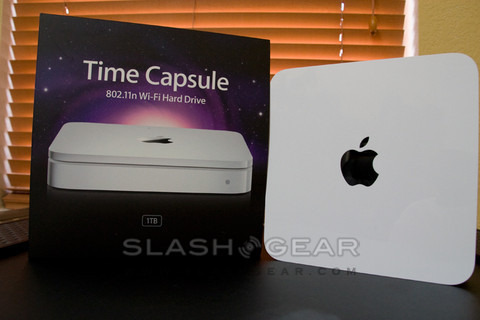
Data backup falls resolutely at the dreary end of the tech-task scale; periodically market researchers release stats showing how few people take the time to safely copy their accumulated files, usually prompting a guilty DVD burning session which never gets repeated. Apple's Time Capsule, then, was welcomed with excited upon its announcement; with the slick, careful design Apple are renowned for, could they manage to make even backup sexy? To be fair, it's a pretty huge challenge. You'll be hard-pressed to find a nicer looking network hard-drive, or one so straightforward to set up, but Time Capsule undoubtedly has its caveats.
The resemblance to an Apple Airport Extreme is not just skin deep; the Time Capsule is basically that 802.11n WiFi router with an added hard-drive. That means you get three gigabit LAN ports, one gigabit WAN port, a USB port and WiFi in a/b/g/n flavors. You can choose between the 2.4GHz and 5GHz bands, which is useful if you already have a WiFi network you want to keep using: set the Time Capsule to 5GHz and while you lose out on backward compatibility with some WiFi devices, you won't be plagued by interference. When we said the Time Capsule was just an Airport sharing casing space with a hard-drive, we weren't quite accurate; Apple has packed the power brick in there too, meaning the power cable is just that, a cable.

Aside from the device itself and that cable, the typically-minimalistic box contains an installation disc (with software for both Mac and Windows) and the usual clutch of quickstart and warranty booklets. On the disc is the latest version of the Airport utility, v5.3, and a walk-through setup guide that manages to make installing a new router relatively straightforward. You can also choose to add the Time Capsule as a bridged device on an existing network, if you're happy with your current router, or should you be replacing an Airport Extreme it'll clone the old settings.

Windows users (for whom XP SP2 and Vista are catered for) get the short end of the stick: the Time Capsule shows up as another volume in the network folder, ready to have files copied across. You can add a password but that's pretty much it. It's when you use the Time Capsule with Leopard's Time Machine app that things get clever; like the rest of us, Apple knows that it's not enough to slap a chunk of storage down and expect people to religiously backup to it, you need to make things relatively automatic.
The updated software basically lets Time Machine work with the new, network-attached drive as if it were a local one. As with any fresh backup, the first time you run it takes an age as Time Machine copies everything across to the Time Capsule's hard-drive. Gigabit is your best option here – we found it took roughly an hour to copy 10GB using the wired connection – as, despite the claimed speeds of 802.11n, it would definitely be an all-night operation carried out wirelessly. Of course, subsequent backups only transfer the changed data; Time Machine kicks in each hour (or sooner if you prod it manually) and squirts the altered files across to the Time Capsule's storage.
In a sense, that could be the end of the review: Time Capsule sits quietly – there's a low-noise fan in the base but things still get toasty warm – archiving your data until the fateful day you want to perform a restore. However people expect more from network-attached storage, and it's here that the Apple device is less comprehensive.

As an all-in-one unit, upgrading the internal hard-drive isn't really catered for. Yes, 500GB or 1TB should see you happy for a while, but if you've a few computers backing up to the Time Capsule the space will eventually dwindle. Thankfully the USB port can handle an external hard-drive, which shows up as a separate volume, and you can even plug in a USB hub and add a number of drives. We had no problem hooking up a USB hard-drive and a flash memory key; they were recognised on all the connected machines, both Mac and Windows. There's no provision, though, for setting up an impromptu RAID array. You can't mirror the internal hard-drive to an external one, nor can you address all the free space as a combined volume.
The USB port can also handle a printer, letting all networked computers send documents to the same machine. It's not a print server, though, and we managed to cause it a few headaches by trying to simultaneously print from a number of computers: while dealing with one, the others bounced back with error messages about the printer not being ready, rather than being queued up. Really, asking the Time Capsule to share a printer is only sufficient for home use where print jobs are sporadic; it's just plain inadequate in a busier environment.
Unlike many network-attached drives, the Time Capsule won't act as a media server either. Apple TV units don't recognise the storage, and although you can move your iTunes library onto it there's no provision for multiple users to all access it at the same time. Hopefully both of these features could be introduced with a firmware update, as they'd turn the Time Capsule into a true media hub.
Anyone looking for something more for their money right now, though, could find better options elsewhere, whether they're more interested in RAID redundancy, media servers or advanced drive management. The obvious alternative that comes to mind is Drobo, which has all three – however, it also has a $499 price tag (that's what you'd pay for the 1TB Time Capsule; the 500GB version costs $299) and that's before hard-drives or an ethernet interface. A better comparison is perhaps Buffalo's LinkStation Pro Duo, the 1TB version of which you can currently pick up for around $300.
Shop around, then, and you'll find similar, not as elegant as Drobo perhaps, but with some of the same functionality, and for the same price or cheaper than Apple are asking for the Time Capsule. The biggest clincher, though, is software support: right now, Time Machine won't backup to any NAS but the Time Capsule, and despite the hardware being basically the same as that of the Airport Extreme, it won't see a USB drive plugged into that either. Apple earns a big black mark for that one.
Have Apple failed to sprinkle their magic across backup, then? No, not at all: if you're a Mac user who is less than organized when it comes to data management, Time Capsule could be ideal. It's very much a set-and-forget solution, with straightforward setup and the reassurance of Time Machine making sure you never lose your files. Advanced users may sneer, but for the legion of Mac owners who up until now have never bothered backing-up, Time Capsule could be just the medicine.
[rating:3.5/5]
Unboxing video