
Apple MacBook Review - Late 2008 Model
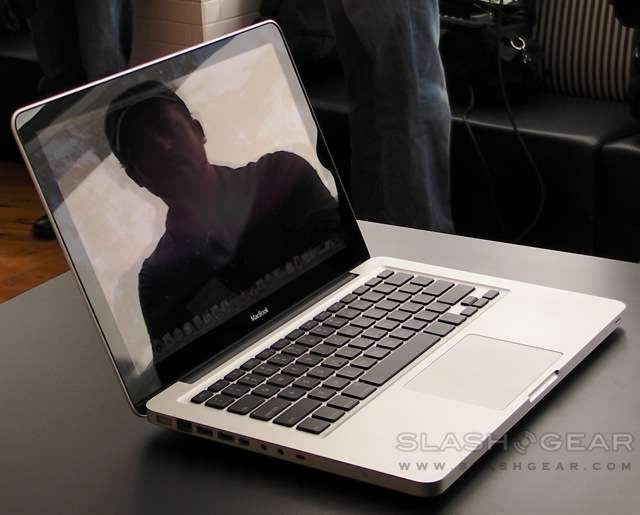
Of all the things Apple should be blessing Steve Jobs' Reality Distortion Field for, it's the perennial success of the MacBook despite not having undergone a serious update in more than two years. As Jobs himself declared at the notebook's launch, the MacBook remains the best selling Macintosh; no RDF was necessary when faced with the new aluminum model's design. It's not, however, the $800 notebook some were predicting – and even more hoping for – so where does this mini-MacBook Pro fit in?

For many people they'll want it to fit in their bag, or on their desk, or in their hands – anywhere, in fact, where they can touch it. There's no denying Apple's strength in industrial design, especially when they have a new, glossy manufacturing method to publicize alongside it. The 1.5-pound casing is hewn, sliced and buffed from a great hunk of aluminum, leaving something only a little thicker than the MacBook Air at 12.8 x 8.9 x 0.95 inches (the Air is a mere 0.7-inches thick). Into that, Apple pour a heady mixture of the latest ULV Core 2 Duo chipset and NVIDIA graphics, topped off with a multitouch trackpad and lashings of glass.

Filled up this way, the MacBook weighs 4.5-pounds. Part of that weight comes from the new, flush-fitting glass display panel, now edged in black rather than the old MacBook's distinct bezel. The absence of a matte option will frustrate those working in direct sunlight (and who will find little solace in Apple's "you can always tilt the screen, or move" advice) but everyone else will be entranced by the vibrant colors and overall brightness. The same 1,280 x 800 resolution as the previous model, it uses LED backlighting to increase visibility while also saving power.


The keyboard is another point where the Air and the MacBook share DNA. In black against the brushed silver, each key stands proud through its own cut-out (backlit in the top-spec MacBook), and typing remains perhaps the most pleasant way to do so bar a Lenovo 'board. Underneath sits the new, 39-percent larger trackpad, freshly topped in glass and barren of any visible buttons; instead, a well-weighted press acts as a single click, while software allows different areas of the pad to represent double- or right-clicks.
It also borrows the latest in multitouch technology, bringing gestures with two, three and four fingers. The same two-finger gestures are present as before, but now you can scroll through photos with three digits, or switch between apps or trigger Expose with four. Short of an iPhone embedded in the palm rest it's the best touch-implementation in a trackpad to-date.

Ports have been shaken down to occupy only the left-hand side of the new MacBook, with both new additions and casualties along the way. Two USB 2.0 ports, a gigabit Ethernet port, audio in/out and the clever MagSafe power port remain, but DVI and FireWire have been jettisoned in favor of a new Mini Display Port. This fresh socket – not, as many are assuming, a proprietary Apple technology – earns its place by virtue of supporting higher resolutions (up to 2,560 x 1,600) and integrated audio than DVI can, but it's more usually a business connector and users may struggle to find as broad a choice of monitors with the port. Of course, Apple will happily sell you a 24-inch Cinema Display to use with it, also announced on Tuesday, but anybody else will have to stump up for the adapter cables. It seems cheap of Apple not to include at least one such adapter in the MacBook box.

The 8x slot-loading SuperDrive lives on the right-hand side of the notebook, sadly not a Blu-ray drive since Apple believes the licensing issues too troublesome to navigate. The same old iSight camera, now hidden behind the glass bezel, lurks above the screen. Connectivity gains draft-n support and Bluetooth 2.1+EDR as standard, but there's no ExpressCard slot so 3G WWAN modems – still not offered as an integrated option by Apple themselves – will have to be USB. The relatively mediocre speakers from the previous MacBook are replaced with a far meatier, more satisfying pair, and there's a built-in Omni directional microphone for VoIP and video conferencing.

Two stock variations of MacBook are available, one with a 2.0GHz Intel Core 2 Duo and the other, which we have to test, with a 2.4GHz chip. Each has 3MB L2 cache, 1066MHz frontside bus and 2GB of DDR3 RAM as standard; maximum supported memory is 4GB. The cheaper 2.0GHz MacBook comes with a 160GB 5,400rpm SATA hard-drive, with 250GB or 320GB versions optional; the 2.4GHz model automatically gets the 250GB drive. Each can alternatively be fitted with a 128GB solid-state drive, which promises faster access times and reduced power use at the not-insubstantial cost of $600-700. We can't quite envisage a scenario where specifying the SSD would make sound financial sense; happily, unclipping the battery from the underside of the case exposes the hard-drive, so future upgrades – when prices are more reasonable – should be straightforward.

Recognizing, perhaps, that more people choose to do media editing and gaming on their notebooks where once such chores could be left to a desktop, Apple have eschewed Intel's integrated graphics offerings and instead thrown in with NVIDIA's brand new GeForce 9400M. Packed with 256MB of dedicated DDR3 memory, the 9400M is capable of simultaneously driving the internal LCD and an external screen at up to DisplayPort's maximum 2,560 x 1600 resolution. It's a move that clearly prioritizes graphical grunt over battery life, as the NVIDIA chipset is undoubtedly more power-hungry than Intel integrated versions.

In choosing the ULV P8600, which runs at 25W, Apple have guaranteed that rival Windows machines – where the 35W CPU alternative is more common – will edge ahead in processing power. If you compare the MacBook to the more extreme ultraportables, however, such as Apple's own MacBook Air, the bigger notebook comes out brighter. Ironically, Apple themselves may have created the most appealing alternative to the Air, for all but the most space-crazed of buyers.

The new battery design contains a 45-watt-hour Li-Polymer power-pack, with only 80-percent of the capacity of the previous MacBook. Apple's own estimates suggest five hours of wireless usage; in the short time we've been using the notebook, we've managed between 3.5 and 4.5hrs away from the mains, depending on screen brightness, wireless and optical drive use. It sounds silly, but among our favorite features of the new MacBook is the move of the LED battery status indicator from underneath – requiring you to flip it upside down – to the left-hand side.

It's hard not to fall for the aluminum MacBook. No, it's not an $800 machine, in fact even the reduced old-type plastic MacBook still available as a sop to budget buyers is still just under $1,000. Next to it, though, you get a glimpse of how the new MacBook puts serious pace between the models that went before.
Performance, with an ultra-low voltage processor, is never going to overwhelm, but the MacBook does a decent job of balancing what mobile users are currently looking for – decent graphics, reasonable run-time on battery power, jaw-dropping good looks that are sturdy to boot – and only asks that buyers not blanch at the inevitable price-tag. $1,299 for the entry-level 2.0GHz MacBook and $1,599 for the 2.4GHz version is a considerable amount of money, and it makes things like Apple's dismissal of Blu-ray – that licensing is a logistical nightmare, and they're waiting for the market to settle down – rankle. Yes, it might be tricky, but surely that's what Apple charges their premium prices for. Right now, it smells of herding customers into the iTunes HD offerings, freshly bolstered recently with more TV content.


While you may find cheaper, though, and even better specified, none will run OS X Leopard and none will have the same design clout as the new MacBook. On that level alone, RDF or not, the "best-selling Macintosh" crown is likely to be passed on to the new aluminum MacBook.
MacBook Unboxing
]