Thursday, May 3rd 2007 by Vincent Nguyen


Worth Reading?


YesNo


+9 [13 votes]
Loading ...

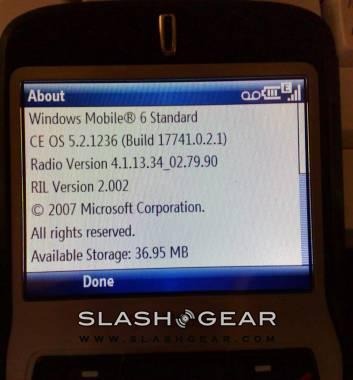
Well, well, well it looks like the T-Mobile Dash is the first to get an upgrade to Windows Mobile 6 beginning Friday, May 4th. I’ve had a few days with my newly upgraded Dash sporting WM6 and must say everything is just dandy. The screen seems brighter – moving around the device and loading apps seem a lot snappier.

dash with wm6

So what’s new in this upgrade?

  • An improved e-mail set up experience, which allows consumers to go to one place on the device to set up e-mail accounts (POP3, MSN, Outlook, etc.) and doesn’t require you to know any server settings for the most popular service providers.
  • An improved Windows Live client that includes features like tabbed IM sessions, voice notes, etc.
  • T-Mobile’s myFaves service now includes e-mail as communication option in addition to text, MMS, etc.
  • T-Mobile also added Voice Command (voice control software) and Office Mobile

dash and wm6The free WM6 upgrade will be available online to T-Mobile Dash customers beginning May 4 at http://www.t-mobile.com/wmupgrade.

Before you flash your Dash with the maintenance release, make sure you check and do the following first:

  • USB sync cable is connected to the computer.
  • All running applications on the computer have been closed.
  • USB sync cable is connected to the Dash to establish an ActiveSync connection with the computer.
  • Back up your personal data from the Dash to your computer using ActiveSync to make sure you don’t lose any of your data. You can also restore your personal data back to the Dash using ActiveSync once the download is done. (Optional)

The upgrade should be breeze. I’ve gone through the upgrade process…so drop me a note should you run into some problems.

Thanks Jax and Kristen - [Press Release]

Subscribe via RSS or Email | Read 2,848 times


  1.  Ewdison Then   View all comments by Ewdison Then  +1  Add karma Subtract karma Quote

    I’ve upgraded mine, went very smooth and without a hitch.

    I like how it makes my font a lot crispier, but feels a little slower

  2.  John Moen   View all comments by John Moen  Neutral  Add karma Subtract karma Quote

    I did update also…went without any problem. However contacts no longer have voice tags and after speaking with T-Mobile folks it appears it is a screw up in this relesase….

    I tired evey suggestion they gave me ….no menu in contacts or speed dial provide for the option.

    Voice Command is dreadful…fails miserably and does not work with my 2.0 Motorola Bluetooth …and according to T-Mobile …does not work with Bluetooth….

    What was the point of putting this junk software in this release…

  3.  dm   View all comments by dm  Neutral  Add karma Subtract karma Quote

    I did update also…went without any problem. However contacts no longer have voice tags and after speaking with T-Mobile folks it appears it is a screw up in this relesase….

    I tired evey suggestion they gave me ….no menu in contacts or speed dial provide for the option.

    Voice Command is dreadful…fails miserably and does not work with my 2.0 Motorola Bluetooth …and according to T-Mobile …does not work with Bluetooth….

    What was the point of putting this junk software in this release…

  4.  dm   View all comments by dm  Neutral  Add karma Subtract karma Quote

    wm6 is really buggy. I concur about the voice command POS. No voice tags, I’m gonna get in wreck trying to use this phone now. At least 5 was stable. This is definitely NOT. Also, coreplayer, which I just bought won’t play right, music stutters throughout song. What’s with the tmobile faux empathy “gee I’m really sorry about this, shucks it would bother me…” what kinda seminar did they all go to to try to be so kind and understanding - friggin’ waste of time! Anyhow wm6 has made the dash a paperweight. many more problems, homescreens

  5.  Derek   View all comments by Derek  Neutral  Add karma Subtract karma Quote

    The T-Mobile support docs lead me to a phantom “Add Voice Tag” menu option. It doesn’t exist! Voice Command refers to a “record” button. I can’t find a record button on the Dash.

    In Windows 5, video full screen was landscape and used the screen efficiently. In Windows Mobile 6, the video is rotated and appears much smaller with big black borders.

    Other areas of the new system are nice. Will they supply a fix for these basic items?

  6.  Satsuki Then   View all comments by Satsuki Then  Neutral  Add karma Subtract karma Quote

    The T-Mobile support docs lead me to a phantom “Add Voice Tag” menu option. It doesn’t exist! Voice Command refers to a “record” button. I can’t find a record button on the Dash.

    In Windows 5, video full screen was landscape and used the screen efficiently. In Windows Mobile 6, the video is rotated and appears much smaller with big black borders.

    Other areas of the new system are nice. Will they supply a fix for these basic items?

    I know! i did an upgrade on it too, i will try to contact the support on monday

  7.  dm   View all comments by dm  Neutral  Add karma Subtract karma Quote

    I spent over an hour on the phone with tmobile - lame attempts - “do cold boot …” to fix problems. Scripts from hell. Anyhow they would NOT send a replacement phone by way of this logic: the upgrade is a software issue, the warranty is for hardware, sorry phone doesn’t work right but you can buy another one! Got supervisor, same problem. Then remembered I’d had a few problems with the phone a couple of months age and bootstrapping those complaints, they finally gave in and are sending me a wm5 dash replacement. They really should have a way of reversing the update, that would save a lot of trouble. Anyhow I’m heading back to wm5.

  8.  Vincent Nguyen   View all comments by Vincent Nguyen  Neutral  Add karma Subtract karma Quote

    I spent over an hour on the phone with tmobile - lame attempts - “do cold boot …” to fix problems. Scripts from hell. Anyhow they would NOT send a replacement phone by way of this logic: the upgrade is a software issue, the warranty is for hardware, sorry phone doesn’t work right but you can buy another one! Got supervisor, same problem. Then remembered I’d had a few problems with the phone a couple of months age and bootstrapping those complaints, they finally gave in and are sending me a wm5 dash replacement. They really should have a way of reversing the update, that would save a lot of trouble. Anyhow I’m heading back to wm5.

    I didn’t have any problems and neither did Ewdi. However, my brother upgraded and ran into the same problem as you did. Lucky for him CompUSA replaced his DASH for $6 under their phone replacement program. Let me check with T-Mo and see what’s up.

    Thanks for letting us know…and really sorry to hear you’re having problems.

  9.  Raeyne   View all comments by Raeyne  +4  Add karma Subtract karma Quote

    Folks, the “record” button on the Dash defaults to the “Home” button to the left of the 5-way pad. Took me forever to find it, though!

    The speed voice tags are not *missing*… they have been replaced with voice command which works very well once you’ve played around with it for a while.

    There are very simple registry fixes for the rotated videos and if you look around the web you will find the ROM pack to go back to WM5 if you want. All it takes is a little bit of searching. And, as always, the friendly folks at howardforums.com are happy to help out with any problems you may have.

    Don’t fret, it is all fixable! The only downside to any of this is that I, too, feel that the phone is slower. Perhaps this will be fixed with a windows mobile update which you can now easily download through your settings menu ;)

  10.  dan petroni   View all comments by dan petroni  Neutral  Add karma Subtract karma Quote

    Ok-

    Did the M6 upgrade… but my SIM card wasn’t compatible because it was an older 2002 version TM SIM. TM sent free SIM and the Dash worked great… except.
    Can’t use voice tags on bluetooth on this new upgrade W6 version on my dash as stated above. Now the replacement app, voice command can be used on the phone by pressing the Home key… but doesn’t get activated my Jawbone BT headset. What where they thinking… or better yet what was I thinking? The darkside does it again.

  11.  David Winick   View all comments by David Winick  Neutral  Add karma Subtract karma Quote

    Tmobile told me today that they have removed the link to Windows Mobile 6.0. Apparently they have realized what garbage it is, at least on the Dash. My problems included:
    1) not syncing all of my contacts or calendar items
    2) stopped the Push email technology from working - in fact, every time i tried to manually get email, it popped up with an error saying i was roaming!

    After over an hour with tech support and 5 different people (none of whom knew the phone like I do), I was told it was a Microsoft problem and too bad. So, I went to a local store, and they told me that 6.0 just doesnt work. In fact, the new release of the latest HTC phone, scheduled for tomorrow, is anticipated to be a disaster given that it comes preloaded with 6.0.

    Finally, i called tech support again and demanded that they send me a new Dash with 5.0 given that the phone has a one year warranty. Thankfully, they agreed. Clearly they are experiencing this quite a bit.

  12.  Todd   View all comments by Todd  Neutral  Add karma Subtract karma Quote

    t-mobile customers beware!!! I had an issue with my DASH and I was then instructed (by t-mobile customer support) to download this new version. Now, my email cannot be sent to my phone and it has taken (so far) about 8 hours for t-mobile to figure out why???
    I am still currently waiting for a call back as they are trying to figure out why this is happening. If you have a work email account that you rely on, you may want to wait before upgrading to this as it has caused a significant amount of lost time.

    The customer support group at t-mobile is not at all properly trained to handle any quesitons that arise and put you on hold for minutes to figure out your issues. This is a horrible release and you should all reconsider before downloading!!!

  13.  Concerned   View all comments by Concerned  +1  Add karma Subtract karma Quote

    HI! Just a Bit of advice David W. was misinformed T-mobile is NOT taking the WM6 upgrade off the website. It will remain there and later patches will be updated later on. The Wing with preloaded WM6 (also dashes being bought from store are also preloaded with wm6 now) is not having any major issues at this time nor was it predicted to have any major issues.

    The issues currently with the Dash are being worked on. By no means is tech support ignoring your concerns. I take dash calls all day long and yes there are problems. But you have to understand there are ALWAYS problems when an OS first comes out. In order to fix the problems you have to find them and we do look for them but a lot of the issues are coming from you customers, who have a better hand on access to the dash than every rep on a call center floor. The fact that you are helping us by bringing these issues to our attention is great. But please bear with us as we are trying to help get these resolved. The one thing that we want you all to check is the ROM version on the phone. There are websites out there that have the WM6 upgrade but they are not a “Valid” T-Mobile copy. If your ROM version isn’t 1.22.531.4T (yes must have T) then you do not have a copy of the software that was meant for the dash and we suggest you reload with our version from our WMupgrade page (this can be found from your myt-mobile page).

    I know the last thing you want to hear is “i am sorry your having this issue” but I truly am sorry. The best thing you can do right now if you find issues is report it to us and please work with us as we try and fix this issue for you. I know, from a customer stand point, that it is hard having a problem with something you use in your everyday life. Please dont just blame this on T-mobile as we did not write the software. We are trying to fix the major issues now. Please bear with us as we find all the fixes for all the issues.

  14.  Ewdison Then   View all comments by Ewdison Then  Neutral  Add karma Subtract karma Quote

    HI! Just a Bit of advice David W. was misinformed T-mobile is NOT taking the WM6 upgrade off the website. It will remain there and later patches will be updated later on. The Wing with preloaded WM6 (also dashes being bought from store are also preloaded with wm6 now) is not having any major issues at this time nor was it predicted to have any major issues.

    The issues currently with the Dash are being worked on. By no means is tech support ignoring your concerns. I take dash calls all day long and yes there are problems.

    But you have to understand there are ALWAYS problems when an OS first comes out. In order to fix the problems you have to find them and we do look for them but a lot of the issues are coming from you customers, who have a better hand on access to the dash than every rep on a call center floor. The fact that you are helping us by bringing these issues to our attention is great.

    But please bear with us as we are trying to help get these resolved. The one thing that we want you all to check is the ROM version on the phone. There are websites out there that have the WM6 upgrade but they are not a “Valid” T-Mobile copy. If your ROM version isn’t 1.22.531.4T (yes must have T) then you do not have a copy of the software that was meant for the dash and we suggest you reload with our version from our WMupgrade page (this can be found from your myt-mobile page).

    I know the last thing you want to hear is “i am sorry your having this issue” but I truly am sorry. The best thing you can do right now if you find issues is report it to us and please work with us as we try and fix this issue for you. I know, from a customer stand point, that it is hard having a problem with something you use in your everyday life. Please dont just blame this on T-mobile as we did not write the software.

    We are trying to fix the major issues now. Please bear with us as we find all the fixes for all the issues.

    Thank you for the information.

  15.  Cynthia   View all comments by Cynthia  Neutral  Add karma Subtract karma Quote

    cannot send email from dash accounts: optonline, aol and yahoo. mail disappears in inbox and does not save in gmail. mail does not save in hotmail.

  16.  Dr. Bob   View all comments by Dr. Bob  Neutral  Add karma Subtract karma Quote

    HI! Just a Bit of advice David W. was misinformed T-mobile is NOT taking the WM6 upgrade off the website. It will remain there and later patches will be updated later on. The Wing with preloaded WM6 (also dashes being bought from store are also preloaded with wm6 now) is not having any major issues at this time nor was it predicted to have any major issues.

    The issues currently with the Dash are being worked on. By no means is tech support ignoring your concerns. I take dash calls all day long and yes there are problems.

    But you have to understand there are ALWAYS problems when an OS first comes out. In order to fix the problems you have to find them and we do look for them but a lot of the issues are coming from you customers, who have a better hand on access to the dash than every rep on a call center floor. The fact that you are helping us by bringing these issues to our attention is great.

    But please bear with us as we are trying to help get these resolved. The one thing that we want you all to check is the ROM version on the phone. There are websites out there that have the WM6 upgrade but they are not a “Valid” T-Mobile copy. If your ROM version isn’t 1.22.531.4T (yes must have T) then you do not have a copy of the software that was meant for the dash and we suggest you reload with our version from our WMupgrade page (this can be found from your myt-mobile page).

    I know the last thing you want to hear is “i am sorry your having this issue” but I truly am sorry. The best thing you can do right now if you find issues is report it to us and please work with us as we try and fix this issue for you. I know, from a customer stand point, that it is hard having a problem with something you use in your everyday life. Please dont just blame this on T-mobile as we did not write the software.

    We are trying to fix the major issues now. Please bear with us as we find all the fixes for all the issues.

  17.  Dr. Bob   View all comments by Dr. Bob  Neutral  Add karma Subtract karma Quote

    Just wanted to clarify. I also updated my Dash to the new ROM version from the t-mobile site and noticed my ROM version doesn’t have the “T” at the end of 1.22.531.4, even though I received the update from T-Mobile. Is this Ok?

    Thanks

  18.  Ron   View all comments by Ron  Neutral  Add karma Subtract karma Quote

    I too upgraded to win mobile 6. I see the email setup is just like a PC (Outlook) but it doesn’t work with COX cable. They do not allow cell phone access to send mail on their servers how it worked before Tmobile must of been paying royalties or something. One of the techs said they stopped being the middleman. Others say they will fix it I been waiting for call backs from two of the techs for weeks now.
    ea it has to be rebooted a lot if you do not check do not warn me when roaming on one of the advanced setup tabs you get the error your roaming when your not.

    You can send through hotmail lol but I lost the ability to send on my home email account since Cox does not allow cells to send email.
    tip keep task manager handy close unused programs or it will lock hard I had to take the battery out once too.

  19.  Randell Durk   View all comments by Randell Durk  Neutral  Add karma Subtract karma Quote

    I agree with the article at the top of the page about the update being a breeze, it truly was. I manually backed up all the files that I could that were not in use as part of the operating system.

    It worked great for several weeks and seemed at times to be a little sluggish. But after time I either got used to it or it started to get a little faster.

    Yesterday 06-06-07 it would not go into vibrate mode, I tried it several times and unsuccessfully, was finally forced to turn it completely off. After shutting it down and going to the meeting I needed to, I turned it back on and it went through a series of reboots about 8 times before I turned it off again and left it off for over an hour.

    After one hour I turned it back on and it booted up successfully. I then tried to set the profile to vibrate again and it would not set and stay again. Meaning that whenever I set it from the pound key it would show vibrate, then instantly go back to normal mode profile.

    I then went into settings on the phone and about half of the applications returned an error message stating, “Error, The settings could not be opened.”

    Later that evening when I noticed that I was not getting activesync email, I noticed that wap was not working to even get to my server to download email or allow internet access.

    I was able to connect it to my activesync on my computer and looked around until I could locate any files that were modified on 06-06-07 and I found two files, eT9Cdb.Cdb and eT9Rudb.Rdb. I renamed these two files with a letter .a on the end of them and rebooted the phone.

    I was then able to the internet and get email, but the profiles and still would not allow me to set it to vibrate and several if not most of the settings will not allow me to change anything with the error message stated above.

    This was a nice update, and as someone above stated all new operating systems have bugs, but some problems have to have a way to reset the phone to it’s original state at least.

    randell

  20.  Randell Durk   View all comments by Randell Durk  -1  Add karma Subtract karma Quote

    I agree with the article at the top of the page about the update being a breeze, it truly was. I manually backed up all the files that I could that were not in use as part of the operating system.

    It worked great for several weeks and seemed at times to be a little sluggish. But after time I either got used to it or it started to get a little faster.

    Yesterday 06-06-07 it would not go into vibrate mode, I tried it several times and unsuccessfully, was finally forced to turn it completely off. After shutting it down and going to the meeting I needed to, I turned it back on and it went through a series of reboots about 8 times before I turned it off again and left it off for over an hour.

    After one hour I turned it back on and it booted up successfully. I then tried to set the profile to vibrate again and it would not set and stay again. Meaning that whenever I set it from the pound key it would show vibrate, then instantly go back to normal mode profile.

    I then went into settings on the phone and about half of the applications returned an error message stating, “Error, The settings could not be opened.”

    Later that evening when I noticed that I was not getting activesync email, I noticed that wap was not working to even get to my server to download email or allow internet access.

    I was able to connect it to my activesync on my computer and looked around until I could locate any files that were modified on 06-06-07 and I found two files, eT9Cdb.Cdb and eT9Rudb.Rdb. I renamed these two files with a letter .a on the end of them and rebooted the phone.

    I was then able to the internet and get email, but the profiles and still would not allow me to set it to vibrate and several if not most of the settings will not allow me to change anything with the error message stated above.

    This was a nice update, and as someone above stated all new operating systems have bugs, but some problems have to have a way to reset the phone to it’s original state at least.

    randell

    I redid the firmware update and this has resolved the issue. It was much easier than I thought. The Tmobile Dash disconnected from the USB and reinstalled the usb drivers and failed, but restarting the firmware update a second time did in fact update the firmware to it’s original configuration and it had my photos that were associated with numbers. I had to reconfigure my speed dials, but overall it went rather smoothly.

    I like my Tmobile DASH.

    Randell

  21.  Tony Lococo   View all comments by Tony Lococo  +1  Add karma Subtract karma Quote

    Bought the T-Mobile Dash and the next day I put on 6.0. Upgrade went OK but I couldn’t find anywhere saying I was running ver 6.0. I hot swapped my microSD card, turned off the phone and went to bed. The next morning when I turned on the phone it went in to a hard loop and couldn’t get to the start screen. I talked to support and discovered that this is a bug in the 6.0 upgrade. Works OK without the memory card or if you never turn off the phone when one is hot-swapped. What is that saying about “buyer beware”?

  22.  Allen S.   View all comments by Allen S.  Neutral  Add karma Subtract karma Quote

    Tmobile told me today that they have removed the link to Windows Mobile 6.0. Apparently they have realized what garbage it is, at least on the Dash. My problems included:
    1) not syncing all of my contacts or calendar items
    2) stopped the Push email technology from working - in fact, every time i tried to manually get email, it popped up with an error saying i was roaming!

    After over an hour with tech support and 5 different people (none of whom knew the phone like I do), I was told it was a Microsoft problem and too bad. So, I went to a local store, and they told me that 6.0 just doesnt work. In fact, the new release of the latest HTC phone, scheduled for tomorrow, is anticipated to be a disaster given that it comes preloaded with 6.0.

    Finally, i called tech support again and demanded that they send me a new Dash with 5.0 given that the phone has a one year warranty. Thankfully, they agreed. Clearly they are experiencing this quite a bit.

    Unfortunately what I’ve heard was those roaming signal issues were in Nevada and the California. The quick workaround was to go to the advanced properties of the email account to enable “download email automatically while roaming”.

  23.  Allen S.   View all comments by Allen S.  Neutral  Add karma Subtract karma Quote

    I too upgraded to win mobile 6. I see the email setup is just like a PC (Outlook) but it doesn’t work with COX cable. They do not allow cell phone access to send mail on their servers how it worked before Tmobile must of been paying royalties or something. One of the techs said they stopped being the middleman. Others say they will fix it I been waiting for call backs from two of the techs for weeks now.
    ea it has to be rebooted a lot if you do not check do not warn me when roaming on one of the advanced setup tabs you get the error your roaming when your not.

    You can send through hotmail lol but I lost the ability to send on my home email account since Cox does not allow cells to send email.
    tip keep task manager handy close unused programs or it will lock hard I had to take the battery out once too.

    Cox.net has blacklisted a whole list of T-mobile IP’s because of “Spamming”. The “MyEmail” service is still available but T-mobile seems to be swaying away from the MyEmail service support; removing the automatic “setup MyEmail” option. The tech support departments of t-mobile (especially PDA) should still be able to manually configure the MyEmail service on the device. Here’s how it works - Setup an email account on your MyTmobile>Communication Tools page. Incoming server is myemail.t-mobile.com, same with outgoing. Outgoing uses authentication. User name is insertfullphonenumberhere:1, password is you original email password. the :1 in the user name represents the first account you setup on MyTmobile. The MyEmail service sometimes has issues, if it fails to setup you email account (Cox, comcast, gmail,etc) try again later. Cheers.

  24.  Stardock7   View all comments by Stardock7  Neutral  Add karma Subtract karma Quote

    Can somebody tell me what to do about the fact that when I synch my calendar, my dash shows it one hour ahead. Don’t know what to do, tried everything but my outlook calendar is just fine. Any suggestions? Anybody going through the same thing?

  25.  Allen S.   View all comments by Allen S.  Neutral  Add karma Subtract karma Quote

    Can somebody tell me what to do about the fact that when I synch my calendar, my dash shows it one hour ahead. Don’t know what to do, tried everything but my outlook calendar is just fine. Any suggestions? Anybody going through the same thing?

    I would try this tech blog: http://tech.yahoo.com/blogs/null/21654

    Did you install the updates for the DASH/PC/Outlook properly? Are you in the Arizona Time Zone (if so, disable automatic DST)?

    If you’re still stuck, may have to plan a date with the PDA department in T-Mobile.

    P.S. Google FTW!

  26.  Allen S.   View all comments by Allen S.  Neutral  Add karma Subtract karma Quote

    Crud, I also forgot WM6 should of resolve those issues… the comment above is if you have WM5 :/

  27.  Cecilia   View all comments by Cecilia  Neutral  Add karma Subtract karma Quote

    I did the stupid update, called tmobile because with the update you lose half the profiles. I no longer have a profile to set my headset. The darn phone resets to automatic profile everytime it reboots. Everyday I have to manually reset my ringtones and profiles. It is a pain in the butt. they did send me another phone, but I had not read up on this update so I updated the new phone too. good grief now I am stuck with it. I wish customer service had just told me not to update the new phone. On this issue customer service really didn’t know very much. Usually they are very helpful. I hope the patches are quick in coming! AND WHERE IS 3G. Could T-mobile be the only company not to release 3G and phones to match?

  28.  Warren Burr   View all comments by Warren Burr  Neutral  Add karma Subtract karma Quote

    Bought the T-Mobile Dash and the next day I put on 6.0. Upgrade went OK but I couldn’t find anywhere saying I was running ver 6.0. I hot swapped my microSD card, turned off the phone and went to bed. The next morning when I turned on the phone it went in to a hard loop and couldn’t get to the start screen. I talked to support and discovered that this is a bug in the 6.0 upgrade. Works OK without the memory card or if you never turn off the phone when one is hot-swapped. What is that saying about “buyer beware”?

    Finally, I have found someone else experiencing the same problem I am. The T-Mobile PDA support morons (3 different ones) have told me they have never heard of this problem before. They sent me a replacement handset which has the same problems. Also, the home screen returns to the default settings ecvery time I power off the phone. As usual, the fist thing they want you to do is a master reset, which in this case solves nothing. Since you got feedback from TM before I ahad this problem, I must assume they have no clue.

  29.  SMFH   View all comments by SMFH  Neutral  Add karma Subtract karma Quote

    All these problems you’ve guys have complained about. I’ve experienced. However, imagine going through it with 3 different replacement handsets, with one on the way. SMFH!! And every time I call TM “Oh, gosh! I’m terribly sorry. This is the first time we’re hearing of that problem. DId you try a master reset? How about re-uploading the software? Oh, ure still having a problem? Well we’re going to send you a new handset in the mail…” lol. God forbid I turn off the phone; it’ll loop 8-10x before it actually reboots, and once it does, it looses all the settings I applied and goes back to the default settings. At this point I’m ready to do away with the “great” (peep the sarcasm?!) windows live services and just deal with the WM5. At least it actually works. But hey, who’s the ******? TM or me for actually trying to upgrade 3x after being sent a replacement? SMFH!!!! lol.

  30.  Phil   View all comments by Phil  Neutral  Add karma Subtract karma Quote

    When I try to do the upgrade, I get Error [206] : Connection … the USB cable is connected, and able to sync up. Did anyone else have this problem?

  31.  purewatersmith   View all comments by purewatersmith  Neutral  Add karma Subtract karma Quote

    I have the DASH, i like some things, like the wi-fi capability. but, i can’t listen to streaming mp3’s, only wmp streams. any fix? also, every time I have called T-mob tech support I get connected to the wrong dept., many times in a row. sometimes it takes 30 min to just get to someone who is in the DASH dept.

  32.  purewatersmith   View all comments by purewatersmith