REGISTER LOGIN

Worth Reading?

NoYes

+70 [94 votes]

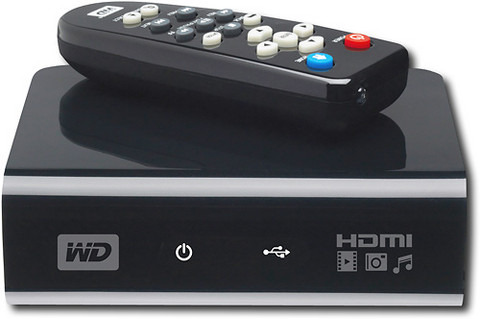
Western Digital has launched an affordable HD Multimedia Player, a $130 compact and light weight media box that supports a wide variety of video, audio and photo formats. Unlike Apple Player, a built-in storage is not included. Contents are supported via attached an USB device, which includes company’s My Passport portable drives, up to two drives at once and playbacks to your displays via HDMI or component output. But the WD has better media supports and promises to deliver motion pictures at its full extend of HD format up to 1080p.

[updated : WD has released firmware 1.01.01 update for this media player]

western digital hd tv player1

MPEG-1/2/4, WMV9, AVI (MPEG-4, Xvid, AVC), H.264, Matroska (MKV), and MOV (MPEG-4 and H.264); including HD supports of MPEG2/4, H.264, and WMV9 supports up to 1080p at 24fps, 1080i at 30fps, and 720p at 60fps are among many advanced video codecs of the WD media player capable of. The Apple TV, on the other hand, supports lower resolution of HD videos up to 720p at 24fps or 540p at 30 fps.

Video is not the only media format the WD excels. For audio, it reads MP3, WMA, OGG, WAV, PCM, LPCM, AAC, FLAC, Dolby Digital, AIFF, and MKA files; together with the support of PLS, M3U, and WPL playlists and SRT subtitle. For images, it supports JPEG, GIF, TIFF, BMG, and PNG.

The WD HD Media player comes with kit package, which includes a remote control, a free software convertor for PC (ArcSoft MediaConverter 2.5), and the media player. Available at BestBuy for additional discount, the WD will relieve you of $99.

Subscribe via RSS or Email | Read 34,739 times

17 Responses to “WD TV Media Player does 1080P and plays MKV”

  1. Andy S. November 3, 2008

    Seriously? This is some of the worst Engrish I think I’ve ever read.

    -9  Add karma Subtract karma  
  2. Saboja December 22, 2008

    The WD TV HD multimedia plays MKV files however all my MKV files do not play with audio – in fact the device displays (Audio Channel 1 Unsupported) – So is their a way to select the approrpiate audio channel?

    +12  Add karma Subtract karma  
    • mrac1973 July 26, 2009

      On your remote there is options button hit that to change youraudio

      +3  Add karma Subtract karma  
  3. Grebo December 27, 2008

    [quote comment="57217"]The WD TV HD multimedia plays MKV files however all my MKV files do not play with audio – in fact the device displays (Audio Channel 1 Unsupported) – So is their a way to select the approrpiate audio channel?[/quote]

    That is exactly my problem. In fact about half have no audio… and the Firmware upgrade hasnt helped. The Audio plays fine on the computer.

    Any ideas anyone?

    +11  Add karma Subtract karma  
  4. Mo December 30, 2008

    Hi

    I had the same problem then I realized it was due to the Digital Audio I hoocked up the opticale audio hookup and vola I got sound. So basically need to have opticale audio theater system or something that can work with opticale audio cable to get sound for those files.

    +3  Add karma Subtract karma  
  5. Kostas January 7, 2009

    I too have the same problem with the Digital Audio thing….i have the Sony 32W4000…but no home theater…so i cant do nothing?

    Neutral  Add karma Subtract karma  
  6. Reimon Osh January 8, 2009

    This is the biggest crap i seen.. somebody should have mentioned that it doesn’t play MKV files with audio!!!! no one suspects that it will only play the sound of a mkv file through the optical out.. geez wat a piece of shit.. am returning it

    -4  Add karma Subtract karma  
  7. wade January 12, 2009

    I had the same problem with the audio! I returned it today. It was a cool little device but i don’t have the money for a new receiver as well and half my files had problems with the audio.
    But to be sure, is there any other way to hear the audio on those files? (other than buying a new receiver or converting the file)

    -1  Add karma Subtract karma  
  8. Boris January 18, 2009

    I had the same problem with some but not all mkv’s I wonder what the difference is…

    Anyway, a quick work around for those who have an older TV or no optical audio input; there are converters avaiable from optical out on the the back of the WD TV HD multimedia player to an analog rca stereo output that can be connected to any tv. The converter is made by a company called Gefen Digital Audio to Analog Audio Converter model #: EXT-DIGAUD-2-AAUD, the cost is $79.00+Shipping not bad if you don’t wanna spend a bunch of money but get your player to work.

    Take a look at 360 pic’s of the device at: http://www.gefen.com/kvm/inclu.....seup.shtml

    Take a closer look at the spec’s and ordered at:
    http://www.gefen.com/kvm/dproduct.jsp?prod_id=4907

    If anyone finds a program fix for the actual WD player lemme know.

    Thanks

    Neutral  Add karma Subtract karma  
  9. DrEvilBetty February 18, 2009

    I purchased one of these myself and ran into the same problem. After a little looking online, I found a free program that converts the digital audio in the MKV file to either standard AC3 or stereo audio. You can leave the digital track in the MKV file or replace it with the new audio track.

    It’s simple to run and is much cheaper at $0 than the gefen converter.

    Here’s the link to the authors site and the tutorial on using the converter along with the download link for the program:
    http://audioconverter.heartware.dk/Tutorial/

    +6  Add karma Subtract karma  
  10. Brabazon April 14, 2009

    Anyone with mkv audio issues. Download mkv2vob for free at http://www.mkv2vob.com

    This will convert your mkv’s for free. Set the config options to convert DTS (and DTS HD) to 5.1 AC3 and it will pretty much convert any MKV to a perfect Mpeg – and your problem is solved.

    I use this all the time with no issue. 99% of the time the video is left and not transcoded – it simply rebuilds the Audio and remuxes it to the video – a very simple tool to get over your audio issues.

    +7  Add karma Subtract karma  
  11. naveedindubai June 27, 2009

    HELP! I have just bought a WD Media player; connected to the TV using HDMI cable and the sound to my home theatre with an optical cable. The DVD ripped movies work fine; however the BluRay ripped movies (5.1) doesn’t have any sound! The setting on the WD for sound is set as digital. Somebody please help.The movies are in MPEG-4 format.

    Neutral  Add karma Subtract karma  
  12. brianbuys July 9, 2009

    It’s true this is a very good player for the money though it does have buggy issues as many have reported. Too bad western digital has not released a firmware version yet to fix these problems. once they do this will be a hard to beat player since it can do ALMOST everything you would want it to do. Seems there are two types now: with and w/o hard drive. those with HDD like the Mediagate or Popcorn hour are a good choice. those w/o hard drives like the WD TV, IOMEGA Screenplay are good too but you have to attach some sort of external usb storage anyway. So choose wisely. If you are looking for something that may be better than the WD TV, search for this: “Mediagate MG-M2TV”. this is the newest player from Mediagate which can do everything the WD TV can but actually supports more formats like RMVB (real video) for many Asian videos. so this is one item i’m really looking forward to. hoping the reviews are good on this one.

    Neutral  Add karma Subtract karma  
    • mrac1973 July 26, 2009

      wow i am going to go out and buy the mg-m2tv because it play asian video ……..not

      Neutral  Add karma Subtract karma  
  13. mrac1973 July 26, 2009

    i got the wd tv for my birthday. I all ready have 2 160gig wd passport. I wish it came with hd wires seeing that its a hd player. I ‘ve got a 12 foot hdmi cable going to a 40 inch V series sony. looks great. but i have to say. I download a 10 gig movie THE MUMMY and it was perfect. Download is a lot of trial and error. But it still beats going to the video store. Now with the hd player I just plug and watch. I see that people are having issues with MKV files Me personally MKV’s are no problem I download from a russian site so most of my movies have more than one audio, just hit that options button and select audio. NEED TO BURN NO MORE THANK GOD!!!!!!!

    +1  Add karma Subtract karma  
    • Frederikil August 16, 2009

      Sounds great – witch russian site are you using?

      Neutral  Add karma Subtract karma  
  14. Ewdison Then July 26, 2009

    Digital media is the way to go noways, I wish they would sell media on a thumbdrive :)

    Neutral  Add karma Subtract karma  

Post a comment

Please login to leave a comment. If you haven't signed up, you can do so free here. Lost your password? Reset it. With SlashGear account, you will be able to participate on SlashGear Forums.