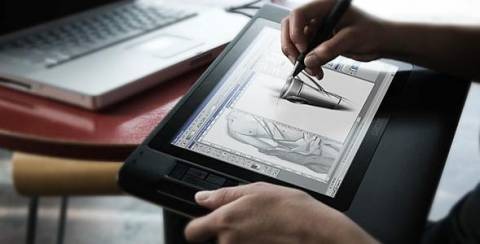
Wacom are known for their huge Cintiq LCD displays with pen-input, but the company also makes a smaller, 12.1-inch model intended to be used in your lap. At $1405 it could hardly be called entry-level, but it has the same 1024 levels of pressure sensitivity, 5080dpi resolution and pen-tilt awareness as its bigger siblings. PC Authority have been trying out the 16:10-aspect 1280 x 800 monitor, and judging by their 5/6 rating they seem impressed.

The draw with these tablet-LCDs is the immediacy of drawing straight onto a screen, rather than using a plain tablet and looking at a separate display. PC Authority aren’t entirely convinced with the 12WX’s 180cd/m2 brightness nor its color accuracy, but they heap extra praise onto its usability and accuracy.
“Drawing on the screen is a dream – it’s responsive, precise, and with practice it’s possible to generate some spectacular results” PC Authority
Thing is, SlashGear has heard a very much conflicting opinion on the Cintiq 12WX, from reader Tom Wingo. Tom had to send his 12WX back after ongoing problems with poor accuracy and jitters along the edges of the display:
“Well after spending a month with my new WACOM Cintiq 12 WX I found that I could indeed live without it. While it’s the perfect size and what I’ve always wanted, reality has shown me that WACOM dropped the ball on this Cintiq terribly. The 1280×800 screen squished down to 12 inches was tough on the eyes when using FLASH. However, the biggest issue that I’ve also heard from other users is the poor accuracy and jitter of the pen in the corners and along the edges. I’ve used the larger Cintiq and am used to a small amount of jitter but the 12WX was terrible. In fact when I contacted WACOM their tech support who had a tablet near the phone reported that theirs was just as bad. They attributed it to the internal switched power-supply for the display and that there was no way to fix the problem.” Tom Wingo, SlashGear commenter
I’ve got a request for comment in with Wacom’s press department; it’s possible that since Tom sent back his Cintiq they’ve changed the power supply or otherwise fixed what sounds like interference between the wireless pen and the tablet layer. I’ll update this post when I hear back.


I am one week from ordering my Cintiq 12wx. I can no longer stand trying to play Marco Polo with my art especially when trying to draw. Now don’t get me wrong I love the Intuos 3 line, but Its to strenuous trying to free hand with the thing. I need the pen and paper feel…but, the jitter… that alone scares me. How is the tablet on your end Chris? Does it have the horrific “jitter” that Tom was so adamant to point out? If that is the case then I will just have to either wait till it gets fixed or hope for the best. For a price tag that not only mauls your wallet but pulls Benjamins from you ***, one would expect total perfection amongst such a product.
I figured I would post since my name is also Chris.
My old 22″ CRT when set to 1600×1200 caused jitters on my old Intuos 12×18.
I’ve been using Wacoms since 95, the separation of hand and screen has never bothered me. I still draw/sketch on paper, then scan it in to be painted — I have no plans to ever abandon paper completely. I can’t recall what the technique was called, but in life drawing we were sometimes required to draw the model without looking at our paper. Prior to using a tablet, I used to draw with my mouse. On my C64 I used a Koala Pad.
Anyways, I recall this comment about jitters with this 12″ Cintiq and it turned me off on getting one. If it’s fixed, then I’ll get one. I want one for portability. Ideally though, a MacBook Pro in a tablet form with 1024 levels of pressure and tilt would be a godsend. I don’t like the fact that all tablet notebooks on the market lack tilt.
Blah, I hate those strips they introduce with the Intuos 3. Please Wacom, make them go away. :(
My teachers never taught us how to draw without looking at the paper. I will make sure when I go in for the college orintation that I ask the art professors about that technique. I do a ton of scanning and retracing my line art… frankly, I’m tired of it. It takes me more to retrace an art piece than it does to free hand it. As I said, to me it feels like Marco Polo with my hands. It could also be because of my Aspergers, but I really don’t know. When I receive my in the mail I will update on its so called horrid jitter. However, I doubt it can be anything worse than my Intuos 3 4×5’s. Well Chris take care.
My first Wacom was a 4×5. Hand cramp galore. :] I still have it and I’m pretty sure it still works. But back then, I only had a 15″ CRT, so its size wasn’t too bad, but compared to now day’s screens, it’s just too small.
My wife says I have some kind of autism, it’s probably just the tablet’s size. ;) The bigger tablets are easier to work with. The closer in size/proportion to your screen, the better. Drawing directly on the screen is ideal, but I’m sure if you had a larger tablet, it would be a bit easier to get used to. When I first got started, I always made sure my tablet was flat on my desk and it was lined up horizontally with the screen. After a while I stopped doing that and now my tablet always sits on lap.
I mainly just paint on my Mac, so I’m using my scanned images as a guide to the real world. I guess it depends on what I’m trying to create.
Thanks, you take care also.
in highschool we drew without looking at the paper. I think it was called blind contour drawing.