Friday, Nov 16th 2007 by Vincent Nguyen


Worth Reading?


YesNo


+6 [22 votes]
Loading ...

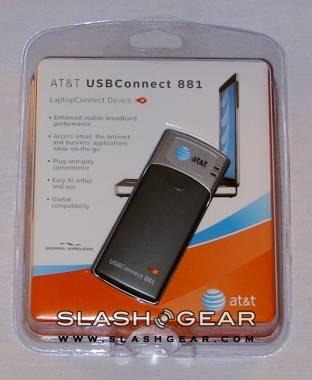
The USBConnect 881 is definitely ahead of its time or rather ahead of schedule since none of AT&T’s markets support HSUPA. That doesn’t stop us from wanting to take a first look at the device as well and test how well it performs under the current network – HSDPA.

USBConnect 881

The unit is sturdy and well built. The USB part of the connector neatly folds up when not in use. You just need to be extra careful when it’s plugged in and you happen to be using your laptop on your lap. There’s a big chance you may accidentally bang it on something if you move around. I’m pretty careless, so there’s a big chance I’m going to whack it on something and break it off. Therefore, from a design point of view, I prefer the internal ExpressCard EX720 by Novatel.

YouTube Preview Image

I was very surprised to that the USBConnect 881 featured a removable battery. This is a good thing since 3G is really greedy on battery power, especially if it’s connected to the laptop while not plugged into a power source.

USBConnect 881

As far as speed goes (see results below), AT&T’s HSDPA is on par with Sprint’s EVDO Rev. A. I have no complaints there. However, when HSUPA comes online, that will be a different story. It will be interesting to see how Sprint WiMAX compares to HSUPA when it rolls out mid next year. Make sure to check back later when these new networks are online for a full review.

Results for the USBConnect 881

Novatel Wireless Merlin EX720

USBConnect 881

I want to thank Sierra Wireless and AT&T for arranging the speedy shipment of the USBConnect!

USBConnect 881

USBConnect 881

Image Gallery

Subscribe via RSS or Email | Read 2,494 times


  1.  xel   View all comments by xel  Neutral  Add karma Subtract karma Quote

    that speedtest screenshot shows myvzw.com as isp. you sure you used right pic?

  2.  Wayne   View all comments by Wayne  -4  Add karma Subtract karma Quote

    Great non-review…you never told your readers what the thing does. It looks like you plug it into the USB port of a laptop…to do what? Presumably to connect with something? Is this a form of WiFi or a celluar connection? What platforms does it work with? And a ‘related product’ is a “Hands Free Dryer”. Too confusing.

  3.  Baron   View all comments by Baron  Neutral  Add karma Subtract karma Quote

    Like the article said, it is used to connect to HSDPA (high-speed downlink packet access). It said check back for review later, this is not a review Wayne.

  4.  Wayne   View all comments by Wayne  Neutral  Add karma Subtract karma Quote

    To Baron,
    Not to put too fine a point on all of this, but the reviewer said “Check back for a FULL review”. This implies that we are, in fact, reading a review, it’s just not a ‘full’ review.

  5.  Vincent Nguyen   View all comments by Vincent Nguyen  Neutral  Add karma Subtract karma Quote

    that speedtest screenshot shows myvzw.com as isp. you sure you used right pic?

    The speedtest is right. It just happened to use Verizon’s network. For the Sprint EVDO Rev. A, it actually used Sprint’s network. Click on the link to the image gallery to view the rest of the images/results from the network speed test for Sprint and Cox.

  6.  steve   View all comments by steve  Neutral  Add karma Subtract karma Quote

    The At&t card can not use Verizon’s network…so still not sure on that screen shot. They use two different technologies, one based on GSM and the other on CDMA. This is the same exact card (design wise) that Sprint has been selling for most of 07 - the 595U. I agree with you on the EX720…less chance to break something…. here is a Video that shows how to make the EX720 into a USB so you can use it in any computer: http://moremobileinternet.com/.....radlepoint

  7.  Larry   View all comments by Larry  Neutral  Add karma Subtract karma Quote

    WILL THE USBConnect 881 work also on a Desktop PC?

  8.  Titus Pullo   View all comments by Titus Pullo  +1  Add karma Subtract karma Quote

    yes……..it works on a regular desktop. I picked it up this evening and having it running on my desktop. I’m used to leeching wi-fi signals, but due to security reasons, I decided to shell out the big bucks on this fine piece of equipment.

    There is one thing I will mention though. There are some streaming video sites that AT&T is blocking. I will have to check Sprint’s mobile broadband to see if that’s the case also.

  9.  sldevlin   View all comments by sldevlin  Neutral  Add karma Subtract karma Quote

    I purchased the usb881. it worked fine in laptop but when i connected it to my desk top the desk top just kept rebooting itself…any suggestions

  10.  Jeffery A. Smith   View all comments by Jeffery A. Smith  Neutral  Add karma Subtract karma Quote

    Could I use this or something similar to replace my cable internet service at home?

    - Would there be a way to share this connection with a router? Maybe like with windows Internet Connection sharing?

    I pay $60 per month for cable internet, but I could kill that, and have a home/road internet solution instead.

    THANKS!

    Jeff “Yooper” Smith
    http://www.yoopersmith.com

  11.  Woody   View all comments by Woody  Neutral  Add karma Subtract karma Quote

    I am looking for a pc card for my hp pavilion that has a 54g 802.11b/gWLAN. Is there an air card that uses this slot or will I have to use a USB connection. Thank you.

  12.  Chutes   View all comments by Chutes  Neutral  Add karma Subtract karma Quote

    Does this work in Europe?

  13.  Kelly Huffman   View all comments by Kelly Huffman  +1  Add karma Subtract karma Quote

    i got this usb connect 881 from AT&T and its a big ****.takes forever for it to connect and when it does it drops it.

  14.  Jeff W.   View all comments by Jeff W.  Neutral  Add karma Subtract karma Quote

    To get over the possibility of knocking the unit out of your USB slot, why not use a USB extension/dongle?
    You can keep it on a table, your lap (road travelers), or if you do not mind some velcro on your machine, attach it to the lid of your laptop.
    They make lenghts ranging from 3″ to 25′.
    Best,

  15.  Mark   View all comments by Mark  Neutral  Add karma Subtract karma Quote

    This thing is a big piece of junk. I can only stay online for minutes at a time. The pages keep giving me the http 400 error. Can anyone give me some help with this thing, for 60 bucks a month this thing is a rip off. I have to constantly disconnect and reconnect with the manager. Uhhhhhhhhhhhhh!


Add your comments

Fill in the required fields below to leave a comment or login to your account. If you haven't signed up, you can do so free here. With SlashGear account, you will be able to participate on SlashGear Forums discussion.


Close [X]
E-mail It
About / Advertise / Contact / Archives / Privacy Policy / Terms of Use
Copyright © 2006-2008 SlashGear, All Rights Reserved.