Monday, Jul 14th 2008 by Vincent Nguyen and Chris Davies


Worth Reading?


YesNo


+22 [24 votes]
Loading ...

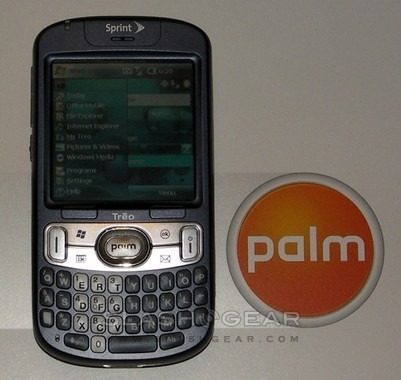
If you’re searching for a phone with some serious rumor history, look no further; the Treo 800w has been knocking around the internet for months now, promising Palm’s fabled usability together with CDMA 3G connectivity.  Now conjecture no more, the touchscreen smartphone has been confirmed as part of Sprint’s new line-up, and we’ve had the 800w in for testing.  Read on for the full review.

Treo 800w Review

Back when it was first tipped the 800w faced stiff competition; six months later, with queues still stretching around the block for Apple’s latest iPhone 3G, the market is positively solid.  The Treo may be the first touchscreen Windows Mobile 6.1 handset in Sprint’s line-up, but look to other networks and there are plenty to choose from.  HTC have recently made their own stand in the segment with the Touch Diamond and Touch Pro while Sony Ericsson have their XPERIA X1 on the horizon, and meanwhile Nokia are prepping the new S60 Touch OS for their own iPhone rivals.

Treo 800w Review

Palm’s gambit is a QWERTY keyboard equipped candybar with a 320 x 320 touchscreen, EvDO Rev.A, WiFi b/g, Bluetooth and GPS, running Windows Mobile 6.1 Pro.  The case design is an evolution, rather than a revolution, of previous Treos, with the usual hard-button keyboard topped by a new shortcut cluster.  In fact, shortcut buttons are obviously top of Palm’s to-do list; the 800w has a new customizable side-button as well as a new one-touch WiFi shortcut key on the top.

Treo 800w Review

Under the hood there’s 256MB of user memory and 128B of program memory, which is relatively healthy; Palm preinstall the usual gathering of mobile Office apps, and Sprint add their own Navigation and TV software.  Round the back lurks a rather mediocre 2-megapixel camera with 2x digital zoom and video capture.

Treo 800w Review

In use, the 800w is relatively speedy, flicking between WM6.1 apps quickly and handling reasonable multitasking without unduly slowing.  The keyboard is little changed from earlier Treos, and as such shares their usability.  However the touchscreen, being inset somewhat, can be difficult and a little uncomfortable to use.  Coming from a full-touchscreen device such as Sprint’s own Instinct, the 800w seems happier used primarily with its hardware keys.

Treo 800w Review

Treo 800w ReviewPalm have finally ditched their proprietary connector in favor of a MicroUSB port.

Using the MicroUSB cable Sprint provide, the Treo can be used as a cellular modem with a laptop.  In fact connectivity is pretty much unfettered, unlike some smartphones, and there’s a broad range of Bluetooth profiles supporting everything from A2DP stereo audio through object exchange to wireless printing.  The battery is a removable 1150 mAh Li-Ion pack, rated as good for 4.5hrs talktime or 200hrs standby; it’s early days in our testing, but unless you hammer the EvDO those seem reasonable - if top end - estimates.

In the end, though, “reasonable” is a word all too readily applied to the Treo 800w.  With an external design that has perhaps moved one step beyond “classic” and into “dated”, the upgraded hardware has trouble capturing the attention it - in parts - deserves.  WiFi and EvDO Rev.A performance are good, with pages loading quickly and push email working exactly as expected, but they’re let down by a touchscreen that pales in comparison to rivals, and a camera that is surpassed by that in most mainstream handsets.  With the exception of a neat home-page app that allows for instant navigation, Palm has left the 800w in pretty much the standard WM6.1 setup, at a time when rivals such as HTC are spending significantly on gentrifying the interface.

It’s a shame, because the carrier services on offer - particularly Sprint Navigation, with turn-by-turn directions and searchable points of interest - are good, and unlimited EvDO Rev.A subscription relatively cheap.  Sprint fought strongly in the contract price wars earlier this year, with their $99.99 “Simply Everything” plan offering unlimited voice, data, text, e-mail, internet access, Sprint TV, Sprint Music, GPS Navigation, Direct Connect and Group Connect.  The carrier deserves a top-notch smartphone to show all that off, an enterprise-friendly Windows Mobile version of the Instinct, and it sadly hasn’t found that in the 800w.

Treo 800w vs iPhone 3G

If it had launched closer to the first suggestions of its existence, the Treo might have stood a chance.  There’s still loyalty to the Palm brand out there and, as the success of the Centro has shown, a market for easy to use and reliable smartphones.  Faced with the iPhone 3G, though, and it’s tough to make a decent case in favor of the 800w.  If you’re devoted to Sprint, need the latest version of Windows Mobile and a touchscreen, the 800w is your choice.  Sadly that’s a choice forced by lack of options, rather than anything else.

Treo 800w vs iPhone 3G

Click to view full image gallery of the Treo 800w for Sprint Network.

Treo 800w for Sprint unboxing

YouTube Preview Image

The Palm Treo 800w is available from Sprint now, priced at $249.99 with a new two year agreement.

Subscribe via RSS or Email | Read 7,673 times


  1.  nev   View all comments by nev  -1  Add karma Subtract karma Quote

    i expected a brand new phone will ask you to first align the screen…

  2.  candycgiz   View all comments by candycgiz  -2  Add karma Subtract karma Quote

    You know, not all touch screen needs screen calibration. iPhone didnt need calibration by end user!

    i expected a brand new phone will ask you to first align the screen…

  3.  Gil   View all comments by Gil  Neutral  Add karma Subtract karma Quote

    I’ve had the 800w for a couple of weeks now. It was my first “Smartphone” and if there were no others around it would be my last!!! This is the worst engineered piece of junk I’ve ever seen! Some reasons I say that:

    Can’t turn it off! You have to remove the battery to turn it off or reboot it… which I have had to so already about 10 times.

    Battery life suxxx! Can’t get through a whole day on a charge…even with no phone calls!

    I travel a lot for business and you can only turn off the phone…everything else is still running and you have to remove the battery to stop them. Which means for 5 hours it is killing the battery for nothing.

    The camera was nice…until it stopped working after about a week. Now when I select the camera instead it goes to the Pictures and Video folder. I’ve tried everything I can think of but it can’t find the camera anymore.

    Can’t close an app. You think you’re closing them, but they’re only moving to the background. They are all still running, still sucking up resources.

    The only way to really close an app is to call up the Task Manager. Stupid!!!

    While roaming in Canada, there were times it would not let me make a phone call. Told me it was busy, please try again later… insert massive disbelief here!!!

    I could go on, but I’m sick of this thing. I’m taking it back and trying a Crackberry…

  4.  JoltinJoe   View all comments by JoltinJoe  +1  Add karma Subtract karma Quote

    The following three items are deal-killers for me, ruling out this phone as a viable competitor in the Windows Mobile space:
    1. It lacks a headphone jack (either 2.5mm or 3.5mm). If you play music on your phone or like to stream media through Windows Media player on your phone as I do, then this phone is useless since you can’t get the audio out of the phone into your speakers, radio, or receiver.

    2. Whether Palm likes it or not, the closest thing to a current standard for communicating with and charging small electronic devices is mini-usb, not micro-usb as the Treo 800w uses. Perhaps Palm is jumping the gun a bit with micro-usb, or maybe they are just on the wrong train. I have at least 4 devices that use mini-usb and I am not willing to add a new cable to my collection just to sync with a Treo 800w and charge it.

    3. The main keyboard lacks a blackslash. If you connect to Exchange, use Microsoft Communicator, or do pretty much anything else with Microsoft products (may I remind Palm that they are running a MS OS on this device) then you need a backslash key. Switching to the soft keyboard just to find a backslash key is lame.

  5.  what   View all comments by what  -3  Add karma Subtract karma Quote

    the backslash is on the Q. You people are just making things up to hate. this phone is great. and anyone who does any texting should know that this phone is why more user friendly than that iCrap phone.

  6.  jason   View all comments by jason  -1  Add karma Subtract karma Quote

    That’s not a backslash moran, it’s a slash.

  7.  Darren   View all comments by Darren  -1  Add karma Subtract karma Quote

    CLEARLY this is ur 1st smartphone. A lot of your issues are with Windows mobile, and you can shut your apps by pressing and holding the HOME button and it will bring up the task manager. Or go into the task manager in the applications folder to close apps. Learn how to use the phone before you complain so much. Smart phones don’t shut off, even the iphone and you cant remove the iphones battery!

    I’ve had the 800w for a couple of weeks now. It was my first “Smartphone” and if there were no others around it would be my last!!! This is the worst engineered piece of junk I’ve ever seen! Some reasons I say that:

    Can’t turn it off! You have to remove the battery to turn it off or reboot it… which I have had to so already about 10 times.

    Battery life suxxx! Can’t get through a whole day on a charge…even with no phone calls!

    I travel a lot for business and you can only turn off the phone…everything else is still running and you have to remove the battery to stop them. Which means for 5 hours it is killing the battery for nothing.

    The camera was nice…until it stopped working after about a week. Now when I select the camera instead it goes to the Pictures and Video folder. I’ve tried everything I can think of but it can’t find the camera anymore.

    Can’t close an app. You think you’re closing them, but they’re only moving to the background. They are all still running, still sucking up resources.

    The only way to really close an app is to call up the Task Manager. Stupid!!!

    While roaming in Canada, there were times it would not let me make a phone call. Told me it was busy, please try again later… insert massive disbelief here!!!

    I could go on, but I’m sick of this thing. I’m taking it back and trying a Crackberry…

  8.  Darren   View all comments by Darren  -1  Add karma Subtract karma Quote

    Press the alt after u make the q/slash… Palm has the BEST keyboards, RIM doesn’t even have a period on the newest of blackberrys–you have to press double space… LEARN HOW TO USE THE DEVICE, it’s not just a plain cell phone… waaahhh

    That’s not a backslash moran, it’s a slash.

  9.  Reed   View all comments by Reed  Neutral  Add karma Subtract karma Quote

    “CLEARLY this is ur 1st smartphone. A lot of your issues are with Windows mobile, and you can shut your apps by pressing and holding the HOME button and it will bring up the task manager. Or go into the task manager in the applications folder to close apps. Learn how to use the phone before you complain so much. Smart phones don’t shut off, even the iphone and you cant remove the iphones battery!”

    The iPhone does too shut off (hold the top button), as well as my Blackberry Curve. Having to close apps with the task manager is just plain annoying. Also, no need to be so rude to someone who is newer to the smartphone world and less informed than you! He had every right not to like it, and it’s his choice to return it. (As a sidenote, Windows Mobile is crap in the first place.)

    Oh, and whoever was complaining new Blackberrys (Blackberries?) don’t have periods on the keyboard, both the Curve and the Pearl do.

    Oh, it was you again that said that. And if you enjoy nail typing, than head on over to your little Treo, but I prefer my Blackberry, thanks.

  10.  Ni   View all comments by Ni  Neutral  Add karma Subtract karma Quote

    Does anyone know when/if the 800w is going to be released by Verizon?


Add your comments

Fill in the required fields below to leave a comment or login to your account. If you haven't signed up, you can do so free here. With SlashGear account, you will be able to participate on SlashGear Forums discussion.


Close [X]
E-mail It
About / Advertise / Contact / Archives / Privacy Policy / Terms of Use
Copyright © 2006-2008 SlashGear, All Rights Reserved.