Wednesday, Oct 17th 2007 by James Allan Brady


Worth Reading?


YesNo


+4 [10 votes]
Loading ...

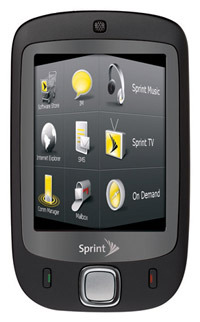
In a “best news of the day” type of move, Sprint has announced they are getting the HTC Touch. They are of course renaming it the Sprint Touch, but we know what it really is.

sprint-touch-htc-vogue

So this thing has an awesome touch screen, a 2MP cam, 400MHz processor, Bluetooth 2.0, WiFi, 3G by way of EV-DO Rev A, and a microSD card slot. For an OS, we get the TouchFLO-customized version of Windows Mobile 6 Pro.

Obviously Sprint’s on-demand services will all be on there, and it should drop later this year, maybe as soon as November 4th. In case you thought the news couldn’t get any better, it will only cost you $250 after rebate and a 2 year contract. I want one, with a passion, I really wanted an iPhone, but now I want one of these, I love Sprint’s network, and what they do with all the handsets they get, this should be an amazing device.

Sprint announces CDMA HTC Touch as the Sprint Touch [via intomobile]

Subscribe via RSS or Email | Read 1,066 times


  1.  ervin   View all comments by ervin  Neutral  Add karma Subtract karma Quote

    this is not going to have wifi… :( bummer but they still claim rev-a update in the future

  2.  ...   View all comments by …  Neutral  Add karma Subtract karma Quote

    it does have wifi

  3.  michael   View all comments by michael  Neutral  Add karma Subtract karma Quote

    it does have wifi but sprint is disabling it infavor of the EV-DO. @#%^&*

  4.  Chris   View all comments by Chris  Neutral  Add karma Subtract karma Quote

    In Europe the HTC Touch has been available for quite some time (June/July) and according to sales figures, sold really well. I own one myself and it’s really a fancy device, be sure to check it out at a store and play around with the TouchFLO technology. Very small as well!

    Any information about other providers selling the HTC Touch?

    Regards,
    Chris
    ___
    http://www.htc-touch-info.com

  5.  ervin   View all comments by ervin  Neutral  Add karma Subtract karma Quote

    it does have wifi

    like i said….no wifi. look it up genius

  6.  blazer   View all comments by blazer  Neutral  Add karma Subtract karma Quote

    I use Sprint and want the HTC Touch with wi-fi - so does anyone know a 3rd party source for CDMA HTC Touch phone (and I will have Sprint configure to their network)?

    (yes, I know it will likely be more expensive than through Sprint - but I need the wi-fi capability)

  7.  Tony   View all comments by Tony  +1  Add karma Subtract karma Quote

    Does anyone know if there are any firmware hacks to enable wi fi on the touch yet? Also does any1 know if it has gps capabilities because i cant find a navigation program for it….

  8.  JP   View all comments by JP  Neutral  Add karma Subtract karma Quote

    Does anyone know if there are any firmware hacks to enable wi fi on the touch yet? Also does any1 know if it has gps capabilities because i cant find a navigation program for it….

    x2. I’m waiting for this phone from Verizon and the WiFi is really the deal breaker for me…

  9.  McNasty   View all comments by McNasty  Neutral  Add karma Subtract karma Quote

    Curious about the hack and will this phone have navigation once Sprint goes EV-DO A.

    From what I have read the Mogul will have Navigation once they go EV-DO A. Just curious if the Touch will do the same?

  10.  erica Torresso   View all comments by erica Torresso  Neutral  Add karma Subtract karma Quote

    I am selling a brand new TOUCH phone by Sprint if anyone is interested.. it comes with a free gift, ALL chargers,usb cables, earpieces, leather case , and so on.. The device also has music and games dowloaded on it as well… For pics and other information,please contact me at beautyeyz0@aol.com. Thanks!!

  11.  Sunil   View all comments by Sunil  Neutral  Add karma Subtract karma Quote

    Here are the steps to use GPS on your sprint (CDMA) HTC Touch and use google maps to navigate for free:)
    1> Upgrade your ROM. Follow instructions here - http://www.htc.com/us/faq_Deta.....amp;act=sd
    2> Download and install google maps for mobile devices - http://www.google.com/mobile/d.....;dc=gh0smm
    3> Make sure your in your gps port (start->settings->system->external GPS) is set to COM4.
    4> Launch Google Maps and click on “Use GPS” in the menu options.
    5> Happily navigate for free:)


Add your comments

Fill in the required fields below to leave a comment or login to your account. If you haven't signed up, you can do so free here. With SlashGear account, you will be able to participate on SlashGear Forums discussion.


Close [X]
E-mail It
About / Advertise / Contact / Archives / Privacy Policy / Terms of Use
Copyright © 2006-2008 SlashGear, All Rights Reserved.