REGISTER LOGIN

Worth Reading?

NoYes

+13 [23 votes]

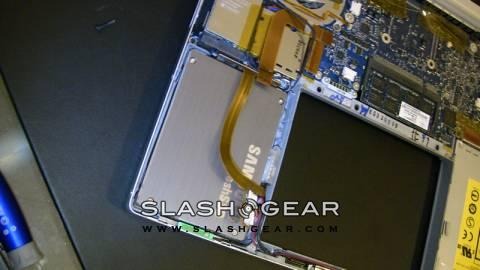
The latest pin-up in the storage world is the Solid-State Drive (SSD), a flash-based drive with no moving parts that can be used in place of a traditional hard disk drive. SSDs are beginning to show up in high-end laptops and – albeit in smaller capacities – in portable media devices, where their low power requirements, resistace to shaking and movement and high data transfer rates make them ideal for high-portability gadgets. SlashGear has been lucky enough to get our hands on one of Samsung’s latest 2.5-inch 64GB NAND drives, currently featuring in high-end models from Dell’s XPS range and Alienware’s Area-51 m9750 notebook as a 128GB RAID array, and thought we’d put the OEM device to the test.

samsung 64gb ssd

On paper, the flash drive certainly stands out. Samsung quote read speeds of 57MB/s and write speeds of 32MB/s, which would peg it at more than twice the rate of a traditional, platter-based hard drive, as well as sub-1ms access times (compared to 10 to 30ms for hard disk drives). Moreover, battery life is increased through the lack of moving parts, with Samsung estimating usage times of 10 to 15-percent longer.

samsung 64gb ssd

Transfer rates should be consistently low, too, as the SSD isn’t reliant on circular platters like its old-tech cousin uses. That fact also has an impact on start-up speeds, which usually require large amounts of jumping around a drive and can run into delays when the drive-heads of traditional drives can’t keep up with demand.

samsung 64gb ssd

Since Samsung helpfully pointed out that the 64GB SSD would work happily with Windows Vista, XP or Linux, we decided to answer the question most road warriors are thinking and install OS X on it instead. We’re currently benchmarking it to see just how much of a difference solid-state can have on Apple’s coveted range of laptops, so keep checking SlashGear for part two of our exclusive Samsung SSD review!

samsung 64gb ssd

Unboxing the Samsung 64GB SSD!

YouTube Preview Image

Samsung 64GB SSD Installed!

YouTube Preview Image

Click to view all Samsung 64GB SSD pictures/hands-on!

Subscribe via RSS or Email | Read 3,473 times

8 Responses to “SlashGear’s exclusive look at the Samsung 64GB SSD in Macbook Pro”

  1. gazget November 9, 2007

    How much for the price of this stuff ?

    compare with 80 gb any brand.

    Neutral  Add karma Subtract karma  
  2. schmolch November 11, 2007

    $950

    Neutral  Add karma Subtract karma  
  3. gazget November 12, 2007

    $950 for 1 unit or bulk and where can find this stuff ?

    Thanks

    Neutral  Add karma Subtract karma  
  4. Ewdison Then November 12, 2007

    For 1 unit, SSD is still not a cheap options at this moment

    Neutral  Add karma Subtract karma  
  5. Stig November 18, 2007

    Cool! This is the beginning of the future! Still early days with cons like high price and low capacity, but still the right way to go :-)

    Neutral  Add karma Subtract karma  
  6. Art December 13, 2007

    In my benchmarks this disk is at least 3 times SLOWER than the regular hard disk when writing small files to the disk, which is the case when you compile programs – it slows the compiler speed at least 2-3 times compared to the regular disk. I guess Samsung got greedy and did not install any cache memory into the $1000 drive! The flash itself is known to be very bad with writing a lot of small files to the disk.

    +1  Add karma Subtract karma  
  7. Daniel December 28, 2007

    [quote comment="32454"]In my benchmarks this disk is at least 3 times SLOWER than the regular hard disk when writing small files to the disk, which is the case when you compile programs – it slows the compiler speed at least 2-3 times compared to the regular disk. I guess Samsung got greedy and did not install any cache memory into the $1000 drive! The flash itself is known to be very bad with writing a lot of small files to the disk.[/quote]

    Well.. Its cuz you need to raid them :)
    Then shit starts to happen. 1gig transfers in 4 sec (not a joke)..
    http://www.nextlevelhardware.c.....attleship/

    -1  Add karma Subtract karma  
  8. Daniel December 28, 2007

    And also 10 sec vista boot.

    Neutral  Add karma Subtract karma  

Post a comment

Please login to leave a comment. If you haven't signed up, you can do so free here. Lost your password? Reset it. With SlashGear account, you will be able to participate on SlashGear Forums.