

Samsung Moment Review
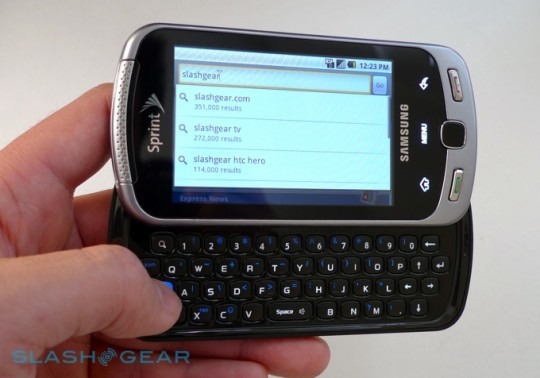
Samsung caught our Android attention with their Galaxy, a slender smartphone with a gorgeous AMOLED touchscreen, and now they're back with the keyboard-toting follow-up. The Samsung Moment on Sprint is a phone with a few firsts of its own – the first QWERTY Android device to offer an AMOLED display, the first to have an 800MHz processor – but it seems the company stopped their innovation before reaching the software: unlike other Android handsets we're seeing, there's no reworked UI and no expansive social network integration. Can a well-turned spec sheet make up for it? Check out the full SlashGear review after the cut.
The Moment's keyboard certainly impressed us initially, with large keys, decent travel, an audible click to let you know you've pressed and an offset layout that we thought better replicates that of a regular keyboard. Unfortunately, Samsung squander that head-start with the frustrating positioning of the space bar and the Fn key, which results in the bottom row of letters being unusually offset underneath the middle row. As you can see from our images, the 'Z' button is offset to the left of the 'A'. It's annoying, because so much else about the Moment's keyboard is great, particularly the finger-room up around the number row granted by Samsung not being stingy with how far the smartphone's screen slides up.

As for that screen, you can't argue with an AMOLED panel for brightness and contrast. Blacks are considerably inkier than on a regular LCD TFT handset, while colors pop, and while it's the same size – at 3.2-inches – as most of HTC's Android range it certainly stands out. Underneath there's an optical trackpad, which we found fiddly and prone to recognition glitches: sometimes you can manage smooth, precise sweeps, other times the pad seems to go all-or-nothing from one side to another. The Home, Menu and back keys are all touch-sensitive, whereas there are physical buttons for call/end; on the side there's a camera shortcut key and, underneath it, a voice command shortcut. Interestingly, Samsung have replaced the usual Google voice-control app with a third-party alternative, though we found little difference in functionality or accuracy.

At 3.2-megapixels, the Moment's camera does little to stand out. There's autofocus and an LED flash, but images are often mediocre with high levels of noise that the contrast-rich display did little to disguise. Android 1.5 has little in the way of camera control – white balance, color effect, macro focus and scene support doesn't come until Android 2.0 – and Samsung have made no noticeable attempt to go halfway with their own app tweaks.
That given, it's a surprise how long the camera takes both to start up and to grab shots. The Moment is sluggish to boot into camera mode, even with the dedicated shortcut key, and there's more lag in-between pressing that button to take photos. It's hard to tell whether the issue comes from the autofocus – there's no focus indicator on-screen – or elsewhere, but it means that unless you're shooting a stationary object (and are yourself very still) you're likely to end up with unwanted image blur.

Once you've taken a shot, Samsung have preloaded an app which will automatically upload each picture to Facebook, YouTube, MySpace or Photobucket, though it's a case of all-or-nothing; there doesn't appear to be a way to flag certain shots for upload. If you only want to share one or two images then the standard Android gallery app offers its usual upload/messaging shortcuts.
Samsung's hands-off attitude to Android spans the entirety of the OS, leaving the Moment pretty much stock when it comes to OS 1.5. Social networking integration is a matter of using the regular, standalone apps, rather than seeing contacts from Facebook or Twitter statuses integrated with Android's own address book. This lack of augmentation and the Moment's 800MHz processor add up to a smoother user experience, though it's not the earth-shattering improvement over the 528MHz chipset many other Android devices still use. Put it side by side with the Verizon DROID by Motorola and you can see the result of Android 2.0's extra tweaking; despite the Motorola DROID having a slower processor in terms of core clock speed, it still feels nippier than the Moment. Our hope is that, since there's little in the way of modification, Samsung should be able to push out an OS 2.0 update for the Moment sooner rather than later.
As it stands, though, it's a mixed bag. The Webkit-based browser is decent – though the Moment's capacitive touchscreen lacks multitouch zoom (and double-tap zoom is an Android 2.0 feature) – and Google Maps does as you'd expect (though, again, the latest Google Maps Navigation beta with turn-by-turn directions is a 2.0 addition); Sprint Navigation is preloaded, though there's a subscription fee involved. The carrier's Sprint TV, NFL and NASCAR apps are also present, with both EVDO Rev.A and WiFi connections for media streaming.
Exchange support is via Moxier Mail, which is reasonably flexible and supports both local and server searches. Unfortunately the stock Android media playback apps aren't anything special, though at least the Moment has a standard 3.5mm headphone socket (frustratingly underneath a port cover); minimal onboard storage is augmented via microSD card, though you'll need to remove not only the battery cover but the battery itself in order to switch it out.

The battery itself – a 1,440mAh Li-Ion pack – recharges via micro-USB (again, covered by a frustrating port flap) and is rated for up to 5.5hrs talktime. With regular use we managed more than a full day on a single charge, though not quite to the point where we could reliably rejuice every other day; the Moment always complained of low battery midway through the second day. Turning off push email and GSP might eke out a little extra standby time.
QWERTY-packing Android smartphones are certainly a little rarer than their touchscreen-only counterparts, but we'd still have second thoughts about picking the Samsung Moment. While its AMOLED display is bright and clear and its keyboard pleasantly expansive (once you've retrained your fingers to deal with its offset layout) its stock Android 1.5 OS pales in comparison to what other manufacturers are doing to distinguish their rival handsets. Most damning, though, is the price: Sprint will ask $179.99 after a $100 mail-in rebate and presuming a new, two-year agreement when the Moment arrives on November 1st. That's perilously close to the $199.99 of the Verizon DROID by Motorola, and right now we can't find enough to recommend the Samsung over the new Motorola.
Screen Test (It's Capacitive) & Photo Gallery
[vms 265b790965a275b53ae5]