REGISTER LOGIN

Worth Reading?

NoYes

+19 [33 votes]

Navigon is quickly rising to the top in the Personal Navigation Device market, even superseding TomTom and Garmin in many areas. Their latest PND is the 2100 Max, which is coincidentally one of the few upgradeable GPS units on the market. It also has a 4.3-inch Widescreen, Text-To-Speech functionality, lane guide assistance and speed warnings along with a fairly comprehensive list of Points of Interest; I mean there were more than a couple points listed in the little town I live in.

With the 2100 Max you get Reality View which gives you a 3D photo-realistic view of difficult intersections and things like that. You also get DirectHelp which will give you quick directions to emergency facilities and/or contact numbers for those same agencies, so you can find the police station, hospital, pharmacy, or car service station that is closest to you.

You can also get live traffic information via an accessory for the 2100 Max, on top of that you can sign up to get FreshMaps which are 12 quarterly map pack updates, and ZAGAT Survey Ratings and Reviews for hotels and restauarants, those are the upgradable options and cost $99.99, $79.99, and $39.99 respectively. The Unit itself has an SD card slot which is occupied by the Maps card, a mini USB port which is only used for charging, a car charging cable and a USB charging cable as well as suction cup mounting brackets.

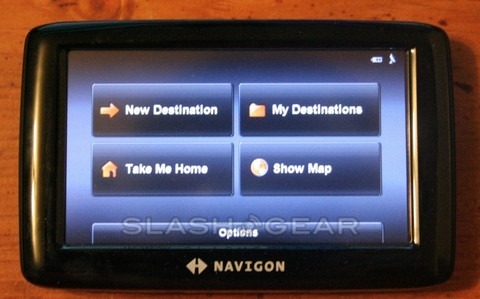
I recently got this unit in for review, and I haven’t had a chance to actually put it to use, but it is extremely small for a GPS unit, not in a bad way, like the screen is unreadable, because it’s not, its 4.3-inches big and the voice reads off any and all directions to you so you don’t really have to look that much. Its small as far as weight and thickness go, I mean it’s about as thick as my Motorola Q9h and no thicker and it’s about as heavy too, it’s extremely easy to hold and use. The best part was that I handed it to someone who I don’t consider tech savvy, nor do they have any experience with GPS units, and it had a charge fresh out of the package and this person was able to use it and navigate the menus with ease, and most importantly without bugging me with a bunch of questions. So, without even having used it for navigation I can already say it’s worth the $300 asking price but I’ll report back with more.

Subscribe via RSS or Email | Read 3,394 times

One Response to “Navigon 2100 Max – thin, light, and easy to use and I’ve got it for review”

  1. Dave April 24, 2008

    I received my 2100 Max 2 weeks ago and am extremely happy with it. To provide a little background, I have been a Tom Tom user, as well as another (PDA software) solution.

    I liked the 2100 Max because I had no plans on using bluetooth and didn’t want to pay for this feature. I also liked it because of the new size of the screen and the claims from Navigon that the 2100 Max included newer software. Another feature I liked, which helped me decide on this unit, was that I could add traffic, Zaget reviews, and fresh maps when I like.

    As far as the slowness that I have read about, I have not experienced this with the 2100 Max. It aquires the necessary satellites quickly, it allows me to input destinations without having to wait for the unit to keep up with the address input. The unit also updates your location at a reasonable rate.

    The one thing I really like is the Reality View. I can’t tell you how many times I took the wrong ramp with my Tom Tom unit. The reality view has provided me with very accurate representations of every interchange I have come across. I have no confusion whatsoever on which lane to be in, in order to navigate to the right ramp. One thing that should be noted, is that the reality view representation is a static image that appears when approaching an interchange. It does not move, or depict your movement through the interchange. However, when you do navigate to the correct lane, the unit will switch back to live view as you continue through the interchange. It does maintain a smaller representation on the lane you should be in as you continue through the interchange.

    The routes are recalculated fairly quickly, as I couldn’t get over (due to traffic) for my off ramp; the unit recalculated a new route for the next exit.

    The voice prompts are very understandable and are spoken at a sufficient frequency; too much for my needs, so I turn my voice prompts off.

    I have not added live traffic yet, so I can’t provide any data in regards to this.

    As for calculating the initial route, you are provided with three settings in which the unit will use for calculations. I have mine set to the optimum setting. I have been provided with a route to a known destination that I would have selected a better route. But with this said, another calculation setting may have followed my known route.

    The unit is light, sleek, and includes a good mount. The display has day/night mode with great graphics. The POIs are very extensive, and many of them are shown on the map in their company’s logo.

    As far as battery life, I would give it 1.5 hours on a full charge. This is not an issue for me, as I always keep the unit in my car – plugged in.

    In closing, I researched many units’ pros/cons and have been very picky on the available units. I also checked with cnet and other reviews on the brother products to the 2100 Max such as the 5100, 2100, and 7100. So I really took a leap of faith when ordering the 2100 Max. I am 100% happy with my decision.

    P.S. I forgot to mention the fact that the unit has an emergency feature which allows you to get to the nearest hospital, police station, service station, and it will provide you with the location you are at should you need to tell AAA or another road side service.

    I hope this helps.

    Dave S.

    +7  Add karma Subtract karma  

Post a comment

Please login to leave a comment. If you haven't signed up, you can do so free here. Lost your password? Reset it. With SlashGear account, you will be able to participate on SlashGear Forums.