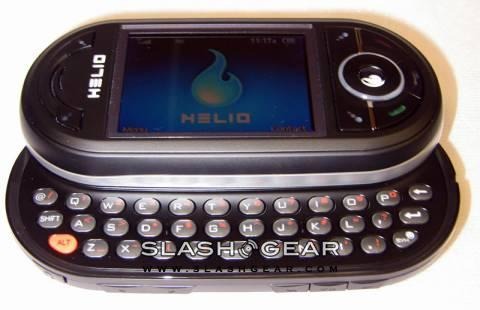
Never underestimate the will power of young consumers. While Helio had said many times over that it’s not possible to load your own ringtones on the Ocean, well they’re dead wrong. A clever member by the name of underscorex1 of HowardForums brought to light how to turn your MP3’s, MIDI or MMF files into ringtones free of charge.
The process is quit simple, and after going through it, you just say to yourself “now why the heck didn’t I think of that?” Basically, all you need to do is rename the file extension and email the ringtones to your Ocean, then simply save the attachment as “rings”. It just can’t get any easier.
Thanks everyone for sending in this tip. Helio fans thank you!
How to upload MMF, Mp3, or MIDI Ringtones to Your Ocean [via Heliocity]
Related review: Helio Ocean hands-on review [via SlashGear]


You can also make your own video ring tones in sort of the same why. If you make the video files into 3G2, you can upload them into your phone and use them as wallpaper.
haha, that’s too funny, you can record a video of your girlfriend nagging at you to “pick up the damn phone” or your dog barking :)
That’s awesome, I’ll have to try it out later!
Thanks for the link, Slashgear!
We’ve been able to confirm that this works a good number of times now, so have fun everyone!
Ringtones sound best in the SMAF-MA7 format. This is available through YAMAHA’s Wave Sound Decorator. when you rename an mp3 to .mmf, the phone still reads it as an mp3 and uses a different chipset to play back the ringtone. That’s why actually converting it to an mmf will always sound clearer and louder.
I can’t figure out how to rename an mp3 to an .mmf….and where do I get this converter?
am i suppose to rename the file itself to extension
example-file name is tuyi so i rename tuyi so it says extension and then e-mail it to myself?
it wont work for me i named the file extension and send it to my phone by e-mail and nothing happens T_T help please i dont feel like buying the crappy ring tones
I tried renaming the file but when I attach it it still says wav at the end. Please help jeny829@aol.com
I can change the file name and send it to my phone but the file is too large. What do i do?
That was the Shezznet. Info on key
Im hear to the rescue. alot of you guys still have problems changing the extension. well you would need a software to change the ext. you can do this by going to http://www.download.com/Extens.....ag=lst-0-1
or type in Extension renamer in the search box. You are changing your format to MMF. and make sure file does not exceed 1mb or else it will not work.
If you still need help let me know
You DO NOT need software to change the extension, just go to My Computer, Tools, Folder Options, View tab, and UNCHECK the option that says “Hide extensions for known file types”, then right click the file, rename it with .mmf at the end and you’re done.
Mark is RIGHT. Don’t download anything. I changed the extensions and followed the directions indicated earlier and it worked great. Also….for anyone interested.
http://www.gearlog.com/2007/05.....e_heli.php
That’s a great forum on how to convert video on your desktop to your phone. Follow the directions specifically though. I converted 300 this afternoon and it looks and sounds great.
can you listen to the music while using the instan messanger
jake i went to that sight where do i go to learn to convert the movies
Another quick way to do it, if you have an FTP program ie. CuteFTP, FlashFXP, etc etc, you can just rename the extension through that and it works great.
Does anyone know how you can edit an mp3? I have a couple songs that I would like to make ring tones with but would like to just use a part of a song then rename it with the .mmf extension. Any help would be great, thanks.
I’ve been using Audacity on linux to make my ringtones and it works great. First, you dont need stereo mp3’s on your phone as ringers, save some size by seperating the stereo tracks and deleting one (like the right channel). Also, eq it and cut off everything below about 100hz (you could probably cut way higher, I’ve not looked at the phone speaker spec as I’ve just not taken the time)… I also boost the volume on it after eq’ing, as it gives you more ‘head room’ after chopping the bass, and that gets the volume better. Then, just export your cut, mono, and eq’d clip, as an mp3. Then, just rename the extension to .mmf from .mp3. Mine are around 500kb for 35 seconds or so… encoded at 128kbps I think, which you could trim that down too but they seem to work fine. You could do a lot more too, but I’m lazy. :)
Oh, and I send mine to my gmail account… super hawt. Screens work great through gmail too. ;)
Hey I renamed an mp3 to .mmf and sent it to my gmail… downloaded it, and saved it as a Ring.
then when I go to my rings folder it says its empty…
does anybody know what’s wrong here?
opps, sorry I went to the next link and found out that the rings you download will go to the “free rings” folder and not just Rings…
I just didn’t check that folder… anyways…
THANKS!!!
ok i got that donr but when it says action and i click it to save, it says… save to email storage…. what do i do…
its to big when i send it to my yahoo mail how do i fix this?
how short should the song be?
when i send a song to my email and i download it the press again it said save it on email storage.. ok after i do that how can i play it or whatever cuz i cant find out how to open the email storage
THANKS SO MUCH THIS SAVES ME SHITLOADS OF TIME HAHAHA THIS WORKS WELL!
Does anyone know how to put video’s or movies on the phone…
That’s awesome! I have put some on mine using Bluetooth Technology.
I haven’t heard of putting movies or videos on a Helio Ocean but I don’t think you can put whole movies because they would take up to much space but not sure.
my emails arent getting through my phone! why? help please!
Creating Personal Ringtones - It looks like two or three other peeps have mentioned this and no one has really given them a straight answer. I’m not a genius but I’ve managed to follow the instructions to change the extension, send the email attachment, blah blah blah….however, the files are still always too big to download according to the ocean. What am I doing wrong or how can I correct this?
hey, i’ve tried doing it but my phone says that the file is too big too, what do i do, someone help me please.
How is it that people can follow directions but can’t use common sense? How many ringtones do you have that plays the entire song? And how many people you know that will call you and let the phone ring that many times before you pick it up? It won’t work because your file is too big. Cut the mp3 down to 15-30 seconds then change the file extension. And read all of the post. Someone one answered this question already before.
can you set a custom ringtone for your text messages instead of just those 4 alerts that they give?
thanks for the tips.. but as noted a few times here… the mp3 file just isnt loud enough.
I used Audacity (FREE) to edit the file down to the size I wanted..(about 30 seconds.. average about 450-550Kb)
and EXPORTED it to a WAV file.
then I used the Yamaha Wave Sound Decorater (FREE) and adjusted the sample to MONO and down to 33000 (the defaults) and did a save as (which gave me the MMF file) and then sent it to myhelio email and saved it to the RINGS folder..
MUCH LOUDER!!!
and all FREE!!
Ok someone help there is one thing no ones really putting much stock into i just got my helio yesterday and these lame tones bite. I have all the software for making tones and i have changed the extention files to .mmf blah blah but when u say email, what am i doing exactly, am i sending it to my helio number 111-1111@myhelio.com or sending it to an email account and retreiving it from the phone and then adding it like that im lost on that account can someone help (Oh by the way i have an Ocean)
does anyone know if this works with the helio heat too?
Hey everybody i found out if you have quicktime pro, for mac or windows, you can export any full length movie to 3gp or 3gpp. You might need to find and install codecs, but if quicktime can open it then it can convert it. You just have to input the specs Johan W. posted:
- File Format: .3g2 or .3gp
- Video Codec: MPEG-4
- Video Size: 176×144
- Audio Codec: AAC
- Total Bitrate: 256kbps or lower
- Frame Rate: 12 frames per second or lower
- Ensure that the encoded file uses the .3gp or .3g2 extension.
follow these directions:
1. Open your video file with quicktime pro. (dont play it)
2. With the file open, goto file tab > export. here you can change the name of the file name and its destination directory. Once your done with that, click on the drop down menu next to export. You should get a list of various conversion methods. Choose “movie to 3g”.
3. Goto “USE” drop down and select 3gpp.
4. Next click on options. input the specs info provided by Johan W. (quicktime on mac will automatically tell you if the input specs are not compatible with mobile standard, just in case you make an error)
5. You can decide whether or not to keep the aspect ratio through letterbox or crop.
6. Close the options window and click save. The process time depends on cpu speed and file length. So far, I have converted avi(divx), mp4,and mpeg2. All files work on Helio Ocean. Mac has Helio support built in (unwittingly), now to try audio for ringtones..I will keep you all updated.
since i have ala-carte plan will i get charged for sending myself the ringtones since i am downloading them?
i got a question last week i was able to make my own ringtones then tday i tried to make a few ringtones an when i send it to my email its telling m icant download it does anyone know if helio figured this out an put a stop to it
Hey please help me i really want to see the .jpg s that i added to my phone on the external storage i can view them on the ocean but i cant set them as screens is any one able to do this ?
I mailed the mmf file to my e-mail, but do you open it up using the surf option?
But .. when I go to the attachment, i can’t download it. SOMEONE HELP! I press the flame button to download it, and it does nothing!
sh*t doesn’t work
Does anyone kno if we can change the txt message alert or get different ones on the Ocean??? please help asap THX
I Love It It Works To Perfection…
It really works. I followed RobF’s instructions to the letter. I’m a 40+ mom and I was so thrilled, and my kids were impressed too. The 2 softwares mentioned were free and easy to use and super quick and easy to install. One tip, when you open the song in Yamaha Sound Decorator - you don’t have to do ANYTHING at all “to” the clip. Just click on “edit” then “sample type” . The defaults are already checked “32000″ and “convert to mono” simply click “ok”. You will see the the clip convert on the screen - now “save as” any file name but leave the default mmf. I used Hotmail on our Helio’s and they downloaded perfect!!! THANK YOU SOOOOOO MUCH - LOVE IT!!
What program is the Yamaha thing supposed to open in? I have a mac. and when I try to do anything with it, it doesnt open and it tells me “this isn’t a video file. HELP!
does this work for the mysto? can the mysto play video rings?
when i save it to my rings and i go to set it as my ringtone it doesnt make any noise. its saved as an .mmf but still it doesnt play.
i used this but when i save as it tells me can not save sample filing….
A CAN ROB F OR SOME ONE PUT A VIDEO UP ON YOUTUBE SHOWING THEM DOING THE RINGTONE AND THEN DOWNLOADING IT
WHY EVERYTIME I GO TO SAVE THE FILE IN YAMAHA SOUND DECORATOR IT SAYS SAMPLING FREQUENCY NOT SUPPORTED PLEASE HELP ME WITH THIS