

Macbook Pro Review - Late 2008 Model
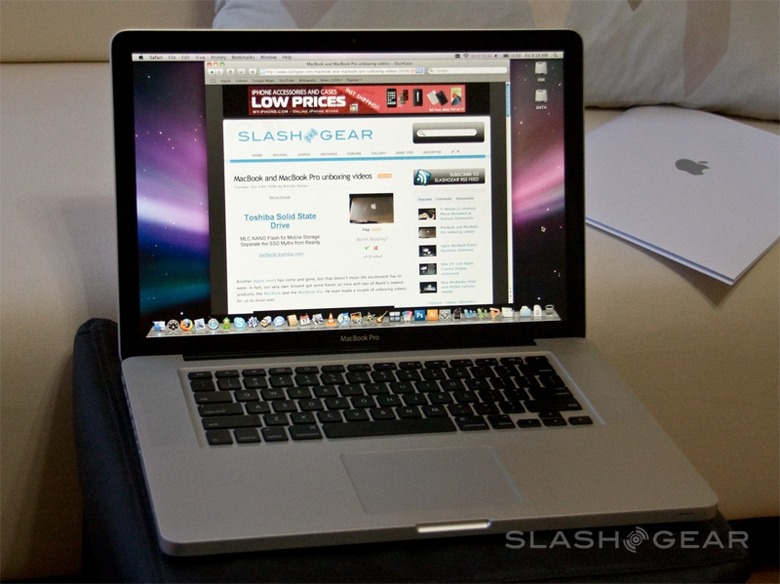
As Apple's flagship laptop, the MacBook Pro arguably has an easier time than the MacBook. With a reputation of superlative performance and style, the Pro is targeted at an audience who, to stereotype a little, has higher priorities than budget than those looking at the MacBook segment. It's a double-edged sword, though: since the last MacBook Pro refresh the laptop has faced fresh competition from Voodoo's slick, niche range, as well as capable (if a touch more mainstream) models from HP, Lenovo and others. Apple's retort is a MacBook Air-inspired casing and dual-graphics; is it enough to keep the MacBook Pro on top?Design and Constructions
The two new MacBooks both share a common manufacturing technique, whereby solid chunks of aluminum are pared down until scant casings remain. It's an alluring concept – a unibody, Apple call it, though of course there is more than one piece to the case as a whole – and a durable one, producing something more solid than just about any other normal notebook. To that aluminum start is added glass and backlit plastic; glass for the screen, a 15-inch 1,440 x 900 panel, and the multitouch trackpad, while the Pro's keyboard takes the same design cues as that of the MacBook Air.
Even with that, the MacBook Pro comes in at 0.95-inches thick, just breaking the record set by its 1-inch predecessor. You don't sacrifice usability to meet that record, though; the keyboard is as tactile and responsive as ever, the new multitouch trackpad a clever development from the previous two-fingered gestures.

Since the button has been dispensed with, it's actually 39-percent larger than before and freshly topped in smooth-gliding glass. A well-weighted press acts as a single click, while software allows different areas of the pad to represent double- or right-clicks. You're able to scroll through photos with three digits, or switch between apps or trigger Expose with four.


Features
The display, nothing changed in terms of resolution from before – still benefits hugely from the LED backlighting, it's almost enough, at full pelt, to deflect criticism of the gloss-finish screen; in all but the most direct sunlight, cranking up the backlight does a decent job of cutting through reflections. Still, that's a sure-fire way to drain your battery, even with LED's more frugal tendencies, and we hope Apple see sense and offer a matte option for those who prefer it.
Ports have been remarshalled around the new casing, with all but the slot-loading optical drive abandoning the right-hand side of the MacBook Pro and instead clustering along the left. The same two USB 2.0 ports, Firewire 800, gigabit Ethernet, audio in/out and MagSafe power port continue over, as does the ExpressCard/34 slot so useful for 3G WWAN modems, but DVI is replaced with new upstart Mini DisplayPort.


Not, as has been accused, a proprietary technology of Apple's own making, Mini DisplayPort was added to support the new Cinema LCD line. Apple's 24-inch Cinema Display, also announced at the event last week, bears the port, but anybody else will have to stump up for the adapter cables. If it seemed cheap not to include at least one adapter in the MacBook box, for Apple to make the same mistake with the MacBook Pro is downright insulting.
Something else you won't find – either as standard or as an option – is Blu-ray. Quizzed about its omission, Steve Jobs blamed licensing for the high-definition format's absence; while that may be a legitimate headache, the fact that most rivals have managed it nonetheless is a black mark against Apple. In fact while existing MacBook Pro owners may not find too much has changed from the current laptop, those coming from other manufacturers may discover they have a variety of cables and cards with nowhere to slot into.
Apple still refuses to add memory card slots to their laptops, and there's no eSATA or HDMI (admittedly Mini DisplayPort is an HDMI rival, so you're unlikely to find both in one place). Given the MacBook Pro's long-standing media editing credentials, the lack of eSATA is a real loss; if casing space for the cutout was an issue, Apple could easily have used one of the combo USB/eSATA sockets seen on some other notebooks.
What you do get is Intel's Centrino 2 platform, with a choice of 2.4GHz or 2.53GHz Core 2 Duo processors in standard configs – priced at $1,999 and $2,499 respectively – and an optional $300 2.8GHz upgrade for the 2.53 version. The former configuration has 3MB of L2 cache, the latter 6MB; each has a 1066MHz system bus. Standard RAM is 2GB 1066MHz DDR3 on the 2.4GHz machine and 4GB (the maximum supported) on the 2.53GHz. Storage comes courtesy of a 250GB 5,400rpm SATA hard-drive on the slower laptop or 320GB on the faster; identically-sized but faster 7,200rpm drives are options, and there's a pricy $500-600 128GB SSD available too. Unlike the previous MacBook Pros, the hard-drive is easily accessible allowing DIY upgrades much more appealing.


Wireless connectivity includes draft-n WiFi and Bluetooth 2.1+EDR. There's still no integrated 3G WWAN option, despite clamoring from owners and would-be owners together with an increasing number of the competition offering onboard HSUPA or EVDO Rev.A. Budget either a USB port or the ExpressCard slot for an external modem if you want to get online outside of WiFi hotspots.
After including the NVIDIA GeForce 9400M in the new aluminum MacBook, Apple ratchets graphics options up a stage further by putting both the 9400M and NVIDIA's GeForce 9600M GT into the MacBook Pro. The concept is that users can switch between moderate and high-powered video cards depending on whether they need longer battery life or better graphical performance. The MacBook Pro requires you to select "Higher Performance" or "Better Battery Life" in the system settings to activate the 9600M or 9400M respectively, then log out of OS X Leopard and back in again to actually switch over. It's a chore and it means users are less likely to make the most of the feature.
Performance and Battery Life
With faster DDR3 memory and the new NVIDIA chipset, the MacBook Pro gain roughly seven percent* of overall performance compared to its predecessor; not a big jump since it still uses the same CPU as the early 2008 model – however it improved greatly in graphics performance with the new GeForce 9600M GT GPU.

Apple claim in excess of five hours battery life using the GeForce 9400M, though that drops to around four hours with the 9600M enabled. We found these figures to be slightly on the ambitious side, with the 9400M lasting around 4.5hrs. Of course, if you're really making the most of the 9600M's extra video grunt then you're likely to see battery drain at an even faster rate. As for gaming graphics performance, I was able to reach 54 fps on Call of Duty 4* at 1024 x 768 resolution; it was very smooth game play experience.

Conclusion
The 15-inch MacBook Pro has always been a distinctive proposition, and the latest update does nothing to change that. If anything, Apple has further distinguished the machine from rivals, and not in entirely a conventionally positive way. There's no denying that the casing and overall design is beautiful, that the interface is highly user-friendly and OS X Leopard remains an elegant alternative to the often muddled world of Windows. Power benefits from the latest Centrino 2 evolutions, and the switchable graphics put at least some of the choices of battery versus ability in the hands of the user. Yet the stubborn avoidance of what has now become mainstream features – memory card readers, eSATA, a 3G WWAN option – will only serve to marginalize the MacBook Pro with would-be buyers. Those who can live with – or work around – its few minor flaws will be rewarded with a solid performance, well-admired laptop.
[rating: 4.5/5]
*Benchmark environment : GeekBench 2.0.19 in 64-bit mode. Leopard 10.5.5 (build 9F33). Early 2008 MacBook Pro (T9500 running at 2.6Ghz with 4GB DDR2 RAM). Late 2008 MacBook Pro (T9400 running at 2.53Ghz with 4GB DDR3 RAM). Call of Duty 4 (Patch 1.7)Unboxing Video
]